


Bailey's Technology Support
Troubleshooting Resources
Restarting Your Computer
It’s important to do this at least two times a week so that the computer can do its weekly updates. Computers that are restarted regularly run better and have less problems.
General Technology Tips
- Computer not working or going slow?
- Try a Reboot-Please make sure to restart 3-4 times a week to make sure they get any updates.
- Still having trouble?Please drive by the nearest FCPS school to connect to the wifi and reboot there. Our computers were designed to be on our network and they can get cranky if they're away too long.
- Video: Turning on Your Laptop
- Video: Turing on Your Laptop (In Spanish)
- Video: Using and Caring for your FCPS Computer (In Spanish)
- Video: How to Login to Your FCPS Laptop
- (New!) Video: How to Clear Your Browser History (you may need to do this if your internet is going slow or if you are experience issues with ST Math or MyOn)
- (New!) Video:How to: Turn off airplane mode
Troubleshooting Audio & Video
- Sound Troubleshooting on Your FCPS Laptop
- Camera Troubleshooting on Your FCPS Laptop
- Microphone Troubleshooting on Your FCPS Laptop
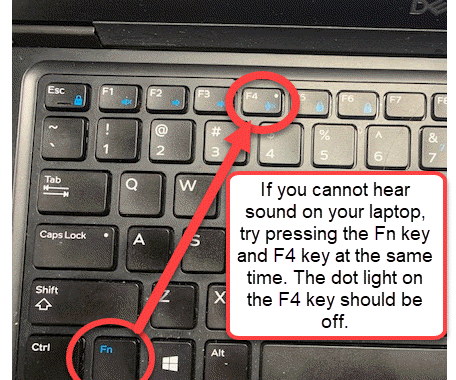
Microphone still not working?
Try pressing the Fn key and the F4 key on your keyboard at the same time. The little white dot light on the F4 key should be OFF
Update Google Chrome
- Having trouble staying connected to Chrome?See if your browser needs updated by following these directions:
- (New!) Video (English)
- (New!) Written Directions (English)
- Video: (Student View) Changing Your Audio/Video Settings in Google Chrome
Resetting a Password
Forgot or Need to Change Your Password for SIS Account, Google, or the FCPS Network?
- Recover or reset a forgotten password or change an existing password by visiting our password management page .
- Still need help? Submit a ticket on our Parent and Student IT Support Portal and a tech support person will be back in touch with you as soon as possible.
Connecting Bluetooth Device
Tips & Tricks for Using Your Computer!
Check out these resources to become more familiar with your laptop!
- (New!) How To: Add & Delete Bookmarks in Google Chrome
- English
- Spanish (coming soon)
Multi-Tasking
- Video: Viewing 2 Windows on the same screen
- If your teacher is using Pear Deck, you may want to see 2 windows at the same time. Check out this trick to see how it's done!
FCPS YouTube Help Channel - County Created Videos for Common Technical Issues
FCPS has developed videos to help students and parents with common technology issues. From computer microphone, video issues to logging into BBCU and Google Classroom.
Technology Support for Families
Access technology videos and technology resources to help your student in the virtual learning environment.
NEW PARENT TECHNOLOGY HELP DESK
Parent Technology Help Desk can be reached at 833-921-3277 (833-921-FCPS) between 7 a.m. and 11 p.m., seven days a week.
PARENT AND STUDENT IT SUPPORT PORTAL
If you need help or are having issues with your laptop please complete this form.

