


Introduction to BigQuery sharing
BigQuery sharing (formerly Analytics Hub) is a data exchange platform that lets you share data and insights at scale across organizational boundaries with a robust security and privacy framework. BigQuery sharing lets you discover and access a data library curated by various data providers. This data library also includes Google-provided datasets.
For example, you can use sharing to augment your analytics and ML initiatives with third-party and Google datasets.
Analytics Hub Identity and Access Management (IAM) roles let you perform the following sharing tasks:
-
As an Analytics Hub Publisher, you can share data with your partner network or within your own organization in real time. Listings let you share data without replicating the shared data, and they can be monetized on the Google Cloud Marketplace or through your own channels. You can build a catalog of analytics-ready data sources with granular permissions that let you deliver data to the right audiences. You can also manage subscriptions and view the usage metrics for your listings.
-
As an Analytics Hub Subscriber, you can discover the data that you are looking for, combine shared data with your existing data, and use the built-in features of BigQuery . When you subscribe to a listing, a linked dataset or linked Pub/Sub subscription is created in your Google Cloud project. You can manage your subscriptions by using the Subscription resource , which stores relevant information about the subscriber and represents the connection between publisher and subscriber.
-
As an Analytics Hub Viewer, you can browse through the shared resources that you have access to in BigQuery sharing and make a request to the publisher to access the shared data. You can discover Cloud Marketplace-integrated commercial listings on both BigQuery sharing and Cloud Marketplace.
-
As an Analytics Hub Admin, you can create data exchanges that enable data sharing, and then give permissions to data publishers and subscribers to access these data exchanges.
For more information, see Configure Analytics Hub roles .
Architecture
BigQuery sharing is built on a publish and subscribe model of Google Cloud data resources, allowing for zero-copy sharing in place. BigQuery sharing supports the following Google Cloud resources:
- BigQuery datasets
- Pub/Sub topics
Publisher workflow
The following diagram describes how a publisher shares assets:
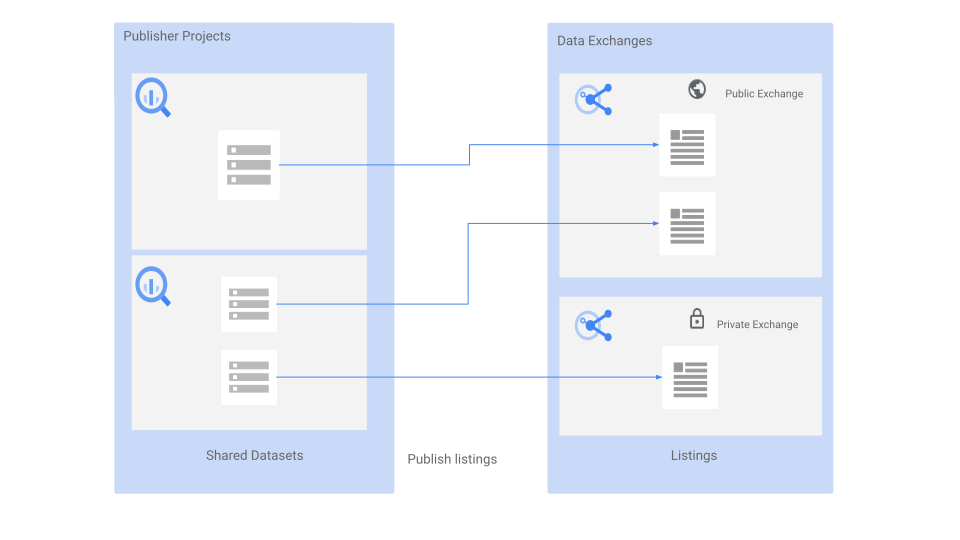
The following sections describe the features in this workflow.
Shared resources
Shared resources are the unit of sharing by a publisher in BigQuery sharing.
Shared datasets
A shared dataset is a BigQuery dataset that is the unit of data sharing in BigQuery sharing. The separation of compute and storage in the BigQuery architecture lets data publishers share datasets with as many subscribers as they want, without having to make multiple copies of the data. As a publisher, you create or use an existing BigQuery dataset in your project with the following supported objects that you want to deliver to your subscribers:
- Authorized views
- Authorized datasets
- BigQuery ML models
- External tables
- Materialized views
- Routines
- Tables
- Table snapshots
- Views
Shared datasets support column-level security and row-level security .
Consider the following limitations for VPC Service Controls and sharing:
-
Don't publish shared data in projects inside VPC Service Controls perimeters. If shared datasets in a project are within a VPC Service Controls perimeter, you need appropriate ingress and egress rules for both the exchange project (hosted listings) and all subscriber projects to successfully subscribe to the publisher's listings.
-
Don't put your exchange project in a VPC Service Controls perimeter, as it might interrupt publishing workflows, requiring ingress and egress rules for the publisher project and all subscriber projects to successfully subscribe to their listings.
Shared topics
A shared topic is a Pub/Sub topic , which is the unit of streaming data sharing in BigQuery . As a publisher, you create or use an existing Pub/Sub topic in your project and distribute it to your subscribers.
Data exchanges
A data exchange is a container that lets you share data through self-service. It contains listings that reference shared resources. Publishers and administrators can grant access to subscribers at the exchange and listing level. This helps you avoid explicitly granting access on the underlying shared resources. You can browse through data exchanges, discover data that you can access, and subscribe to shared resources. When you create a data exchange , you can assign a primary contact email address. This email address lets users contact the data exchange owner with questions or concerns.
A data exchange can be one of the following types:
- Private data exchange.By default, a data exchange is private and only users or groups that have access to that exchange can view or subscribe to its listings.
- Public data exchange.By default, a data exchange is private and only
users or groups that have access to that exchange can view or subscribe to its
listings. However, you can choose to make a data exchange public. Listings in
public data exchanges can be discovered
and subscribed to
by Google Cloud users (
allAuthenticatedUsers) . For more information about public data exchanges, see Make a data exchange public .
The Analytics Hub Admin role lets you create multiple data exchanges and manage other users performing sharing tasks.
Listings
A listing is a reference to a shared resource that a publisher lists in a data exchange. As a publisher, you can create a listing and specify the resource description, sample queries to run or sample message data, links to any relevant documentation, and any additional information that helps subscribers use your shared resource. When you create a listing, you can assign a primary contact email address, a provider name and contact, and a publisher name and contact.
The primary contact email address lets users contact the listing owner with questions or concerns about the data exchange. The provider name and contact is the agency that originally provided the data for the listing. This information is optional. The publisher name and contact is the agency that publishes the data for use in BigQuery sharing. This information is optional. For more information, see Manage listings .
A listing can be one of two types, based on the IAM policy set for the listing and the type of data exchange that contains the listing:
- Public listing.A public listing is shared with all Google Cloud users (
allAuthenticatedUsers) . Listings in a public data exchange are public listings. These listings can be references of a free public resource or a commercial resource . If the listing is of a commercial resource, subscribers can either request access to the listing directly from the data provider, or they can browse and purchase Google Cloud Marketplace-integrated commercial listings . - Private listing.A private listing is shared directly with individuals or groups. For example, a private listing can reference a marketing metrics dataset that you share with other internal teams within your organization.
Subscriber workflow
The following diagram describes how Analytics Hub subscribers interact with shared resources:
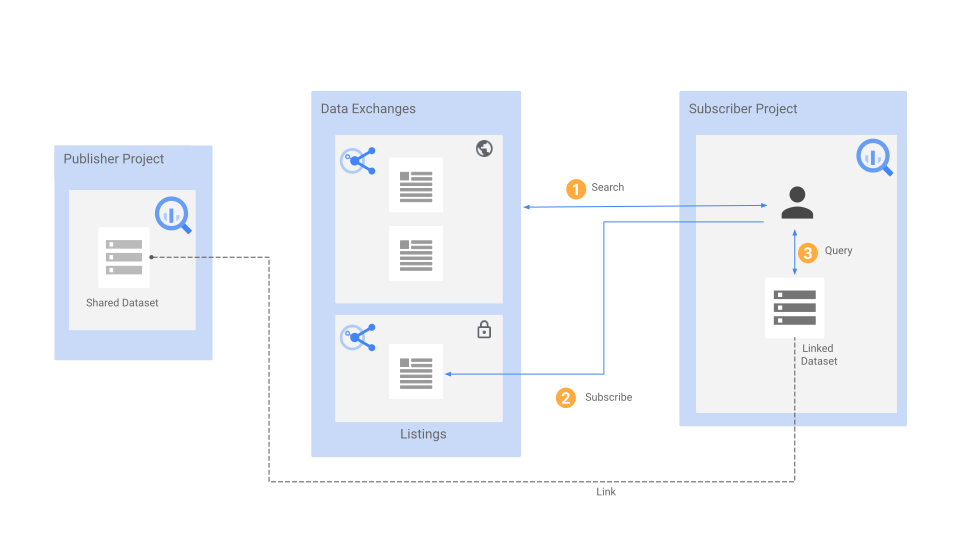
The following sections describe the features in the subscriber workflow.
Linked resources
Linked resources are created when subscribing to a BigQuery sharing listing, connecting a subscriber to the underlying shared resource.
Linked datasets
A linked dataset is a read-only BigQuery dataset that serves as a pointer or reference to a shared dataset. Subscribing to a listing creates a linked dataset in your project and not a copy of the dataset, so subscribers can read the data but cannot add or update objects within it. When you query objects such as tables and views through a linked dataset, the data from the shared dataset is returned. For more information about linked datasets, see View and subscribe to listings and data exchanges .
Linked datasets are authorized to access tables and views of a shared dataset. Subscribers with linked datasets access tables and views of a shared dataset without any additional Identity and Access Management authorization.
Linked datasets support the following objects:
Linked Pub/Sub subscriptions
Subscribing to a listing with a shared topic creates a linked Pub/Sub subscription in the subscriber project. No copies of the shared topic or message data are created. Subscribers of the linked Pub/Sub subscription can access the messages published to the shared topic. Subscribers access the message data of a shared topic without any additional IAM authorization. Publishers can manage subscriptions both in Pub/Sub directly or through BigQuery sharing subscription management. For more information about linked Pub/Sub subscriptions, see Stream sharing with Pub/Sub .
Data egress options (BigQuery shared datasets only)
Data egress options let publishers restrict subscribers from exporting data out of BigQuery linked datasets.
Publishers can enable data egress restriction on a listing, the results of a query, or both. When data egress is restricted, the following restrictions apply:
-
Copy, clone, export, and snapshot APIs are unavailable.
-
Copy, clone, export, and snapshot options are unavailable in the Google Cloud console.
-
Connecting the restricted dataset to the table explorer is unavailable.
-
BigQuery Data Transfer Service is unavailable on the restricted dataset.
-
CREATE TABLE AS SELECTstatements and writing to a destination table are unavailable. -
CREATE VIEW AS SELECTstatements and writing to a destination view are unavailable.
When you create a listing , you can set the appropriate data egress options.
Limitations
BigQuery sharing has the following limitations:
-
A shared dataset can have a maximum of 1,000 linked datasets.
-
A shared topic can have a maximum of 10,000 Pub/Sub subscriptions. This limit includes linked Pub/Sub subscriptions and Pub/Sub subscriptions created outside of BigQuery sharing (for example, directly from Pub/Sub).
-
A dataset with unsupported resources cannot be selected as a shared dataset when you create a listing . For more information about the BigQuery objects that BigQuery sharing supports, see Shared datasets .
-
You can't set IAM roles or IAM policies on individual tables within a linked dataset. Apply them at the linked dataset level instead.
-
You can't attach IAM tags on tables within a linked dataset. Apply them at the linked dataset level instead.
-
Linked datasets created before July 25, 2023, aren't backfilled by the subscription resource . Only subscriptions created after July 25, 2023 work with the API methods.
-
If you are a publisher, the following BigQuery interoperability limitations apply:
-
You must grant subscribers explicit permissions to read the source dataset to query views within linked datasets. To grant access to views, as a best practice, create authorized views . Authorized views can grant subscribers access to the view data without giving them access to the underlying source data.
-
The query plan reveals the shared view query and the routine query, including project IDs, and other datasets involved in authorized views. Never include anything such as encryption keys that you consider sensitive in the shared view or routine query.
-
Shared datasets are indexed in Data Catalog (deprecated) and Dataplex Universal Catalog . Updates on a shared dataset, such as adding tables or views, become available to subscribers without delay. However, in certain scenarios, for example, when there are more than 100 subscribers or tables in a shared dataset, the updates might take up to 18 hours to get indexed in these services. Due to the indexing delay, subscribers cannot search for these updated resources in the Google Cloud console immediately.
-
Shared topics are indexed in Data Catalog (deprecated) and Dataplex Universal Catalog, but you cannot filter specifically for its resource type.
-
If you have set up row-level security or data masking policies on the tables that are listed, then subscribers must be an Enterprise or Enterprise Plus customer to run the query job on the linked dataset. For information about editions, see Introduction to BigQuery editions .
-
-
If you are a subscriber, the following BigQuery interoperability limitations apply:
-
Materialized views that refer to tables in the linked dataset aren't supported.
-
Taking snapshots of linked dataset tables isn't supported.
-
Queries with linked datasets and
JOINstatements that are larger than 1 TB (physical storage) might fail. You can contact support to resolve this issue. -
You cannot use region qualifiers with
INFORMATION_SCHEMAviews to view metadata for your linked dataset . -
The following limitations apply to listings for multiple regions:
-
Listings for multiple regions are supported only for shared datasets and linked dataset replicas. Listings for multiple regions aren't supported for shared Pub/Sub topics and subscriptions.
-
Listings for multiple regions aren't supported in data clean rooms.
-
Listings for multiple regions aren't supported in BigQuery Omni regions .
-
-
The following limitations apply for the usage metrics:
-
You can't get the usage metrics for listings that were subscribed before July 20, 2023.
-
External table usage metrics for the
num_rows_processedandtotal_bytes_processedfields might contain inaccurate data. -
Usage metrics for consumption are supported only for usage with BigQuery jobs . The following resources don't support consumption:
-
Usage metrics for views are populated only for queries after April 22, 2024.
-
Usage metrics aren't captured for linked Pub/Sub subscriptions in BigQuery. You can continue to see usage directly in Pub/Sub.
-
SQL stored procedures aren't available in the BigQuery sharing usage metrics dashboard. You can view details in the
INFORMATION_SCHEMA.ROUTINESview, but not in theINFORMATION_SCHEMA.SHARED_DATASET_USAGEview. For more information, see UseINFORMATION_SCHEMAview .
-
-
The following limitations apply when subscribing to Salesforce Data Cloud data:
- Data Cloud data is shared as views. As a subscriber, you can't access the underlying tables that the views reference.
Supported regions
BigQuery sharing is supported in the following regions and multi-regions.
Regions
The following table lists the regions in the Americas where sharing is available.| Region description | Region name | Details |
|---|---|---|
|
Columbus, Ohio
|
us-east5
|
|
|
Dallas
|
us-south1
|
 Low CO 2 Low CO 2
|
|
Iowa
|
us-central1
|
Low CO 2
|
|
Las Vegas
|
us-west4
|
|
|
Los Angeles
|
us-west2
|
|
|
Mexico
|
northamerica-south1
|
|
|
Montréal
|
northamerica-northeast1
|
Low CO 2
|
|
Northern Virginia
|
us-east4
|
|
|
Oklahoma
|
us-central2
|
Low CO 2
|
|
Oregon
|
us-west1
|
Low CO 2
|
|
Salt Lake City
|
us-west3
|
|
|
São Paulo
|
southamerica-east1
|
Low CO 2
|
|
Santiago
|
southamerica-west1
|
|
|
South Carolina
|
us-east1
|
|
|
Toronto
|
northamerica-northeast2
|
|
| Region description | Region name | Details |
|---|---|---|
|
Delhi
|
asia-south2
|
|
|
Hong Kong
|
asia-east2
|
|
|
Jakarta
|
asia-southeast2
|
|
|
Melbourne
|
australia-southeast2
|
|
|
Mumbai
|
asia-south1
|
|
|
Osaka
|
asia-northeast2
|
|
|
Seoul
|
asia-northeast3
|
|
|
Singapore
|
asia-southeast1
|
|
|
Sydney
|
australia-southeast1
|
|
|
Taiwan
|
asia-east1
|
|
|
Tokyo
|
asia-northeast1
|
| Region description | Region name | Details |
|---|---|---|
|
Belgium
|
europe-west1
|
Low CO 2
|
|
Berlin
|
europe-west10
|
|
|
Finland
|
europe-north1
|
Low CO 2
|
|
Frankfurt
|
europe-west3
|
|
|
London
|
europe-west2
|
Low CO 2
|
|
Madrid
|
europe-southwest1
|
Low CO 2
|
|
Milan
|
europe-west8
|
|
|
Netherlands
|
europe-west4
|
Low CO 2
|
|
Paris
|
europe-west9
|
Low CO 2
|
|
Turin
|
europe-west12
|
|
|
Warsaw
|
europe-central2
|
|
|
Zürich
|
europe-west6
|
Low CO 2
|
| Region description | Region name | Details |
|---|---|---|
|
Dammam
|
me-central2
|
|
|
Doha
|
me-central1
|
|
|
Tel Aviv
|
me-west1
|
| Region description | Region name | Details |
|---|---|---|
|
Johannesburg
|
africa-south1
|
Multi-regions
The following table lists the multi-regions where sharing is available.| Multi-region description | Multi-region name |
|---|---|
| Data centers within member states of the European Union 1 | EU
|
| Data centers in the United States | US
|
1
Data located in the EU
multi-region is not
stored in the europe-west2
(London) or europe-west6
(Zürich) data
centers.
Omni regions
The following table lists the Omni where sharing is available.aws-us-east-1
aws-us-west-2
aws-ap-northeast-2
aws-ap-southeast-2
aws-eu-west-1
aws-eu-central-1
azure-eastus2
Example use case
This section provides an example of how to use sharing in BigQuery.
Suppose you are a retailer and your organization has real-time demand forecasting data in a Google Cloud project named Forecasting. You want to share this demand forecasting data with hundreds of vendors in your supply-chain system. The following sections describe how you can share your data with vendors through BigQuery sharing.
Administrators
As the owner of the Forecasting project, you must first enable the API and then
assign the Analytics Hub Admin role
( roles/analyticshub.admin
) to a user who administers the data exchange in the
project. Users with the Analytics Hub Admin role are referred to as BigQuery sharing administrators
.
A BigQuery sharing administrator can perform the following tasks:
-
Create, update, delete, and share the data exchange in your organization's Forecasting project.
-
Manage other BigQuery sharing administrators with the Analytics Hub Admin role.
-
Manage BigQuery sharing publishers by granting the Analytics Hub Publisher role (
roles/analyticshub.publisher) to your organization's employees. If you want employees to only update, delete, and share listings, but not create them, grant them the Analytics Hub Listing Admin role (roles/analyticshub.listingAdmin). -
Manage BigQuery sharing subscribers by granting the Analytics Hub Subscriber role (
roles/analyticshub.subscriber) to a Google group consisting of all vendors. If you want vendors to only view available exchanges and listings, grant them the Analytics Hub Viewer role (roles/analyticshub.viewer). These vendors aren't able to subscribe to listings.
For more information, see BigQuery sharing IAM roles and Manage data exchanges .
Publishers
Publishers create the following listings for their datasets in the Forecasting project or in a different project:
- Listing A: Demand Forecast Dataset 1
- Listing B: Demand Forecast Dataset 2
- Listing C: Demand Forecast Dataset 3
As a data provider, you can track the usage metrics for your shared dataset. The usage metrics include the following details:
- Jobs that run against your shared dataset.
- Consumption details of your shared dataset by subscriber projects and organizations.
- The number of rows and bytes the job processes.
For more information, see Manage listings .
Subscribers
Subscribers can browse through listings that they have access to in data exchanges. They can also subscribe to these listings and add these datasets to their projects by creating a linked dataset. Vendors can then run queries on these linked datasets and retrieve results in real time.
For more information, see View and subscribe to listings and data exchanges .
Pricing
There is no additional cost for managing data exchanges or listings.
For BigQuery datasets, publishers pay for data storage, whereas subscribers pay for queries that run against the shared data based on either on-demand or capacity-based pricing models. For information about pricing, see BigQuery pricing .
For Pub/Sub, topic publishers pay for the total number of bytes written (publish throughput) to the shared topic and network egress (if applicable). Subscribers pay for the total number of bytes read (subscribe throughput) from the linked subscription and network egress (if applicable). For more information, see Pub/Sub pricing .
Quotas
For information about BigQuery sharing quotas, see Quotas and limits .
Compliance
BigQuery sharing, as part of BigQuery, is compliant with the following compliance programs:
VPC Service Controls
You can set the ingress and egress rules needed to let publishers and subscribers access data from projects that have VPC Service Controls perimeters. For more information, see Sharing VPC Service Controls rules .
What's next
- Learn how to view and subscribe to listings and data exchanges .
- Learn how to grant Analytics Hub roles .
