


This document outlines the network bandwidth capabilities and configurations for Compute Engine instances with attached GPUs. Learn about the maximum network bandwidth, Network Interface Card (NIC) arrangements, and recommended VPC network setups for various GPU machine types, including the A4X Max, A4X, A4, A3, A2, G4, G2, and N1 series. Understanding these configurations can help you optimize performance for your distributed workloads on Compute Engine.
The maximum network bandwidth that is available for compute instances with attached GPUs is as follows:
- A4X Max (NVIDIA GB300 Ultra Superchips): up to 3,600 Gbps
- A4X (NVIDIA GB200 Superchips): up to 2,000 Gbps
- A4 (NVIDIA B200): up to 3,600 Gbps
- A3 Ultra (NVIDIA H200): up to 3,600 Gbps
- A3 Mega (NVIDIA H100): up to 1,600 Gbps
- A3 High (NVIDIA H100): up to 1,000 Gbps
- A3 Edge (NVIDIA H100): up to 800 Gbps
- G4 (NVIDIA RTX PRO 6000): up to 400 Gbps
- A2 (NVIDIA A100) and G2 (NVIDIA L4): up to 100 Gbps
- N1 with NVIDIA T4 or V100 GPUs: up to 100 Gbps based on the combination of GPU and vCPU count
- N1 with NVIDIA P100 or P4 GPUs: 32 Gbps
Review network bandwidth and NIC arrangement
Use the following section to review the network arrangement and bandwidth speed for each GPU machine type.
A4X Max and A4X machine types
The A4X Max and A4X machine series, which are both based on the NVIDIA Blackwell architecture, are designed for demanding, large-scale, distributed AI workloads. The primary differentiator between the two is their attached accelerators and networking hardware, as outlined in the following table:
| A4X Max machine series | A4X machine series | |
|---|---|---|
|
Attached hardware
|
NVIDIA GB300 Ultra Superchips | NVIDIA GB200 Superchips |
|
GPU-to-GPU networking
|
4 NVIDIA ConnectX-8 (CX-8) SuperNICs that provide 3,200 Gbps bandwidth in an 8-way rail-aligned topology | 4 NVIDIA ConnectX-7 (CX-7) NICs that provide 1,600 Gbps bandwidth in a 4-way rail-aligned topology |
|
General purpose networking
|
2 Titanium smart NICs that provide 400 Gbps bandwidth | 2 Titanium smart NICs that provide 400 Gbps bandwidth |
|
Total maximum network bandwidth
|
3,600 Gbps | 2,000 Gbps |
Multi-layered networking architecture
A4X Max and A4X compute instances use a multi-layered, hierarchical networking architecture with a rail-aligned design to optimize performance for various communication types. In this topology, instances connect across multiple independent network planes, called rails.
- A4X Max instances use an 8-way rail-aligned topology where each of the four 800 Gbps ConnectX-8 NICs connects to two separate 400 Gbps rails.
- A4X instances use a 4-way rail-aligned topology where each of the four ConnectX-7 NICs connects to a separate rail.
The networking layers for these machine types are as follows:
-
Intra-node and Intra-subblock communication (NVLink): A high-speed NVLink fabric interconnects GPUs for high-bandwidth, low-latency communication. This fabric connects all the GPUs within a single instance and extends across a subblock, which consists of 18 A4X Max or A4X instances (a total of 72 GPUs). This allows all 72 GPUs in a subblock to communicate as if they were in a single, large-scale GPU server.
-
Inter-subblock communication (ConnectX NICs with RoCE): to scale workloads beyond a single subblock, these machines use NVIDIA ConnectX NICs. These NICs use RDMA over Converged Ethernet (RoCE) to provide high-bandwidth, low-latency communication between subblocks, to let you build large-scale training clusters with thousands of GPUs.
-
General-purpose networking (Titanium Smart NICs): in addition to the specialized GPU networks, each instance has two Titanium smart NICs, providing a combined 400 Gbps of bandwidth for general networking tasks. This includes traffic for storage, management, and connecting to other Google Cloud services or the public internet.
A4X Max architecture
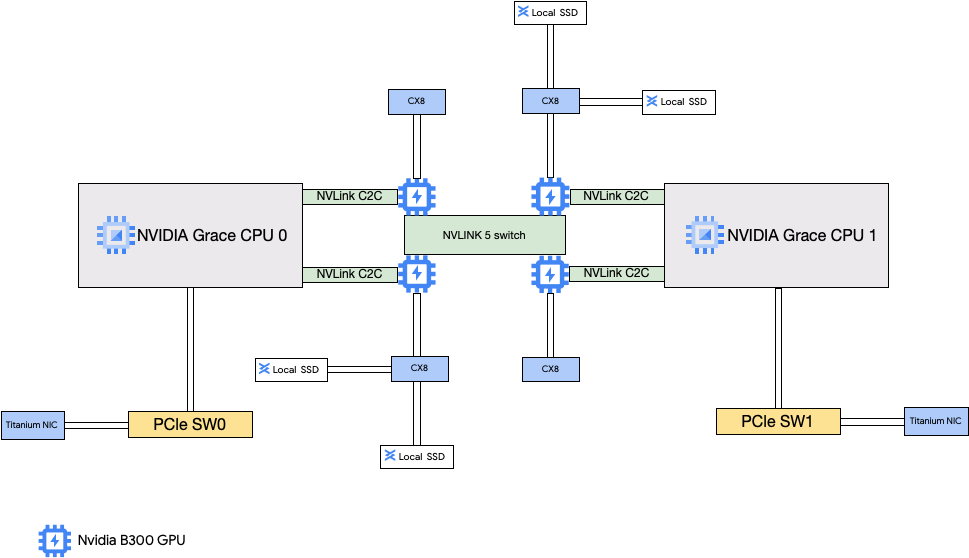
The A4X Max architecture is built around NVIDIA GB300 Ultra Superchips. A key feature of this design is the direct connection of the four 800 Gbps NVIDIA ConnectX-8 (CX-8) SuperNICs to the GPUs. These NICs are part of an 8-way rail-aligned network topology where each NIC connects to two separate 400 Gbps rails. This direct path enables RDMA, providing high bandwidth and low latency for GPU-to-GPU communication across different subblocks. These Compute Engine instances also include high-performance local SSDs that are attached to the ConnectX-8 NICs, bypassing the PCIe bus for faster data access.
A4X architecture
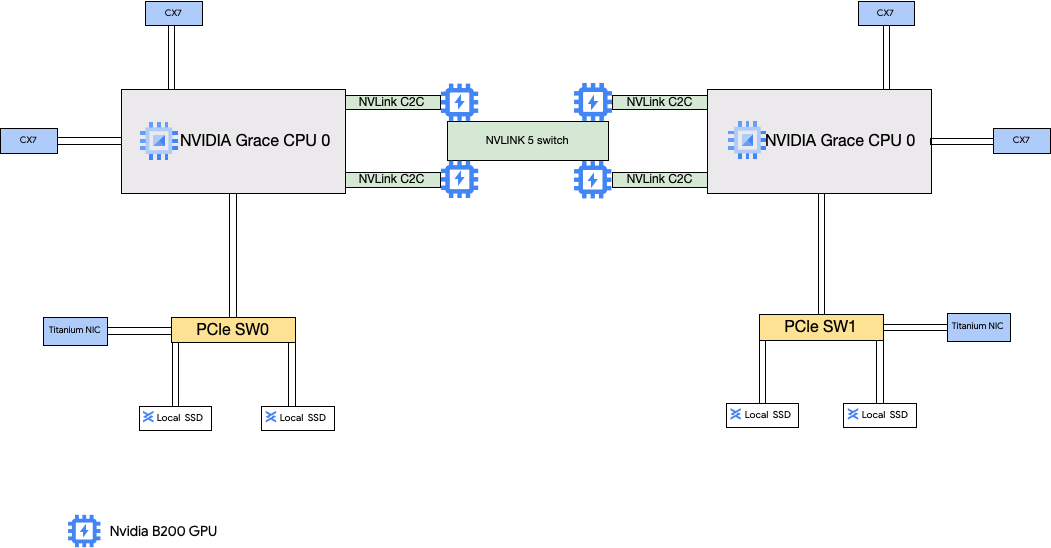
The A4X architecture uses NVIDIA GB200 Superchips. In this configuration, the four NVIDIA ConnectX-7 (CX-7) NICs are connected to the host CPU. This setup provides high-performance networking for GPU-to-GPU communication between subblocks.
A4X Max and A4X Virtual Private Cloud (VPC) network configuration
To use the full networking capabilities of these machine types, you need to create and attach VPC networks to your instances. To use all available NICs, you must create VPC networks as follows:
-
Two regular VPC networksfor the Titanium Smart NICs.
- For A4X Max, these VPC networks use the Intel IDPF LAN PF device driver .
- For A4X, these VPC networks use the Google Virtual NIC (gVNIC) network interface.
-
One VPC network with the RoCE network profileis required for the ConnectX NICs when you create clusters of multiple A4X Max or A4X subblocks. The RoCE VPC network must have one subnet for each network rail. This means eight subnets for A4X Max instances and four subnets for A4X instances. If you use a single subblock, you can omit this VPC network because the multi-node NVLink fabric handles direct GPU-to-GPU communication.
To set up these networks, see Create VPC networks in the AI Hypercomputer documentation.
A4X Max and A4X machine types
A4X Max
| Machine type | vCPU count 1 | Instance memory (GB) | Attached Local SSD (GiB) | Physical NIC count | Maximum network bandwidth (Gbps) 2 | GPU count | GPU memory 3
(GB HBM3e) |
|---|---|---|---|---|---|---|---|
a4x-maxgpu-4g-metal
|
144 | 960 | 12,000 | 6 | 3,600 | 4 | 1,116 |
1
A vCPU is implemented as a single hardware hyper-thread on one of
the available CPU platforms
.
2
Maximum egress bandwidth cannot exceed the number given. Actual
egress bandwidth depends on the destination IP address and other factors.
For more information about network bandwidth,
see Network bandwidth
.
3
GPU memory is the memory on a GPU device that can be used for
temporary storage of data. It is separate from the instance's memory and is
specifically designed to handle the higher bandwidth demands of your
graphics-intensive workloads.
A4X
| Machine type | vCPU count 1 | Instance memory (GB) | Attached Local SSD (GiB) | Physical NIC count | Maximum network bandwidth (Gbps) 2 | GPU count | GPU memory 3
(GB HBM3e) |
|---|---|---|---|---|---|---|---|
a4x-highgpu-4g
|
140 | 884 | 12,000 | 6 | 2,000 | 4 | 744 |
1
A vCPU is implemented as a single hardware hyper-thread on one of
the available CPU platforms
.
2
Maximum egress bandwidth cannot exceed the number given. Actual
egress bandwidth depends on the destination IP address and other factors.
For more information about network bandwidth,
see Network bandwidth
.
3
GPU memory is the memory on a GPU device that can be used for
temporary storage of data. It is separate from the instance's memory and is
specifically designed to handle the higher bandwidth demands of your
graphics-intensive workloads.
A4 and A3 Ultra machine types
The A4 machine types have NVIDIA B200 GPUs attached and A3 Ultra machine types have NVIDIA H200 GPUs attached.
These machine types provide eight NVIDIA ConnectX-7 (CX-7) network interface cards (NICs) and two Google virtual NICs (gVNIC). The eight CX-7 NICs deliver a total network bandwidth of 3,200 Gbps. These NICs are dedicated for only high-bandwidth GPU to GPU communication and can't be used for other networking needs such as public internet access. As outlined in the following diagram, each CX-7 NIC is aligned with one GPU to optimize non-uniform memory access (NUMA). All eight GPUs can rapidly communicate with each other by using the all to all NVLink bridge that connects them. The two other gVNIC network interface cards are smart NICs that provide an additional 400 Gbps of network bandwidth for general purpose networking requirements. Combined, the network interface cards provide a total maximum network bandwidth of 3,600 Gbps for these machines.

To use these multiple NICs, you need to create 3 Virtual Private Cloud networks as follows:
- Two regular VPC networks: each gVNIC must attach to a different VPC network
- One RoCE VPC network: all eight CX-7 NICs share the same RoCE VPC network
To set up these networks, see Create VPC networks in the AI Hypercomputer documentation.
A4
| Machine type | vCPU count 1 | Instance memory (GB) | Attached Local SSD (GiB) | Physical NIC count | Maximum network bandwidth (Gbps) 2 | GPU count | GPU memory 3
(GB HBM3e) |
|---|---|---|---|---|---|---|---|
a4-highgpu-8g
|
224 | 3,968 | 12,000 | 10 | 3,600 | 8 | 1,440 |
1
A vCPU is implemented as a single hardware hyper-thread on one of
the available CPU platforms
.
2
Maximum egress bandwidth cannot exceed the number given. Actual
egress bandwidth depends on the destination IP address and other factors.
For more information about network bandwidth, see Network bandwidth
.
3
GPU memory is the memory on a GPU device that can be used for
temporary storage of data. It is separate from the instance's memory and is
specifically designed to handle the higher bandwidth demands of your
graphics-intensive workloads.
A3 Ultra
| Machine type | vCPU count 1 | Instance memory (GB) | Attached Local SSD (GiB) | Physical NIC count | Maximum network bandwidth (Gbps) 2 | GPU count | GPU memory 3
(GB HBM3e) |
|---|---|---|---|---|---|---|---|
a3-ultragpu-8g
|
224 | 2,952 | 12,000 | 10 | 3,600 | 8 | 1128 |
1
A vCPU is implemented as a single hardware hyper-thread on one of
the available CPU platforms
.
2
Maximum egress bandwidth cannot exceed the number given. Actual
egress bandwidth depends on the destination IP address and other factors.
For more information about network bandwidth,
see Network bandwidth
.
3
GPU memory is the memory on a GPU device that can be used for
temporary storage of data. It is separate from the instance's memory and is
specifically designed to handle the higher bandwidth demands of your
graphics-intensive workloads.
A3 Mega, High, and Edge machine types
These machine types have H100 GPUs attached. Each of these machine types have a fixed GPU count, vCPU count, and memory size.
- Single NIC A3 VMs : For A3 VMs with 1 to 4 GPUs attached, only a single physical network interface card (NIC) is available.
- Multi-NIC A3 VMs
: For A3 VMs with 8 GPUS attached,
multiple physical NICs are available. For these A3 machine types the NICs are arranged as follows on
a Peripheral Component Interconnect Express (PCIe) bus:
- For the A3 Mega machine type : a NIC arrangement of 8+1 is available. With this arrangement, 8 NICs share the same PCIe bus, and 1 NIC resides on a separate PCIe bus.
- For the A3 High machine type : a NIC arrangement of 4+1 is available. With this arrangement, 4 NICs share the same PCIe bus, and 1 NIC resides on a separate PCIe bus.
- For the A3 Edge machine type machine type : a NIC arrangement of 4+1 is available. With this arrangement, 4 NICs share the same PCIe bus, and 1 NIC resides on a separate PCIe bus. These 5 NICs provide a total network bandwidth of 400 Gbps for each VM.
NICs that share the same PCIe bus, have a non-uniform memory access (NUMA) alignment of one NIC per two NVIDIA H100 GPUs. These NICs are ideal for dedicated high bandwidth GPU to GPU communication. The physical NIC that resides on a separate PCIe bus is ideal for other networking needs. For instructions on how to setup networking for A3 High and A3 Edge VMs, see set up jumbo frame MTU networks .
A3 Mega
| Machine type | vCPU count 1 | Instance memory (GB) | Attached Local SSD (GiB) | Physical NIC count | Maximum network bandwidth (Gbps) 2 | GPU count | GPU memory 3
(GB HBM3) |
|---|---|---|---|---|---|---|---|
a3-megagpu-8g
|
208 | 1,872 | 6,000 | 9 | 1,800 | 8 | 640 |
A3 High
| Machine type | vCPU count 1 | Instance memory (GB) | Attached Local SSD (GiB) | Physical NIC count | Maximum network bandwidth (Gbps) 2 | GPU count | GPU memory 3
(GB HBM3) |
|---|---|---|---|---|---|---|---|
a3-highgpu-1g
|
26 | 234 | 750 | 1 | 25 | 1 | 80 |
a3-highgpu-2g
|
52 | 468 | 1,500 | 1 | 50 | 2 | 160 |
a3-highgpu-4g
|
104 | 936 | 3,000 | 1 | 100 | 4 | 320 |
a3-highgpu-8g
|
208 | 1,872 | 6,000 | 5 | 1,000 | 8 | 640 |
A3 Edge
(GB HBM3)
a3-edgegpu-8g
- 800: for asia-south1 and northamerica-northeast2
- 400: for all other A3 Edge regions
1
A vCPU is implemented as a single hardware hyper-thread on one of
the available CPU platforms
.
2
Maximum egress bandwidth cannot exceed the number given. Actual
egress bandwidth depends on the destination IP address and other factors.
For more information about network bandwidth,
see Network bandwidth
.
3
GPU memory is the memory on a GPU device that can be used for
temporary storage of data. It is separate from the instance's memory and is
specifically designed to handle the higher bandwidth demands of your
graphics-intensive workloads.
A2 machine types
Each A2 machine type has a fixed number of NVIDIA A100 40GB or NVIDIA A100 80 GB GPUs attached. Each machine type also has a fixed vCPU count and memory size.
A2 machine series are available in two types:
- A2 Ultra: these machine types have A100 80GB GPUs and Local SSD disks attached.
- A2 Standard: these machine types have A100 40GB GPUs attached.
A2 Ultra
| Machine type | vCPU count 1 | Instance memory (GB) | Attached Local SSD (GiB) | Maximum network bandwidth (Gbps) 2 | GPU count | GPU memory 3
(GB HBM2e) |
|---|---|---|---|---|---|---|
a2-ultragpu-1g
|
12 | 170 | 375 | 24 | 1 | 80 |
a2-ultragpu-2g
|
24 | 340 | 750 | 32 | 2 | 160 |
a2-ultragpu-4g
|
48 | 680 | 1,500 | 50 | 4 | 320 |
a2-ultragpu-8g
|
96 | 1,360 | 3,000 | 100 | 8 | 640 |
A2 Standard
| Machine type | vCPU count 1 | Instance memory (GB) | Local SSD supported | Maximum network bandwidth (Gbps) 2 | GPU count | GPU memory 3
(GB HBM2) |
|---|---|---|---|---|---|---|
a2-highgpu-1g
|
12 | 85 | Yes | 24 | 1 | 40 |
a2-highgpu-2g
|
24 | 170 | Yes | 32 | 2 | 80 |
a2-highgpu-4g
|
48 | 340 | Yes | 50 | 4 | 160 |
a2-highgpu-8g
|
96 | 680 | Yes | 100 | 8 | 320 |
a2-megagpu-16g
|
96 | 1,360 | Yes | 100 | 16 | 640 |
1
A vCPU is implemented as a single hardware hyper-thread on one of
the available CPU platforms
.
2
Maximum egress bandwidth cannot exceed the number given. Actual
egress bandwidth depends on the destination IP address and other factors.
For more information about network bandwidth,
see Network bandwidth
.
3
GPU memory is the memory on a GPU device that can be used for
temporary storage of data. It is separate from the instance's memory and is
specifically designed to handle the higher bandwidth demands of your
graphics-intensive workloads.
G4 machine types
G4 accelerator-optimized
machine types use NVIDIA RTX PRO 6000 Blackwell Server Edition GPUs
( nvidia-rtx-pro-6000
)
and are
suitable for NVIDIA Omniverse simulation workloads, graphics-intensive applications, video
transcoding, and virtual desktops. G4 machine types also provide a low-cost solution for
performing single host inference and model tuning compared with A series machine types.
| Machine type | vCPU count 1 | Instance memory (GB) | Maximum Titanium SSD supported (GiB) 2 | Physical NIC count | Maximum network bandwidth (Gbps) 3 | GPU count | GPU memory 4
(GB GDDR7) |
|---|---|---|---|---|---|---|---|
g4-standard-48
|
48 | 180 | 1,500 | 1 | 50 | 1 | 96 |
g4-standard-96
|
96 | 360 | 3,000 | 1 | 100 | 2 | 192 |
g4-standard-192
|
192 | 720 | 6,000 | 1 | 200 | 4 | 384 |
g4-standard-384
|
384 | 1,440 | 12,000 | 2 | 400 | 8 | 768 |
1
A vCPU is implemented as a single hardware hyper-thread on one of
the available CPU platforms
.
2
You can add Titanium SSD disks when creating a G4 instance. For the number of disks
you can attach, see Machine types that require you to choose a number of Local SSD disks
.
3
Maximum egress bandwidth cannot exceed the number given. Actual
egress bandwidth depends on the destination IP address and other factors.
See Network bandwidth
.
4
GPU memory is the memory on a GPU device that can be used for
temporary storage of data. It is separate from the instance's memory and is
specifically designed to handle the higher bandwidth demands of your
graphics-intensive workloads.
G2 machine types
G2 accelerator-optimized machine types have NVIDIA L4 GPUs attached and are ideal for cost-optimized inference, graphics-intensive and high performance computing workloads.
Each G2 machine type also has a default memory and a custom memory range. The custom memory range defines the amount of memory that you can allocate to your instance for each machine type. You can also add Local SSD disks when creating a G2 instance. For the number of disks you can attach, see Machine types that require you to choose a number of Local SSD disks .
To get the higher network bandwidth rates (50 Gbps or higher) applied to most GPU instances, it is recommended that you use Google Virtual NIC (gVNIC). For more information about creating GPU instances that use gVNIC, see Creating GPU instances that use higher bandwidths .
| Machine type | vCPU count 1 | Default instance memory (GB) | Custom instance memory range (GB) | Max Local SSD supported (GiB) | Maximum network bandwidth (Gbps) 2 | GPU count | GPU memory 3 (GB GDDR6) |
|---|---|---|---|---|---|---|---|
g2-standard-4
|
4 | 16 | 16 to 32 | 375 | 10 | 1 | 24 |
g2-standard-8
|
8 | 32 | 32 to 54 | 375 | 16 | 1 | 24 |
g2-standard-12
|
12 | 48 | 48 to 54 | 375 | 16 | 1 | 24 |
g2-standard-16
|
16 | 64 | 54 to 64 | 375 | 32 | 1 | 24 |
g2-standard-24
|
24 | 96 | 96 to 108 | 750 | 32 | 2 | 48 |
g2-standard-32
|
32 | 128 | 96 to 128 | 375 | 32 | 1 | 24 |
g2-standard-48
|
48 | 192 | 192 to 216 | 1,500 | 50 | 4 | 96 |
g2-standard-96
|
96 | 384 | 384 to 432 | 3,000 | 100 | 8 | 192 |
1
A vCPU is implemented as a single hardware hyper-thread on one of
the available CPU platforms
.
2
Maximum egress bandwidth cannot exceed the number given. Actual
egress bandwidth depends on the destination IP address and other factors.
For more information about network bandwidth,
see Network bandwidth
.
3
GPU memory is the memory on a GPU device that can be used for
temporary storage of data. It is separate from the instance's memory and is
specifically designed to handle the higher bandwidth demands of your
graphics-intensive workloads.
N1 + GPU machine types
For N1 general-purpose virtual machine (VM) instances that have T4 and V100 GPUs attached, you can get a maximum network bandwidth of up to 100 Gbps, based on the combination of GPU and vCPU count. For all other N1 GPU instances, see Overview .
Review the following section to calculate the maximum network bandwidth that is available for your T4 and V100 instances based on the GPU model, vCPU, and GPU count.
Less than 5 vCPUs
For T4 and V100 instances that have 5 vCPUs or less, a maximum network bandwidth of 10 Gbps is available.
More than 5 vCPUs
For T4 and V100 instances that have more than 5 vCPUs, maximum network bandwidth is calculated based on the number of vCPUs and GPUs for that VM.
To get the higher network bandwidth rates (50 Gbps or higher) applied to most GPU instances, it is recommended that you use Google Virtual NIC (gVNIC). For more information about creating GPU instances that use gVNIC, see Creating GPU instances that use higher bandwidths .
min(vcpu_count * 2, 32)
min(vcpu_count * 2, 32)
min(vcpu_count * 2, 50)
min(vcpu_count * 2, 100)
min(vcpu_count * 2, 32)
min(vcpu_count * 2, 50)
min(vcpu_count * 2, 100)
MTU settings and GPU machine types
To increase network throughput, set a higher maximum transmission unit (MTU) value for your VPC networks. Higher MTU values increase the packet size and reduce the packet-header overhead, which in turn increases payload data throughput.
For GPU machine types, we recommend the following MTU settings for your VPC networks.
- A4X Max
- A4X
- A4
- A3 Ultra
- A3 Mega
- A3 High
- A3 Edge
- A2 Standard
- A2 Ultra
- G4
- G2
- N1 machine types that support GPUs
When setting the MTU value, note the following:
- 8192 is two 4 KB pages.
- 8244 is recommended in A3 Mega, A3 High, and A3 Edge VMs for GPU NICs that have header split enabled.
- Use a value of 8896 unless otherwise indicated in the table.
Create high bandwidth GPU machines
To create GPU instances that use higher network bandwidths, use one of the following methods based on the machine type:
-
To create A2, G2 and N1 instances that use higher network bandwidths, see Use higher network bandwidth for A2, G2, and N1 instances . To test or verify the bandwidth speed for these machines, you can use the benchmarking test. For more information, see Checking network bandwidth .
-
To create A3 Mega instances that use higher network bandwidths, see Deploy an A3 Mega Slurm cluster for ML training . To test or verify the bandwidth speed for these machines, use a benchmarking test by following the steps in Checking network bandwidth .
-
For A3 High and A3 Edge instances that use higher network bandwidths, see Create an A3 VM with GPUDirect-TCPX enabled . To test or verify the bandwidth speed for these machines, you can use the benchmarking test. For more information, see Checking network bandwidth .
-
For other accelerator-optimized machine types, no action is required to use higher network bandwidth; creating an instance as documented already uses high network bandwidth. To learn how to create instances for other accelerator-optimized machine types, see Create a VM that has attached GPUs .
What's next?
- Learn more about GPU platforms .
- Learn how to create instances with attached GPUs .
- Learn about Use higher network bandwidth .
- Learn about GPU pricing .
