Item logo image for Time Stamper

Time Stamper

Featured
3.6 (

20 ratings

)
Item media 2 (screenshot) for Time Stamper
Item media 3 (screenshot) for Time Stamper
Item media 1 (screenshot) for Time Stamper
Item media 2 (screenshot) for Time Stamper
Item media 3 (screenshot) for Time Stamper
Item media 1 (screenshot) for Time Stamper
Item media 2 (screenshot) for Time Stamper
Item media 1 (screenshot) for Time Stamper
Item media 2 (screenshot) for Time Stamper
Item media 3 (screenshot) for Time Stamper

Overview

Quick and easy adding of a timestamp to an input field

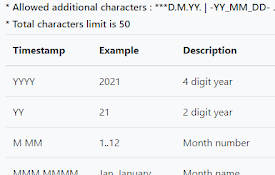
A simple extension to add a time stamp to an editable field from the context menu. After clicking into a text input area, right click to bring up the context menu; then click the "Insert Timestamp" entry. This will add the current timestamp as set on the options page. If you appreciate the extension and would like to get me a coffee, you can do so here: https://www.buymeacoffee.com/timestamper Updates: v2.2.0 - Added the ability to choose the displaying of the option for 1 or 2 timestamps. v2.1.0 - Added a second timestamp. This allows for the ability to quickly select between to different formats.

3.6 out of 5 20 ratings

Learn more about results and reviews.

Details

  • Version
    2.2.0
  • Updated
    April 14, 2026
  • Offered by
    Christopher
  • Size
    126KiB
  • Languages
    English (United States)
  • Developer
    Email
    Christopher.Baldoni@gmail.com
  • Non-trader
    This developer has not identified itself as a trader. For consumers in the European Union, please note that consumer rights do not apply to contracts between you and this developer.

Privacy

Manage extensions and learn how they're being used in your organization
The developer has disclosed that it will not collect or use your data.

This developer declares that your data is

  • Not being sold to third parties, outside of the approved use cases
  • Not being used or transferred for purposes that are unrelated to the item's core functionality
  • Not being used or transferred to determine creditworthiness or for lending purposes

Support

Related

Utime

4.6

Converts UNIX timestamps to human-readable dates and vice versa.

Timestamp Extension

0.0

A Chrome extension that converts timestamps to readable dates.

ezyVet Quick Schedule

5.0

Prime a patient and auto-fill the next selected blank appointment inside ezyVet.

TimeStamped

0.0

A simple Chrome extension for timestamping inputs. Gone are the days of wasting precious seconds trying to figure out the current…

ezyVet Simple Hover

5.0

Adds simplified appointment hover and hover controls to ezyVet scheduler.

Date Stamp

5.0

Inserts the current date and time at the cursor.

Date Today for Google Chrome

4.5

The best clock to see the current day and time at a glance, with an option to display a digital clock.

Timestamp

4.6

Copy time and date into clipboard in dynamic format

Timestampeder

4.6

Prepends a timestamp to your file download names

ezyVet Quick Move

5.0

Prime any scheduled appointment and move it by clicking an open calendar slot.

CoVet

4.5

CoVet – The Comprehensive AI Copilot for Veterinary Excellence Transform Veterinary Practice with CoVet's All-In-One AI Solution…

Timestamp My Page

5.0

The extension adds timestamp to all your pages. That's it!

Utime

4.6

Converts UNIX timestamps to human-readable dates and vice versa.

Timestamp Extension

0.0

A Chrome extension that converts timestamps to readable dates.

ezyVet Quick Schedule

5.0

Prime a patient and auto-fill the next selected blank appointment inside ezyVet.

TimeStamped

0.0

A simple Chrome extension for timestamping inputs. Gone are the days of wasting precious seconds trying to figure out the current…

ezyVet Simple Hover

5.0

Adds simplified appointment hover and hover controls to ezyVet scheduler.

Date Stamp

5.0

Inserts the current date and time at the cursor.

Date Today for Google Chrome

4.5

The best clock to see the current day and time at a glance, with an option to display a digital clock.

Timestamp

4.6

Copy time and date into clipboard in dynamic format

Google apps
Create a Mobile Website
View Site in Mobile | Classic
Share by: