Item logo image for AI Anywhere (Multi-AI Sidebar for Claude, ChatGPT and more)

AI Anywhere (Multi-AI Sidebar for Claude, ChatGPT and more)
summerlabs.xyz
5.0 (

26 ratings

)
Extension Tools 405 users
Item media 2 (screenshot) for AI Anywhere (Multi-AI Sidebar for Claude, ChatGPT and more)
Item media 3 (screenshot) for AI Anywhere (Multi-AI Sidebar for Claude, ChatGPT and more)
Item video thumbnail
Item media 2 (screenshot) for AI Anywhere (Multi-AI Sidebar for Claude, ChatGPT and more)
Item media 3 (screenshot) for AI Anywhere (Multi-AI Sidebar for Claude, ChatGPT and more)
Item video thumbnail
Item media 2 (screenshot) for AI Anywhere (Multi-AI Sidebar for Claude, ChatGPT and more)
Item video thumbnail
Item media 2 (screenshot) for AI Anywhere (Multi-AI Sidebar for Claude, ChatGPT and more)
Item media 3 (screenshot) for AI Anywhere (Multi-AI Sidebar for Claude, ChatGPT and more)

Overview

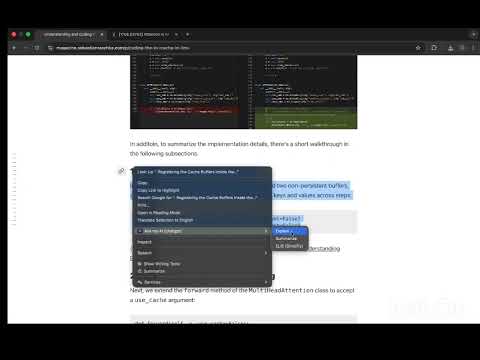
Your AI assistant, always one click away. Highlight text on any page to explain with ChatGPT, Claude, DeepSeek, Perplexity, & more.

Tired of copying text to ChatGPT and losing your place? Yeah, me too. I built this because tab-switching was driving me crazy. You're reading something, get confused, copy the text, open ChatGPT/Claude, paste it... and now you forgot where you were. AI Anywhere (formerly Ask My AI) fixes this. Press Cmd/Ctrl+Shift+E on any text and your AI pops up in a sidebar. That's it. FREE & OPEN SOURCE No subscriptions, no API costs, nothing to pay for. Ever. Code's on GitHub: https://github.com/biraj21/ask-my-ai EVERYTHING JUST WORKS: - You're already logged in - Your ChatGPT Plus? Works - Your custom instructions? There - Your chat history? Saved - No setup, no API keys, nothing HOW YOU'LL ACTUALLY USE IT You're reading docs, and something's confusing → highlight it → Cmd/Ctrl+Shift+E → answer shows up, you keep reading Learning something new → ask questions as you go instead of breaking focus every 30 seconds The whole point is keeping you in flow instead of constantly context-switching. It's open source so you can see exactly what it does. No sketchy stuff.

Details

  • Version
    0.0.13
  • Updated
    March 20, 2026
  • Size
    75.38KiB
  • Languages
    English
  • Developer
    Website
    Email
    biraj.pub@gmail.com
  • Non-trader
    This developer has not identified itself as a trader. For consumers in the European Union, please note that consumer rights do not apply to contracts between you and this developer.

Privacy

Manage extensions and learn how they're being used in your organization
The developer has disclosed that it will not collect or use your data. To learn more, see the developer’s privacy policy .

This developer declares that your data is

  • Not being sold to third parties, outside of the approved use cases
  • Not being used or transferred for purposes that are unrelated to the item's core functionality
  • Not being used or transferred to determine creditworthiness or for lending purposes

Support

Related

AI-MultiPrompt

3.7

A Web Extension that allows to simultaneously submit a prompt to multiple AI chats

SurfMind: Free AI chat (GPT, Claude, Gemini, OpenRouter)

4.9

AI assistant for every website you visit

AI Chat Navigator: Navigation Sidebar, Mindmap & Export for ChatGPT & More

5.0

Organize, navigate, visualize, copy & export conversations across multiple AI platforms such as ChatGPT, Gemini, Claude, DeepSeek

AI Panel: Privacy-first AI sidebar on any webpage

5.0

Talk to AI in one click — without leaving a page.

NeuralSide - AI Sidebar | Free GPT-5

3.0

Free GPT-5 & Mistral AI in your Chrome sidebar — chat, write and code without leaving the page.

Perplexity Sidebar

3.6

Open Perplexity in a Chrome sidebar

WritePro AI – Smart Writing Assistant

5.0

Your free AI assistant to help you write, edit, and think faster.

Free AI Sidebar: ChatGPT, Claude, Gemini, DeepSeek, Perplexity & more

5.0

Access AI services directly from the browser sidebar

Sen Chat: AI Sidebar - Chat with all AI models

5.0

AI chat, advanced web search, document interaction, and more into a convenient sidebar.

Crompt AI: One Platform That Brings GPT, Claude, Gemini & More Together

5.0

Crompt AI: Seamless GPT, Claude, Gemini, Grok access. All-in-one AI for smarter chat, writing, summary, generation & automation.

Anything Sidebar: All-in-One, AI, Bookmarks, Vertical Tabs

4.9

All-in-One Sidebar: Chat with AI, browse, search & translate. Features vertical tabs, bookmarks & multi-tab. Ultimate productivity.

AI Multi-Platform Quick Search (Perplexity, ChatGPT & Claude)

5.0

Highlight text on any webpage and choose a platform (Perplexity, ChatGPT, Claude) to search instantly.

AI-MultiPrompt

3.7

A Web Extension that allows to simultaneously submit a prompt to multiple AI chats

SurfMind: Free AI chat (GPT, Claude, Gemini, OpenRouter)

4.9

AI assistant for every website you visit

AI Chat Navigator: Navigation Sidebar, Mindmap & Export for ChatGPT & More

5.0

Organize, navigate, visualize, copy & export conversations across multiple AI platforms such as ChatGPT, Gemini, Claude, DeepSeek

AI Panel: Privacy-first AI sidebar on any webpage

5.0

Talk to AI in one click — without leaving a page.

NeuralSide - AI Sidebar | Free GPT-5

3.0

Free GPT-5 & Mistral AI in your Chrome sidebar — chat, write and code without leaving the page.

Perplexity Sidebar

3.6

Open Perplexity in a Chrome sidebar

WritePro AI – Smart Writing Assistant

5.0

Your free AI assistant to help you write, edit, and think faster.

Free AI Sidebar: ChatGPT, Claude, Gemini, DeepSeek, Perplexity & more

5.0

Access AI services directly from the browser sidebar

Google apps
Create a Mobile Website
View Site in Mobile | Classic
Share by:
