Item logo image for Apple TV SubStyler: Customize subtitles [QVI]

Apple TV SubStyler: Customize subtitles [QVI]

4.1 (

9 ratings

)
Item media 2 (screenshot) for Apple TV SubStyler: Customize subtitles [QVI]
Item video thumbnail
Item media 2 (screenshot) for Apple TV SubStyler: Customize subtitles [QVI]
Item video thumbnail
Item media 2 (screenshot) for Apple TV SubStyler: Customize subtitles [QVI]

Overview

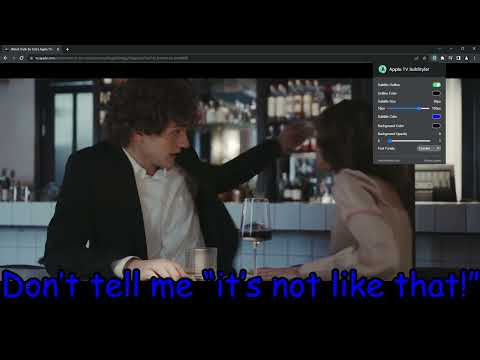
Extension to customize captions and subtitles on Apple TV. Change text size, font, color, and add background.

Wake up your inner artist and express your creativity by customizing AppleTV+ subtitle style. Even though you usually don’t use movie captions, you may consider starting after checking out all the settings this extension has to offer. Now you’re able to: - Choose custom text color,🌈 - Adjust text size,📏 - Add text outline and choose its color,🌈 - Add text background, choose its color and adjust the opacity🌈 - Choose font family🔤 Feeling artistic? Here’s another bonus: all the colors can be chosen either from a built-in color picker or by entering RGB value, creating almost endless style possibilities. Take the subtitle customization to the next level with AppleTV+ SubStyler and let your imagination run wild!! Too many options? Worry not! Check out some basic settings, such as text size and background. All you need to do is add AppleTV+ Substyler extension to your browser, manage available options in the control panel and adjust subtitles to your own preferences. It’s as simple as that! ❗**Disclaimer: All product and company names are trademarks or registered trademarks of their respective holders. This extension holds no association or affiliation with them or any third-party companies.**❗ This extension is part of the Quality Viewership Initiative, a collaborative effort to enhance the understanding of audience engagement. It collects anonymous, aggregated viewing insights to support creators and studios in improving the quality of their content. You can stop sharing your information at any time by switching the toggle on the options page.

4.1 out of 5 9 ratings

Learn more about results and reviews.

Details

  • Version
    1.0.20
  • Updated
    February 11, 2026
  • Offered by
    Streaming Extensions
  • Size
    125KiB
  • Languages
    55 languages
  • Developer
    HideApp
    1021 East Lincolnway Cheyenne, WY 82001 US
    Email
    primepartyapp@gmail.com
    Phone
    +1 802-284-5301
  • Trader
    This developer has identified itself as a trader per the definition from the European Union and committed to only offer products or services that comply with EU laws.
  • D-U-N-S
    132615120

Privacy

Manage extensions and learn how they're being used in your organization

Apple TV SubStyler: Customize subtitles [QVI] has disclosed the following information regarding the collection and usage of your data. More detailed information can be found in the developer's privacy policy .

Apple TV SubStyler: Customize subtitles [QVI] handles the following:

Personally identifiable information
Authentication information
Location
User activity
Website content

This developer declares that your data is

  • Not being sold to third parties, outside of the approved use cases
  • Not being used or transferred for purposes that are unrelated to the item's core functionality
  • Not being used or transferred to determine creditworthiness or for lending purposes

Support

Related

What to watch on Apple TV TMDb ratings

0.0

View movie ratings directly on Apple TV. Based on scores from TMDB.

Apple TV Extended: boost your viewing [QVI]

2.2

Boost your Apple TV viewing experience: adjust speed, skip intros & recaps, hide spoilers.

Disney+ Episode Selector: episode list.

0.0

Extension adds an episode list button to select the episode while watching Disney+ series.

Audio Booster for Apple TV

0.0

Struggling with quiet audio? 🚀 Try Audio Booster for Apple TV and amplify your experience! 🎧

AppleTV+ Episode Selector: episode list

0.0

Extension adds an episode list button to select the episode while watching Apple TV+ series.

Apple TV Skipper: skip intros & recaps

3.2

Automatically skip intros, recaps, and click next episode button on AppleTV

Rakuten TV SubStyler: customize subtitles

0.0

Extension to customize captions and subtitles on Rakuten TV. Change text size, font, color, and add background.

HBO Max SubStyler: Customize subtitles [QVI]

5.0

Extension to customize captions and subtitles on HBO Max. Change text size, font, color, and add background.

Voice Control for Apple TV

0.0

🔊Voice Control for Apple TV 🚀 Play, pause, fast-forward, and more, all without lifting a finger! 🙌🎬

Customized subtitles, works with Disney Plus

3.8

Independent software - not affiliated with Disney. Change Disney+ subtitle fonts, colors, sizes, outlines and backgrounds.

Subtitle Reader works with Disney+

4.0

Independent software - not affiliated with Disney. Turn Disney+ subtitles into audio with text-to-speech in 13 languages.

Customized subtitles, works with Paramount+ [QVI]

5.0

Independent software not affiliated with Paramount. Customize Paramount+ subtitles with fonts, colors, size and backgrounds.

What to watch on Apple TV TMDb ratings

0.0

View movie ratings directly on Apple TV. Based on scores from TMDB.

Apple TV Extended: boost your viewing [QVI]

2.2

Boost your Apple TV viewing experience: adjust speed, skip intros & recaps, hide spoilers.

Disney+ Episode Selector: episode list.

0.0

Extension adds an episode list button to select the episode while watching Disney+ series.

Audio Booster for Apple TV

0.0

Struggling with quiet audio? 🚀 Try Audio Booster for Apple TV and amplify your experience! 🎧

AppleTV+ Episode Selector: episode list

0.0

Extension adds an episode list button to select the episode while watching Apple TV+ series.

Apple TV Skipper: skip intros & recaps

3.2

Automatically skip intros, recaps, and click next episode button on AppleTV

Rakuten TV SubStyler: customize subtitles

0.0

Extension to customize captions and subtitles on Rakuten TV. Change text size, font, color, and add background.

HBO Max SubStyler: Customize subtitles [QVI]

5.0

Extension to customize captions and subtitles on HBO Max. Change text size, font, color, and add background.

Google apps
Create a Mobile Website
View Site in Mobile | Classic
Share by: