


ChatGPT Folders, Timestamp, Bookmarks, Bulk-Actions - GPT Master Toolkit

Overview
Organize ChatGPT with folders, stars, timestamps, minimap, and follow-up suggestions. Navigate long chats & save time.
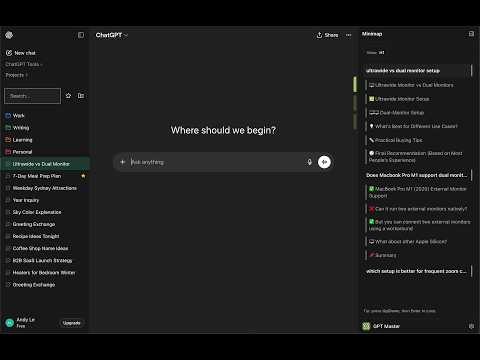
Add ChatGPT folders, bookmarks, and timestamps to organize ChatGPT the way you actually work. GPT Master is the organizational layer ChatGPT never built - folders, stars, message bookmarks, timestamps, follow-up suggestions, minimap, and search in one lightweight extension. FEATURES 🗂️ ChatGPT Folders - Create folders and nested subfolders to organize ChatGPT by project, client, or topic - Assign custom colors for fast visual scanning - Drag and drop conversations between folders - Rename, delete, and restructure anytime - Expand or collapse all folders at once from the context menu - Add child folders directly from any folder's context menu ⭐ ChatGPT Stars & Pins - Star important threads for one-click retrieval - stop scrolling to find what matters - Dedicated starred section in the sidebar - Filter to show only starred conversations 🔖 ChatGPT Bookmarks - Bookmark specific messages within conversations - Jump back to any bookmarked message from the sidebar ⏰ ChatGPT Timestamps - See exactly when each message was sent - know when ideas happened - Relative time for recent messages ("just now", "5m ago") - Absolute timestamps for older messages 📝 Notes & Highlights - Write notes on any conversation and bookmark key passages - Keep notes docked in the right rail for quick reference while chatting - Organize your thoughts alongside your conversations 🏷️ Conversation Tags - Tag conversations with custom labels to group them across folders - Filter the sidebar by tag for instant context switching - Manage tags in Admin Hub: rename, recolor, and delete in bulk ⚡ Speed Booster - Keeps long conversations fast by only rendering nearby messages - Cuts memory use in threads with hundreds of exchanges - Enable or disable in Admin Hub under Performance 💬 Smart Follow-Up Suggestions - AI-generated follow-up prompts appear after each response - One click to keep the conversation going - no more staring at a blank prompt - Suggestions always available, even offline - Enhanced follow-up delivery is resilient, with graceful fallback when network requests fail 🗺️ Conversation Minimap - Visual table of contents for long conversations - stop scrolling through 50+ messages - Jump to any section with one click 🔍 Search - Search conversations by title and content - Filter by folder or star status 📦 Bulk Actions - Multi-select conversations for batch move, archive, or star 🧭 Conversation Context Menu - Right-click any conversation for quick actions: Copy Link, Move to Folder, Add Note, and View Details - Conversation Details panel shows title, model, message count, folder, creation date, and starred status BUILT FOR POWER USERS - Changes sync instantly across all open ChatGPT tabs - Rename and archive conversations inline - Under 1 MB - loads fast, no slowdown PRIVACY - GPT Master never captures your conversation content - Folder data, bookmarks, and settings are stored locally in Chrome - AI follow-up suggestions are optional and only run after consent - Analytics can be disabled in Settings - Google sign-in is optional for plan visibility only Works on chatgpt.com. Free to install. Compatible with ChatGPT Free, Plus, and Team plans.
Details
- Version2.11.2
- UpdatedMay 2, 2026
- Size919KiB
- LanguagesEnglish
- Developer
- Non-traderThis developer has not identified itself as a trader. For consumers in the European Union, please note that consumer rights do not apply to contracts between you and this developer.
Privacy

ChatGPT Folders, Timestamp, Bookmarks, Bulk-Actions - GPT Master Toolkit has disclosed the following information regarding the collection and usage of your data. More detailed information can be found in the developer's privacy policy .
ChatGPT Folders, Timestamp, Bookmarks, Bulk-Actions - GPT Master Toolkit handles the following:
This developer declares that your data is
- Not being sold to third parties, outside of the approved use cases
- Not being used or transferred for purposes that are unrelated to the item's core functionality
- Not being used or transferred to determine creditworthiness or for lending purposes


