Item logo image for Easy Screen Shader

Easy Screen Shader

Item media 6 (screenshot) for Easy Screen Shader
Item video thumbnail
Item media 2 (screenshot) for Easy Screen Shader
Item media 3 (screenshot) for Easy Screen Shader
Item media 4 (screenshot) for Easy Screen Shader
Item media 5 (screenshot) for Easy Screen Shader
Item media 6 (screenshot) for Easy Screen Shader
Item video thumbnail
Item media 2 (screenshot) for Easy Screen Shader
Item media 3 (screenshot) for Easy Screen Shader
Item media 4 (screenshot) for Easy Screen Shader
Item media 5 (screenshot) for Easy Screen Shader
Item media 6 (screenshot) for Easy Screen Shader

Overview

Tint Chrome with a soothing hue to ease eye strain and fatigue.

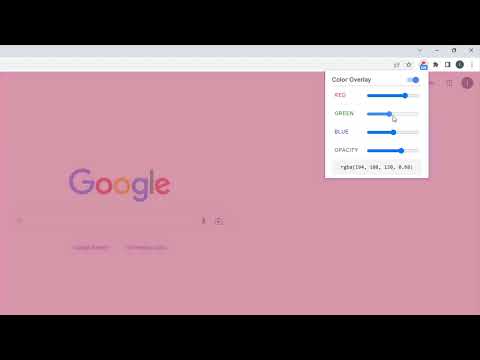
Looking for a way to protect your eyes from the harmful effects of blue light when using your computer at night? Check out this extension - a lightweight and user-friendly tool that can easily adjust your screen color to match the surroundings. The extension helps reduce eye strain by putting a custom color overlay over web contents. It's a great way to avoid the excessive blue light emitted by computer screen particularly in low-light conditions. The tool is very easy to set up. The options page lets you customize color value in the format of RGBA to suit your preferences. An ON/OFF switch lets you easily enable or disable the overlay feature. Once enabled, color overlay will be put to all Chrome tabs based on the color you've set. You are free to disable overlay feature anytime. Additionally, We’ve added some of our new extensions at the bottom for your convenience and enjoyment!

Details

  • Version
    0.1.4
  • Updated
    August 31, 2025
  • Size
    76.36KiB
  • Languages
    English
  • Developer
    Website
    Email
    webtools.any@gmail.com
  • Non-trader
    This developer has not identified itself as a trader. For consumers in the European Union, please note that consumer rights do not apply to contracts between you and this developer.

Privacy

Manage extensions and learn how they're being used in your organization
The developer has disclosed that it will not collect or use your data. To learn more, see the developer’s privacy policy .

This developer declares that your data is

  • Not being sold to third parties, outside of the approved use cases
  • Not being used or transferred for purposes that are unrelated to the item's core functionality
  • Not being used or transferred to determine creditworthiness or for lending purposes

Support

For help with questions, suggestions, or problems, visit the developer's support site

Related

EyeShield - Blue Light Protection

0.0

Protect your eyes from blue light with a customizable warm overlay

hb-sd Page Color

4.5

Change colors of web pages by using filters.

Easy Night Shift

5.0

Adjust screen brightness to a protective color from the list or choose your preferred shade.

Saturation Adjuster

0.0

Adjust webpage saturation with a simple slider

Chrome Filters

4.7

Customize your chrome with css filters

DyslexiAid

2.0

Makes text easier to read for people with dyslexia. Unleash the potential of adaptive fonts and soothing color palettes.

Lumitabs

3.7

This extension lets you easily control the current tab brightness.

Dark Read

5.0

Ease eye strain. Dark Read is a simple Chrome extension to change the background color of a web page.

ColorVeil

4.3

Add your own customized color filter (veil) over any website or document to help with dyslexia, visual stress, eye strain, and more.

Tab Brightness & Warmth Adjuster

5.0

Adjust the brightness and warmth of web pages with ease.

BlueLight Filter Pro

5.0

Protect your eye health by filtering blue light.

Web Color Filter

3.8

Apply color filters to your web pages. Multiple dark mode themes. Ajust the brightness, contrast, saturation, etc.

EyeShield - Blue Light Protection

0.0

Protect your eyes from blue light with a customizable warm overlay

hb-sd Page Color

4.5

Change colors of web pages by using filters.

Easy Night Shift

5.0

Adjust screen brightness to a protective color from the list or choose your preferred shade.

Saturation Adjuster

0.0

Adjust webpage saturation with a simple slider

Chrome Filters

4.7

Customize your chrome with css filters

DyslexiAid

2.0

Makes text easier to read for people with dyslexia. Unleash the potential of adaptive fonts and soothing color palettes.

Lumitabs

3.7

This extension lets you easily control the current tab brightness.

Dark Read

5.0

Ease eye strain. Dark Read is a simple Chrome extension to change the background color of a web page.

Google apps
Create a Mobile Website
View Site in Mobile | Classic
Share by:
