Item logo image for Full Page & Scrollable Areas Screenshot – Capture X

Full Page & Scrollable Areas Screenshot – Capture X

4.9 (

90 ratings

)
Extension Tools 10,000 users
Item media 5 (screenshot) for Full Page & Scrollable Areas Screenshot – Capture X
Item media 6 (screenshot) for Full Page & Scrollable Areas Screenshot – Capture X
Item video thumbnail
Item media 2 (screenshot) for Full Page & Scrollable Areas Screenshot – Capture X
Item media 3 (screenshot) for Full Page & Scrollable Areas Screenshot – Capture X
Item media 4 (screenshot) for Full Page & Scrollable Areas Screenshot – Capture X
Item media 5 (screenshot) for Full Page & Scrollable Areas Screenshot – Capture X
Item media 6 (screenshot) for Full Page & Scrollable Areas Screenshot – Capture X
Item video thumbnail
Item media 2 (screenshot) for Full Page & Scrollable Areas Screenshot – Capture X
Item video thumbnail
Item media 2 (screenshot) for Full Page & Scrollable Areas Screenshot – Capture X
Item media 3 (screenshot) for Full Page & Scrollable Areas Screenshot – Capture X
Item media 4 (screenshot) for Full Page & Scrollable Areas Screenshot – Capture X
Item media 5 (screenshot) for Full Page & Scrollable Areas Screenshot – Capture X
Item media 6 (screenshot) for Full Page & Scrollable Areas Screenshot – Capture X

Overview

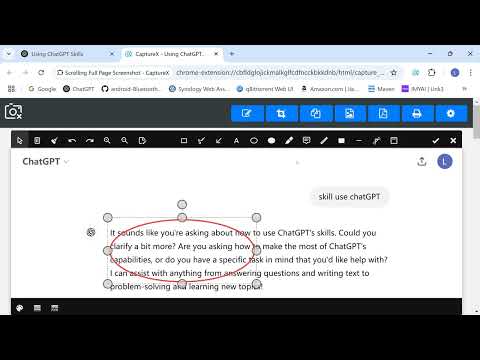
Capture full webpages, scrollable areas, or selected areas. Annotate, copy, print, or save as PDF/JPG/PNG.

This extension only runs when you click the extension icon, with minimum permissions required. Capture full webpage screenshots by scrolling, support image editing and annotation features, convert to PDF or JPEG/PNG files, and download for local saving. Why Install CaptureX? Key Features: 1️⃣ Take a scrolling screenshot of the entire page and stitch it into one image.🔥 2️⃣ Capture scrollable child areas. 🔥 3️⃣ Capture the selection of the page. 🔥 4️⃣ Edit screenshots and add annotations. 🔥 5️⃣ Convert screenshots to PDF for downloading and saving. 🔥 6️⃣ Save screenshots as JPEG/PNG files. 7️⃣ Copy screenshots to the clipboard. 8️⃣ Print screenshots directly. All our features are free of charge. Privacy & Security: This extension only requests minimum permissions and does not run by default. It only activates when the user clicks the extension icon. This design ensures users' privacy is protected and avoids any unauthorized automatic actions or data collection. Users always have full control over when to enable extension features, enhancing security and privacy protection during use.

4.9 out of 5 90 ratings

Learn more about results and reviews.

Details

  • Version
    3.2.1
  • Updated
    December 30, 2025
  • Offered by
    Johnny
  • Size
    7.57MiB
  • Languages
    31 languages
  • Developer
    Email
    webman.ling@gmail.com
  • Non-trader
    This developer has not identified itself as a trader. For consumers in the European Union, please note that consumer rights do not apply to contracts between you and this developer.

Privacy

Manage extensions and learn how they're being used in your organization
The developer has disclosed that it will not collect or use your data.

This developer declares that your data is

  • Not being sold to third parties, outside of the approved use cases
  • Not being used or transferred for purposes that are unrelated to the item's core functionality
  • Not being used or transferred to determine creditworthiness or for lending purposes

Related

Capture Full Page Screenshot

5.0

Capture a screenshot of your current page according to visible and fullpage with just one click.

Full page screenshot

4.3

Capture the entire web page, including the scrolling area, with one click

Screenshot Entire Webpage

4.7

Capture a full page screenshot easily with the Screenshot Entire Webpage extension. Perfect for whole page screen capture.

TakeScreenshot – capture area, full page or scrolling screenshot

4.9

Easily capture an area, the entire screen or a scrolling page and instantly add annotations: highlight, draw, write...

Full Page Screenshot

4.6

Full page screen capture is a simple extension that lets you capture the entire screen in one click. Get an entire page screenshot.

LongShot - 智能长截图

4.0

专业的滚动截图工具,可截取整页或选定区域。

CocoShot: Screenshot & Screen Recorder

4.9

Capture full page screenshots and record screen to MP4 with annotations. PDF export with clickable links included.

Scrolling screenshot tool & screen capture

4.3

Scrolling Screenshot tool for screen capture and screen sharing

Scrolling screenshot tool & screen capture

1.7

Scrolling Screenshot tool for screen capture and screen sharing

滚动截屏

4.0

轻松截取网页滚动内容的 Chrome 扩展

精准截图 - 一键智能精准截图工具

4.6

AI时代的首款智能截图工具!

Full Page Screenshot – Fastest Scrolling Screen Capture (BlitzCapture)

5.0

Capture full page screenshots instantly. Fast scrolling capture for long webpages. Simple, high-quality results.

Capture Full Page Screenshot

5.0

Capture a screenshot of your current page according to visible and fullpage with just one click.

Full page screenshot

4.3

Capture the entire web page, including the scrolling area, with one click

Screenshot Entire Webpage

4.7

Capture a full page screenshot easily with the Screenshot Entire Webpage extension. Perfect for whole page screen capture.

TakeScreenshot – capture area, full page or scrolling screenshot

4.9

Easily capture an area, the entire screen or a scrolling page and instantly add annotations: highlight, draw, write...

Full Page Screenshot

4.6

Full page screen capture is a simple extension that lets you capture the entire screen in one click. Get an entire page screenshot.

LongShot - 智能长截图

4.0

专业的滚动截图工具,可截取整页或选定区域。

CocoShot: Screenshot & Screen Recorder

4.9

Capture full page screenshots and record screen to MP4 with annotations. PDF export with clickable links included.

Scrolling screenshot tool & screen capture

4.3

Scrolling Screenshot tool for screen capture and screen sharing

Google apps
Create a Mobile Website
View Site in Mobile | Classic
Share by:
