Item logo image for Gemini to Notion Export - Bulk Export

Gemini to Notion Export - Bulk Export
https://chatgpt2notion.com/
4.2 (

10 ratings

)
Extension Tools 1,000 users
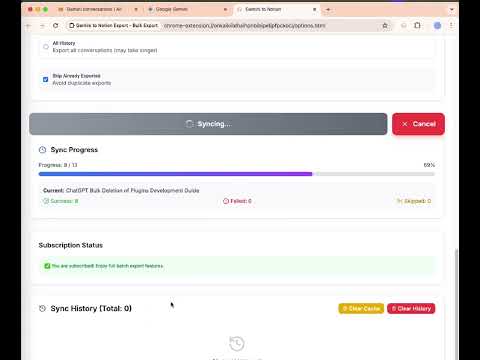
Item media 3 (screenshot) for Gemini to Notion Export - Bulk Export
Item media 4 (screenshot) for Gemini to Notion Export - Bulk Export
Item video thumbnail
Item media 2 (screenshot) for Gemini to Notion Export - Bulk Export
Item media 3 (screenshot) for Gemini to Notion Export - Bulk Export
Item media 4 (screenshot) for Gemini to Notion Export - Bulk Export
Item video thumbnail
Item media 2 (screenshot) for Gemini to Notion Export - Bulk Export
Item video thumbnail
Item media 2 (screenshot) for Gemini to Notion Export - Bulk Export
Item media 3 (screenshot) for Gemini to Notion Export - Bulk Export
Item media 4 (screenshot) for Gemini to Notion Export - Bulk Export

Overview

Easily export, backup, and sync your Gemini conversations to Notion. Download and organize your AI chat history with one click.

✨ Export Gemini (Google AI) Chats to Notion – Bulk Export, Organize, and Sync Easily export, save, sync, and organize your Gemini (Google AI) chat conversations directly into Notion. No more copy-paste mess — this extension lets you automate backup and transfer of your AI chat history with just one click. Perfect for researchers, developers, creators, and anyone using Gemini as a productivity or knowledge tool. 🚀 FEATURES • One-click bulk export of Gemini chats to Notion • Preserves content structure: chat flow, formatting, code blocks, markdown • Export deep research documents as Notion sub-pages for detailed analysis • Automatically sync and organize your AI conversations by topic or date • Secure by design – all data stays in your browser, never uploaded • Clean, fast, and modern UI with intuitive controls 🛠️ HOW TO USE 1. Open any Gemini chat conversation 2. Click the extension icon in your browser 3. Select your Notion database 4. Click “Export” — your chat will be instantly sent to Notion 📦 USE CASES • Export Gemini chats to Notion for writing, research, or code • Save deep research findings as structured Notion sub-pages • Backup your Gemini conversations for future reference • Organize AI knowledge into your Notion workspace • Share AI-generated content with teammates or collaborators • Build your Second Brain in Notion using Gemini's output 🔗 USEFUL LINKS • Product Homepage: https://chatgptsave.notion.site/Gemini-to-Notion-23710052f0c88041bd8bcaa3254660b9 • Submit Issues or Feedback: https://github.com/aluoapp/export-gemini-to-notion/issues • ✉️ Contact: chatgpt2notion@gmail.com 📜 UPDATE LOG • 2026-01-09 Fixed an issue where Gemini conversations were truncated when the chat history was too long. Full export of the entire conversation is now supported. • 2025-12-09 Optimized error prompts and fixed the issue of retrieving Gemini sub-documents. 🛡️ PRIVACY FIRST This extension processes everything 100% locally in your browser. No data is sent to any server, ensuring total privacy and security.

4.2 out of 5 10 ratings

Learn more about results and reviews.

Details

  • Version
    1.4.0
  • Updated
    January 9, 2026
  • Size
    384KiB
  • Languages
    11 languages
  • Developer
    Website
    Email
    aluoapps@gmail.com
  • Non-trader
    This developer has not identified itself as a trader. For consumers in the European Union, please note that consumer rights do not apply to contracts between you and this developer.

Privacy

Gemini to Notion Export - Bulk Export has disclosed the following information regarding the collection and usage of your data. More detailed information can be found in the developer's privacy policy .

Gemini to Notion Export - Bulk Export handles the following:

Personally identifiable information

This developer declares that your data is

  • Not being sold to third parties, outside of the approved use cases
  • Not being used or transferred for purposes that are unrelated to the item's core functionality
  • Not being used or transferred to determine creditworthiness or for lending purposes

Support

For help with questions, suggestions, or problems, visit the developer's support site

Related

AI Exporter: Save ChatGPT, Gemini to PDF | To Markdown | Sync to Notion

4.7

Export ChatGPT, DeepSeek, Gemini, Grok chats to PDF/Markdown/Txt/image. Supports download/copy, content selection, and Notion sync.

Gemini to PDF - Batch Export

4.3

Bulk Export all your Gemini conversations to PDF files with one click

AINote to Notion

3.9

Save Claude conversations to Notion with one click. Export Claude conversations

DeepSeek to Notion

1.0

Batch Save DeepSeek conversations to Notion with one click. Export DeepSeek conversations

AI Chat to PDF

4.3

Instantly export your Gemini chats to PDF: smart conversion for perfect results.

Perplexity to Notion - Batch Export

4.4

Bulk Export all your PerlexityAI conversations to Notion with one click

Add to Notion

5.0

Seamlessly save web content to Notion with a single click

Save to Notion

4.3

Save the Web to Notion

AI Chat Exporter: Gemini to PDF, MD and more

4.7

Export Gemini chats to PDF, Markdown, Text, CSV... Free and fully customizable.

Save ChatGPT to Notion

4.4

Save ChatGPT conversations to Notion with one click. Bulk Export ChatGPT conversations

Grok to Notion

4.4

Batch Save Grok conversations to Notion with one click. Export Grok conversations

ChatGPT & AI Backup: Export Markdown & Notion Sync

4.1

Export AI conversations to Markdown or sync to Notion. Backup your chats from popular platforms.

AI Exporter: Save ChatGPT, Gemini to PDF | To Markdown | Sync to Notion

4.7

Export ChatGPT, DeepSeek, Gemini, Grok chats to PDF/Markdown/Txt/image. Supports download/copy, content selection, and Notion sync.

Gemini to PDF - Batch Export

4.3

Bulk Export all your Gemini conversations to PDF files with one click

AINote to Notion

3.9

Save Claude conversations to Notion with one click. Export Claude conversations

DeepSeek to Notion

1.0

Batch Save DeepSeek conversations to Notion with one click. Export DeepSeek conversations

AI Chat to PDF

4.3

Instantly export your Gemini chats to PDF: smart conversion for perfect results.

Perplexity to Notion - Batch Export

4.4

Bulk Export all your PerlexityAI conversations to Notion with one click

Add to Notion

5.0

Seamlessly save web content to Notion with a single click

Save to Notion

4.3

Save the Web to Notion

Google apps
Create a Mobile Website
View Site in Mobile | Classic
Share by:
