Item logo image for Hide My Web

Hide My Web

2.3 (

6 ratings

)
Extension Tools 135 users
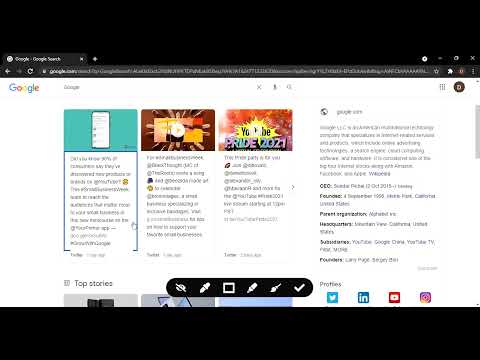
Item media 4 (screenshot) for Hide My Web
Item media 5 (screenshot) for Hide My Web
Item video thumbnail
Item media 2 (screenshot) for Hide My Web
Item media 3 (screenshot) for Hide My Web
Item media 4 (screenshot) for Hide My Web
Item media 5 (screenshot) for Hide My Web
Item video thumbnail
Item media 2 (screenshot) for Hide My Web
Item video thumbnail
Item media 2 (screenshot) for Hide My Web
Item media 3 (screenshot) for Hide My Web
Item media 4 (screenshot) for Hide My Web
Item media 5 (screenshot) for Hide My Web

Overview

Hide, blur, and highlight elements of any webpage with a single click of mouse.

Hide My Web lets you instantly hide, blur, or highlight any element on a webpage — with a single click. What it does: Hide — Remove distracting or sensitive elements from view Blur — Redact content without fully removing it (great for screenshots and screen recordings) Highlight — Mark important sections with a custom color for quick reference Hide Title — Replace the browser tab title so others can't see what you're viewing Why install it: Privacy — Blur or hide personal info (emails, names, balances) before sharing your screen or taking screenshots Focus — Remove ads, banners, and distractions to concentrate on what matters Presentations — Clean up any webpage before a demo or recording No account needed — Works instantly with zero setup. Click the icon and start editing. Built-in tools: Full undo/redo support — never worry about making a mistake Reset button to restore the page to its original state Lightweight floating toolbar that stays out of your way Minimal permissions — only accesses the page you're actively editing. No data collection, no background tracking.

2.3 out of 5 6 ratings

Learn more about results and reviews.

Details

  • Version
    1.0.4
  • Updated
    March 15, 2026
  • Features
    Offers in-app purchases
  • Offered by
    Divyanshu
  • Size
    101KiB
  • Languages
    English (United States)
  • Developer
    Email
    divyanshugour197@gmail.com
  • Non-trader
    This developer has not identified itself as a trader. For consumers in the European Union, please note that consumer rights do not apply to contracts between you and this developer.

Privacy

Manage extensions and learn how they're being used in your organization
The developer has disclosed that it will not collect or use your data. To learn more, see the developer’s privacy policy .

This developer declares that your data is

  • Not being sold to third parties, outside of the approved use cases
  • Not being used or transferred for purposes that are unrelated to the item's core functionality
  • Not being used or transferred to determine creditworthiness or for lending purposes

Support

Related

Blurrr

5.0

Blur any element with a single click. Keep your privacy safe.

ElementHider

4.4

Hides elements that contain keywords set by user

DataMask

4.6

Mask sensitive data in screenshots. Take full page screenshots and export to PNG/JPEG/WEBP using online screenshot editor

🛡️ StealthView – One-click privacy for your screen 🔒

4.0

🛡️ One-click privacy mode that blurs your screen and protects your data — 100% offline. ⚡

ZeroBlur

4.5

Blur any sensitive information from any website or web app. Keep data safe when delivering demos or recording videos!

Blur Page

1.0

Hide sensitive information on page

Hide That!

4.4

This extension can hide or remove selected elements on a page. Useful for removing invasive adverts, banners and overlays.

Hide Website Contents with Rectangle Overlay

0.0

Block website spoilers & distractions. Place a custom rectangle at custom URL/domain. Show/hide with ease.

blurweb.app

4.4

Blur any element text, image, input or paragraphs with single click.

Content Edit & Blur

4.6

Easily edit, replace or blur elements on any webpage

Hide Anything - Element Hider for Chrome™

2.1

Best element hider for Chrome™. Remove distractions in a breeze.

Greeked and blurred

5.0

Blurs, greeks (dummy text, 'lorem ipsum') web elements and focuses on the form.

Blurrr

5.0

Blur any element with a single click. Keep your privacy safe.

ElementHider

4.4

Hides elements that contain keywords set by user

DataMask

4.6

Mask sensitive data in screenshots. Take full page screenshots and export to PNG/JPEG/WEBP using online screenshot editor

🛡️ StealthView – One-click privacy for your screen 🔒

4.0

🛡️ One-click privacy mode that blurs your screen and protects your data — 100% offline. ⚡

ZeroBlur

4.5

Blur any sensitive information from any website or web app. Keep data safe when delivering demos or recording videos!

Blur Page

1.0

Hide sensitive information on page

Hide That!

4.4

This extension can hide or remove selected elements on a page. Useful for removing invasive adverts, banners and overlays.

Hide Website Contents with Rectangle Overlay

0.0

Block website spoilers & distractions. Place a custom rectangle at custom URL/domain. Show/hide with ease.

Google apps
Create a Mobile Website
View Site in Mobile | Classic
Share by:
