Item logo image for Markdown Capturer - BibCit

Markdown Capturer - BibCit

4.1 (

13 ratings

)
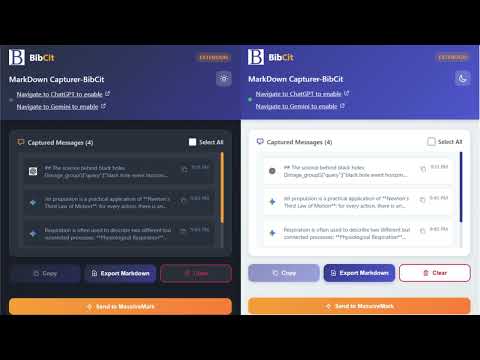
Item media 6 (screenshot) for Markdown Capturer - BibCit
Item video thumbnail
Item media 2 (screenshot) for Markdown Capturer - BibCit
Item media 3 (screenshot) for Markdown Capturer - BibCit
Item media 4 (screenshot) for Markdown Capturer - BibCit
Item media 5 (screenshot) for Markdown Capturer - BibCit
Item media 6 (screenshot) for Markdown Capturer - BibCit
Item video thumbnail
Item media 2 (screenshot) for Markdown Capturer - BibCit
Item media 3 (screenshot) for Markdown Capturer - BibCit
Item media 4 (screenshot) for Markdown Capturer - BibCit
Item media 5 (screenshot) for Markdown Capturer - BibCit
Item media 6 (screenshot) for Markdown Capturer - BibCit

Overview

Capture Markdown from chatgpt and Gemini.

What's New in Version 2.4: Minor bug fix. What's New in Version 2.3: ✅ Language Support - We've added langugage support so that user can use it in native language. ✅ ChatGpt - We have fixed error on chatgpt, due to recent update in chatgpt copy button was not working on individual chat, we have fixed it in this version. ✅ Same Great Functionality - All markdown capture features work perfectly without the debugger permission. Use BibCit's Markdown Capturer Web Extension to Copy and export AI responses from ChatGPT and Gemini. Markdown Capturer-BibCit allows users to copy their ChatGPT and Gemini AI content in true markdown format. It adds a one-click button to copy responses in proper markdown format. Users have an option to copy responses from ChatGPT and Gemini either one by one or even have an option to bulk export the entire thread of conversations in markdown file format. In a dedicated message manager it automatically saves conversations locally and lets you download complete threads as markdown files. Ideal for developers, writers, students, researchers, and professionals who work with markdown in their notes, documentation, or knowledge bases. Copy once, paste AI responses as markdown format into any markdown editor of your choice including BibCit's Massivemark without need for manual reformatting. Commitment to Privacy: No access to your passwords or sensitive data on other sites Only active on AI platforms (ChatGPT and Gemini) where you explicitly use it Your data stays local on your device

4.1 out of 5 13 ratings

Learn more about results and reviews.

Details

  • Version
    2.4
  • Updated
    March 30, 2026
  • Offered by
    BibCit
  • Size
    87.24KiB
  • Languages
    15 languages
  • Developer
    Email
    bibcithelp@gmail.com
  • Non-trader
    This developer has not identified itself as a trader. For consumers in the European Union, please note that consumer rights do not apply to contracts between you and this developer.

Privacy

Manage extensions and learn how they're being used in your organization
The developer has disclosed that it will not collect or use your data.

This developer declares that your data is

  • Not being sold to third parties, outside of the approved use cases
  • Not being used or transferred for purposes that are unrelated to the item's core functionality
  • Not being used or transferred to determine creditworthiness or for lending purposes

Support

For help with questions, suggestions, or problems, visit the developer's support site

Related

Export Gemini Chats to Word

5.0

Instantly Export Your Gemini Chats to Word: Effortless Conversion for Professional Results.

ChatGPT Equation Renderer

4.5

Display equations in ChatGPT using Latex notation

AI Chat Exporter for Gemini: PDF, Word & Markdown

4.6

Save Gemini chats as PDF, Word, or Markdown. One-click export with perfect formatting for code blocks, tables, math, and images.

ChatGPT to Google Docs, Word or PDF

4.5

Convert the ChatGPT content into a Google Docs, Word or a PDF format in a single click.

AI Chat to Word, PDF & Google Docs - for Gemini

4.6

Convert the Gemini content into a Microsoft Word, Google Docs or a PDF format in a single click.

Mathpix Snip

4.3

Convert PDFs to LaTeX, DOCX, Markdown, and more

DeepShare: Export AI Chats as Word

4.1

Export AI Chats from DeepSeek, ChatGPT, Gemini, Grok... to Word Documents, copy formulas; take long screenshots of DeepSeek Chats.

AI Chat Exporter: Save ChatGPT, Claude, Gemini & Deepseek as PDF/TXT/WORD

3.1

Export ChatGPT, Claude, Gemini & Deepseek conversations to PDF/TEXT/WORD.

AI Chat Exporter: Gemini to PDF, MD and more

4.8

Export Gemini chats to PDF, Markdown, Text, CSV... Free and fully customizable.

KaTeXGPT - AI to Word Equation Converter. (ChatGPT, Gemini, Claude & More)

4.4

Converts equations into Word-compatible format with a single click. Perfect for students and researchers!

ChatGPT to PDF, Word, Markdown & Google Docs

4.8

One-click export ChatGPT to PDF, Word, Markdown or Google Docs. Keeps code, tables,math equations and images perfectly formatted.

ChatGPT to Word

5.0

Use ChatGPT to Word extension to save chatgpt chat as docx and print. Export chatgpt conversations to word easily.

Export Gemini Chats to Word

5.0

Instantly Export Your Gemini Chats to Word: Effortless Conversion for Professional Results.

ChatGPT Equation Renderer

4.5

Display equations in ChatGPT using Latex notation

AI Chat Exporter for Gemini: PDF, Word & Markdown

4.6

Save Gemini chats as PDF, Word, or Markdown. One-click export with perfect formatting for code blocks, tables, math, and images.

ChatGPT to Google Docs, Word or PDF

4.5

Convert the ChatGPT content into a Google Docs, Word or a PDF format in a single click.

AI Chat to Word, PDF & Google Docs - for Gemini

4.6

Convert the Gemini content into a Microsoft Word, Google Docs or a PDF format in a single click.

Mathpix Snip

4.3

Convert PDFs to LaTeX, DOCX, Markdown, and more

DeepShare: Export AI Chats as Word

4.1

Export AI Chats from DeepSeek, ChatGPT, Gemini, Grok... to Word Documents, copy formulas; take long screenshots of DeepSeek Chats.

AI Chat Exporter: Save ChatGPT, Claude, Gemini & Deepseek as PDF/TXT/WORD

3.1

Export ChatGPT, Claude, Gemini & Deepseek conversations to PDF/TEXT/WORD.

Google apps
Create a Mobile Website
View Site in Mobile | Classic
Share by:
