Item logo image for NestlyTab

NestlyTab

5.0 (

9 ratings

)
Extension Tools 31 users
Item media 4 (screenshot) for NestlyTab
Item video thumbnail
Item media 2 (screenshot) for NestlyTab
Item media 3 (screenshot) for NestlyTab
Item media 4 (screenshot) for NestlyTab
Item video thumbnail
Item media 2 (screenshot) for NestlyTab
Item media 3 (screenshot) for NestlyTab
Item media 4 (screenshot) for NestlyTab

Overview

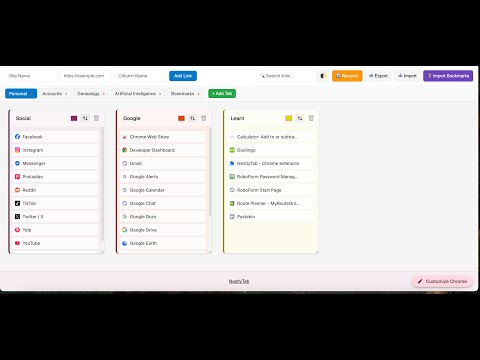
Organize websites in a customizable column-based grid with drag-and-drop, tabs, and quick access.

NestlyTab transforms your chaotic bookmark collection into an organized, visual workspace that actually makes sense. 🎯 WHAT IT DOES: Replace your cluttered bookmark bar with a clean, colorful dashboard. Organize websites into custom columns, create separate workspaces for different projects, and access everything with a single click. âš¡ WHY YOU'LL LOVE IT: - INSTANT ACCESS - Single-click any bookmark to open it immediately - VISUAL ORGANIZATION - Color-coded columns make finding sites effortless - MULTI-SELECT POWER - Hold Ctrl/Cmd to select multiple bookmarks - SMART WORKSPACES - Separate tabs for Work, Personal, Projects, or anything else - DRAG & DROP SIMPLE - Move bookmarks and columns like desktop icons - BULK IMPORT - Add dozens of URLs at once from text or CSV file - IMPORT EXISTING - Bring in all your Chrome bookmarks automatically - BOOKMARK NOTES - Add private notes to any bookmark - AUTO-BACKUP - Schedule automatic exports so you never lose your data 🚀 PERFECT FOR: - Professionals managing multiple projects with dozens of reference sites - Researchers organizing sources by topic or timeline - Students keeping track of course materials and resources - Anyone with 20+ bookmarks who's tired of endless scrolling ✨ WHAT'S NEW IN v1.7.7: - Move columns to any position by number with the ↕ button - Move tabs to any position by number — order persists when Chrome reopens - Bulk Import URLs from pasted text or uploaded .txt / .csv files - Improved layout with tighter column spacing - Scrollable toolbar so all buttons are always accessible - Color picker now opens centered for easy reading 🔒 YOUR DATA STAYS PRIVATE: Everything is stored locally in your browser. No accounts, no servers, no data collection — ever. Stop wasting time hunting through bookmark folders. Get organized in under 5 minutes. 🚀

Details

  • Version
    1.7.7
  • Updated
    February 15, 2026
  • Offered by
    NestlyTab
  • Size
    1.92MiB
  • Languages
    English
  • Developer
    Email
    TabTimerPro@gmail.com
  • Non-trader
    This developer has not identified itself as a trader. For consumers in the European Union, please note that consumer rights do not apply to contracts between you and this developer.

Privacy

Manage extensions and learn how they're being used in your organization

NestlyTab has disclosed the following information regarding the collection and usage of your data. More detailed information can be found in the developer's privacy policy .

NestlyTab handles the following:

Web history
Website content

This developer declares that your data is

  • Not being sold to third parties, outside of the approved use cases
  • Not being used or transferred for purposes that are unrelated to the item's core functionality
  • Not being used or transferred to determine creditworthiness or for lending purposes

Related

Share on BlueSky

3.2

Share the current page on BlueSky

NewTab Startpage Organizer Dashboard

5.0

Maak van je nieuwe tabblad een georganiseerde werkruimte. Houd bladwijzers gescheiden per context. Minimalistisch en prachtig.

Permanent clipboard

4.4

Keep your most-used replies, templates, and notes one click away. Insert anywhere from the popup or right-click menu.

Where is my Meeting?

5.0

A small helper to find your online meetings (e.g. Google Meet) in your endless list of tabs!

Bookmark List in New Tab

5.0

Shows bookmark list in new tab page

Extension Manager Pro

0.0

Organize and manage your Chrome extensions with categories

Tab-Snap

4.5

Get open tab URLs for window, or load a list of URLs into new tabs on this window.

Automatic Tab Opener

4.0

Enables the user to set specific times to open a tab for a specific URL with options of closing automatically the tab when complete

Link Control

4.1

Link Control - Adjust the color of your previously viewed links.

Brotab

5.0

Transform Chrome's new tab into a powerful bookmark management system

Share on Twitter

4.4

Share current tab, links and selected text on Twitter (X.com).

Multi Find: Search and Highlight

4.2

Find and highlight multiple words on webpages. Count occurrences, scroll to the results and locate words with scrollbar marks.

Share on BlueSky

3.2

Share the current page on BlueSky

NewTab Startpage Organizer Dashboard

5.0

Maak van je nieuwe tabblad een georganiseerde werkruimte. Houd bladwijzers gescheiden per context. Minimalistisch en prachtig.

Permanent clipboard

4.4

Keep your most-used replies, templates, and notes one click away. Insert anywhere from the popup or right-click menu.

Where is my Meeting?

5.0

A small helper to find your online meetings (e.g. Google Meet) in your endless list of tabs!

Bookmark List in New Tab

5.0

Shows bookmark list in new tab page

Extension Manager Pro

0.0

Organize and manage your Chrome extensions with categories

Tab-Snap

4.5

Get open tab URLs for window, or load a list of URLs into new tabs on this window.

Automatic Tab Opener

4.0

Enables the user to set specific times to open a tab for a specific URL with options of closing automatically the tab when complete

Google apps
Create a Mobile Website
View Site in Mobile | Classic
Share by:
