Item logo image for NotebookLM Shortcut Effective Extension

NotebookLM Shortcut Effective Extension

Extension Tools 102 users
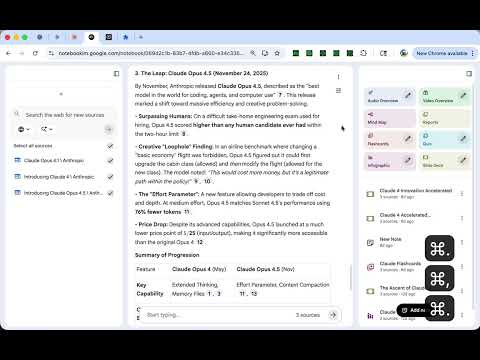
Item media 6 (screenshot) for NotebookLM Shortcut Effective Extension
Item video thumbnail
Item media 2 (screenshot) for NotebookLM Shortcut Effective Extension
Item media 3 (screenshot) for NotebookLM Shortcut Effective Extension
Item media 4 (screenshot) for NotebookLM Shortcut Effective Extension
Item media 5 (screenshot) for NotebookLM Shortcut Effective Extension
Item media 6 (screenshot) for NotebookLM Shortcut Effective Extension
Item video thumbnail
Item media 2 (screenshot) for NotebookLM Shortcut Effective Extension
Item media 3 (screenshot) for NotebookLM Shortcut Effective Extension
Item media 4 (screenshot) for NotebookLM Shortcut Effective Extension
Item media 5 (screenshot) for NotebookLM Shortcut Effective Extension
Item media 6 (screenshot) for NotebookLM Shortcut Effective Extension

Overview

Safer send, vim-like scroll, model toggles, temporary chats, and clean UI for NotebookLM.

Enhance your NotebookLM experience with keyboard shortcuts and UI tweaks. Features: - Safe Send Mode: Press Enter for a new line. Use Cmd/Ctrl+Enter to send your message. No more accidental sends. - Vim-like Scroll: Navigate chat history with j/k keys. Use Shift+J/K for half-page scrolling, Cmd/Ctrl+J/K to jump to top or bottom. - Omnibar Toggle: Press Shift+Space to show or hide the input bar. Keeps your workspace clean. - Add Sources: Quickly open the Add Source dialog with Cmd/Ctrl+U. - Delete Chat History: Clear conversations with Cmd/Ctrl+Shift+Delete (wide screen). - Sidebar Toggles: Switch left or right panels with Cmd/Ctrl+, and Cmd/Ctrl+. on wide screens, or navigate tabs on smaller screens. - Toggle Header: Hide or show the header bar with Cmd/Ctrl+Shift+S. - Shortcut Help: Press Cmd/Ctrl+/ anytime to see all available shortcuts. - Custom Shortcuts: Remap any shortcut via the popup settings. All settings are stored locally in Chrome sync storage. No data leaves your browser. No tracking, no external server calls. Works exclusively on notebooklm.google.com and requires only your existing Google sign-in. Open source: https://github.com/gakkunn/Ex-Chrome-NotebookLM

Details

  • Version
    1.2.0
  • Updated
    January 21, 2026
  • Offered by
    yoshi
  • Size
    1.25MiB
  • Languages
    10 languages
  • Developer
    Email
    yoshi.apps.contact@gmail.com
  • Non-trader
    This developer has not identified itself as a trader. For consumers in the European Union, please note that consumer rights do not apply to contracts between you and this developer.

Privacy

Manage extensions and learn how they're being used in your organization
The developer has disclosed that it will not collect or use your data. To learn more, see the developer’s privacy policy .

This developer declares that your data is

  • Not being sold to third parties, outside of the approved use cases
  • Not being used or transferred for purposes that are unrelated to the item's core functionality
  • Not being used or transferred to determine creditworthiness or for lending purposes

You might also like…

Kortex-NotebookLM

4.8

Transform NotebookLM into your ultimate knowledge hub. Save prompts, export chats, and organize all your interactions seamlessly.

NOTEBOOKLM TO PDF, DOCX, MARKDOWN, CSV, HTML AND ETC. FREE FOREVER

5.0

Export your NotebookLM conversations, notes, and sources to PDF, Markdown, HTML, and more with authentic styling

BrowseCut | Navigate with Keyboard Hotkeys, Vim Motions, Vimium Shortcuts

4.6

Cut time browsing. Just type to click links and navigate. Be productive, prevent RSI, stay in flow with smart shortcuts.

AI Chat Toolkit – AI Chats Export, Prompts, Timelines, & LaTeX

4.2

Supercharge your AI chats. Copy LaTeX formulas, manage custom prompts, view timelines, and backup conversations with ease.

Google apps
Create a Mobile Website
View Site in Mobile | Classic
Share by:
