Item logo image for PageVS - Super Split View for Browser

PageVS - Super Split View for Browser
https://pagevs.netlify.app/
4.8 (

9 ratings

)
Extension Tools 2,000 users
Item media 5 (screenshot) for PageVS - Super Split View for Browser
Item media 6 (screenshot) for PageVS - Super Split View for Browser
Item video thumbnail
Item media 2 (screenshot) for PageVS - Super Split View for Browser
Item media 3 (screenshot) for PageVS - Super Split View for Browser
Item media 4 (screenshot) for PageVS - Super Split View for Browser
Item media 5 (screenshot) for PageVS - Super Split View for Browser
Item media 6 (screenshot) for PageVS - Super Split View for Browser
Item video thumbnail
Item media 2 (screenshot) for PageVS - Super Split View for Browser
Item video thumbnail
Item media 2 (screenshot) for PageVS - Super Split View for Browser
Item media 3 (screenshot) for PageVS - Super Split View for Browser
Item media 4 (screenshot) for PageVS - Super Split View for Browser
Item media 5 (screenshot) for PageVS - Super Split View for Browser
Item media 6 (screenshot) for PageVS - Super Split View for Browser

Overview

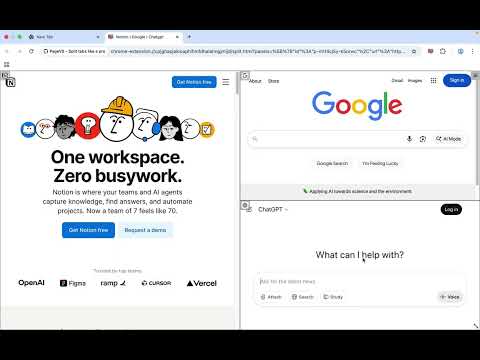
Open multiple websites in one tab, and freely customize, save, and restore your layout.

🚀 Why Choose PageVS Most Chrome split screen extensions only provide simple column layouts with very limited customization. PageVS is a powerful Chrome split screen extension that lets you freely resize, drag, and arrange multiple panes in a single tab, making your tab split screen workflow much simpler and far more flexible. 📌 Features ● 3 split modes: Vertical, Horizontal, Auto. ● Scroll Sync: keep panes scrolling together. ● Cross Pane highlight: highlight selected text across all panes. ● Freeform layout: resize and drag each pane. ● Layout bookmarks: save a layout and restore it in one click. ● Up to 36 panes per tab. ● Light mode and Dark mode. ● Reader mode (experimental): a distraction free reading view for supported pages.

4.8 out of 5 9 ratings

Learn more about results and reviews.

Details

  • Version
    3.3.9
  • Updated
    January 4, 2026
  • Size
    539KiB
  • Languages
    21 languages
  • Developer
    Website
    Email
    linjapyc@gmail.com
  • Non-trader
    This developer has not identified itself as a trader. For consumers in the European Union, please note that consumer rights do not apply to contracts between you and this developer.

Privacy

Manage extensions and learn how they're being used in your organization
The developer has disclosed that it will not collect or use your data. To learn more, see the developer’s privacy policy .

This developer declares that your data is

  • Not being sold to third parties, outside of the approved use cases
  • Not being used or transferred for purposes that are unrelated to the item's core functionality
  • Not being used or transferred to determine creditworthiness or for lending purposes

Support

Related

Peek Pop: Link Preview

4.9

Instantly preview links with a simple double-click, without breaking your workflow

Megi

5.0

Turn endless AI chats into a structured outline. Drag, drop, and group your prompts in the browser sidepanel.

1TabScape: Split tabs into 1 tab, merging all websites.

4.8

A smart tab merging tool that helps you browse multiple websites in the same tab.

Multitask - Split and display pages together

5.0

Create custom layouts to view multiple websites simultaneously. Save URL presets for instant organization.

Split Screen

5.0

Dynamically splits the current tab into multiple windows side by side on the current screen.

PeekLink

4.8

快速预览链接内容,支持绕过部分网站的iframe限制以提供完整预览体验

Split Screen in Tab - ChatGPT Sidebar

4.4

Split View in One Tab! Multitask with ChatGPT Sidebar!

Quad Tabs - Split your Browser

0.0

Convert four tabs into separate browser windows with Alt+Shift+Q and remembers the layout per display.

Split Screen Extension

5.0

Split screen functionality for Chrome

Asider

0.0

Arrange browser windows up to your saved user-defined grid layouts in one-click, and with multi-monitor support!

Screen Splitter - Tab Resize - Split Screen

5.0

Split Screen for Google Chrome. Splits your screen into multiple windows. Screen Splitter Multi Monitor support.

SplitPilot - Split Screen for Chrome

5.0

Open two websites side by side in one tab. Multitask faster with a clean split-screen for Google Chrome.

Peek Pop: Link Preview

4.9

Instantly preview links with a simple double-click, without breaking your workflow

Megi

5.0

Turn endless AI chats into a structured outline. Drag, drop, and group your prompts in the browser sidepanel.

1TabScape: Split tabs into 1 tab, merging all websites.

4.8

A smart tab merging tool that helps you browse multiple websites in the same tab.

Multitask - Split and display pages together

5.0

Create custom layouts to view multiple websites simultaneously. Save URL presets for instant organization.

Split Screen

5.0

Dynamically splits the current tab into multiple windows side by side on the current screen.

PeekLink

4.8

快速预览链接内容,支持绕过部分网站的iframe限制以提供完整预览体验

Split Screen in Tab - ChatGPT Sidebar

4.4

Split View in One Tab! Multitask with ChatGPT Sidebar!

Quad Tabs - Split your Browser

0.0

Convert four tabs into separate browser windows with Alt+Shift+Q and remembers the layout per display.

Google apps
Create a Mobile Website
View Site in Mobile | Classic
Share by:
