


PrintFriendly: Print Clean Pages, Save as PDF & Screenshot, AI Tools

Overview
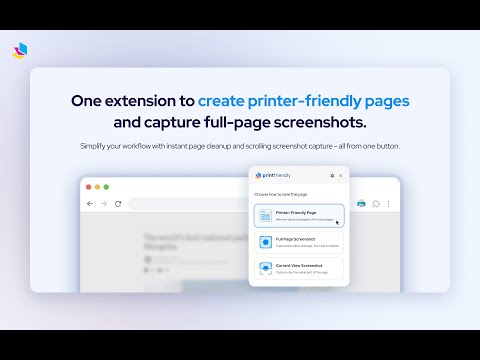
Print clean web pages, save as PDF, take screenshots, or use reader mode. AI summaries & ad removal. Works on ChatGPT & Gemini.
Join millions of users who rely on PrintFriendly to print web pages, convert any webpage to PDF, or take full-page screenshots, all without ads, sidebars, or clutter. It works like a reader mode, but gives you more control: adjust text size, remove images, edit text, highlight key content, and customize your layout before printing or saving. PrintFriendly is perfect for teachers, students, researchers, and anyone who needs clean, printable, shareable content. Print articles, save recipes as PDFs, archive research, and even capture conversations with tools like Claude and Gemini. 🪄 Convert Web Pages to PDF Turn any webpage into a clean, professional PDF without ads, headers, or navigation. Preserve text, images, and links with full support for non-Latin characters and right-to-left languages. Adjust margins, choose between A4 and Letter page sizes, and download with one click. Log into the extension to sync your account with printfriendly.com, where you can also convert, compress, edit, merge, and sign PDFs. Upload PDF, DOCX, XLSX, JPG, and other file types for conversion. Your settings and preferences sync between the extension and website. 🖨️ Print Web Pages Without Clutter Remove ads, pop-ups, navigation bars, and footers to create clean printouts of any webpage. Use Delete mode to remove entire sections or click and drag to remove multiple blocks at once. Use Highlight to emphasize important content, or switch to Edit mode to modify text directly on the page. 📸 Full-Page Screenshots Capture a full-page screenshot or current-view screenshot of any webpage with one click. Works on sites with iframes, dynamic content, and complex layouts. Export screenshots as PNG, JPG, or PDF. Ideal for archiving web pages, saving visual records, or sharing content exactly as it appears on screen. ✏️ Edit, Delete & Highlight Before You Save Make changes directly on the page before printing or saving as PDF. Modify text, adjust font size, remove images, delete unwanted sections, and highlight important information. All editing tools work in full-screen mode with undo support. 🤖 AI Page Summaries Generate AI-powered summaries of any web page directly inside PrintFriendly. Quickly understand long articles, research papers, or complex content without reading every word. Upgrade your printing, PDF conversion, and screenshot experience today with PrintFriendly. By using this extension, you agree to our Terms of Service and Privacy Policy: 🤝 Terms of Service: https://www.printfriendly.com/terms 📃 Privacy Policy: https://www.printfriendly.com/privacy 🛠 Release Notes: https://docs.google.com/document/d/1H4P-5JJxJ9JQoDYYXNCHz0wJK3GUQGXAGrM9xUhmV9k/edit?tab=t.0
Details
- Version6.11.14
- UpdatedApril 25, 2026
- Size4.45MiB
- Languages54 languages
- DeveloperPrint Friendly LLCWebsite
8605 Santa Monica Boulevard PMB 27149 West Hollywood, CA 90069 USEmail
developer@printfriendly.comPhone
+1 323-546-6906 - TraderThis developer has identified itself as a trader per the definition from the European Union and committed to only offer products or services that comply with EU laws.
- D-U-N-S127524248
Privacy

PrintFriendly: Print Clean Pages, Save as PDF & Screenshot, AI Tools has disclosed the following information regarding the collection and usage of your data. More detailed information can be found in the developer's privacy policy .
PrintFriendly: Print Clean Pages, Save as PDF & Screenshot, AI Tools handles the following:
This developer declares that your data is
- Not being sold to third parties, outside of the approved use cases
- Not being used or transferred for purposes that are unrelated to the item's core functionality
- Not being used or transferred to determine creditworthiness or for lending purposes
Support
For help with questions, suggestions, or problems, visit the developer's support site


