Item logo image for Screen Canvas - Draw on any Web page

Screen Canvas - Draw on any Web page
screencanvas.co
Featured
4.3 (

21 ratings

)
Item media 3 (screenshot) for Screen Canvas - Draw on any Web page
Item media 4 (screenshot) for Screen Canvas - Draw on any Web page
Item video thumbnail
Item media 2 (screenshot) for Screen Canvas - Draw on any Web page
Item media 3 (screenshot) for Screen Canvas - Draw on any Web page
Item media 4 (screenshot) for Screen Canvas - Draw on any Web page
Item video thumbnail
Item media 2 (screenshot) for Screen Canvas - Draw on any Web page
Item video thumbnail
Item media 2 (screenshot) for Screen Canvas - Draw on any Web page
Item media 3 (screenshot) for Screen Canvas - Draw on any Web page
Item media 4 (screenshot) for Screen Canvas - Draw on any Web page

Overview

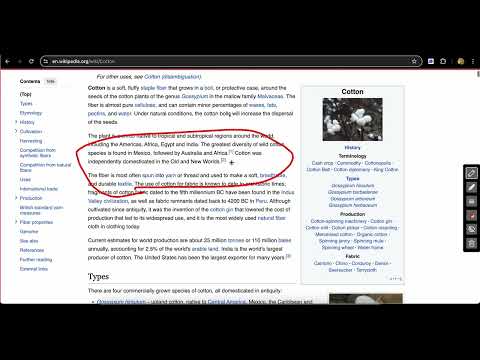
Draw on any web page, highlight text blocks, and annotate them with notes and colours, all for FREE.

With Screen Canvas, you can draw on any web page, or annotate them. You can highlight texts and add notes to them, so you remember why you highlighted them. You can drag your drawings from one area on the page to the other. Finally, you can take a screenshot of the page when you're done or create a share link that you can easily copy and paste. Features: ⭐ You can draw on any web page with any colour ⭐ You can highlight texts and add notes to them for easy recollection ⭐ You can drag around your drawings ⭐ You can save your work and re-store it when a website reloads (Paid feature) ⭐ You can take full page screenshots that actually work 📸 ⭐ You can hide and show drawings at any point ⭐ You can easily delete each drawing with your keyboard ⭐ You can easily share your annotations by converting it into a link that you can copy-page to your friends and colleagues

4.3 out of 5 21 ratings

Learn more about results and reviews.

Details

  • Version
    1.6.1
  • Updated
    February 15, 2025
  • Size
    223KiB
  • Languages
    English
  • Developer
    Website
    Email
    ifedapoolarewaju@gmail.com
  • Non-trader
    This developer has not identified itself as a trader. For consumers in the European Union, please note that consumer rights do not apply to contracts between you and this developer.

Privacy

Manage extensions and learn how they're being used in your organization
The developer has disclosed that it will not collect or use your data. To learn more, see the developer’s privacy policy .

This developer declares that your data is

  • Not being sold to third parties, outside of the approved use cases
  • Not being used or transferred for purposes that are unrelated to the item's core functionality
  • Not being used or transferred to determine creditworthiness or for lending purposes

Related

Web Paint Tool - Page Marker & Editor to Draw on web

5.0

Draw, annotate, and mark up any web page with a versatile set of drawing tools. Add text, shapes, and highlights to web content.

Draw on Screen

4.6

Draw, highlight, and annotate on any webpage with Draw on Screen — the simplest way to comment as you browse!

Web Marker - Draw on Websites

4.5

Draw on any webpage in real time! Draw, highlight, add shapes & more. Easy to use, perfect for studying & teaching.

Page Marker - Draw on Web

4.1

Draw or highlight on any website in real time. Add text, lines, and shapes. Move, undo, or redo anything you draw.

Web Paint Tool - draw online

4.5

Draw rectangle, circle, lines and others shapes or add text on any web pages, then make screenshot the result.

PromptEasily ChatGPT - HDTeam

1.0

PromptEasily ChatGPT - HDTeam adds a list of curated prompt templates for SEO, SaaS and more to ChatGPT. Try today.

The Big Gift List

5.0

Easily add items to your 'The Big Gift List' lists

Michael's Upgrade for TrakED

5.0

Upgraded features for TrakED in the THS. (This extension is not an official product of the THS or Intersystems TrakCare software.)

Draw on Page

3.5

Easily draw on any website with simple drawing tools, then print the result.

Quick Draw

5.0

Draw and customize colored shapes directly on any webpage

Trello Bug Feature Colors

0.0

Sets colors on Trello cards

Whiteboard Pro – Draw On Any Site

3.3

Turn any webpage into a whiteboard! Works on any site with full-page coverage. Perfect for notes, and teaching—fast. 🚀

Web Paint Tool - Page Marker & Editor to Draw on web

5.0

Draw, annotate, and mark up any web page with a versatile set of drawing tools. Add text, shapes, and highlights to web content.

Draw on Screen

4.6

Draw, highlight, and annotate on any webpage with Draw on Screen — the simplest way to comment as you browse!

Web Marker - Draw on Websites

4.5

Draw on any webpage in real time! Draw, highlight, add shapes & more. Easy to use, perfect for studying & teaching.

Page Marker - Draw on Web

4.1

Draw or highlight on any website in real time. Add text, lines, and shapes. Move, undo, or redo anything you draw.

Web Paint Tool - draw online

4.5

Draw rectangle, circle, lines and others shapes or add text on any web pages, then make screenshot the result.

PromptEasily ChatGPT - HDTeam

1.0

PromptEasily ChatGPT - HDTeam adds a list of curated prompt templates for SEO, SaaS and more to ChatGPT. Try today.

The Big Gift List

5.0

Easily add items to your 'The Big Gift List' lists

Michael's Upgrade for TrakED

5.0

Upgraded features for TrakED in the THS. (This extension is not an official product of the THS or Intersystems TrakCare software.)

Google apps
Create a Mobile Website
View Site in Mobile | Classic
Share by:
