Item logo image for SheetWhiz: Excel & PPT Shortcuts, Tracing, & What-If for Sheets & Slides

SheetWhiz: Excel & PPT Shortcuts, Tracing, & What-If for Sheets & Slides
Kalo Technologies, Inc.
Featured
4.9 (

48 ratings

)
Extension Tools 10,000 users
Item media 5 (screenshot) for SheetWhiz: Excel & PPT Shortcuts, Tracing, & What-If for Sheets & Slides
Item media 6 (screenshot) for SheetWhiz: Excel & PPT Shortcuts, Tracing, & What-If for Sheets & Slides
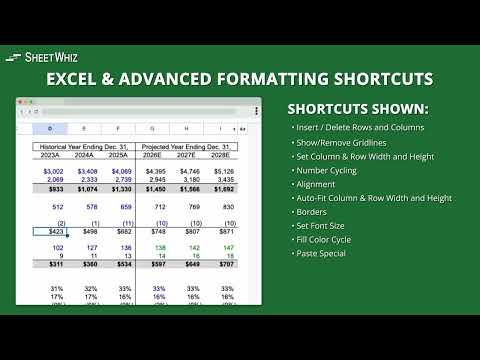
Item video thumbnail
Item media 2 (screenshot) for SheetWhiz: Excel & PPT Shortcuts, Tracing, & What-If for Sheets & Slides
Item media 3 (screenshot) for SheetWhiz: Excel & PPT Shortcuts, Tracing, & What-If for Sheets & Slides
Item media 4 (screenshot) for SheetWhiz: Excel & PPT Shortcuts, Tracing, & What-If for Sheets & Slides
Item media 5 (screenshot) for SheetWhiz: Excel & PPT Shortcuts, Tracing, & What-If for Sheets & Slides
Item media 6 (screenshot) for SheetWhiz: Excel & PPT Shortcuts, Tracing, & What-If for Sheets & Slides
Item video thumbnail
Item media 2 (screenshot) for SheetWhiz: Excel & PPT Shortcuts, Tracing, & What-If for Sheets & Slides
Item video thumbnail
Item media 2 (screenshot) for SheetWhiz: Excel & PPT Shortcuts, Tracing, & What-If for Sheets & Slides
Item media 3 (screenshot) for SheetWhiz: Excel & PPT Shortcuts, Tracing, & What-If for Sheets & Slides
Item media 4 (screenshot) for SheetWhiz: Excel & PPT Shortcuts, Tracing, & What-If for Sheets & Slides
Item media 5 (screenshot) for SheetWhiz: Excel & PPT Shortcuts, Tracing, & What-If for Sheets & Slides
Item media 6 (screenshot) for SheetWhiz: Excel & PPT Shortcuts, Tracing, & What-If for Sheets & Slides

Overview

SheetWhiz brings Trace Precedents, Trace Dependents, Goal Seek, What-If, Macabacus format cycling, Excel and PPT shortcuts to Google

SheetWhiz brings Excel-style shortcuts, auditing tools, and modeling functionality to Google Sheets and Google Slides. Built for finance, FP&A, investing, operations, and other spreadsheet-heavy workflows, it helps you move faster, audit formulas more easily, and bring more of the speed and productivity you expect from Excel into Google Workspace. ► KEY FEATURES • Excel and PowerPoint shortcuts in Google Sheets and Google Slides Use familiar shortcuts across Mac and Windows, with fully customizable key mappings to match your workflow. • Trace Precedents and Trace Dependents Instantly see formula relationships, jump between linked cells, and navigate spreadsheet logic with arrow keys. Great for auditing models and understanding how formulas flow across a sheet. • Goal Seek and What-If analysis Run Goal Seek and build one- and two-variable data sensitivities directly in Google Sheets for financial models, budgets, forecasts, and scenario analysis. • Format Cycling Apply consistent number formats, company colors, and indentation cycles with a single shortcut, similar to workflows used in tools like Macabacus and Arixcel. • Export Selection as Image Copy cells into Google Slides or Docs while preserving formatting and linking back to the source spreadsheet. • Auto-Color for faster audits Quickly highlight hardcoded inputs and linked cells so it is easier to review spreadsheet structure and spot issues. ► WHY SHEETWHIZ • Familiar to users of Excel add-ins like Macabacus, Arixcel, FactSet, and CapIQ, but built specifically for Google Sheets and Google Slides • Designed for finance and operations teams that want Excel-like speed while working in Google Workspace • Works across both Mac and Windows with native key mappings • Lets you customize shortcuts and formatting cycles to fit your team’s workflow • Secure and private: SheetWhiz never sees or stores your spreadsheet data and is SOC 2 Type 2 compliant ► INCLUDED SHORTCUT CATEGORIES SheetWhiz includes shortcuts and tools for: • Trace Precedents and Trace Dependents • Goal Seek and What-If data sensitivities • Paste Special actions like formulas and values • Insert and delete rows and columns • Borders, alignment, autofit, row height, and column width • Decimal controls, fonts, and text wrapping • Filters, freeze panes, merge and unmerge • Number, font color, and fill color cycles • Export Selection as Image • Auto-Color for spreadsheet audits • Google Slides alignment, layering, grouping, distribution, and text formatting shortcuts ► FREE TRIAL AND PLANS All new installs include a 21-day free trial of the Pro plan. After the trial, you will continue on the Free plan with core formatting shortcuts, with the option to upgrade anytime.

4.9 out of 5 48 ratings

Learn more about results and reviews.

Details

  • Version
    2.1.10
  • Updated
    April 28, 2026
  • Features
    Offers in-app purchases
  • Size
    2.3MiB
  • Languages
    English (United States)
  • Developer
    Kalo Technologies, Inc.
    908 Florida St San Francisco, CA 94110-2807 US
    Website
    Email
    info@sheetwhiz.com
    Phone
    +1 808-542-1170
  • Trader
    This developer has identified itself as a trader per the definition from the European Union and committed to only offer products or services that comply with EU laws.

Privacy

Manage extensions and learn how they're being used in your organization
The developer has disclosed that it will not collect or use your data. To learn more, see the developer’s privacy policy .

This developer declares that your data is

  • Not being sold to third parties, outside of the approved use cases
  • Not being used or transferred for purposes that are unrelated to the item's core functionality
  • Not being used or transferred to determine creditworthiness or for lending purposes

Support

For help with questions, suggestions, or problems, visit the developer's support site

Related

Gorilla Sheet

1.0

A Chrome Extension to trace precedents and dependents in Google Sheets using keyboard shortcuts.

Sheets Genie

5.0

Turn Google Sheets into a business automation & web scraping powerhouse.

ChatGPT Sheets – Use ChatGPT for Sheets

4.4

Boost your Google Sheets with ChatGPT! Get instant answers, copy-paste solutions, and easy shortcuts with ChatGPT Sheets!

Converter for Excel

3.9

Convert Excel Files to PDF Format Now

Google Sheets ALT Keys and Trace Formulas

5.0

Extension that Enables Excel-style ALT-key Shortcuts for Google Sheets, plus Trace Formulas, Goal Seek, and More

Sheets Helper

5.0

An extension that assists with Google Sheets formulas

Google Sheet Search

4.3

Adds a button to search through sheets in Google Sheets

Excel to Google Sheets

5.0

Convert an Excel or CSV file into Google Sheets by dragging and dropping it into your browser

Add to Sheets - Save to Google Sheets in 1 click

4.3

Right-click to add any content to Google Sheets. Quick Row Entry & No-code Automations for finding data, emails and links on sites.

Send to Sheets - CSV & Excel File Viewer

3.9

Instantly view your downloaded CSV and Excel files in Google Sheets.

Formula Explorer

5.0

Formula Explorer brings Formula Breakdowns, Precedent & Dependent Tracing, Goal Seek, and Formatting Utilities to Google Sheets.

SheetsGPT - AI Google Sheets Formula Maker

4.6

AI extension that uses AI to provide Sheets functions

Gorilla Sheet

1.0

A Chrome Extension to trace precedents and dependents in Google Sheets using keyboard shortcuts.

Sheets Genie

5.0

Turn Google Sheets into a business automation & web scraping powerhouse.

ChatGPT Sheets – Use ChatGPT for Sheets

4.4

Boost your Google Sheets with ChatGPT! Get instant answers, copy-paste solutions, and easy shortcuts with ChatGPT Sheets!

Converter for Excel

3.9

Convert Excel Files to PDF Format Now

Google Sheets ALT Keys and Trace Formulas

5.0

Extension that Enables Excel-style ALT-key Shortcuts for Google Sheets, plus Trace Formulas, Goal Seek, and More

Sheets Helper

5.0

An extension that assists with Google Sheets formulas

Google Sheet Search

4.3

Adds a button to search through sheets in Google Sheets

Excel to Google Sheets

5.0

Convert an Excel or CSV file into Google Sheets by dragging and dropping it into your browser

Google apps
Create a Mobile Website
View Site in Mobile | Classic
Share by:
