Item logo image for Splunk Search Assistant

Splunk Search Assistant

5.0 (

5 ratings

)
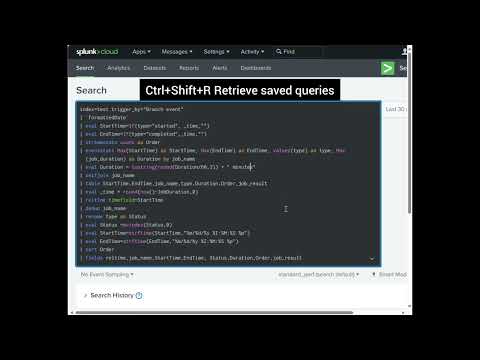
Item media 4 (screenshot) for Splunk Search Assistant
Item video thumbnail
Item media 2 (screenshot) for Splunk Search Assistant
Item media 3 (screenshot) for Splunk Search Assistant
Item media 4 (screenshot) for Splunk Search Assistant
Item video thumbnail
Item media 2 (screenshot) for Splunk Search Assistant
Item media 3 (screenshot) for Splunk Search Assistant
Item media 4 (screenshot) for Splunk Search Assistant

Overview

This extension supercharges the SPL search box with several improvements.

## Key Features - **Snippets with Tags & Renaming**: Use Ctrl+Shift+C (Windows) or Ctrl+S (Mac) to save your current query as a snippet. You can tag your snippets (including multiple tags per snippet) and rename them for simpler organization. You can then retrieve your saved snippets with Ctrl+Shift+R OR Ctrl+R for Mac. - **Search History** (Ctrl+Shift+H / Cmd+Shift+H): Never lose a search again. Every time you hit search, it's added to the built-in history. By default, up to 1,000 searches are saved and older searches are deleted. You can increase or decrease the limit saved in the extension settings. - **Command Help** (Ctrl+Space): Place your cursor on a command, press the shortcut, and a handy popup appears with reference info for most Splunk commands. Additionaly, this will find usages for that command in your saved snippets. - **Toggle Comments** (Ctrl+/): Quickly comment or uncomment lines. Select multiple lines, or just place the cursor anywhere and watch them toggle in or out. - **Fold Comments** (Ctrl+'): Collapse long blocks of comments to tidy up your workspace. Simply click to unfold them again. ## Privacy & Data Storage This extension: - Stores all data (snippets and search history) locally in your browser - Does not collect or transmit any data - Does not require any external servers or cloud storage - Keeps your queries and searches completely private and under your control All saved snippets and search history are stored using Chrome's local storage API and remain on your machine. You can export your snippets or clear your data at any time through the extension settings.

Details

  • Version
    1.3.62
  • Updated
    February 25, 2025
  • Offered by
    julioplasencia
  • Size
    94.37KiB
  • Languages
    English
  • Developer
    None
    address_redacted New City, NY 10956-3130 US
    Email
    juanmartespm@gmail.com
  • Non-trader
    This developer has not identified itself as a trader. For consumers in the European Union, please note that consumer rights do not apply to contracts between you and this developer.

Privacy

Manage extensions and learn how they're being used in your organization
The developer has disclosed that it will not collect or use your data.

This developer declares that your data is

  • Not being sold to third parties, outside of the approved use cases
  • Not being used or transferred for purposes that are unrelated to the item's core functionality
  • Not being used or transferred to determine creditworthiness or for lending purposes

Support

Related

Tranvaluate

5.0

Translation evaluator with contextual hover suggestions & vocabulary management

Timerange Clipboard

0.0

An extension that makes it easy to copy and paste time ranges in URLs between different web pages.

Time Zone Converter - Savvy Time

4.5

Time zone and local time converter. Compare and convert time between many locations at a time.

Salesforce Colored Favicons

4.6

Updates the standard favicon on Salesforce tabs with colored versions to help differentiate between different organizations.

Sputnik

5.0

OSINT web extension

Instant Username Generator

5.0

One Click Instantly Generate Memorable Usernames! How to Use: 👇 Unlock effortless username generation in just a few clicks with…

GraphQL Network Inspector

4.6

Simple and clean network inspector for GraphQL

Splunk row coloring

5.0

Colors Rows in Splunk based on configurable options

Better Experience for Argo CD

0.0

Add a realtime-filter feature for input fields such as Project Name, Repository URL and Cluster URL.

Maven Tools for Salesforce

4.8

One tool to rule them all! An ever-growing collection of Salesforce developer tools.

SN Utils OnPrem

4.9

Productivity tools for ServiceNow — On-Prem Edition, offered by SN Utils B.V. Not affiliated with ServiceNow, Inc.

SN Utils - Tools for ServiceNow

4.9

Productivity tools for ServiceNow, offered by SN Utils B.V. Not affiliated with ServiceNow, Inc.

Tranvaluate

5.0

Translation evaluator with contextual hover suggestions & vocabulary management

Timerange Clipboard

0.0

An extension that makes it easy to copy and paste time ranges in URLs between different web pages.

Time Zone Converter - Savvy Time

4.5

Time zone and local time converter. Compare and convert time between many locations at a time.

Salesforce Colored Favicons

4.6

Updates the standard favicon on Salesforce tabs with colored versions to help differentiate between different organizations.

Sputnik

5.0

OSINT web extension

Instant Username Generator

5.0

One Click Instantly Generate Memorable Usernames! How to Use: 👇 Unlock effortless username generation in just a few clicks with…

GraphQL Network Inspector

4.6

Simple and clean network inspector for GraphQL

Splunk row coloring

5.0

Colors Rows in Splunk based on configurable options

Google apps
Create a Mobile Website
View Site in Mobile | Classic
Share by:
