Item logo image for Ultrawidify

Ultrawidify

Featured
3.4 (

329 ratings

)
Item media 3 (screenshot) for Ultrawidify
Item media 4 (screenshot) for Ultrawidify
Item video thumbnail
Item media 2 (screenshot) for Ultrawidify
Item media 3 (screenshot) for Ultrawidify
Item media 4 (screenshot) for Ultrawidify
Item video thumbnail
Item media 2 (screenshot) for Ultrawidify
Item video thumbnail
Item media 2 (screenshot) for Ultrawidify
Item media 3 (screenshot) for Ultrawidify
Item media 4 (screenshot) for Ultrawidify

Overview

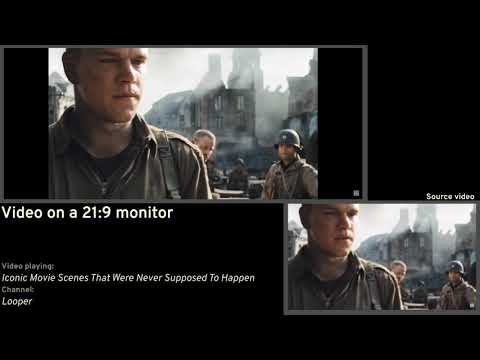
Removes black bars on ultrawide videos and offers advanced options to fix aspect ratio.

Removes unnecessary black bars from the videos. Youtube and Twitch are officially supported by default. You can enable it for other sites as well, but support for other sites is not guaranteed. Features: 1️⃣ Automatic aspect ratio detection (not supported on websites that utilize DRM. You may want to turn this option off when on battery power or when experiencing performance issues) 2️⃣ Crop to aspect ratio 3️⃣ Stretch video 4️⃣ Zoom video to aspect ratio Keyboard shortcuts also exist. -- Github's here: https://github.com/tamius-han/ultrawidify Full list of features (WIP): https://github.com/tamius-han/ultrawidify/wiki

3.4 out of 5 329 ratings

Learn more about results and reviews.

Details

  • Version
    6.3.0
  • Updated
    July 19, 2025
  • Offered by
    Tamius Han
  • Size
    8.93MiB
  • Languages
    English
  • Developer
    Email
    tamius.han@gmail.com
  • Non-trader
    This developer has not identified itself as a trader. For consumers in the European Union, please note that consumer rights do not apply to contracts between you and this developer.

Privacy

Manage extensions and learn how they're being used in your organization
The developer has disclosed that it will not collect or use your data.

This developer declares that your data is

  • Not being sold to third parties, outside of the approved use cases
  • Not being used or transferred for purposes that are unrelated to the item's core functionality
  • Not being used or transferred to determine creditworthiness or for lending purposes

Support

Related

Video Fill - TheY2T

4.8

Stretch any video to fill your screen — remove letterboxing and pillarboxing on streams and video players.

UltraWide for YouTube: custom fullscreen ratios [QVI]

4.3

Go fullscreen on your ultrawide monitor. Fit the video to 21:9, 32:9, or custom ratio. Designed for YouTube platform.

Zoom To Fill

2.8

Remove black bars from videos on Netflix, Prime, YouTube & more. Aspect ratio presets, keyboard shortcuts, and more.

YouTube Inline Fullscreen

4.4

Make the most out of your screen space with a single click!

Zoom to Fill - Ultrawide Video

3.9

Removes videos black bars on Netflix, Amazon Prime, Disney Plus, HBO Max, Youtube by changing to ultrawide video aspect ratio.

StretchView

4.2

Remove black bars from streaming videos. Control aspect ratio, use PiP mode, and enhance video playback on popular platforms.

UltraWideo – Remove Black Bars & Fit Any Video to Your Screen

4.4

Remove black bars and fit any video to your screen. Works on Netflix, YouTube, Prime, Disney+, HBO and all video sites.

Video Aspect Ratio Zoom

4.1

Removes video black bars from Youtube , Disney Plus, Netflix, Amazon Prime, HBO Max and all other platforms.

Ultrawide Monitor for YouTube

4.4

Remove black bars when watching YouTube videos on ultrawide monitors

Better Netflix

4.1

Adds various features to Netflix like support for ultrawide displays (21:9 aspect ratio).

Zoom Video - UltraWide Video

4.6

Zoom video, change aspect ratio of any video, removing black bars on Netflix, Amazon Prime, YouTube, HBO. Ultrawide video.

UltraWide Streaming: custom ratios [QVI]

4.1

Go fullscreen on your ultrawide monitor. Fit the video to 21:9, 32:9, or custom ratio. Supports most streaming platforms.

Video Fill - TheY2T

4.8

Stretch any video to fill your screen — remove letterboxing and pillarboxing on streams and video players.

UltraWide for YouTube: custom fullscreen ratios [QVI]

4.3

Go fullscreen on your ultrawide monitor. Fit the video to 21:9, 32:9, or custom ratio. Designed for YouTube platform.

Zoom To Fill

2.8

Remove black bars from videos on Netflix, Prime, YouTube & more. Aspect ratio presets, keyboard shortcuts, and more.

YouTube Inline Fullscreen

4.4

Make the most out of your screen space with a single click!

Zoom to Fill - Ultrawide Video

3.9

Removes videos black bars on Netflix, Amazon Prime, Disney Plus, HBO Max, Youtube by changing to ultrawide video aspect ratio.

StretchView

4.2

Remove black bars from streaming videos. Control aspect ratio, use PiP mode, and enhance video playback on popular platforms.

UltraWideo – Remove Black Bars & Fit Any Video to Your Screen

4.4

Remove black bars and fit any video to your screen. Works on Netflix, YouTube, Prime, Disney+, HBO and all video sites.

Video Aspect Ratio Zoom

4.1

Removes video black bars from Youtube , Disney Plus, Netflix, Amazon Prime, HBO Max and all other platforms.

Google apps
Create a Mobile Website
View Site in Mobile | Classic
Share by:
