Item logo image for Zenith Vertical Tabs

Zenith Vertical Tabs

https://zenith-tabs.vercel.app/
3.9 (

7 ratings

)
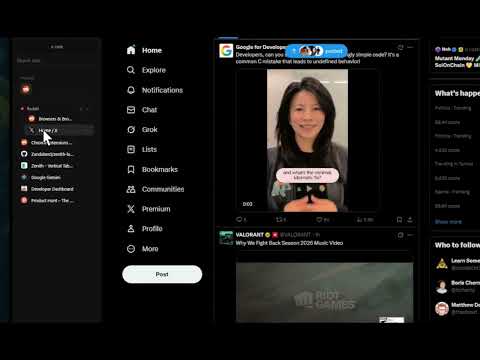
Item media 2 (screenshot) for Zenith Vertical Tabs
Item video thumbnail
Item media 2 (screenshot) for Zenith Vertical Tabs
Item video thumbnail
Item media 2 (screenshot) for Zenith Vertical Tabs

Overview

A premium Zen-inspired vertical sidebar that appears on hover or with Alt+V

๐Ÿšง EARLY BETA — Thank you for being an early adopter! ๐ŸŒฟ ZENITH VERTICAL TABS — A Zen-Inspired Browsing Experience Transform your Chrome browser with a sleek, minimal vertical tabs sidebar inspired by Zen Browser. Access all your tabs with a simple hover or the Alt+V shortcut. โš ๏ธ This extension is in early beta. You may encounter bugs or unexpected behavior. We appreciate your patience and feedback as we continue to improve! โ”โ”โ”โ”โ”โ”โ”โ”โ”โ”โ”โ”โ”โ”โ”โ”โ”โ”โ”โ”โ”โ”โ”โ”โ”โ”โ”โ”โ”โ”โ”โ”โ”โ” โœจ KEY FEATURES - Vertical Sidebar — Hover on the left edge or press Alt+V to reveal your tabs - Pin Sidebar — Keep it constantly visible (pushes website content so nothing is covered) - Resizable Width — Drag the edge to customize the sidebar size to your liking - Tab Search — Quickly find any tab with instant search - Smart URL Bar — Press Alt+T for new tab or Alt+K to edit current URL - Tab Groups — Organize tabs into colored groups - Drag & Drop — Reorder tabs effortlessly - Tab Previews — Hover over tabs to see page snapshots - Context Menu — Right-click for quick actions (pin, mute, duplicate, close, move to window, add to group, and more) โ”โ”โ”โ”โ”โ”โ”โ”โ”โ”โ”โ”โ”โ”โ”โ”โ”โ”โ”โ”โ”โ”โ”โ”โ”โ”โ”โ”โ”โ”โ”โ”โ”โ” โŒจ๏ธ KEYBOARD SHORTCUTS Alt+V → Toggle sidebar Alt+T → Open new tab with URL bar Alt+K → Edit current page URL โ”โ”โ”โ”โ”โ”โ”โ”โ”โ”โ”โ”โ”โ”โ”โ”โ”โ”โ”โ”โ”โ”โ”โ”โ”โ”โ”โ”โ”โ”โ”โ”โ”โ” ๐ŸŽจ DESIGN PHILOSOPHY Inspired by Zen Browser and Arc, Zenith brings a premium minimal aesthetic to Chrome. The sidebar features: - Frosted glass effect with subtle blur - Smooth animations and micro-interactions - Clean typography and intuitive icons - Dark theme that complements any website โ”โ”โ”โ”โ”โ”โ”โ”โ”โ”โ”โ”โ”โ”โ”โ”โ”โ”โ”โ”โ”โ”โ”โ”โ”โ”โ”โ”โ”โ”โ”โ”โ”โ” ๐Ÿ”’ PRIVACY FIRST - No data collection - No analytics or tracking - Works entirely offline โ”โ”โ”โ”โ”โ”โ”โ”โ”โ”โ”โ”โ”โ”โ”โ”โ”โ”โ”โ”โ”โ”โ”โ”โ”โ”โ”โ”โ”โ”โ”โ”โ”โ” ๐Ÿš€ BONUS FEATURES - Pinned tabs grid — Quick access to your favorite sites - Audio indicators — See which tabs are playing sound - Mute controls — Silence noisy tabs with one click - Tab discarding — Save memory on inactive tabs - Multi-window support — Each window has its own sidebar - Navigation controls — Back, forward, refresh, and home buttons โ”โ”โ”โ”โ”โ”โ”โ”โ”โ”โ”โ”โ”โ”โ”โ”โ”โ”โ”โ”โ”โ”โ”โ”โ”โ”โ”โ”โ”โ”โ”โ”โ”โ” Perfect for power users who want a cleaner, more organized browsing experience without sacrificing aesthetics. ๐Ÿ› Found a bug? Have feedback? We'd love to hear from you!

3.9 out of 5 7 ratings

Learn more about results and reviews.

Details

  • Version
    1.0.2
  • Updated
    January 7, 2026
  • Size
    108KiB
  • Languages
    English
  • Developer
    Website
    Email
    aziz@briskl.tech
  • Non-trader
    This developer has not identified itself as a trader. For consumers in the European Union, please note that consumer rights do not apply to contracts between you and this developer.

Privacy

Manage extensions and learn how they're being used in your organization
The developer has disclosed that it will not collect or use your data. To learn more, see the developer’s privacy policy .

This developer declares that your data is

  • Not being sold to third parties, outside of the approved use cases
  • Not being used or transferred for purposes that are unrelated to the item's core functionality
  • Not being used or transferred to determine creditworthiness or for lending purposes

Related

VertiTab - Vertical Tabs · Cloud Sync · AI Browser Agent

4.7

Professional tab management, supporting vertical tabs, tree tabs, snapshots, bookmarks, groups, sync and AI features

YourDynamicDashboard

5.0

A dynamic and personalized new tab dashboard.

Tabs Fall: Vertical Tabs In Side Panel

4.0

A minimalist side panel tool for vertical tab management. Supports tab groups, tab search, and multi-window functionality.

BerryPeek - Link Preview & Quick Peek

5.0

Preview links in an elegant overlay with Shift+Click, inspired by Arc browser.

Vertical Tabs - Tabybara

4.9

Display and manage your tabs vertically in side panel.

Vertical Tabs

4.1

Vertical tab manager in side panel

Tabwise: Vertical Tabs & Workspaces

5.0

Arc-style vertical tabs for Chrome. Smart switching, workspaces, immersive mode. No duplicate tabs. Privacy-first.

Tabs in Vertical

5.0

Displays all open tabs in a vertical sidebar for better readability

Sharp Tabs v3 - Best Open Source All-in-1 Tabs Manager (Vertical & Pop-up)!

4.9

Fully Free. Vertical Tabs. Instant Search. Advanced Suspend. AI Organize. Auto Session Backups. Duplicates. Workspaces. Much More!

Tabs++

5.0

Ensures pinned tabs are persistent and reset to their initial URL when closed.

Sidebar for Tabs/Bookmarks

4.4

A Chrome extension that mimics the vertical tabs of the Arc browser.

Arcify: Arc like vertical tab spaces

4.3

A sidebar extension that replicates Arc browser's tab management system

VertiTab - Vertical Tabs · Cloud Sync · AI Browser Agent

4.7

Professional tab management, supporting vertical tabs, tree tabs, snapshots, bookmarks, groups, sync and AI features

YourDynamicDashboard

5.0

A dynamic and personalized new tab dashboard.

Tabs Fall: Vertical Tabs In Side Panel

4.0

A minimalist side panel tool for vertical tab management. Supports tab groups, tab search, and multi-window functionality.

BerryPeek - Link Preview & Quick Peek

5.0

Preview links in an elegant overlay with Shift+Click, inspired by Arc browser.

Vertical Tabs - Tabybara

4.9

Display and manage your tabs vertically in side panel.

Vertical Tabs

4.1

Vertical tab manager in side panel

Tabwise: Vertical Tabs & Workspaces

5.0

Arc-style vertical tabs for Chrome. Smart switching, workspaces, immersive mode. No duplicate tabs. Privacy-first.

Tabs in Vertical

5.0

Displays all open tabs in a vertical sidebar for better readability

Google apps
Create a Mobile Website
View Site in Mobile | Classic
Share by:
