


This page describes how to configure the assistant's behavior.
-
In the Google Cloud console, go to the Gemini Enterprise page.
-
Click the name of the app that you want to configure.
-
Click Configurations.
-
In the Additional LLM system instructionssection, select Customize.
-
Enter the additional LLM system instructions.
For example:
Make the summary headings bold List the resources as an unordered list -
In the Enable web groundingsection, make sure the toggle is switched on and then select one of the following options:
-
Google search (not Data Residency compliant)to use the standard Google Search index for grounding.
-
Enterprise web search (Data Residency compliant)to use the enterprise-grade and compliant web index.
-
-
In the Default web search statesection, use the toggle to define the default behavior for queries:
-
Switch the toggle on to enable web search by default for new queries.
-
Switch the toggle off to disable web search by default.
-
-
In the Enable location contextsection, use the toggle switch to enable or disable the feature:
-
Switch the toggle on to allow the Gemini Enterprise app to use location data to improve the quality of responses.
-
Switch the toggle off to disable the use of location context.

Configure the web setting and location context
-
-
In the Enable Model Armorsection, follow the instructions to configure Model Armorand setup the Model Armor templates. For more information, see the Configure Model Armor page.
-
In the Banned phrasessection, click Add banned phraseto add a phrase.
-
In the dialog, enter the banned phrase and choose the match type.
-
Simple string match: This is a substring match. For example, if Hellois a banned phrase, both Hello worldand Helloworldare rejected.
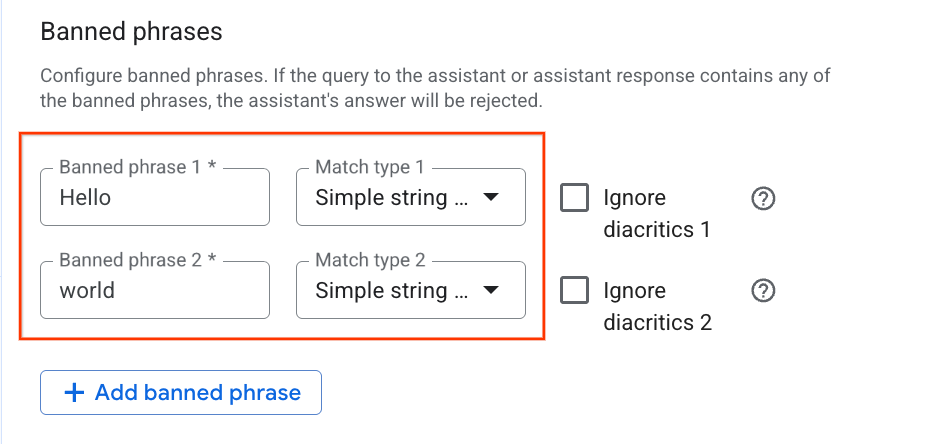
Enter the banned phrase and choose the Single string match type -
Word boundary string match: This blocks the phrase as a whole word. For example, if Hellois a banned phrase, Hello worldis rejected, but Helloworldis accepted.
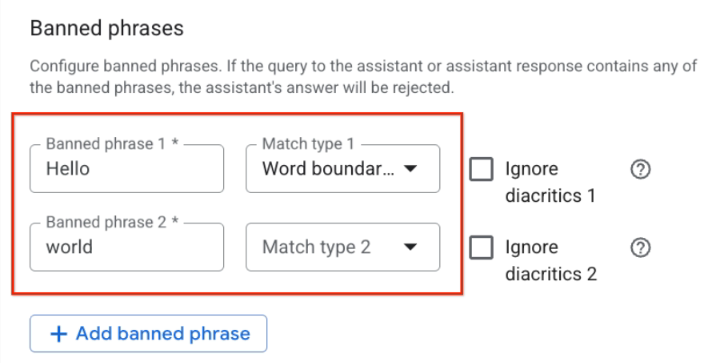
Enter the banned phrase and choose the Word boundary string match type
-
-
After entering the phrase and selecting the match type, click Save and publish.
