

If you have a signal provider SDK that generates real-time bidding (RTB) signals, you can develop a secure signal adapter to let Google Mobile Ads SDK collect signals from your SDK.
Google Mobile Ads SDK forwards your signals to selected participating Authorized Buyers and Open Bidding buyers.
The following diagram illustrates the request-response lifecycle for secure signal collection:
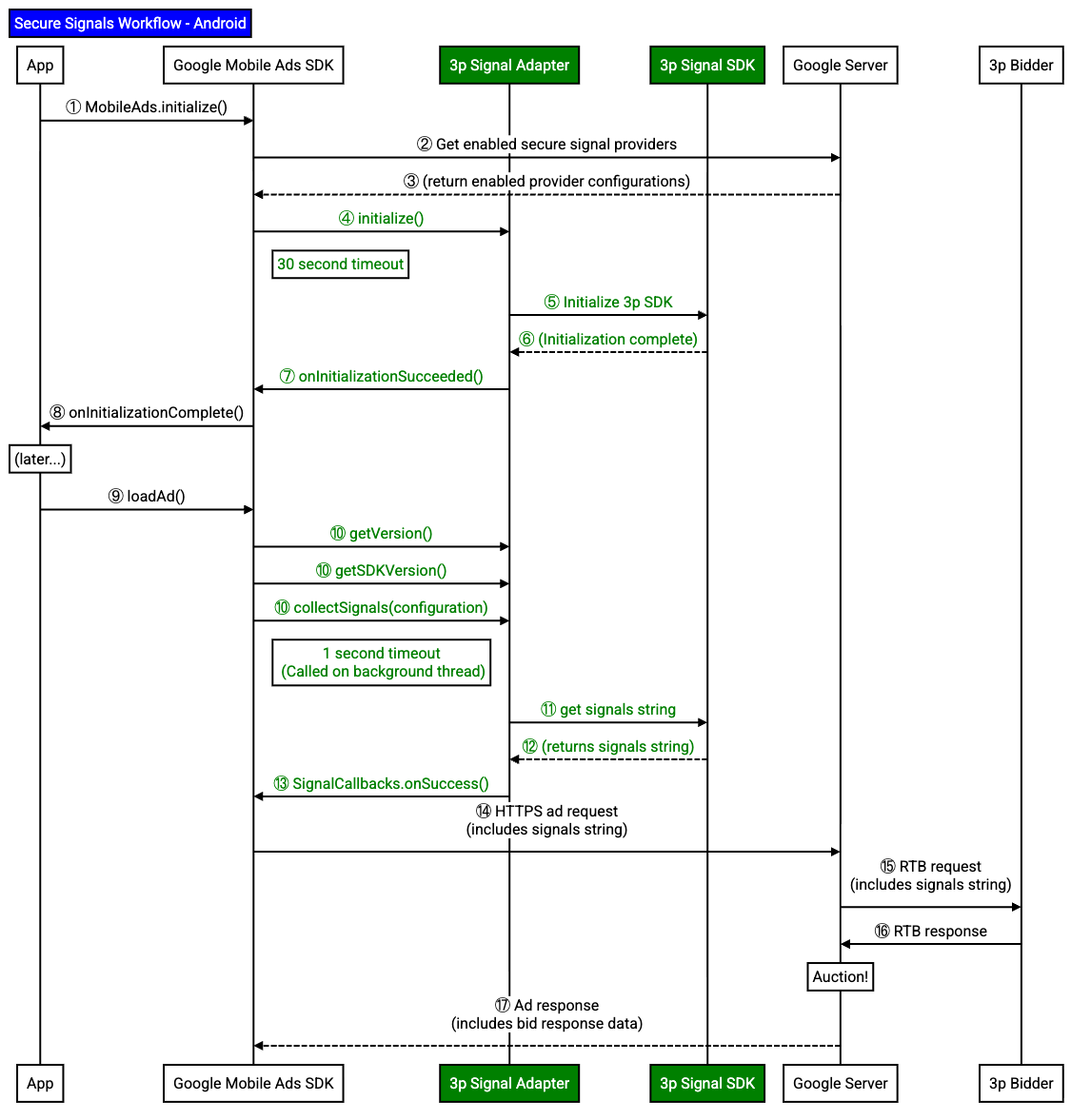
A secure signal adapter is responsible for adapter initialization and signal collection.
Implement a secure signal adapter
Implement a secure signal adapter for Google Mobile Ads SDK to collect signals from your SDK.
This guide covers how to implement a secure signal adapter by
extending the RtbAdapter
abstract class.
The following example
extends the RtbAdapter
abstract class:
Java
public
class
SampleAdapterSnippets
extends
RtbAdapter
{
Initialize the adapter
Google Mobile Ads SDK
calls the initialize()
method
when Google Mobile Ads SDK
instantiates your secure signal adapter. Use this method to
initialize your SDK.
When your SDK initializes fully and is ready for Google Mobile Ads SDK
to collect
signals, call the InitializationCompleteCallback
callback.
If your secure signals adapter doesn't call back, Google Mobile Ads SDK doesn't collect signals from your secure signal adapter.
The following example calls the completion callback to inform Google Mobile Ads SDK that your SDK has initialized successfully:
Java
@Override
public
void
initialize
(
Context
context
,
InitializationCompleteCallback
initializationCompleteCallback
,
List<MediationConfiguration>
configurations
)
{
// Add your SDK initialization logic here.
// Invoke the InitializationCompleteCallback once initialization completes.
initializationCompleteCallback
.
onInitializationSucceeded
();
}
Report adapter and SDK version
Your secure signal adapter must report both your adapter version and your SDK version. Google Mobile Ads SDK uses these versions for reporting and troubleshooting.
If your SDK implements this adapter in the same binary, you can return the same version for both the adapter and SDK versions.
The following example returns the version of your secure signal adapter:
Java
@Override
public
VersionInfo
getVersionInfo
()
{
// If your SDK implements this adapter in the same binary, return
// the same version as your SDK.
// return getSDKVersionInfo();
// If you built a separate binary for this adapter, return
// the adapter's version here.
int
major
=
4
;
int
minor
=
5
;
int
micro
=
6
;
return
new
VersionInfo
(
major
,
minor
,
micro
);
}
The following example returns the version of your SDK that your secure signal adapter interacts with:
Java
Replace SDK_VERSION_STRING with your SDK version string.
Collect signals
On every ad request, Google Mobile Ads SDK collects signals simultaneously from all adapters on a background thread.
The following example collects and returns signals to Google Mobile Ads SDK
by calling the SignalCallbacks.onSuccess()
method:
Java
Replace SAMPLE_SIGNAL_PLACEHOLDER with your secure signal string.
Signal collection must complete within one second. If signal collection takes longer than one second, consider caching signals in your secure signal adapter or your SDK when you initialize the adapter .
If your secure signal adapter fails to collect signals,
pass an error to the signalCallbacks.onFailure()
method.
Obfuscate signals
When you share secure signals with bidders and curation partners , you must obfuscate the signals.
