Earth Engine is introducingnoncommercial quota tiersto safeguard shared compute resources and ensure reliable performance for everyone. All noncommercial projects will need to select a quota tier byApril 27, 2026or will use the Community Tier by default. Tier quotas will take effect for all projects (regardless of tier selection date) onApril 27, 2026.Learn more.
Geodesic vs. Planar GeometriesStay organized with collectionsSave and categorize content based on your preferences.
Page Summary
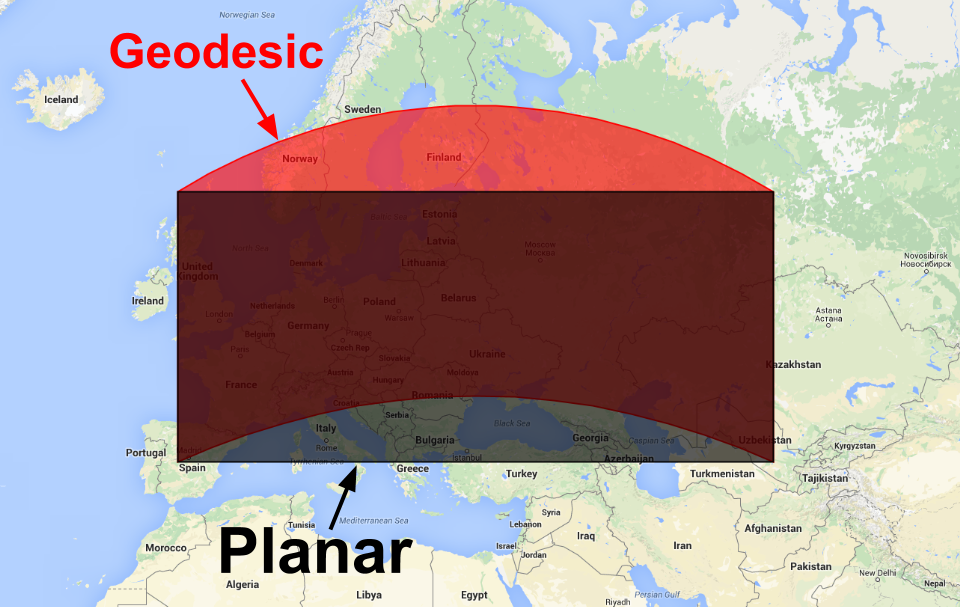
Earth Engine geometries are either geodesic (shortest path on a sphere) or planar (shortest path in a 2-D plane).
By default, Earth Engine geometry constructors create geodesic geometries, which are suitable for global data.
Planar geometries can be created by setting thegeodesicparameter tofalsein the constructor.
You can convert between geodesic and planar geometries using theee.Geometryconstructor.
A geometry created in Earth Engine is either geodesic (i.e. edges are the shortest path
on the surface of a sphere) or planar (i.e. edges are the shortest path in a 2-D Cartesian
plane). No one planar coordinate system is suitable for global collections of features,
so Earth Engine's geometry constructors build geodesic geometries by default. To make a
planar geometry, constructors have ageodesicparameter that can be set
tofalse:
[[["Easy to understand","easyToUnderstand","thumb-up"],["Solved my problem","solvedMyProblem","thumb-up"],["Other","otherUp","thumb-up"]],[["Missing the information I need","missingTheInformationINeed","thumb-down"],["Too complicated / too many steps","tooComplicatedTooManySteps","thumb-down"],["Out of date","outOfDate","thumb-down"],["Samples / code issue","samplesCodeIssue","thumb-down"],["Other","otherDown","thumb-down"]],["Last updated 2023-10-06 UTC."],[],["Earth Engine geometry can be geodesic (shortest path on a sphere) or planar (shortest path on a 2D plane). Geodesic is the default for global collections. To create a planar geometry, set the `geodesic` parameter to `false` in the `ee.Geometry` constructor, as shown in the code example: `var planarPolygon = ee.Geometry(polygon, null, false);`. Conversion between these types is possible using the same constructor. Figure 1 illustrates the visual difference between geodesic (red) and planar (black) polygons.\n"]]