

This page describes how to convert a TensorFlow model to a LiteRT model (an
optimized FlatBuffer
format identified
by the .tflite
file extension) using the LiteRT converter.
Conversion workflow
The diagram below illustrations the high-level workflow for converting your model:
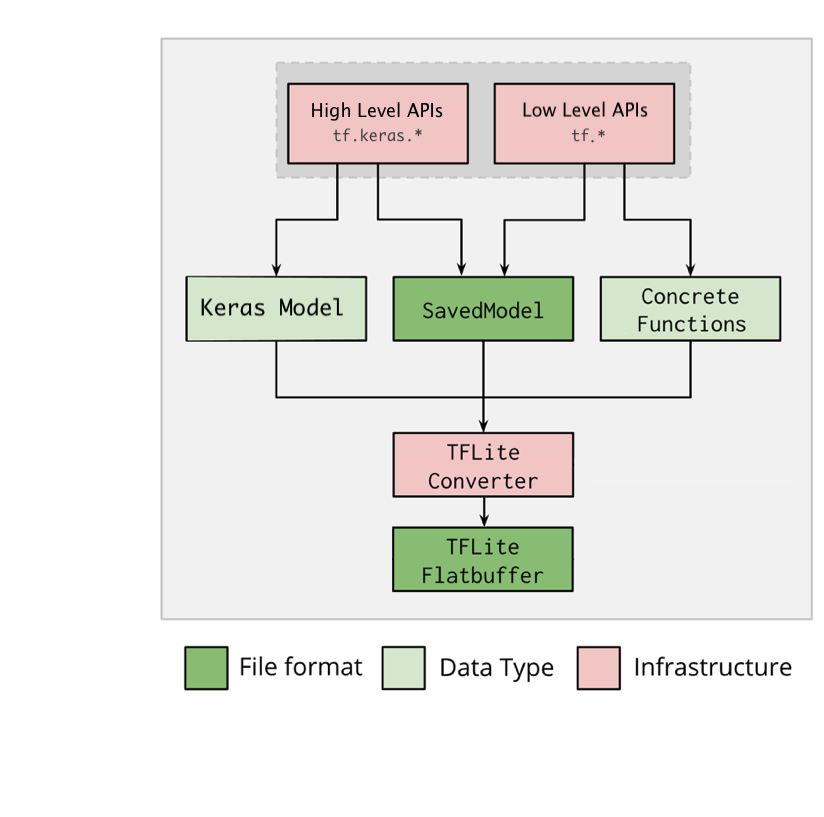
Figure 1.Converter workflow.
You can convert your model using one of the following options:
- Python API ( recommended ): This allows you to integrate the conversion into your development pipeline, apply optimizations, add metadata and many other tasks that simplify the conversion process.
- Command line : This only supports basic model conversion.
Python API
Helper code: To learn more about the LiteRT converter API, run print(help(tf.lite.TFLiteConverter))
.
Convert a TensorFlow model using tf.lite.TFLiteConverter
. A
TensorFlow model is stored using the SavedModel format and is generated either
using the high-level tf.keras.*
APIs (a Keras model) or the low-level tf.*
APIs (from which you generate concrete functions). As a result, you have the
following three options (examples are in the next few sections):
-
tf.lite.TFLiteConverter.from_saved_model()( recommended): Converts a SavedModel . -
tf.lite.TFLiteConverter.from_keras_model(): Converts a Keras model. -
tf.lite.TFLiteConverter.from_concrete_functions(): Converts concrete functions .
Convert a SavedModel (recommended)
The following example shows how to convert a SavedModel into a TensorFlow Lite model.
  import

 tensorflow

 as

 tf
 # Convert the model
 converter
 =
 tf
 .
 lite
 .
 TFLiteConverter
 .
 from_saved_model
 (
 saved_model_dir
 )
 # path to the SavedModel directory
 tflite_model
 =
 converter
 .
 convert
 ()
 # Save the model.
 with
 open
 (
 'model.tflite'
 ,
 'wb'
 )
 as
 f
 :
 f
 .
 write
 (
 tflite_model
 )
Convert a Keras model
The following example shows how to convert a Keras model into a TensorFlow Lite model.
  import

 tensorflow

 as

 tf
 # Create a model using high-level tf.keras.* APIs
 model
 =
 tf
 .
 keras
 .
 models
 .
 Sequential
 ([
 tf
 .
 keras
 .
 layers
 .
 Dense
 (
 units
 =
 1
 ,
 input_shape
 =
 [
 1
 ]),
 tf
 .
 keras
 .
 layers
 .
 Dense
 (
 units
 =
 16
 ,
 activation
 =
 'relu'
 ),
 tf
 .
 keras
 .
 layers
 .
 Dense
 (
 units
 =
 1
 )
 ])
 model
 .
 compile
 (
 optimizer
 =
 'sgd'
 ,
 loss
 =
 'mean_squared_error'
 )
 # compile the model
 model
 .
 fit
 (
 x
 =
 [
 -
 1
 ,
 0
 ,
 1
 ],
 y
 =
 [
 -
 3
 ,
 -
 1
 ,
 1
 ],
 epochs
 =
 5
 )
 # train the model
 # (to generate a SavedModel) tf.saved_model.save(model, "saved_model_keras_dir")
 # Convert the model.
 converter
 =
 tf
 .
 lite
 .
 TFLiteConverter
 .
 from_keras_model
 (
 model
 )
 tflite_model
 =
 converter
 .
 convert
 ()
 # Save the model.
 with
 open
 (
 'model.tflite'
 ,
 'wb'
 )
 as
 f
 :
 f
 .
 write
 (
 tflite_model
 )
Convert concrete functions
The following example shows how to convert concrete functions into a LiteRT model.
  import

 tensorflow

 as

 tf
 # Create a model using low-level tf.* APIs
 class

 Squared
 (
 tf
 .
 Module
 ):
 @tf
 .
 function
 (
 input_signature
 =
 [
 tf
 .
 TensorSpec
 (
 shape
 =
 [
 None
 ],
 dtype
 =
 tf
 .
 float32
 )])
 def

 __call__
 (
 self
 ,
 x
 ):
 return
 tf
 .
 square
 (
 x
 )
 model
 =
 Squared
 ()
 # (ro run your model) result = Squared(5.0) # This prints "25.0"
 # (to generate a SavedModel) tf.saved_model.save(model, "saved_model_tf_dir")
 concrete_func
 =
 model
 .
 __call__
 .
 get_concrete_function
 ()
 # Convert the model.
 converter
 =
 tf
 .
 lite
 .
 TFLiteConverter
 .
 from_concrete_functions
 ([
 concrete_func
 ],
 model
 )
 tflite_model
 =
 converter
 .
 convert
 ()
 # Save the model.
 with
 open
 (
 'model.tflite'
 ,
 'wb'
 )
 as
 f
 :
 f
 .
 write
 (
 tflite_model
 )
Other features
-
Apply optimizations . A common optimization used is post training quantization , which can further reduce your model latency and size with minimal loss in accuracy.
-
Add metadata , which makes it easier to create platform specific wrapper code when deploying models on devices.
Conversion errors
The following are common conversion errors and their solutions:
-
Error:
Some ops are not supported by the native TFLite runtime, you can
enable TF kernels fallback using TF Select.
Solution: The error occurs as your model has TF ops that don't have a corresponding TFLite implementation. You can resolve this by using the TF op in the TFLite model (recommended). If you want to generate a model with TFLite ops only, you can either add a request for the missing TFLite op in GitHub issue #21526 (leave a comment if your request hasn’t already been mentioned) or create the TFLite op yourself.
-
Error:
.. is neither a custom op nor a flex opSolution: If this TF op is:
- Supported in TF: The error occurs because the TF op is missing from the allowlist (an exhaustive list of TF ops supported by TFLite). You can resolve this as follows:
- Unsupported in TF: The error occurs because TFLite is unaware of the custom TF operator defined by you. You can resolve this as follows:
- Create the TF op .
- Convert the TF model to a TFLite model .
- Create the TFLite op and run inference by linking it to the TFLite runtime.
Command Line Tool
If you've installed TensorFlow 2.x from
pip
, use the tflite_convert
command.
To view all the available flags, use the following command:
 $
tflite_convert
--help `
--output_file `
.
Type:
string.
Full
path
of
the
output
file. `
--saved_model_dir `
.
Type:
string.
Full
path
to
the
SavedModel
directory. `
--keras_model_file `
.
Type:
string.
Full
path
to
the
Keras
H5
model
file. `
--enable_v1_converter `
.
Type:
bool.
 (
default
False )

Enables
the
converter
and
flags
used
 in

TF
 1
.x
instead
of
TF
 2
.x.

You
are
required
to
provide
the
 `
--output_file `

flag
and
either
the
 `
--saved_model_dir `

or
 `
--keras_model_file `

flag.
If you have the TensorFlow 2.x
source
donwloaded and want to run
the converter from that source without building and installing the package, you
can replace ' tflite_convert
' with ' bazel run
tensorflow/lite/python:tflite_convert --
' in the command.
Converting a SavedModel
 tflite_convert
 \

--saved_model_dir =
/tmp/mobilenet_saved_model
 \

--output_file =
/tmp/mobilenet.tflite
Converting a Keras H5 model
 tflite_convert
 \

--keras_model_file =
/tmp/mobilenet_keras_model.h5
 \

--output_file =
/tmp/mobilenet.tflite
