

Using graphics processing units (GPUs) to run your machine learning (ML) models can dramatically improve the performance of your model and the user experience of your ML-enabled applications. On iOS devices, you can enable use of GPU-accelerated execution of your models using a delegate . Delegates act as hardware drivers for LiteRT, allowing you to run the code of your model on GPU processors.
This page describes how to enable GPU acceleration for LiteRT models in iOS apps. For more information about using the GPU delegate for LiteRT, including best practices and advanced techniques, see the GPU delegates page.
Use GPU with Interpreter API
The LiteRT Interpreter API provides a set of general purpose APIs for building a machine learning applications. The following instructions guide you through adding GPU support to an iOS app. This guide assumes you already have an iOS app that can successfully execute an ML model with LiteRT.
Modify the Podfile to include GPU support
Starting with the LiteRT 2.3.0 release, the GPU delegate is excluded
from the pod to reduce the binary size. You can include them by specifying a
subspec for the TensorFlowLiteSwift
pod:
  pod

 'TensorFlowLiteSwift/Metal'
 ,

 '~> 0.0.1-nightly'
 ,
OR
  pod

 'TensorFlowLiteSwift'
 ,

 '~> 0.0.1-nightly'
 ,

 :subspecs

 =
>
 [
 'Metal'
 ]
You can also use TensorFlowLiteObjC
or TensorFlowLiteC
if you want to use
the Objective-C, which is available for versions 2.4.0 and higher, or the C API.
Initialize and use GPU delegate
You can use the GPU delegate with the LiteRT Interpreter API with a number of programming languages. Swift and Objective-C are recommended, but you can also use C++ and C. Using C is required if you are using a version of LiteRT earlier than 2.4. The following code examples outline how to use the delegate with each of these languages.
Swift
 import

 TensorFlowLite
 // Load model ...
 // Initialize LiteRT interpreter with the GPU delegate.
 let

 delegate

 =

 MetalDelegate
 ()
 if

 let

 interpreter

 =

 try

 Interpreter
 (
 modelPath
 :

 modelPath
 ,

 delegates
 :

 [
 delegate
 ])

 {

 // Run inference ...
 }
Objective-C
 // Import module when using CocoaPods with module support
 @import

 TFLTensorFlowLite
 ;
 // Or import following headers manually
 #import "tensorflow/lite/objc/apis/TFLMetalDelegate.h"
 #import "tensorflow/lite/objc/apis/TFLTensorFlowLite.h"
 // Initialize GPU delegate
 TFLMetalDelegate
 *

 metalDelegate

 =

 [[
 TFLMetalDelegate

 alloc
 ]

 init
 ];
 // Initialize interpreter with model path and GPU delegate
 TFLInterpreterOptions
 *

 options

 =

 [[
 TFLInterpreterOptions

 alloc
 ]

 init
 ];
 NSError
 *

 error

 =

 nil
 ;
 TFLInterpreter
 *

 interpreter

 =

 [[
 TFLInterpreter

 alloc
 ]

 initWithModelPath
 :
 modelPath

 options
 :
 options

 delegates
 :
 @[

 metalDelegate

 ]

 error
 :
& error
 ];
 if

 (
 error

 !=

 nil
 )

 {

 /* Error handling... */

 }
 if

 (
 !
 [
 interpreter

 allocateTensorsWithError
 :
& error
 ])

 {

 /* Error handling... */

 }
 if

 (
 error

 !=

 nil
 )

 {

 /* Error handling... */

 }
 // Run inference ...
C++
 // Set up interpreter.
 auto

 model

 =

 FlatBufferModel
 ::
 BuildFromFile
 (
 model_path
 );
 if

 (
 !
 model
 )

 return

 false
 ;
 tflite
 ::
 ops
 ::
 builtin
 ::
 BuiltinOpResolver

 op_resolver
 ;
 std
 ::
 unique_ptr<Interpreter
 >

 interpreter
 ;
 InterpreterBuilder
 (
 *
 model
 ,

 op_resolver
 )(
 &
 interpreter
 );
 // Prepare GPU delegate.
 auto
 *

 delegate

 =

 TFLGpuDelegateCreate
 (
 /*default options=*/
 nullptr
 );
 if

 (
 interpreter
 ->
 ModifyGraphWithDelegate
 (
 delegate
 )

 !=

 kTfLiteOk
 )

 return

 false
 ;
 // Run inference.
 WriteToInputTensor
 (
 interpreter
 ->
 typed_input_tensor<float
 >
 (
 0
 ));
 if

 (
 interpreter
 ->
 Invoke
 ()

 !=

 kTfLiteOk
 )

 return

 false
 ;
 ReadFromOutputTensor
 (
 interpreter
 ->
 typed_output_tensor<float
 >
 (
 0
 ));
 // Clean up.
 TFLGpuDelegateDelete
 (
 delegate
 );
C (before 2.4.0)
 #include

 "tensorflow/lite/c/c_api.h"
 #include

 "tensorflow/lite/delegates/gpu/metal_delegate.h"
 // Initialize model
 TfLiteModel
 *

 model

 =

 TfLiteModelCreateFromFile
 (
 model_path
 );
 // Initialize interpreter with GPU delegate
 TfLiteInterpreterOptions
 *

 options

 =

 TfLiteInterpreterOptionsCreate
 ();
 TfLiteDelegate
 *

 delegate

 =

 TFLGPUDelegateCreate
 (
 nil
 );

 // default config
 TfLiteInterpreterOptionsAddDelegate
 (
 options
 ,

 metal_delegate
 );
 TfLiteInterpreter
 *

 interpreter

 =

 TfLiteInterpreterCreate
 (
 model
 ,

 options
 );
 TfLiteInterpreterOptionsDelete
 (
 options
 );
 TfLiteInterpreterAllocateTensors
 (
 interpreter
 );
 NSMutableData

 *
 input_data

 =

 [
 NSMutableData

 dataWithLength
 :
 input_size

 *

 sizeof
 (
 float
 )];
 NSMutableData

 *
 output_data

 =

 [
 NSMutableData

 dataWithLength
 :
 output_size

 *

 sizeof
 (
 float
 )];
 TfLiteTensor
 *

 input

 =

 TfLiteInterpreterGetInputTensor
 (
 interpreter
 ,

 0
 );
 const

 TfLiteTensor
 *

 output

 =

 TfLiteInterpreterGetOutputTensor
 (
 interpreter
 ,

 0
 );
 // Run inference
 TfLiteTensorCopyFromBuffer
 (
 input
 ,

 inputData
 .
 bytes
 ,

 inputData
 .
 length
 );
 TfLiteInterpreterInvoke
 (
 interpreter
 );
 TfLiteTensorCopyToBuffer
 (
 output
 ,

 outputData
 .
 mutableBytes
 ,

 outputData
 .
 length
 );
 // Clean up
 TfLiteInterpreterDelete
 (
 interpreter
 );
 TFLGpuDelegateDelete
 (
 metal_delegate
 );
 TfLiteModelDelete
 (
 model
 );
GPU API language use notes
- LiteRT versions prior to 2.4.0 can only use the C API for Objective-C.
- The C++ API is only available when you are using bazel or build TensorFlow Lite by yourself. C++ API can't be used with CocoaPods.
- When using LiteRT with the GPU delegate with C++, get the GPU
delegate via the
TFLGpuDelegateCreate()function and then pass it toInterpreter::ModifyGraphWithDelegate(), instead of callingInterpreter::AllocateTensors().
Build and test with release mode
Change to a release build with the appropriate Metal API accelerator settings to get better performance and for final testing. This section explains how to enable a release build and configure setting for Metal acceleration.
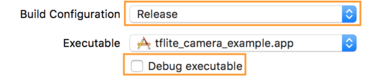
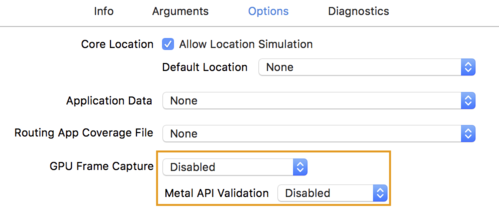
To change to a release build:
- Edit the build settings by selecting Product > Scheme > Edit Scheme...and then selecting Run.
- On the Infotab, change Build Configurationto Releaseand
uncheck Debug executable.
- Click the Optionstab and change GPU Frame Captureto Disabledand Metal API Validationto Disabled.
- Make sure to select Release-only builds on 64-bit architecture. Under Project navigator > tflite_camera_example > PROJECT > your_project_name >
Build Settingsset Build Active Architecture Only > Releaseto Yes.

Advanced GPU support
This section covers advanced uses of the GPU delegate for iOS, including delegate options, input and output buffers, and use of quantized models.
Delegate Options for iOS
The constructor for GPU delegate accepts a struct
of options in the Swift
API
, Objective-C
API
,
and C
API
.
Passing nullptr
(C API) or nothing (Objective-C and Swift API) to the
initializer sets the default options (which are explicated in the Basic Usage
example above).
Swift
 // THIS:
 var

 options

 =

 MetalDelegate
 .
 Options
 ()
 options
 .
 isPrecisionLossAllowed

 =

 false
 options
 .
 waitType

 =

 .
 passive
 options
 .
 isQuantizationEnabled

 =

 true
 let

 delegate

 =

 MetalDelegate
 (
 options
 :

 options
 )
 // IS THE SAME AS THIS:
 let

 delegate

 =

 MetalDelegate
 ()
Objective-C
 // THIS:
 TFLMetalDelegateOptions
 *

 options

 =

 [[
 TFLMetalDelegateOptions

 alloc
 ]

 init
 ];
 options
 .
 precisionLossAllowed

 =

 false
 ;
 options
 .
 waitType

 =

 TFLMetalDelegateThreadWaitTypePassive
 ;
 options
 .
 quantizationEnabled

 =

 true
 ;
 TFLMetalDelegate
 *

 delegate

 =

 [[
 TFLMetalDelegate

 alloc
 ]

 initWithOptions
 :
 options
 ];
 // IS THE SAME AS THIS:
 TFLMetalDelegate
 *

 delegate

 =

 [[
 TFLMetalDelegate

 alloc
 ]

 init
 ];
C
 // THIS:
 const

 TFLGpuDelegateOptions

 options

 =

 {

 .
 allow_precision_loss

 =

 false
 ,

 .
 wait_type

 =

 TFLGpuDelegateWaitType
 ::
 TFLGpuDelegateWaitTypePassive
 ,

 .
 enable_quantization

 =

 true
 ,
 };
 TfLiteDelegate
 *

 delegate

 =

 TFLGpuDelegateCreate
 (
 options
 );
 // IS THE SAME AS THIS:
 TfLiteDelegate
 *

 delegate

 =

 TFLGpuDelegateCreate
 (
 nullptr
 );
Input/Output buffers using C++ API
Computation on the GPU requires that the data is available to the GPU. This requirement often means you must perform a memory copy. You should avoid having your data cross the CPU/GPU memory boundary if possible, as this can take up a significant amount of time. Usually, such crossing is inevitable, but in some special cases, one or the other can be omitted.
If the network's input is an image already loaded in the GPU memory (for example, a GPU texture containing the camera feed) it can stay in the GPU memory without ever entering the CPU memory. Similarly, if the network's output is in the form of a renderable image, such as a image style transfer operation, you can directly display the result on screen.
To achieve best performance, LiteRT makes it possible for users to directly read from and write to the TensorFlow hardware buffer and bypass avoidable memory copies.
Assuming the image input is in GPU memory, you must first convert it to a MTLBuffer
object for Metal. You can associate a TfLiteTensor
to a
user-prepared MTLBuffer
with the TFLGpuDelegateBindMetalBufferToTensor()
function. Note that this function must
be called after Interpreter::ModifyGraphWithDelegate()
. Additionally, the inference output is,
by default, copied from GPU memory to CPU memory. You can turn this behavior off
by calling Interpreter::SetAllowBufferHandleOutput(true)
during
initialization.
C++
 #
 include

 "tensorflow/lite/delegates/gpu/metal_delegate.h"
 #
 include

 "tensorflow/lite/delegates/gpu/metal_delegate_internal.h"
 // ...
 // Prepare GPU delegate.
 auto
 *

 delegate

 =

 TFLGpuDelegateCreate
 (
 nullptr
 );
 if

 (
 interpreter
 ->
 ModifyGraphWithDelegate
 (
 delegate
 )

 !=

 kTfLiteOk
 )

 return

 false
 ;
 interpreter
 ->
 SetAllowBufferHandleOutput
 (
 true
 );

 // disable default gpu->cpu copy
 if

 (
 !
 TFLGpuDelegateBindMetalBufferToTensor
 (

 delegate
 ,

 interpreter
 ->
 inputs
 ()[
 0
 ],

 user_provided_input_buffer
 ))

 {

 return

 false
 ;
 }
 if

 (
 !
 TFLGpuDelegateBindMetalBufferToTensor
 (

 delegate
 ,

 interpreter
 ->
 outputs
 ()[
 0
 ],

 user_provided_output_buffer
 ))

 {

 return

 false
 ;
 }
 // Run inference.
 if

 (
 interpreter
 ->
 Invoke
 ()

 !=

 kTfLiteOk
 )

 return

 false
 ;
Once the default behavior is turned off, copying the inference output from GPU
memory to CPU memory requires an explicit call to Interpreter::EnsureTensorDataIsReadable()
for each output tensor. This
approach also works for quantized models, but you still need to use a float32 sized buffer with float32 data, because the buffer is bound to the
internal de-quantized buffer.
Quantized models
The iOS GPU delegate libraries support quantized models by default . You do not need to make any code changes to use quantized models with the GPU delegate. The following section explains how to disable quantized support for testing or experimental purposes.
Disable quantized model support
The following code shows how to disable support for quantized models.
Swift
 var

 options

 =

 MetalDelegate
 .
 Options
 ()

 options
 .
 isQuantizationEnabled

 =

 false

 let

 delegate

 =

 MetalDelegate
 (
 options
 :

 options
 )
Objective-C
 TFLMetalDelegateOptions
 *

 options

 =

 [[
 TFLMetalDelegateOptions

 alloc
 ]

 init
 ];

 options
 .
 quantizationEnabled

 =

 false
 ;
C
 TFLGpuDelegateOptions

 options

 =

 TFLGpuDelegateOptionsDefault
 ();

 options
 .
 enable_quantization

 =

 false
 ;

 TfLiteDelegate
 *

 delegate

 =

 TFLGpuDelegateCreate
 (
 options
 );
For more information about running quantized models with GPU acceleration, see GPU delegate overview.
