

Image segmenters predict whether each pixel of an image is associated with a certain class. This is in contrast to object detection, which detects objects in rectangular regions, and image classification, which classifies the overall image. See the image segmentation overview example for more information about image segmenters.
Use the Task Library ImageSegmenter
API to deploy your custom image segmenters
or pretrained ones into your mobile apps.
Key features of the ImageSegmenter API
-
Input image processing, including rotation, resizing, and color space conversion.
-
Label map locale.
-
Two output types, category mask and confidence masks.
-
Colored label for display purpose.
Supported image segmenter models
The following models are guaranteed to be compatible with the ImageSegmenter
API.
-
The pretrained image segmentation models on TensorFlow Hub .
-
Custom models that meet the model compatibility requirements .
Run inference in Java
See the Image Segmentation reference
app
for an example of how to use ImageSegmenter
in an Android app.
Step 1: Import Gradle dependency and other settings
Copy the .tflite
model file to the assets directory of the Android module
where the model will be run. Specify that the file should not be compressed, and
add the TensorFlow Lite library to the module’s build.gradle
file:
  android

 {

 // Other settings

 // Specify tflite file should not be compressed for the app apk

 aaptOptions

 {

 noCompress

 "tflite"

 }
 }
 dependencies

 {

 // Other dependencies

 // Import the Task Vision Library dependency

 implementation

 '
 org
 .
 tensorflow
 :
 tensorflow
 -
 lite
 -
 task
 -
 vision
 '

 // Import the GPU delegate plugin Library for GPU inference

 implementation

 '
 org
 .
 tensorflow
 :
 tensorflow
 -
 lite
 -
 gpu
 -
 delegate
 -
 plugin
 '
 }
Step 2: Using the model
  // Initialization
 ImageSegmenterOptions

 options

 =

 ImageSegmenterOptions
 .
 builder
 ()

 .
 setBaseOptions
 (
 BaseOptions
 .
 builder
 ().
 useGpu
 ().
 build
 ())

 .
 setOutputType
 (
 OutputType
 .
 CONFIDENCE_MASK
 )

 .
 build
 ();
 ImageSegmenter

 imageSegmenter

 =

 ImageSegmenter
 .
 createFromFileAndOptions
 (
 context
 ,

 modelFile
 ,

 options
 );
 // Run inference
 List<Segmentation>

 results

 =

 imageSegmenter
 .
 segment
 (
 image
 );
See the source code and
javadoc
for more options to configure ImageSegmenter
.
Run inference in iOS
Step 1: Install the dependencies
The Task Library supports installation using CocoaPods. Make sure that CocoaPods is installed on your system. Please see the CocoaPods installation guide for instructions.
Please see the CocoaPods guide for details on adding pods to an Xcode project.
Add the TensorFlowLiteTaskVision
pod in the Podfile.
 target 'MyAppWithTaskAPI' do
  use_frameworks!
  pod 'TensorFlowLiteTaskVision'
end
Make sure that the .tflite
model you will be using for inference is present in
your app bundle.
Step 2: Using the model
Swift
  // Imports
 import

 TensorFlowLiteTaskVision
 // Initialization
 guard

 let

 modelPath

 =

 Bundle
 .
 main
 .
 path
 (
 forResource
 :

 "deeplabv3"
 ,

 ofType
 :

 "tflite"
 )

 else

 {

 return

 }
 let

 options

 =

 ImageSegmenterOptions
 (
 modelPath
 :

 modelPath
 )
 // Configure any additional options:
 // options.outputType = OutputType.confidenceMasks
 let

 segmenter

 =

 try

 ImageSegmenter
 .
 segmenter
 (
 options
 :

 options
 )
 // Convert the input image to MLImage.
 // There are other sources for MLImage. For more details, please see:
 // https://developers.google.com/ml-kit/reference/ios/mlimage/api/reference/Classes/GMLImage
 guard

 let

 image

 =

 UIImage

 (
 named
 :

 "plane.jpg"
 ),

 let

 mlImage

 =

 MLImage
 (
 image
 :

 image
 )

 else

 {

 return

 }
 // Run inference
 let

 segmentationResult

 =

 try

 segmenter
 .
 segment
 (
 mlImage
 :

 mlImage
 )
Objective-C
  // Imports
 #import <TensorFlowLiteTaskVision/TensorFlowLiteTaskVision.h>
 // Initialization
 NSString

 *
 modelPath

 =

 [[
 NSBundle

 mainBundle
 ]

 pathForResource
 :
 @"deeplabv3"

 ofType
 :
 @"tflite"
 ];
 TFLImageSegmenterOptions

 *
 options

 =

 [[
 TFLImageSegmenterOptions

 alloc
 ]

 initWithModelPath
 :
 modelPath
 ];
 // Configure any additional options:
 // options.outputType = TFLOutputTypeConfidenceMasks;
 TFLImageSegmenter

 *
 segmenter

 =

 [
 TFLImageSegmenter

 imageSegmenterWithOptions
 :
 options

 error
 :
 nil
 ];
 // Convert the input image to MLImage.
 UIImage

 *
 image

 =

 [
 UIImage

 imageNamed
 :
 @"plane.jpg"
 ];
 // There are other sources for GMLImage. For more details, please see:
 // https://developers.google.com/ml-kit/reference/ios/mlimage/api/reference/Classes/GMLImage
 GMLImage

 *
 gmlImage

 =

 [[
 GMLImage

 alloc
 ]

 initWithImage
 :
 image
 ];
 // Run inference
 TFLSegmentationResult

 *
 segmentationResult

 =

 [
 segmenter

 segmentWithGMLImage
 :
 gmlImage

 error
 :
 nil
 ];
See the source
code
for more options to configure TFLImageSegmenter
.
Run inference in Python
Step 1: Install the pip package
pip install tflite-support
Step 2: Using the model
  # Imports
 from

 tflite_support.task

 import
 vision
 from

 tflite_support.task

 import
 core
 from

 tflite_support.task

 import
 processor
 # Initialization
 base_options
 =
 core
 .
 BaseOptions
 (
 file_name
 =
 model_path
 )
 segmentation_options
 =
 processor
 .
 SegmentationOptions
 (
 output_type
 =
 processor
 .
 SegmentationOptions
 .
 output_type
 .
 CATEGORY_MASK
 )
 options
 =
 vision
 .
 ImageSegmenterOptions
 (
 base_options
 =
 base_options
 ,
 segmentation_options
 =
 segmentation_options
 )
 segmenter
 =
 vision
 .
 ImageSegmenter
 .
 create_from_options
 (
 options
 )
 # Alternatively, you can create an image segmenter in the following manner:
 # segmenter = vision.ImageSegmenter.create_from_file(model_path)
 # Run inference
 image_file
 =
 vision
 .
 TensorImage
 .
 create_from_file
 (
 image_path
 )
 segmentation_result
 =
 segmenter
 .
 segment
 (
 image_file
 )
See the source
code
for more options to configure ImageSegmenter
.
Run inference in C++
  // Initialization
 ImageSegmenterOptions

 options
 ;
 options
 .
 mutable_base_options
 ()
 -
> mutable_model_file
 ()
 -
> set_file_name
 (
 model_path
 );
 std
 ::
 unique_ptr<ImageSegmenter>

 image_segmenter

 =

 ImageSegmenter
 ::
 CreateFromOptions
 (
 options
 ).
 value
 ();
 // Create input frame_buffer from your inputs, `image_data` and `image_dimension`.
 // See more information here: tensorflow_lite_support/cc/task/vision/utils/frame_buffer_common_utils.h
 std
 ::
 unique_ptr<FrameBuffer>

 frame_buffer

 =

 CreateFromRgbRawBuffer
 (

 image_data
 ,

 image_dimension
 );
 // Run inference
 const

 SegmentationResult

 result

 =

 image_segmenter
 -
> Segment
 (
 *
 frame_buffer
 ).
 value
 ();
See the source
code
for more options to configure ImageSegmenter
.
Example results
Here is an example of the segmentation results of deeplab_v3 , a generic segmentation model available on TensorFlow Hub.
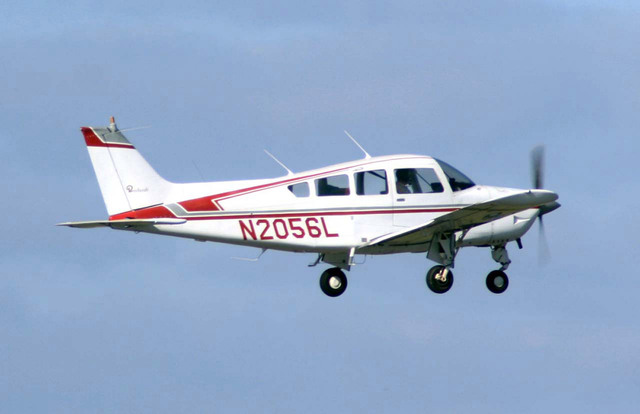
 Color Legend:
 (r: 000, g: 000, b: 000):
  index       : 0
  class name  : background
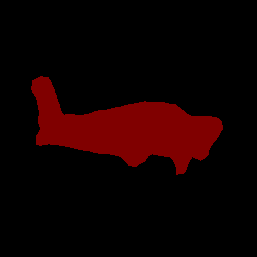
 (r: 128, g: 000, b: 000):
  index       : 1
  class name  : aeroplane

# (omitting multiple lines for conciseness) ...

 (r: 128, g: 192, b: 000):
  index       : 19
  class name  : train
 (r: 000, g: 064, b: 128):
  index       : 20
  class name  : tv
Tip: use a color picker on the output PNG file to inspect the output mask with
this legend.
The segmentation category mask should looks like:
Try out the simple CLI demo tool for ImageSegmenter with your own model and test data.
Model compatibility requirements
The ImageSegmenter
API expects a TFLite model with mandatory TFLite Model
Metadata
. See examples of creating
metadata for image segmenters using the TensorFlow Lite Metadata Writer
API
.
-
Input image tensor (kTfLiteUInt8/kTfLiteFloat32)
- image input of size
[batch x height x width x channels]. - batch inference is not supported (
batchis required to be 1). - only RGB inputs are supported (
channelsis required to be 3). - if type is kTfLiteFloat32, NormalizationOptions are required to be attached to the metadata for input normalization.
- image input of size
-
Output masks tensor: (kTfLiteUInt8/kTfLiteFloat32)
- tensor of size
[batch x mask_height x mask_width x num_classes], wherebatchis required to be 1,mask_widthandmask_heightare the dimensions of the segmentation masks produced by the model, andnum_classesis the number of classes supported by the model. - optional (but recommended) label map(s) can be attached as
AssociatedFile-s with type TENSOR_AXIS_LABELS, containing one label per
line. The first such AssociatedFile (if any) is used to fill the
labelfield (named asclass_namein C++) of the results. Thedisplay_namefield is filled from the AssociatedFile (if any) whose locale matches thedisplay_names_localefield of theImageSegmenterOptionsused at creation time ("en" by default, i.e. English). If none of these are available, only theindexfield of the results will be filled.
- tensor of size
