

Graph
A CalculatorGraphConfig
proto specifies the topology and functionality of a
MediaPipe graph. Each node
in the graph represents a particular calculator or
subgraph, and specifies necessary configurations, such as registered
calculator/subgraph type, inputs, outputs and optional fields, such as
node-specific options, input policy and executor, discussed in Synchronization
.
CalculatorGraphConfig
has several other fields to configure global graph-level
settings, e.g. graph executor configs, number of threads, and maximum queue size
of input streams. Several graph-level settings are useful for tuning the
performance of the graph on different platforms (e.g., desktop v.s. mobile). For
instance, on mobile, attaching a heavy model-inference calculator to a separate
executor can improve the performance of a real-time application since this
enables thread locality.
Below is a trivial CalculatorGraphConfig
example where we have series of
passthrough calculators :
  #

 This

 graph

 named

 main_pass_throughcals_nosubgraph.pbtxt

 contains

 4
 #

 passthrough

 calculators.
 input_stream
 :

 "in"
 output_stream
 :

 "out"
 node

 {

 calculator
 :

 "PassThroughCalculator"

 input_stream
 :

 "in"

 output_stream
 :

 "out1"
 }
 node

 {

 calculator
 :

 "PassThroughCalculator"

 input_stream
 :

 "out1"

 output_stream
 :

 "out2"
 }
 node

 {

 calculator
 :

 "PassThroughCalculator"

 input_stream
 :

 "out2"

 output_stream
 :

 "out3"
 }
 node

 {

 calculator
 :

 "PassThroughCalculator"

 input_stream
 :

 "out3"

 output_stream
 :

 "out"
 }
MediaPipe offers an alternative C++
representation for complex graphs (e.g. ML pipelines, handling model metadata, optional nodes, etc.). The above graph may look like:
  CalculatorGraphConfig

 BuildGraphConfig
 ()

 {

 Graph

 graph
 ;

 // Graph inputs

 Stream<AnyType>

 in

 =

 graph
 .
 In
 (
 0
 ).
 SetName
 (
 "in"
 );

 auto

 pass_through_fn

 =

 [](
 Stream<AnyType>

 in
 ,

 Graph
&
 graph
 )

 -
>
 Stream<AnyType>

 {

 auto
&
 node

 =

 graph
 .
 AddNode
 (
 "PassThroughCalculator"
 );

 in
 .
 ConnectTo
 (
 node
 .
 In
 (
 0
 ));

 return

 node
 .
 Out
 (
 0
 );

 };

 Stream<AnyType>

 out1

 =

 pass_through_fn
 (
 in
 ,

 graph
 );

 Stream<AnyType>

 out2

 =

 pass_through_fn
 (
 out1
 ,

 graph
 );

 Stream<AnyType>

 out3

 =

 pass_through_fn
 (
 out2
 ,

 graph
 );

 Stream<AnyType>

 out4

 =

 pass_through_fn
 (
 out3
 ,

 graph
 );

 // Graph outputs

 out4
 .
 SetName
 (
 "out"
 ).
 ConnectTo
 (
 graph
 .
 Out
 (
 0
 ));

 return

 graph
 .
 GetConfig
 ();
 }
See more details in Building Graphs in C++ .
Subgraph
To modularize a CalculatorGraphConfig
into sub-modules and assist with re-use
of perception solutions, a MediaPipe graph can be defined as a Subgraph
. The
public interface of a subgraph consists of a set of input and output streams
similar to a calculator's public interface. The subgraph can then be included in
a CalculatorGraphConfig
as if it were a calculator. When a MediaPipe graph is
loaded from a CalculatorGraphConfig
, each subgraph node is replaced by the
corresponding graph of calculators. As a result, the semantics and performance
of the subgraph is identical to the corresponding graph of calculators.
Below is an example of how to create a subgraph named TwoPassThroughSubgraph
.
-
Defining the subgraph.
  #

 This

 subgraph

 is

 defined

 in

 two_pass_through_subgraph.pbtxt
 #

 and

 is

 registered

 as

 "TwoPassThroughSubgraph"
 type
 :

 "TwoPassThroughSubgraph"
 input_stream
 :

 "out1"
 output_stream
 :

 "out3"
 node

 {

 calculator
 :

 "PassThroughCalculator"

 input_stream
 :

 "out1"

 output_stream
 :

 "out2"
 }
 node

 {

 calculator
 :

 "PassThroughCalculator"

 input_stream
 :

 "out2"

 output_stream
 :

 "out3"
 }
The public interface to the subgraph consists of:
- Graph input streams
- Graph output streams
- Graph input side packets
- Graph output side packets
-
Register the subgraph using BUILD rule
mediapipe_simple_subgraph. The parameterregister_asdefines the component name for the new subgraph.# Small section of BUILD file for registering the "TwoPassThroughSubgraph" # subgraph for use by main graph main_pass_throughcals.pbtxt mediapipe_simple_subgraph ( name = "twopassthrough_subgraph" , graph = "twopassthrough_subgraph.pbtxt" , register_as = "TwoPassThroughSubgraph" , deps = [ "//mediapipe/calculators/core:pass_through_calculator" , "//mediapipe/framework:calculator_graph" , ], ) -
Use the subgraph in the main graph.
  #

 This

 main

 graph

 is

 defined

 in

 main_pass_throughcals.pbtxt
 #

 using

 subgraph

 called

 "TwoPassThroughSubgraph"
 input_stream
 :

 "in"
 node

 {

 calculator
 :

 "PassThroughCalculator"

 input_stream
 :

 "in"

 output_stream
 :

 "out1"
 }
 node

 {

 calculator
 :

 "TwoPassThroughSubgraph"

 input_stream
 :

 "out1"

 output_stream
 :

 "out3"
 }
 node

 {

 calculator
 :

 "PassThroughCalculator"

 input_stream
 :

 "out3"

 output_stream
 :

 "out4"
 }
Graph Options
It is possible to specify a "graph options" protobuf for a MediaPipe graph
similar to the Calculator Options
protobuf specified for a MediaPipe calculator. These "graph options" can be
specified where a graph is invoked, and used to populate calculator options and
subgraph options within the graph.
In a CalculatorGraphConfig
, graph options can be specified for a subgraph
exactly like calculator options, as shown below:
  node

 {

 calculator
 :

 "FlowLimiterCalculator"

 input_stream
 :

 "image"

 output_stream
 :

 "throttled_image"

 node_options
 :

 {

 [
 type
 .
 googleapis
 .
 com
 /
 mediapipe
 .
 FlowLimiterCalculatorOptions
 ]

 {

 max_in_flight
 :

 1

 }

 }
 }
 node

 {

 calculator
 :

 "FaceDetectionSubgraph"

 input_stream
 :

 "IMAGE:throttled_image"

 node_options
 :

 {

 [
 type
 .
 googleapis
 .
 com
 /
 mediapipe
 .
 FaceDetectionOptions
 ]

 {

 tensor_width
 :

 192

 tensor_height
 :

 192

 }

 }
 }
In a CalculatorGraphConfig
, graph options can be accepted and used to populate
calculator options, as shown below:
  graph_options
 :

 {

 [
 type
 .
 googleapis
 .
 com
 /
 mediapipe
 .
 FaceDetectionOptions
 ]

 {}
 }
 node
 :

 {

 calculator
 :

 "ImageToTensorCalculator"

 input_stream
 :

 "IMAGE:image"

 node_options
 :

 {

 [
 type
 .
 googleapis
 .
 com
 /
 mediapipe
 .
 ImageToTensorCalculatorOptions
 ]

 {

 keep_aspect_ratio
 :

 true

 border_mode
 :

 BORDER_ZERO

 }

 }

 option_value
 :

 "output_tensor_width:options/tensor_width"

 option_value
 :

 "output_tensor_height:options/tensor_height"
 }
 node

 {

 calculator
 :

 "InferenceCalculator"

 node_options
 :

 {

 [
 type
 .
 googleapis
 .
 com
 /
 mediapipe
 .
 InferenceCalculatorOptions
 ]

 {}

 }

 option_value
 :

 "delegate:options/delegate"

 option_value
 :

 "model_path:options/model_path"
 }
In this example, the FaceDetectionSubgraph
accepts graph option protobuf FaceDetectionOptions
. The FaceDetectionOptions
is used to define some field
values in the calculator options ImageToTensorCalculatorOptions
and some field
values in the subgraph options InferenceCalculatorOptions
. The field values
are defined using the option_value:
syntax.
In the CalculatorGraphConfig::Node
protobuf, the fields node_options:
and option_value:
together define the option values for a calculator such as ImageToTensorCalculator
. The node_options:
field defines a set of literal
constant values using the text protobuf syntax. Each option_value:
field
defines the value for one protobuf field using information from the enclosing
graph, specifically from field values of the graph options of the enclosing
graph. In the example above, the option_value:
"output_tensor_width:options/tensor_width"
defines the field ImageToTensorCalculatorOptions.output_tensor_width
using the value of FaceDetectionOptions.tensor_width
.
The syntax of option_value:
is similar to the syntax of input_stream:
. The
syntax is option_value: "LHS:RHS"
. The LHS identifies a calculator option
field and the RHS identifies a graph option field. More specifically, the LHS
and RHS each consists of a series of protobuf field names identifying nested
protobuf messages and fields separated by '/'. This is known as the "ProtoPath"
syntax. Nested messages that are referenced in the LHS or RHS must already be
defined in the enclosing protobuf in order to be traversed using option_value:
.
Cycles
By default, MediaPipe requires calculator graphs to be acyclic and treats cycles in a graph as errors. If a graph is intended to have cycles, the cycles need to be annotated in the graph config. This page describes how to do that.
NOTE: The current approach is experimental and subject to change. We welcome your feedback.
Please use the CalculatorGraphTest.Cycle
unit test in mediapipe/framework/calculator_graph_test.cc
as sample code. Shown below is
the cyclic graph in the test. The sum
output of the adder is the sum of the
integers generated by the integer source calculator.
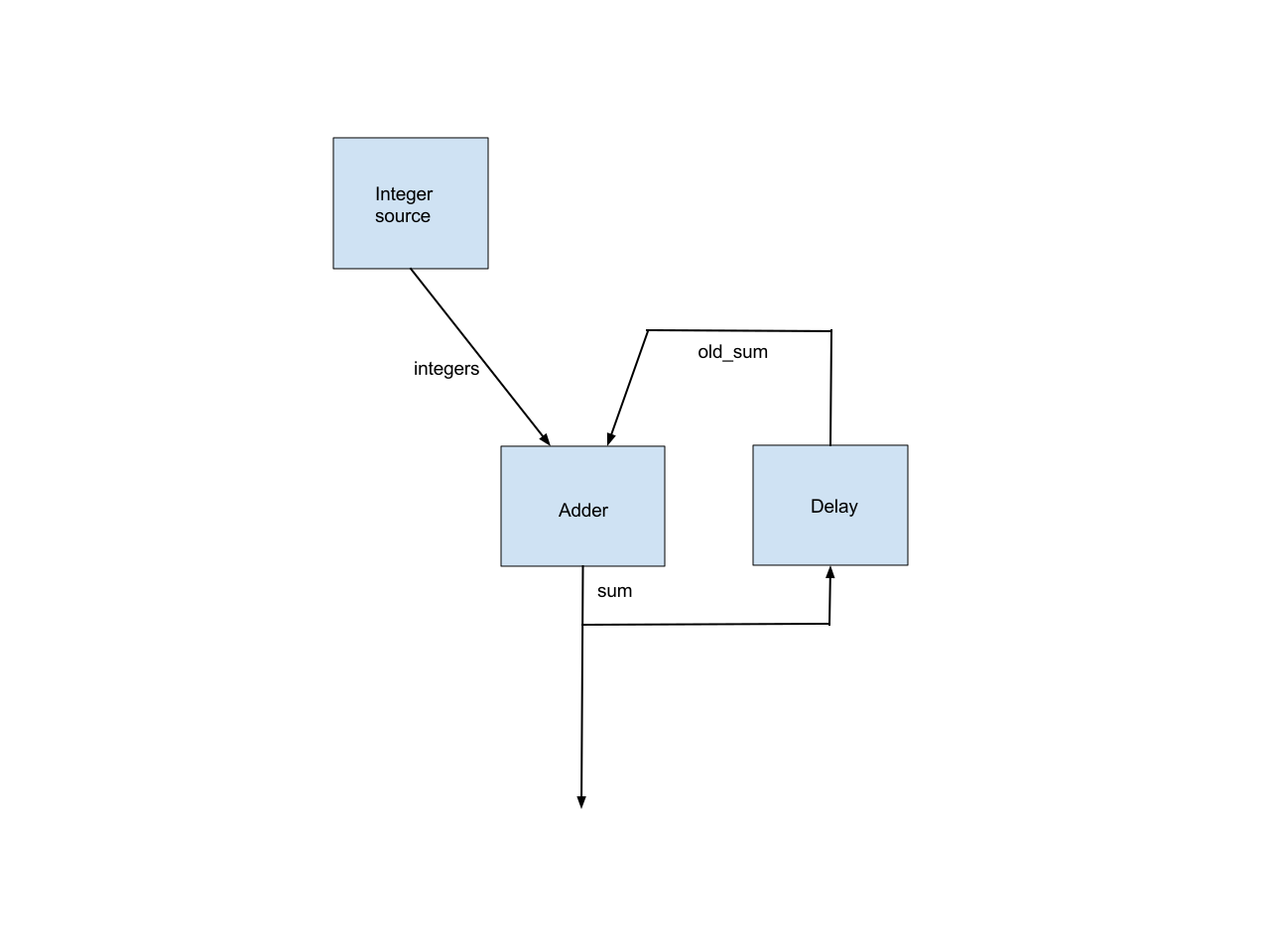
This simple graph illustrates all the issues in supporting cyclic graphs.
Back Edge Annotation
We require that an edge in each cycle be annotated as a back edge. This allows MediaPipe’s topological sort to work, after removing all the back edges.
There are usually multiple ways to select the back edges. Which edges are marked as back edges affects which nodes are considered as upstream and which nodes are considered as downstream, which in turn affects the priorities MediaPipe assigns to the nodes.
For example, the CalculatorGraphTest.Cycle
test marks the old_sum
edge as a
back edge, so the Delay node is considered as a downstream node of the adder
node and is given a higher priority. Alternatively, we could mark the sum
input to the delay node as the back edge, in which case the delay node would be
considered as an upstream node of the adder node and is given a lower priority.
Initial Packet
For the adder calculator to be runnable when the first integer from the integer
source arrives, we need an initial packet, with value 0 and with the same
timestamp, on the old_sum
input stream to the adder. This initial packet
should be output by the delay calculator in the Open()
method.
Delay in a Loop
Each loop should incur a delay to align the previous sum
output with the next
integer input. This is also done by the delay node. So the delay node needs to
know the following about the timestamps of the integer source calculator:
-
The timestamp of the first output.
-
The timestamp delta between successive outputs.
We plan to add an alternative scheduling policy that only cares about packet ordering and ignores packet timestamps, which will eliminate this inconvenience.
Early Termination of a Calculator When One Input Stream is Done
By default, MediaPipe calls the Close()
method of a non-source calculator when
all of its input streams are done. In the example graph, we want to stop the
adder node as soon as the integer source is done. This is accomplished by
configuring the adder node with an alternative input stream handler, EarlyCloseInputStreamHandler
.
Relevant Source Code
Delay Calculator
Note the code in Open()
that outputs the initial packet and the code in Process()
that adds a (unit) delay to input packets. As noted above, this
delay node assumes that its output stream is used alongside an input stream with
packet timestamps 0, 1, 2, 3, ...
  class

 UnitDelayCalculator

 :

 public

 Calculator

 {

 public
 :
 static

 absl
 ::
 Status

 FillExpectations
 (
 const

 CalculatorOptions
&
 extendable_options
 ,

 PacketTypeSet
 *

 inputs
 ,
 PacketTypeSet
 *

 outputs
 ,

 PacketTypeSet
 *

 input_side_packets
 )

 {
 inputs
 -
> Index
 (
 0
 )
 -
> Set<int>
 (
 "An integer."
 );
 outputs
 -
> Index
 (
 0
 )
 -
> Set<int>
 (
 "The input delayed by one time unit."
 );
 return

 absl
 ::
 OkStatus
 ();
 }
 absl
 ::
 Status

 Open
 ()

 final

 {
 Output
 ()
 -
> Add
 (
 new

 int
 (
 0
 ),

 Timestamp
 (
 0
 ));
 return

 absl
 ::
 OkStatus
 ();
 }
 absl
 ::
 Status

 Process
 ()

 final

 {
 const

 Packet
&
 packet

 =

 Input
 ()
 -
> Value
 ();
 Output
 ()
 -
> AddPacket
 (
 packet
 .
 At
 (
 packet
 .
 Timestamp
 ().
 NextAllowedInStream
 ()));
 return

 absl
 ::
 OkStatus
 ();
 }
 };
Graph Config
Note the back_edge
annotation and the alternative input_stream_handler
.
  node

 {
 calculator
 :

 'GlobalCountSourceCalculator'
 input_side_packet
 :

 'global_counter'
 output_stream
 :

 'integers'
 }
 node

 {
 calculator
 :

 'IntAdderCalculator'
 input_stream
 :

 'integers'
 input_stream
 :

 'old_sum'
 input_stream_info
 :

 {
 tag_index
 :

 ':1'

 #

 'old_sum'
 back_edge
 :

 true
 }
 output_stream
 :

 'sum'
 input_stream_handler

 {
 input_stream_handler
 :

 'EarlyCloseInputStreamHandler'
 }
 }
 node

 {
 calculator
 :

 'UnitDelayCalculator'
 input_stream
 :

 'sum'
 output_stream
 :

 'old_sum'
 }
