

The MediaPipe Framework Android Archive (AAR) library is a convenient way to use MediaPipe Framework with Android Studio and Gradle. MediaPipe Framework doesn't publish a general AAR that can be used by all projects. Instead, developers need to create a mediapipe_aar() target to generate a custom AAR file for their own projects. This is necessary in order to include specific resources such as MediaPipe calculators needed for each project.
Steps to build a MediaPipe Framework AAR
-
Create a mediapipe_aar() target.
In the MediaPipe directory, create a new mediapipe_aar() target in a BUILD file. You need to figure out what calculators are used in the graph and provide the calculator dependencies to the mediapipe_aar(). For example, to build an AAR for a face detection graph, you can put the following code into mediapipe/examples/android/src/java/com/google/mediapipe/apps/aar_example/BUILD.
load ( "//mediapipe/java/com/google/mediapipe:mediapipe_aar.bzl" , "mediapipe_aar" ) mediapipe_aar ( name = "mediapipe_face_detection" , calculators = [ "//mediapipe/graphs/face_detection:mobile_calculators" ], ) -
Run the Bazel build command to generate the AAR.
 bazel
build
-c
opt
--strip =
ALWAYS
 \

--host_crosstool_top =
@bazel_tools//tools/cpp:toolchain
 \

--fat_apk_cpu =
arm64-v8a,armeabi-v7a
 \

--legacy_whole_archive =
 0

 \

--features =
-legacy_whole_archive
 \

--copt =
-fvisibility =
hidden
 \

--copt =
-ffunction-sections
 \

--copt =
-fdata-sections
 \

--copt =
-fstack-protector
 \

--copt =
-Oz
 \

--copt =
-fomit-frame-pointer
 \

--copt =
-DABSL_MIN_LOG_LEVEL =
 2

 \

--linkopt =
-Wl,--gc-sections,--strip-all
 \

//path/to/the/aar/build/file:aar_name.aar
For the face detection AAR target we made in step 1, run:
bazel build -c opt --strip = ALWAYS \ --host_crosstool_top = @bazel_tools//tools/cpp:toolchain \ --fat_apk_cpu = arm64-v8a,armeabi-v7a \ --legacy_whole_archive = 0 \ --features = -legacy_whole_archive \ --copt = -fvisibility = hidden \ --copt = -ffunction-sections \ --copt = -fdata-sections \ --copt = -fstack-protector \ --copt = -Oz \ --copt = -fomit-frame-pointer \ --copt = -DABSL_MIN_LOG_LEVEL = 2 \ --linkopt = -Wl,--gc-sections,--strip-all \ //mediapipe/examples/android/src/java/com/google/mediapipe/apps/aar_example:mediapipe_face_detection.aar # It should print: # Target //mediapipe/examples/android/src/java/com/google/mediapipe/apps/aar_example:mediapipe_face_detection.aar up-to-date: # bazel-bin/mediapipe/examples/android/src/java/com/google/mediapipe/apps/aar_example/mediapipe_face_detection.aar -
(Optional) Save the AAR to your preferred location.
 cp
bazel-bin/mediapipe/examples/android/src/java/com/google/mediapipe/apps/aar_example/mediapipe_face_detection.aar
/absolute/path/to/your/preferred/location
Steps to use a MediaPipe Framework AAR in Android Studio with Gradle
-
Start Android Studio and go to your project.
-
Copy the AAR into app/libs.
 cp
bazel-bin/mediapipe/examples/android/src/java/com/google/mediapipe/apps/aar_example/mediapipe_face_detection.aar
/path/to/your/app/libs/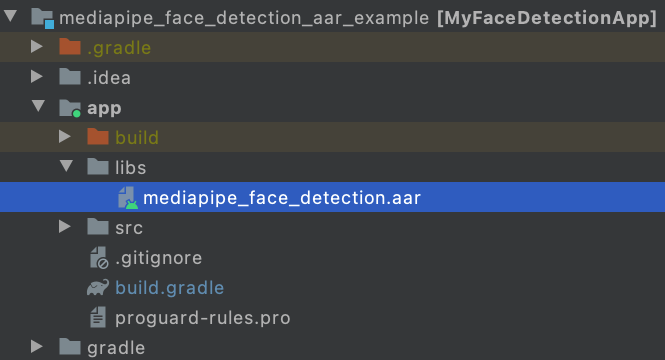
-
Make app/src/main/assets and copy assets (graph, model, and etc) into app/src/main/assets.
Build the MediaPipe binary graph and copy the assets into app/src/main/assets, e.g., for the face detection graph, you need to build and copy the binary graph and the face detection tflite model.
 bazel
build
-c
opt
mediapipe/graphs/face_detection:face_detection_mobile_gpu_binary_graph
cp
bazel-bin/mediapipe/graphs/face_detection/face_detection_mobile_gpu.binarypb
/path/to/your/app/src/main/assets/
cp
mediapipe/modules/face_detection/face_detection_short_range.tflite
/path/to/your/app/src/main/assets/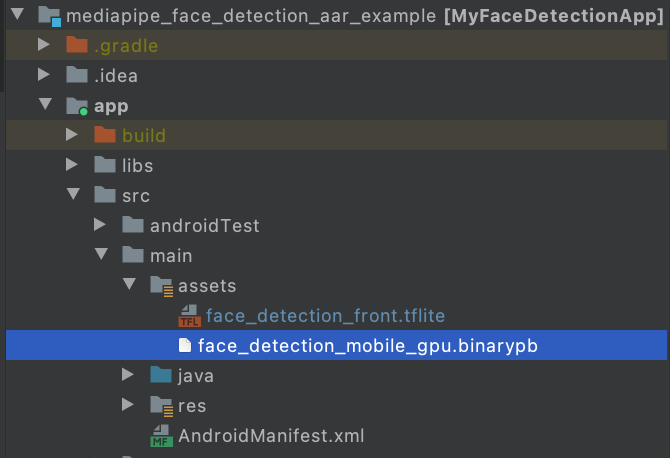
-
Modify app/build.gradle to add MediaPipe dependencies and MediaPipe AAR.
dependencies { implementation fileTree ( dir : ' libs ' , include : [ ' * . jar ' , ' * . aar ' ]) implementation ' androidx . appcompat : appcompat : 1.0.2 ' implementation ' androidx . constraintlayout : constraintlayout : 1.1.3 ' testImplementation ' junit : junit : 4.12 ' androidTestImplementation ' androidx . test . ext : junit : 1.1.0 ' androidTestImplementation ' androidx . test . espresso : espresso - core : 3.1.1 ' // MediaPipe deps implementation ' com . google . flogger : flogger : latest . release ' implementation ' com . google . flogger : flogger - system - backend : latest . release ' implementation ' com . google . code . findbugs : jsr305 : latest . release ' implementation ' com . google . guava : guava : 27.0.1 - android ' implementation ' com . google . protobuf : protobuf - javalite : 3.19.1 ' // CameraX core library def camerax_version = "1.0.0-beta10" implementation "androidx.camera:camera-core:$camerax_version" implementation "androidx.camera:camera-camera2:$camerax_version" implementation "androidx.camera:camera-lifecycle:$camerax_version" // AutoValue def auto_value_version = "1.8.1" implementation "com.google.auto.value:auto-value-annotations:$auto_value_version" annotationProcessor "com.google.auto.value:auto-value:$auto_value_version" } -
Follow our Android app examples to use MediaPipe in Android Studio for your use case. If you are looking for an example, a face detection example can be found here and a multi-hand tracking example can be found here .
