

The MediaPipe Gesture Recognizer task lets you recognize hand gestures in real time, and provides the recognized hand gesture results and hand landmarks of the detected hands. These instructions show you how to use the Gesture Recognizer with Python applications.
You can see this task in action by viewing the Web demo For more information about the capabilities, models, and configuration options of this task, see the Overview .
Code example
The example code for Gesture Recognizer provides a complete implementation of this task in Python for your reference. This code helps you test this task and get started on building your own hand gesture recognizer. You can view, run, and edit the Gesture Recognizer example code using just your web browser.
If you are implementing the Gesture Recognizer for Raspberry Pi, refer to the Raspberry Pi example app .
Setup
This section describes key steps for setting up your development environment and code projects specifically to use Gesture Recognizer. For general information on setting up your development environment for using MediaPipe tasks, including platform version requirements, see the Setup guide for Python .
Packages
The MediaPipe Gesture Recognizer task requires the mediapipe PyPI package. You can install and import these dependencies with the following:
 $
python
-m
pip
install
mediapipe
Imports
Import the following classes to access the Gesture Recognizer task functions:
  import

 mediapipe

 as

 mp
 from

 mediapipe.tasks

 import
 python
 from

 mediapipe.tasks.python

 import
 vision
Model
The MediaPipe Gesture Recognizer task requires a trained model bundle that is compatible with this task. For more information on available trained models for Gesture Recognizer, see the task overview Models section .
Select and download the model, and then store it in a local directory:
  model_path
 =
 '/absolute/path/to/gesture_recognizer.task'
Specify the path of the model within the Model Name parameter, as shown below:
  base_options
 =
 BaseOptions
 (
 model_asset_path
 =
 model_path
 )
Create the task
The MediaPipe Gesture Recognizer task uses the create_from_options
function to set up the
task. The create_from_options
function accepts values for configuration
options to handle. For more information on configuration options, see Configuration options
.
The following code demonstrates how to build and configure this task.
These samples also show the variations of the task construction for images, video files, and live video streams.
Image
 import

 mediapipe

 as

 mp
 BaseOptions
 =
 mp
 .
 tasks
 .
 BaseOptions
 GestureRecognizer
 =
 mp
 .
 tasks
 .
 vision
 .
 GestureRecognizer
 GestureRecognizerOptions
 =
 mp
 .
 tasks
 .
 vision
 .
 GestureRecognizerOptions
 VisionRunningMode
 =
 mp
 .
 tasks
 .
 vision
 .
 RunningMode
 # Create a gesture recognizer instance with the image mode:
 options
 =
 GestureRecognizerOptions
 (
 base_options
 =
 BaseOptions
 (
 model_asset_path
 =
 '/path/to/model.task'
 ),
 running_mode
 =
 VisionRunningMode
 .
 IMAGE
 )
 with
 GestureRecognizer
 .
 create_from_options
 (
 options
 )
 as
 recognizer
 :
 # The detector is initialized. Use it here.
 # ...
Video
 import

 mediapipe

 as

 mp
 BaseOptions
 =
 mp
 .
 tasks
 .
 BaseOptions
 GestureRecognizer
 =
 mp
 .
 tasks
 .
 vision
 .
 GestureRecognizer
 GestureRecognizerOptions
 =
 mp
 .
 tasks
 .
 vision
 .
 GestureRecognizerOptions
 VisionRunningMode
 =
 mp
 .
 tasks
 .
 vision
 .
 RunningMode
 # Create a gesture recognizer instance with the video mode:
 options
 =
 GestureRecognizerOptions
 (
 base_options
 =
 BaseOptions
 (
 model_asset_path
 =
 '/path/to/model.task'
 ),
 running_mode
 =
 VisionRunningMode
 .
 VIDEO
 )
 with
 GestureRecognizer
 .
 create_from_options
 (
 options
 )
 as
 recognizer
 :
 # The detector is initialized. Use it here.
 # ...
Live stream
 import

 mediapipe

 as

 mp
 BaseOptions
 =
 mp
 .
 tasks
 .
 BaseOptions
 GestureRecognizer
 =
 mp
 .
 tasks
 .
 vision
 .
 GestureRecognizer
 GestureRecognizerOptions
 =
 mp
 .
 tasks
 .
 vision
 .
 GestureRecognizerOptions
 GestureRecognizerResult
 =
 mp
 .
 tasks
 .
 vision
 .
 GestureRecognizerResult
 VisionRunningMode
 =
 mp
 .
 tasks
 .
 vision
 .
 RunningMode
 # Create a gesture recognizer instance with the live stream mode:
 def

 print_result
 (
 result
 :
 GestureRecognizerResult
 ,
 output_image
 :
 mp
 .
 Image
 ,
 timestamp_ms
 :
 int
 ):
 print
 (
 'gesture recognition result:
 {}
 '
 .
 format
 (
 result
 ))
 options
 =
 GestureRecognizerOptions
 (
 base_options
 =
 BaseOptions
 (
 model_asset_path
 =
 '/path/to/model.task'
 ),
 running_mode
 =
 VisionRunningMode
 .
 LIVE_STREAM
 ,
 result_callback
 =
 print_result
 )
 with
 GestureRecognizer
 .
 create_from_options
 (
 options
 )
 as
 recognizer
 :
 # The detector is initialized. Use it here.
 # ...
Configuration options
This task has the following configuration options for Python applications:
running_mode
IMAGE: The mode for single image inputs.
VIDEO: The mode for decoded frames of a video.
LIVE_STREAM: The mode for a livestream of input data, such as from a camera. In this mode, resultListener must be called to set up a listener to receive results asynchronously.
IMAGE, VIDEO, LIVE_STREAM
}IMAGE
num_hands
GestureRecognizer
.Any integer > 0
1
min_hand_detection_confidence
0.0 - 1.0
0.5
min_hand_presence_confidence
0.0 - 1.0
0.5
min_tracking_confidence
0.0 - 1.0
0.5
canned_gestures_classifier_options
["None", "Closed_Fist", "Open_Palm", "Pointing_Up", "Thumb_Down", "Thumb_Up", "Victory", "ILoveYou"]
- Display names locale:
any string - Max results:
any integer - Score threshold:
0.0-1.0 - Category allowlist:
vector of strings - Category denylist:
vector of strings
- Display names locale:
"en" - Max results:
-1 - Score threshold:
0 - Category allowlist: empty
- Category denylist: empty
custom_gestures_classifier_options
- Display names locale:
any string - Max results:
any integer - Score threshold:
0.0-1.0 - Category allowlist:
vector of strings - Category denylist:
vector of strings
- Display names locale:
"en" - Max results:
-1 - Score threshold:
0 - Category allowlist: empty
- Category denylist: empty
result_callback
LIVE_STREAM
ResultListener
Prepare data
Prepare your input as an image file or a numpy array, then convert it to a mediapipe.Image
object. If your input is a video file or live stream from a
webcam, you can use an external library such as OpenCV
to load your input frames as numpy
arrays.
Image
 import

 mediapipe

 as

 mp
 # Load the input image from an image file.
 mp_image
 =
 mp
 .
 Image
 .
 create_from_file
 (
 '/path/to/image'
 )
 # Load the input image from a numpy array.
 mp_image
 =
 mp
 .
 Image
 (
 image_format
 =
 mp
 .
 ImageFormat
 .
 SRGB
 ,
 data
 =
 numpy_image
 )
Video
 import

 mediapipe

 as

 mp
 # Use OpenCV’s VideoCapture to load the input video.
 # Load the frame rate of the video using OpenCV’s CV_CAP_PROP_FPS
 # You’ll need it to calculate the timestamp for each frame.
 # Loop through each frame in the video using VideoCapture#read()
 # Convert the frame received from OpenCV to a MediaPipe’s Image object.
 mp_image
 =
 mp
 .
 Image
 (
 image_format
 =
 mp
 .
 ImageFormat
 .
 SRGB
 ,
 data
 =
 numpy_frame_from_opencv
 )
Live stream
 import

 mediapipe

 as

 mp
 # Use OpenCV’s VideoCapture to start capturing from the webcam.
 # Create a loop to read the latest frame from the camera using VideoCapture#read()
 # Convert the frame received from OpenCV to a MediaPipe’s Image object.
 mp_image
 =
 mp
 .
 Image
 (
 image_format
 =
 mp
 .
 ImageFormat
 .
 SRGB
 ,
 data
 =
 numpy_frame_from_opencv
 )
Run the task
The Gesture Recognizer uses the recognize, recognize_for_video and recognize_async functions to trigger inferences. For gesture recognition, this involves preprocessing input data, detecting hands in the image, detecting hand landmarks, and recognizing hand gesture from the landmarks.
The following code demonstrates how execute the processing with the task model.
Image
 # Perform gesture recognition on the provided single image.
 # The gesture recognizer must be created with the image mode.
 gesture_recognition_result
 =
 recognizer
 .
 recognize
 (
 mp_image
 )
Video
 # Perform gesture recognition on the provided single image.
 # The gesture recognizer must be created with the video mode.
 gesture_recognition_result
 =
 recognizer
 .
 recognize_for_video
 (
 mp_image
 ,
 frame_timestamp_ms
 )
Live stream
 # Send live image data to perform gesture recognition.
 # The results are accessible via the `result_callback` provided in
 # the `GestureRecognizerOptions` object.
 # The gesture recognizer must be created with the live stream mode.
 recognizer
 .
 recognize_async
 (
 mp_image
 ,
 frame_timestamp_ms
 )
Note the following:
- When running in the video mode or the live stream mode, you must also provide the Gesture Recognizer task the timestamp of the input frame.
- When running in the image or the video model, the Gesture Recognizer task will block the current thread until it finishes processing the input image or frame.
- When running in the live stream mode, the Gesture Recognizer task doesn’t block the current thread but returns immediately. It will invoke its result listener with the recognition result every time it has finished processing an input frame. If the recognition function is called when the Gesture Recognizer task is busy processing another frame, the task will ignore the new input frame.
For a complete example of running an Gesture Recognizer on an image, see the code example for details.
Handle and display results
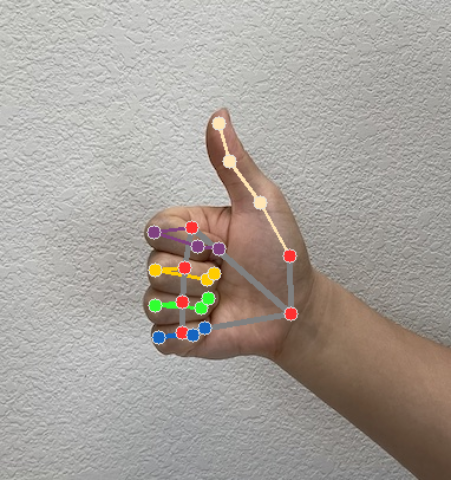
The Gesture Recognizer generates a gesture detection result object for each recognition run. The result object contains hand landmarks in image coordinates, hand landmarks in world coordinates, handedness(left/right hand), and hand gestures categories of the detected hands.
The following shows an example of the output data from this task:
The resulted GestureRecognizerResult
contains four components, and each component is an array, where each element contains the detected result of a single detected hand.
-
Handedness
Handedness represents whether the detected hands are left or right hands.
-
Gestures
The recognized gesture categories of the detected hands.
-
Landmarks
There are 21 hand landmarks, each composed of
x,yandzcoordinates. Thexandycoordinates are normalized to [0.0, 1.0] by the image width and height, respectively. Thezcoordinate represents the landmark depth, with the depth at the wrist being the origin. The smaller the value, the closer the landmark is to the camera. The magnitude ofzuses roughly the same scale asx. -
World Landmarks
The 21 hand landmarks are also presented in world coordinates. Each landmark is composed of
x,y, andz, representing real-world 3D coordinates in meters with the origin at the hand’s geometric center.
  GestureRecognizerResult
 :
 Handedness
 :
 Categories
 #0:
 index
 :
 0
 score
 :
 0.98396
 categoryName
 :
 Left
 Gestures
 :
 Categories
 #0:
 score
 :
 0.76893
 categoryName
 :
 Thumb_Up
 Landmarks
 :
 Landmark
 #0:
 x
 :
 0.638852
 y
 :
 0.671197
 z
 :
 -
 3.41E-7
 Landmark
 #1:
 x
 :
 0.634599
 y
 :
 0.536441
 z
 :
 -
 0.06984
 ...
 (
 21
 landmarks
 for
 a
 hand
 )
 WorldLandmarks
 :
 Landmark
 #0:
 x
 :
 0.067485
 y
 :
 0.031084
 z
 :
 0.055223
 Landmark
 #1:
 x
 :
 0.063209
 y
 :
 -
 0.00382
 z
 :
 0.020920
 ...
 (
 21
 world
 landmarks
 for
 a
 hand
 )
The following images shows a visualization of the task output:
The Gesture Recognizer example code demonstrates how to display the recognition results returned from the task, see the code example for details.
