

The MediaPipe Gesture Recognizer task lets you recognize hand gestures in real time, and provides the recognized hand gesture results and the hand landmarks of the detected hands. These instructions show you how to use the Gesture Recognizer for web and JavaScript apps.
You can see this task in action by viewing the demo . For more information about the capabilities, models, and configuration options of this task, see the Overview .
Code example
The example code for Gesture Recognizer provides a complete implementation of this task in JavaScript for your reference. This code helps you test this task and get started on building your own gesture recognition app. You can view, run, and edit the Gesture Recognizer example using just your web browser.
Setup
This section describes key steps for setting up your development environment specifically to use Gesture Recognizer. For general information on setting up your web and JavaScript development environment, including platform version requirements, see the Setup guide for web .
JavaScript packages
Gesture Recognizer code is available through the MediaPipe @mediapipe/tasks-vision
NPM
package. You can
find and download these libraries by following the instructions in the platform Setup guide
.
You can install the required packages through NPM using the following command:
 npm
install
@mediapipe/tasks-vision
If you want to import the task code via a content delivery network (CDN)
service, add the following code in the <head>
tag in your HTML file:
 <!-- You can replace JSDeliver with another CDN if you prefer to -->
<head>
  <script src="https://cdn.jsdelivr.net/npm/@mediapipe/tasks-vision/vision_bundle.mjs"
    crossorigin="anonymous"></script>
</head>
Model
The MediaPipe Gesture Recognizer task requires a trained model that is compatible with this task. For more information on available trained models for Gesture Recognizer, see the task overview Models section .
Select and download the model, and then store it within your project directory:
<dev-project-root>/app/shared/models/
Create the task
Use one of the Gesture Recognizer createFrom...()
functions to
prepare the task for running inferences. Use the createFromModelPath()
function with a relative or absolute path to the trained model file.
If your model is already loaded into memory, you can use the createFromModelBuffer()
method.
The code example below demonstrates using the createFromOptions()
function to
set up the task. The createFromOptions
function allows you to customize the
Gesture Recognizer with configuration options. For more information on configuration
options, see Configuration options
.
The following code demonstrates how to build and configure the task with custom options:
  // Create task for image file processing:
 const

 vision

 =

 await

 FilesetResolver
 .
 forVisionTasks
 (

 // path/to/wasm/root

 "https://cdn.jsdelivr.net/npm/@mediapipe/tasks-vision@latest/wasm "
 );
 const

 gestureRecognizer

 =

 await

 GestureRecognizer
 .
 createFromOptions
 (
 vision
 ,

 {

 baseOptions
 :

 {

 modelAssetPath
 :

 "https://storage.googleapis.com/mediapipe-tasks/gesture_recognizer/gesture_recognizer.task"

 },

 numHands
 :

 2
 });
Configuration options
This task has the following configuration options for Web applications:
runningMode
IMAGE: The mode for single image inputs.
VIDEO: The mode for decoded frames of a video or on a livestream of input data, such as from a camera.
IMAGE, VIDEO
}IMAGE
num_hands
GestureRecognizer
.Any integer > 0
1
min_hand_detection_confidence
0.0 - 1.0
0.5
min_hand_presence_confidence
0.0 - 1.0
0.5
min_tracking_confidence
0.0 - 1.0
0.5
canned_gestures_classifier_options
["None", "Closed_Fist", "Open_Palm", "Pointing_Up", "Thumb_Down", "Thumb_Up", "Victory", "ILoveYou"]
- Display names locale:
any string - Max results:
any integer - Score threshold:
0.0-1.0 - Category allowlist:
vector of strings - Category denylist:
vector of strings
- Display names locale:
"en" - Max results:
-1 - Score threshold:
0 - Category allowlist: empty
- Category denylist: empty
custom_gestures_classifier_options
- Display names locale:
any string - Max results:
any integer - Score threshold:
0.0-1.0 - Category allowlist:
vector of strings - Category denylist:
vector of strings
- Display names locale:
"en" - Max results:
-1 - Score threshold:
0 - Category allowlist: empty
- Category denylist: empty
Prepare data
Gesture Recognizer can recognize gestures in images in any format supported by the host browser. The task also handles data input preprocessing, including resizing, rotation and value normalization. To recognize gestures in videos, you can use the API to quickly process one frame at a time, using the timestamp of the frame to determine when the gestures occur within the video.
Run the task
The Gesture Recognizer uses the recognize()
(with running mode 'image'
) and recognizeForVideo()
(with running mode 'video'
) methods to trigger
inferences. The task processes the data, attempts to recognize hand
gestures, and then reports the results.
The following code demonstrates how execute the processing with the task model:
Image
 const

 image

 =

 document
 .
 getElementById
 (
 "image"
 )

 as

 HTMLImageElement
 ;
 const

 gestureRecognitionResult

 =

 gestureRecognizer
 .
 recognize
 (
 image
 );
Video
 await

 gestureRecognizer
 .
 setOptions
 ({

 runningMode
 :

 "video"

 });
 let

 lastVideoTime

 =

 -
 1
 ;
 function

 renderLoop
 ():

 void

 {

 const

 video

 =

 document
 .
 getElementById
 (
 "video"
 );

 if

 (
 video
 .
 currentTime

 !==

 lastVideoTime
 )

 {

 const

 gestureRecognitionResult

 =

 gestureRecognizer
 .
 recognizeForVideo
 (
 video
 );

 processResult
 (
 gestureRecognitionResult
 );

 lastVideoTime

 =

 video
 .
 currentTime
 ;

 }

 requestAnimationFrame
 (()

 =>

 {

 renderLoop
 ();

 });
 }
Calls to the Gesture Recognizer recognize()
and recognizeForVideo()
methods run
synchronously and block the user interface thread. If you recognize gestures in
video frames from a device's camera, each recognition will block the main
thread. You can prevent this by implementing web workers to run the recognize()
and recognizeForVideo()
methods on another thread.
For a more complete implementation of running a Gesture Recognizer task, see the example .
Handle and display results
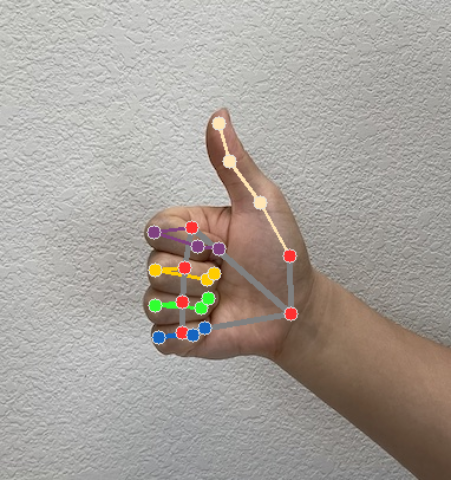
The Gesture Recognizer generates a gesture detection result object for each recognition run. The result object contains hand landmarks in image coordinates, hand landmarks in world coordinates, handedness(left/right hand), and hand gestures categories of the detected hands.
The following shows an example of the output data from this task:
The resulted GestureRecognizerResult
contains four components, and each component is an array, where each element contains the detected result of a single detected hand.
-
Handedness
Handedness represents whether the detected hands are left or right hands.
-
Gestures
The recognized gesture categories of the detected hands.
-
Landmarks
There are 21 hand landmarks, each composed of
x,yandzcoordinates. Thexandycoordinates are normalized to [0.0, 1.0] by the image width and height, respectively. Thezcoordinate represents the landmark depth, with the depth at the wrist being the origin. The smaller the value, the closer the landmark is to the camera. The magnitude ofzuses roughly the same scale asx. -
World Landmarks
The 21 hand landmarks are also presented in world coordinates. Each landmark is composed of
x,y, andz, representing real-world 3D coordinates in meters with the origin at the hand’s geometric center.
 GestureRecognizerResult:
  Handedness:
    Categories #0:
      index        : 0
      score        : 0.98396
      categoryName : Left
  Gestures:
    Categories #0:
      score        : 0.76893
      categoryName : Thumb_Up
  Landmarks:
    Landmark #0:
      x            : 0.638852
      y            : 0.671197
      z            : -3.41E-7
    Landmark #1:
      x            : 0.634599
      y            : 0.536441
      z            : -0.06984 ...
(21 landmarks for a hand)
  WorldLandmarks:
    Landmark #0:
      x            : 0.067485
      y            : 0.031084
      z            : 0.055223
    Landmark #1:
      x            : 0.063209
      y            : -0.00382
      z            : 0.020920 ...
(21 world landmarks for a hand)
The following images shows a visualization of the task output:
For a more complete implementation of creating a Gesture Recognizer task, see the example .
