

4.1.5 Conversion Tracking
Value and Business Impact
To effectively provide the Google ecosystem's powerful machine learning and analytics for your merchant client ad campaigns, you need to place conversion tracking and remarketing tags on the client websites.
A conversion in Google Ads is when a user performs some specified action after clicking an ad, such as purchasing a product, installing a mobile app, or signing up for an email list. Conversion tracking provides key insights into users' actions after viewing or clicking an ad, including information for calculating and comparing return on investment (ROI) to help your clients make decisions on where to focus advertising spend. Tracking also helps ensure that data is available for reconciliation purposes. Orders differ depending on the product or category, so conversion tracking can also be useful to show how specific listing groups are converting into sales.
A conversion goal is a group of conversion actions with the same underlying goal. For example, 'Purchase' can be a conversion goal that has 'Website purchases' and 'Store sales' as conversion actions.
Conversion actions are still used to track conversions and optimize the campaign. You create conversion actions and Google group those in conversion goals.
Purchase conversion action
Implementing the conversion tracking described here enables your merchant's Google Ads account to measure the number of Purchase conversions and the value of these conversions. Without conversion tracking, you are not be able to measure the business value the campaign is driving in terms of ROAS (return on ad spend). It also sends additional data signals that enable the campaign to optimize performance.
Other conversion actions
While purchase conversion action is required only, tracking additional conversion actions can provide additional insights to your merchants. We recommend logging everything possible, while implementing as many of the core conversion actions. A full list of the recommended conversion actions are described in the Tech API guidance section.
In general, the recommendation is to capture the following:
- Any success event directly associated with value
- Success events that contribute to core conversions such as add_to_cart and sign_up.
- Engagements and user interactions that help advertisers understand how they're engaging their end users
Secondary conversion actions are for observation and reporting only, affect bidding. Learn more about primary and secondary conversion actions.
UX Guidance
To minimize the risk of errors, we recommend that you implement conversion tracking programmatically without merchant input, but you should ensure that your merchants know that conversion tracking has been set up.
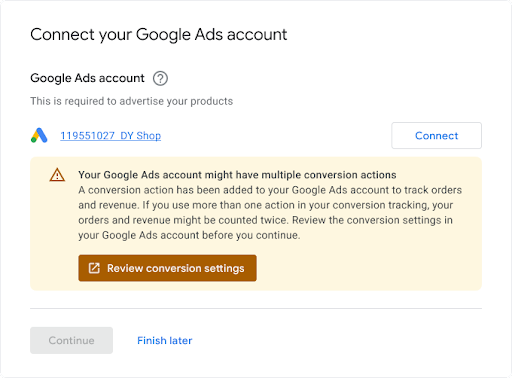
When merchants link an existing Ads account, we recommend surfacing a notification that their account may have conversion tracking already set up, as there may be conflicts that must be resolved. An example is shown below.
Tech Guidance
Here is how conversion tracking works. This section elaborates more on each step:
-
You create a 'ConversionAction' in your merchant's Ads account to track purchases (and optionally other customer actions) made on their website.
-
You add the tag, or code snippet, for that conversion action to a website or mobile app. For details, see Set up conversion tracking for your website .
-
When a customer clicks on the ad, a temporary cookie is placed on the customer's computer or mobile device.
-
When the customer completes the action defined for the advertiser, Google recognizes the cookie (through the added code snippet), and records a conversion together with other parameters such as 'value' if appropriate.
Pre-requisites
Before you begin, make sure you have a Google tag Developer ID. If you don't have a Google tag Developer ID, fill out the Google tag Developer ID request form . Your Developer ID is different from other IDs, such as the Measurement ID or Conversion ID, which your end users add to their website measurement code.
Create and configure conversion actions
The following examples show how to create a conversion action and to add it to an Ads account. Each sample handles all the background authentication tasks for you, and walks you through creating a conversion action:
Java
// Copyright 2018 Google LLC // // Licensed under the Apache License, Version 2.0 (the "License"); // you may not use this file except in compliance with the License. // You may obtain a copy of the License at // // https://www.apache.org/licenses/LICENSE-2.0 // // Unless required by applicable law or agreed to in writing, software // distributed under the License is distributed on an "AS IS" BASIS, // WITHOUT WARRANTIES OR CONDITIONS OF ANY KIND, either express or implied. // See the License for the specific language governing permissions and // limitations under the License. package com.google.ads.googleads.examples.remarketing ; import static com.google.ads.googleads.examples.utils.CodeSampleHelper.getPrintableDateTime ; import com.beust.jcommander.Parameter ; import com.google.ads.googleads.examples.utils.ArgumentNames ; import com.google.ads.googleads.examples.utils.CodeSampleParams ; import com.google.ads.googleads.lib.GoogleAdsClient ; import com.google.ads.googleads.v24.enums.ConversionActionCategoryEnum.ConversionActionCategory ; import com.google.ads.googleads.v24.enums.ConversionActionStatusEnum.ConversionActionStatus ; import com.google.ads.googleads.v24.enums.ConversionActionTypeEnum.ConversionActionType ; import com.google.ads.googleads.v24.errors.GoogleAdsError ; import com.google.ads.googleads.v24.errors.GoogleAdsException ; import com.google.ads.googleads.v24.resources.ConversionAction ; import com.google.ads.googleads.v24.resources.ConversionAction.ValueSettings ; import com.google.ads.googleads.v24.services.ConversionActionOperation ; import com.google.ads.googleads.v24.services.ConversionActionServiceClient ; import com.google.ads.googleads.v24.services.MutateConversionActionResult ; import com.google.ads.googleads.v24.services.MutateConversionActionsResponse ; import java.io.FileNotFoundException ; import java.io.IOException ; import java.util.Collections ; /** Adds a conversion action. */ public class AddConversionAction { private static class AddConversionActionParams extends CodeSampleParams { @Parameter ( names = ArgumentNames . CUSTOMER_ID , required = true ) private Long customerId ; } public static void main ( String [] args ) { AddConversionActionParams params = new AddConversionActionParams (); if ( ! params . parseArguments ( args )) { // Either pass the required parameters for this example on the command line, or insert them // into the code here. See the parameter class definition above for descriptions. params . customerId = Long . parseLong ( "INSERT_CUSTOMER_ID_HERE" ); } GoogleAdsClient googleAdsClient = null ; try { googleAdsClient = GoogleAdsClient . newBuilder (). fromPropertiesFile (). build (); } catch ( FileNotFoundException fnfe ) { System . err . printf ( "Failed to load GoogleAdsClient configuration from file. Exception: %s%n" , fnfe ); System . exit ( 1 ); } catch ( IOException ioe ) { System . err . printf ( "Failed to create GoogleAdsClient. Exception: %s%n" , ioe ); System . exit ( 1 ); } try { new AddConversionAction (). runExample ( googleAdsClient , params . customerId ); } catch ( GoogleAdsException gae ) { // GoogleAdsException is the base class for most exceptions thrown by an API request. // Instances of this exception have a message and a GoogleAdsFailure that contains a // collection of GoogleAdsErrors that indicate the underlying causes of the // GoogleAdsException. System . err . printf ( "Request ID %s failed due to GoogleAdsException. Underlying errors:%n" , gae . getRequestId ()); int i = 0 ; for ( GoogleAdsError googleAdsError : gae . getGoogleAdsFailure (). getErrorsList ()) { System . err . printf ( " Error %d: %s%n" , i ++ , googleAdsError ); } System . exit ( 1 ); } } /** * Runs the example. * * @param googleAdsClient the Google Ads API client. * @param customerId the client customer ID. * @throws GoogleAdsException if an API request failed with one or more service errors. */ private void runExample ( GoogleAdsClient googleAdsClient , long customerId ) { // Creates a ConversionAction. ConversionAction conversionAction = ConversionAction . newBuilder () // Note that conversion action names must be unique. If a conversion action already // exists with the specified conversion_action_name the create operation will fail with // a ConversionActionError.DUPLICATE_NAME error. . setName ( "Earth to Mars Cruises Conversion #" + getPrintableDateTime ()) . setCategory ( ConversionActionCategory . DEFAULT ) . setType ( ConversionActionType . WEBPAGE ) . setStatus ( ConversionActionStatus . ENABLED ) . setViewThroughLookbackWindowDays ( 15L ) . setValueSettings ( ValueSettings . newBuilder () . setDefaultValue ( 23.41 ) . setAlwaysUseDefaultValue ( true ) . build ()) . build (); // Creates the operation. ConversionActionOperation operation = ConversionActionOperation . newBuilder (). setCreate ( conversionAction ). build (); try ( ConversionActionServiceClient conversionActionServiceClient = googleAdsClient . getLatestVersion (). createConversionActionServiceClient ()) { MutateConversionActionsResponse response = conversionActionServiceClient . mutateConversionActions ( Long . toString ( customerId ), Collections . singletonList ( operation )); System . out . printf ( "Added %d conversion actions:%n" , response . getResultsCount ()); for ( MutateConversionActionResult result : response . getResultsList ()) { System . out . printf ( "New conversion action added with resource name: '%s'%n" , result . getResourceName ()); } } } }
C#
// Copyright 2019 Google LLC // // Licensed under the Apache License, Version 2.0 (the "License"); // you may not use this file except in compliance with the License. // You may obtain a copy of the License at // // http://www.apache.org/licenses/LICENSE-2.0 // // Unless required by applicable law or agreed to in writing, software // distributed under the License is distributed on an "AS IS" BASIS, // WITHOUT WARRANTIES OR CONDITIONS OF ANY KIND, either express or implied. // See the License for the specific language governing permissions and // limitations under the License. using CommandLine ; using Google.Ads.Gax.Examples ; using Google.Ads.GoogleAds.Lib ; using Google.Ads.GoogleAds.V24.Errors ; using Google.Ads.GoogleAds.V24.Resources ; using Google.Ads.GoogleAds.V24.Services ; using System ; using static Google . Ads . GoogleAds . V24 . Enums . ConversionActionCategoryEnum . Types ; using static Google . Ads . GoogleAds . V24 . Enums . ConversionActionStatusEnum . Types ; using static Google . Ads . GoogleAds . V24 . Enums . ConversionActionTypeEnum . Types ; namespace Google.Ads.GoogleAds.Examples.V24 { /// <summary> /// This code example illustrates adding a conversion action. /// </summary> public class AddConversionAction : ExampleBase { /// <summary> /// Command line options for running the <see cref="AddConversionAction"/> example. /// </summary> public class Options : OptionsBase { /// <summary> /// The Google Ads customer ID for which the conversion action is added. /// </summary> [Option("customerId", Required = true, HelpText = "The Google Ads customer ID for which the conversion action is added.")] public long CustomerId { get ; set ; } } /// <summary> /// Main method, to run this code example as a standalone application. /// </summary> /// <param name="args">The command line arguments.</param> public static void Main ( string [] args ) { Options options = ExampleUtilities . ParseCommandLine<Options> ( args ); AddConversionAction codeExample = new AddConversionAction (); Console . WriteLine ( codeExample . Description ); codeExample . Run ( new GoogleAdsClient (), options . CustomerId ); } /// <summary> /// Returns a description about the code example. /// </summary> public override string Description = > "This code example illustrates adding a conversion action." ; /// <summary> /// Runs the code example. /// </summary> /// <param name="client">The Google Ads client.</param> /// <param name="customerId">The Google Ads customer ID for which the conversion action is /// added.</param> public void Run ( GoogleAdsClient client , long customerId ) { // Get the ConversionActionService. ConversionActionServiceClient conversionActionService = client . GetService ( Services . V24 . ConversionActionService ); // Note that conversion action names must be unique. // If a conversion action already exists with the specified name the create operation // will fail with a ConversionAction.DUPLICATE_NAME error. string ConversionActionName = "Earth to Mars Cruises Conversion #" + ExampleUtilities . GetRandomString (); // Add a conversion action. ConversionAction conversionAction = new ConversionAction () { Name = ConversionActionName , Category = ConversionActionCategory . Default , Type = ConversionActionType . Webpage , Status = ConversionActionStatus . Enabled , ViewThroughLookbackWindowDays = 15 , ValueSettings = new ConversionAction . Types . ValueSettings () { DefaultValue = 23.41 , AlwaysUseDefaultValue = true } }; // Create the operation. ConversionActionOperation operation = new ConversionActionOperation () { Create = conversionAction }; try { // Create the conversion action. MutateConversionActionsResponse response = conversionActionService . MutateConversionActions ( customerId . ToString (), new ConversionActionOperation [] { operation }); // Display the results. foreach ( MutateConversionActionResult newConversionAction in response . Results ) { Console . WriteLine ( $"New conversion action with resource name = " + $"'{newConversionAction.ResourceName}' was added." ); } } catch ( GoogleAdsException e ) { Console . WriteLine ( "Failure:" ); Console . WriteLine ( $"Message: {e.Message}" ); Console . WriteLine ( $"Failure: {e.Failure}" ); Console . WriteLine ( $"Request ID: {e.RequestId}" ); throw ; } } } }
PHP
< ?php /** * Copyright 2018 Google LLC * * Licensed under the Apache License, Version 2.0 (the "License"); * you may not use this file except in compliance with the License. * You may obtain a copy of the License at * * https://www.apache.org/licenses/LICENSE-2.0 * * Unless required by applicable law or agreed to in writing, software * distributed under the License is distributed on an "AS IS" BASIS, * WITHOUT WARRANTIES OR CONDITIONS OF ANY KIND, either express or implied. * See the License for the specific language governing permissions and * limitations under the License. */ namespace Google\Ads\GoogleAds\Examples\Remarketing; require __DIR__ . '/../../vendor/autoload.php'; use GetOpt\GetOpt; use Google\Ads\GoogleAds\Examples\Utils\ArgumentNames; use Google\Ads\GoogleAds\Examples\Utils\ArgumentParser; use Google\Ads\GoogleAds\Examples\Utils\Helper; use Google\Ads\GoogleAds\Lib\V24\GoogleAdsClient; use Google\Ads\GoogleAds\Lib\V24\GoogleAdsClientBuilder; use Google\Ads\GoogleAds\Lib\V24\GoogleAdsException; use Google\Ads\GoogleAds\Lib\OAuth2TokenBuilder; use Google\Ads\GoogleAds\V24\Enums\ConversionActionCategoryEnum\ConversionActionCategory; use Google\Ads\GoogleAds\V24\Enums\ConversionActionStatusEnum\ConversionActionStatus; use Google\Ads\GoogleAds\V24\Enums\ConversionActionTypeEnum\ConversionActionType; use Google\Ads\GoogleAds\V24\Errors\GoogleAdsError; use Google\Ads\GoogleAds\V24\Resources\ConversionAction; use Google\Ads\GoogleAds\V24\Resources\ConversionAction\ValueSettings; use Google\Ads\GoogleAds\V24\Services\ConversionActionOperation; use Google\Ads\GoogleAds\V24\Services\MutateConversionActionsRequest; use Google\ApiCore\ApiException; /** This example illustrates adding a conversion action. */ class AddConversionAction { private const CUSTOMER_ID = 'INSERT_CUSTOMER_ID_HERE'; public static function main() { // Either pass the required parameters for this example on the command line, or insert them // into the constants above. $options = (new ArgumentParser())->parseCommandArguments([ ArgumentNames::CUSTOMER_ID => GetOpt::REQUIRED_ARGUMENT ]); // Generate a refreshable OAuth2 credential for authentication. $oAuth2Credential = (new OAuth2TokenBuilder())->fromFile()->build(); // Construct a Google Ads client configured from a properties file and the // OAuth2 credentials above. $googleAdsClient = (new GoogleAdsClientBuilder()) ->fromFile() ->withOAuth2Credential($oAuth2Credential) ->build(); try { self::runExample( $googleAdsClient, $options[ArgumentNames::CUSTOMER_ID] ?: self::CUSTOMER_ID ); } catch (GoogleAdsException $googleAdsException) { printf( "Request with ID '%s' has failed.%sGoogle Ads failure details:%s", $googleAdsException->getRequestId(), PHP_EOL, PHP_EOL ); foreach ($googleAdsException->getGoogleAdsFailure()->getErrors() as $error) { /** @var GoogleAdsError $error */ printf( "\t%s: %s%s", $error->getErrorCode()->getErrorCode(), $error->getMessage(), PHP_EOL ); } exit(1); } catch (ApiException $apiException) { printf( "ApiException was thrown with message '%s'.%s", $apiException->getMessage(), PHP_EOL ); exit(1); } } /** * Runs the example. * * @param GoogleAdsClient $googleAdsClient the Google Ads API client * @param int $customerId the customer ID */ public static function runExample(GoogleAdsClient $googleAdsClient, int $customerId) { // Creates a conversion action. $conversionAction = new ConversionAction([ // Note that conversion action names must be unique. // If a conversion action already exists with the specified conversion_action_name // the create operation will fail with a ConversionActionError.DUPLICATE_NAME error. 'name' => 'Earth to Mars Cruises Conversion #' . Helper::getPrintableDatetime(), 'category' => ConversionActionCategory::PBDEFAULT, 'type' => ConversionActionType::WEBPAGE, 'status' => ConversionActionStatus::ENABLED, 'view_through_lookback_window_days' => 15, 'value_settings' => new ValueSettings([ 'default_value' => 23.41, 'always_use_default_value' => true ]) ]); // Creates a conversion action operation. $conversionActionOperation = new ConversionActionOperation(); $conversionActionOperation->setCreate($conversionAction); // Issues a mutate request to add the conversion action. $conversionActionServiceClient = $googleAdsClient->getConversionActionServiceClient(); $response = $conversionActionServiceClient->mutateConversionActions( MutateConversionActionsRequest::build($customerId, [$conversionActionOperation]) ); printf("Added %d conversion actions:%s", $response->getResults()->count(), PHP_EOL); foreach ($response->getResults() as $addedConversionAction) { /** @var ConversionAction $addedConversionAction */ printf( "New conversion action added with resource name: '%s'%s", $addedConversionAction->getResourceName(), PHP_EOL ); } } } AddConversionAction::main();
Python
#!/usr/bin/env python # Copyright 2018 Google LLC # # Licensed under the Apache License, Version 2.0 (the "License"); # you may not use this file except in compliance with the License. # You may obtain a copy of the License at # # https://www.apache.org/licenses/LICENSE-2.0 # # Unless required by applicable law or agreed to in writing, software # distributed under the License is distributed on an "AS IS" BASIS, # WITHOUT WARRANTIES OR CONDITIONS OF ANY KIND, either express or implied. # See the License for the specific language governing permissions and # limitations under the License. """This example illustrates adding a conversion action.""" import argparse import sys import uuid from google.ads.googleads.client import GoogleAdsClient from google.ads.googleads.errors import GoogleAdsException from google.ads.googleads.v24.resources.types.conversion_action import ( ConversionAction , ) from google.ads.googleads.v24.services.services.conversion_action_service import ( ConversionActionServiceClient , ) from google.ads.googleads.v24.services.types.conversion_action_service import ( ConversionActionOperation , MutateConversionActionsResponse , ) def main ( client : GoogleAdsClient , customer_id : str ) - > None : conversion_action_service : ConversionActionServiceClient = ( client . get_service ( "ConversionActionService" ) ) # Create the operation. conversion_action_operation : ConversionActionOperation = client . get_type ( "ConversionActionOperation" ) # Create conversion action. conversion_action : ConversionAction = conversion_action_operation . create # Note that conversion action names must be unique. If a conversion action # already exists with the specified conversion_action_name, the create # operation will fail with a ConversionActionError.DUPLICATE_NAME error. conversion_action . name = f "Earth to Mars Cruises Conversion { uuid . uuid4 () } " conversion_action . type_ = ( client . enums . ConversionActionTypeEnum . UPLOAD_CLICKS ) conversion_action . category = ( client . enums . ConversionActionCategoryEnum . DEFAULT ) conversion_action . status = client . enums . ConversionActionStatusEnum . ENABLED conversion_action . view_through_lookback_window_days = 15 # Create a value settings object. value_settings : ConversionAction . ValueSettings = ( conversion_action . value_settings ) value_settings . default_value = 15.0 value_settings . always_use_default_value = True # Add the conversion action. conversion_action_response : MutateConversionActionsResponse = ( conversion_action_service . mutate_conversion_actions ( customer_id = customer_id , operations = [ conversion_action_operation ], ) ) print ( "Created conversion action " f '" { conversion_action_response . results [ 0 ] . resource_name } ".' ) if __name__ == "__main__" : parser : argparse . ArgumentParser = argparse . ArgumentParser ( description = "Adds a conversion action for specified customer." ) # The following argument(s) should be provided to run the example. parser . add_argument ( "-c" , "--customer_id" , type = str , required = True , help = "The Google Ads customer ID." , ) args : argparse . Namespace = parser . parse_args () # GoogleAdsClient will read the google-ads.yaml configuration file in the # home directory if none is specified. googleads_client : GoogleAdsClient = GoogleAdsClient . load_from_storage ( version = "v24" ) try : main ( googleads_client , args . customer_id ) except GoogleAdsException as ex : print ( f 'Request with ID " { ex . request_id } " failed with status ' f '" { ex . error . code () . name } " and includes the following errors:' ) for error in ex . failure . errors : print ( f ' \t Error with message " { error . message } ".' ) if error . location : for field_path_element in error . location . field_path_elements : print ( f " \t\t On field: { field_path_element . field_name } " ) sys . exit ( 1 )
Ruby
#!/usr/bin/env ruby # Encoding: utf-8 # # Copyright 2018 Google LLC # # Licensed under the Apache License, Version 2.0 (the "License"); # you may not use this file except in compliance with the License. # You may obtain a copy of the License at # # https://www.apache.org/licenses/LICENSE-2.0 # # Unless required by applicable law or agreed to in writing, software # distributed under the License is distributed on an "AS IS" BASIS, # WITHOUT WARRANTIES OR CONDITIONS OF ANY KIND, either express or implied. # See the License for the specific language governing permissions and # limitations under the License. # # This code example illustrates adding a conversion action. require 'optparse' require 'google/ads/google_ads' require 'date' require_relative '../shared/error_handler.rb' def add_conversion_action ( customer_id ) # GoogleAdsClient will read a config file from # ENV['HOME']/google_ads_config.rb when called without parameters client = Google :: Ads :: GoogleAds :: GoogleAdsClient . new # Add a conversion action. conversion_action = client . resource . conversion_action do | ca | ca . name = "Earth to Mars Cruises Conversion #{ ( Time . new . to_f * 100 ) . to_i } " ca . type = :UPLOAD_CLICKS ca . category = :DEFAULT ca . status = :ENABLED ca . view_through_lookback_window_days = 15 # Create a value settings object. ca . value_settings = client . resource . value_settings do | vs | vs . default_value = 15 vs . always_use_default_value = true end end # Create the operation. conversion_action_operation = client . operation . create_resource . conversion_action ( conversion_action ) # Add the ad group ad. response = client . service . conversion_action . mutate_conversion_actions ( customer_id : customer_id , operations : [ conversion_action_operation ] , ) puts "New conversion action with resource name = #{ response . results . first . resource_name } ." end if __FILE__ == $0 options = {} # The following parameter(s) should be provided to run the example. You can # either specify these by changing the INSERT_XXX_ID_HERE values below, or on # the command line. # # Parameters passed on the command line will override any parameters set in # code. # # Running the example with -h will print the command line usage. options [ :customer_id ] = 'INSERT_CUSTOMER_ID_HERE' OptionParser . new do | opts | opts . banner = sprintf ( 'Usage: %s [options]' , File . basename ( __FILE__ )) opts . separator '' opts . separator 'Options:' opts . on ( '-C' , '--customer-id CUSTOMER-ID' , String , 'Customer ID' ) do | v | options [ :customer_id ] = v end opts . separator '' opts . separator 'Help:' opts . on_tail ( '-h' , '--help' , 'Show this message' ) do puts opts exit end end . parse! begin add_conversion_action ( options . fetch ( :customer_id ) . tr ( "-" , "" )) rescue Google :: Ads :: GoogleAds :: Errors :: GoogleAdsError = > e GoogleAdsErrorHandler . handle_google_ads_error ( e ) raise # Re-raise the error to maintain original script behavior. end end
Perl
#!/usr/bin/perl -w # # Copyright 2019, Google LLC # # Licensed under the Apache License, Version 2.0 (the "License"); # you may not use this file except in compliance with the License. # You may obtain a copy of the License at # # http://www.apache.org/licenses/LICENSE-2.0 # # Unless required by applicable law or agreed to in writing, software # distributed under the License is distributed on an "AS IS" BASIS, # WITHOUT WARRANTIES OR CONDITIONS OF ANY KIND, either express or implied. # See the License for the specific language governing permissions and # limitations under the License. # # This example illustrates adding a conversion action. use strict ; use warnings ; use utf8 ; use FindBin qw($Bin) ; use lib "$Bin/../../lib" ; use Google::Ads::GoogleAds::Client ; use Google::Ads::GoogleAds::Utils::GoogleAdsHelper ; use Google::Ads::GoogleAds::V24::Resources::ConversionAction ; use Google::Ads::GoogleAds::V24::Resources::ValueSettings ; use Google::Ads::GoogleAds::V24::Enums::ConversionActionCategoryEnum qw(DEFAULT) ; use Google::Ads::GoogleAds::V24::Enums::ConversionActionTypeEnum qw(WEBPAGE) ; use Google::Ads::GoogleAds::V24::Enums::ConversionActionStatusEnum qw(ENABLED) ; use Google::Ads::GoogleAds::V24::Services::ConversionActionService::ConversionActionOperation ; use Getopt::Long qw(:config auto_help) ; use Pod::Usage ; use Cwd qw(abs_path) ; use Data::Uniqid qw(uniqid) ; # The following parameter(s) should be provided to run the example. You can # either specify these by changing the INSERT_XXX_ID_HERE values below, or on # the command line. # # Parameters passed on the command line will override any parameters set in # code. # # Running the example with -h will print the command line usage. my $customer_id = "INSERT_CUSTOMER_ID_HERE" ; sub add_conversion_action { my ( $api_client , $customer_id ) = @_ ; # Note that conversion action names must be unique. # If a conversion action already exists with the specified conversion_action_name, # the create operation fails with error ConversionActionError.DUPLICATE_NAME. my $conversion_action_name = "Earth to Mars Cruises Conversion #" . uniqid (); # Create a conversion action. my $conversion_action = Google::Ads::GoogleAds::V24::Resources:: ConversionAction - > new ({ name = > $conversion_action_name , category = > DEFAULT , type = > WEBPAGE , status = > ENABLED , viewThroughLookbackWindowDays = > 15 , valueSettings = > Google::Ads::GoogleAds::V24::Resources:: ValueSettings - > new ({ defaultValue = > 23.41 , alwaysUseDefaultValue = > "true" })}); # Create a conversion action operation. my $conversion_action_operation = Google::Ads::GoogleAds::V24::Services::ConversionActionService:: ConversionActionOperation - > new ({ create = > $conversion_action }); # Add the conversion action. my $conversion_actions_response = $api_client - > ConversionActionService () - > mutate ({ customerId = > $customer_id , operations = > [ $conversion_action_operation ]}); printf "New conversion action added with resource name: '%s'.\n" , $conversion_actions_response - > { results }[ 0 ]{ resourceName }; return 1 ; } # Don't run the example if the file is being included. if ( abs_path ( $0 ) ne abs_path ( __FILE__ )) { return 1 ; } # Get Google Ads Client, credentials will be read from ~/googleads.properties. my $api_client = Google::Ads::GoogleAds:: Client - > new (); # By default examples are set to die on any server returned fault. $api_client - > set_die_on_faults ( 1 ); # Parameters passed on the command line will override any parameters set in code. GetOptions ( "customer_id=s" = > \ $customer_id ); # Print the help message if the parameters are not initialized in the code nor # in the command line. pod2usage ( 2 ) if not check_params ( $customer_id ); # Call the example. add_conversion_action ( $api_client , $customer_id =~ s/-//g r ); =pod =head1 NAME add_conversion_action =head1 DESCRIPTION This example illustrates adding a conversion action. =head1 SYNOPSIS add_conversion_action.pl [options] -help Show the help message. -customer_id The Google Ads customer ID. =cut
curl
Since the preceding examples are generic in nature, here are additional notes so that the ConversionAction is configured correctly for Performance Max. Each of your conversion actions should be configured as follows:
-
Type - Set the ConversionActionType as WEBPAGE, because these purchases events are occurring on a website.
-
Biddable – Set to
truefor your primary conversion action (purchase) to optimize campaigns towards sales. For secondary conversion actions (E.G add to cart), set the value tofalse. -
Category - For each of your conversion actions (primary or secondary),set the ConversionActionCategory . Below, you can find the relevant conversation action category for each of the 7 conversion actions we recommend implementing. Note Google Ads automatically assigns conversion actions to a standard conversion goal based on their category. For example, purchase conversion actions are assigned to the standard conversion goal called "Purchases". Later, you can configure the Performance Max campaign to optimize for this Purchases goal.
You can find below a list of recommended conversion actions. We recommend implementing at least the first four conversion actions and as many of the other recommended actions as possible.
You may also consider implementing additional events relevant for online sales . For even more granular tracking, you can also create additional conversion actions or customized conversion actions (for example, an action for "add payment information" every time a user uses the search option on the website, or an action for "search" every time a user uses the search option on the website). Secondary conversion actions provide additional tracking for your merchants and are used by Google Ads for observation.
| Priority | Conversion Action | Conversion Action Category | Google Tag Event Name | Description |
|---|---|---|---|---|
|
Mandatory
|
Purchase | PURCHASE | purchase | User completes a purchase |
|
Strongly recommended for all storebuilders
|
Add to cart | ADD_TO_CART | add_to_cart | User adds a product to the cart |
|
Strongly recommended for all storebuilders
|
Begin checkout | BEGIN_CHECKOUT | begin_checkout | User begins the checkout process |
|
Strongly recommended for all storebuilders
|
View item | PAGE_VIEW | page_view | User opens a product page |
|
Strongly recommended when applicable (not typically applicable to storebuilders)
|
Sign up | SIGNUP | sign_up | User signs up for an accoun |
|
Strongly recommended when applicable (not typically applicable to storebuilders)
|
Generate lead | SUBMIT_LEAD_FORM | generate_lead | User generates a lead through a form |
|
Strongly recommended when applicable (not typically applicable to storebuilders)
|
Subscribe | SUBSCRIBE_PAID | not applicable (custom) | User subscribes to paid a service |
|
Strongly recommended when applicable (not typically applicable to storebuilders)
|
Book appointment | BOOK_APPOINTMENT | not applicable (custom) | User books an appointment |
|
Strongly recommended when applicable (not typically applicable to storebuilders)
|
Request quote | REQUEST_QUOTE | not applicable (custom) | User submits a form requesting a price estimate |
Merchants with an existing Ads account
If you allow merchants to onboard with an existing Ads account, you may run into the situation where the account already has conversion actions. We don't recommend using an existing conversion action, as there is no guarantee that it has been properly setup. In addition, there are extra steps you have to take in order to handle these potential scenarios:
-
Account has multiple goals (for example, Purchases + Page views + Contacts) that are all marked as "account default". When a new campaign is created, it defaults to optimizing towards all of these goals. You don't want this for the Performance Max campaign.
-
Account already has one (or more) conversion action for tracking purchases and it's already grouped under the Purchases goal. This means that after you the campaign doubles count a purchase, because there are two conversion tags firing.
To ensure that the Performance Max campaign uses your custom conversion action and that action only:
-
Create a CustomConversionGoal , and add your Purchase conversion action to the goal's list of
conversion_actions[]. Set the status to ENABLED. -
In the Performance Max campaign's ConversionGoalCampaignConfig , set
custom_conversion_goalto the custom goal that you created in step (1). -
As a result of step (2), Google Ads should have automatically updated the campaign's ConversionGoalCampaignConfig such that the
goal_config_levelis set to CAMPAIGN(instead of CUSTOMER, which would direct it to use the account-default goals), but it's worth double checking that this actually happened.
Retrieve the tag for the conversion action
Once you have created the conversion action, you need to insert the corresponding code snippet called a tag to the conversion page on the advertiser's website. To ensure that Google Ads can measure all conversions regardless of the customer's browser, use the updated Google Ads conversion tracking tag . This tag consists of two parts:
-
The
global_site_tag, which must be installed on every page of the advertiser's website. -
The
event_snippet, which should be placed on web pages that indicate a conversion action such as a checkout confirmation or lead submission page.
You can retrieve these two parts with ConversionActionService .
The tag sets cookies that store a unique identifier for a customer or the ad click that brought the customer to the site. The cookies receive the ad click information from a Google Click Identifier ( GCLID) parameter included in the conversion tracking tag. You must enable the advertiser's website and lead-tracking system to capture and store the GCLID, which is the unique ID that Google Ads provides for every impression of a Google ad.
More about the global tag and where to install it
The Google tag (gtag.js)
is a tagging framework and API that lets you
send event data to both Google Ads and Google Analytics. The global site tag
works in unison with an event snippet or a phone snippet to track your
conversions. Add the Google tag
to the <head>
section of every page
on the advertiser's site and configure it to work with Google Ads. You can then
use gtag() commands to capture events and send data
to Google Ads.
To understand how this works, see Use the global site tag for Google Ads conversion tracking
.
You use the following commands with the Google tag:
-
config:Initialize a Google product (Google Ads, Analytics, etc.), configure settings, and prepare to send data to an account.
-
event:Register a conversion by sending an event such as purchase (recommended) or adding to a shopping cart ( secondary conversion actions ). We recommend reviewing the gtag.js Event reference guide .
-
set:Set parameters common to all events on the page, such as currency.
The following example is a JavaScript code snippet of the global site tag to send data to Google Ads. The GOOGLE_CONVERSION_IDplaceholder value is a unique numerical ID for a single advertiser account.
 <!-- Google Tag (gtag.js) - Google Ads: GOOGLE_CONVERSION_ID -->
<script async src="https://www.googletagmanager.com/gtag/js?id=AW-GOOGLE_CONVERSION_ID">
</script>
<script>
  window.dataLayer = window.dataLayer || [];
  function gtag(){dataLayer.push(arguments)};
  gtag('js', new Date());
   gtag('set', 'developer_id.<developer ID>', true); // Replace with your Google tag Developer ID
  gtag('config', 'AW-GOOGLE_CONVERSION_ID');
</script>
The Google tag snippet should appear only once per page. If there's an existing instance of gtag.js, you should add new tag IDs to the existing tag. To send data to multiple accounts, you can add a call to the 'config' command for every account you are using, specifying each account's conversion ID, as shown in the following example:
 <!-- Google Tag (gtag.js) - Google Ads: GOOGLE_CONVERSION_ID_1 -->
<script async src="https://www.googletagmanager.com/gtag/js?id=AW-GOOGLE_CONVERSION_ID_1"></script>
<script>
  window.dataLayer = window.dataLayer || [];
  function gtag(){dataLayer.push(arguments)};
  gtag('js', new Date());
  gtag('config', 'AW-GOOGLE_CONVERSION_ID_1');
  gtag('config', 'AW-GOOGLE_CONVERSION_ID_2');
</script>
More about the event snippet and where to install it
For purchase conversion tracking to work, the purchase event snippet should be installed on the conversion page itself. This is usually the order confirmation page. It can be placed anywhere in the code, after the global tag snippet. The event snippets for secondary conversion actions (for example: add to cart) should be placed in the respective pages.
In the sample snippet below, AW-CONVERSION_IDand gTag_developer_IDstand for the conversion ID unique to your Google Ads account and your Google Tag developer account, while AW-CONVERSION_LABELstands for the conversion label, which is unique per conversion action:
 <!-- Event snippet for a purchase conversion page -->
<script>
  gtag('event', 'conversion', {
       'send_to':'AW-CONVERSION_ID/CONVERSION_LABEL',
       'developer_id.<gTag developer ID>': true,
       'transaction_id': '<transaction_id (string)>' //unique ID for the transaction (e.g. an order ID); it's used for de-duplication purposes
       'value': 1.0,
       'currency': 'USD', //three-letter currency code, useful for advertisers who accept multiple currencies
       'country': 'US',
       'new_customer': false, //new customer acquisition goal
       'tax': 1.24, //tax cost-US only
       'shipping': 0.00, //shipping cost-US only
       'delivery_postal_code': '94043', //shipping data validation-US only
       'estimated_delivery_date': '2020-07-31', //shipping validation-US only
       'aw_merchant_id': 12345, //shipping validation-US only
       'aw_feed_country': 'US', //shipping validation-US only
       'aw_feed_language': 'EN', //shipping validation-US only
       'items': [
       {
             'id': 'P12345',
             'name': 'Android Warhol T-Shirt',
             'quantity': 2,
             'price': 12.04,
             'estimated_delivery_date': '2020-07-31', //shipping-US only
              'google_business_vertical': 'retail'
       }, …],
  });
</script>
Though some parameters are optional, it's recommended that you include as much information as is available for each event. Learn more about which parameters are available for each event type .
Parameters provide additional information about the ways in which users interact with your website or app.
If you want to measure a conversion event based on a click (E.G on a button or a dynamic response for a site using AJAX), you can also use the following snippet instead:
 <!-- Event snippet for test conversion click -->
In your html page, add the snippet and call gtag_report_conversion when someone clicks on the chosen link or button. -->
<script>
function gtag_report_conversion(url) {
  var callback = function () {
    if (typeof(url) != 'undefined') {
      window.location = url;
    }
  };
  gtag('event', 'conversion', {
      'send_to': 'AW-CONVERSION_ID/CONVERSION_LABEL',
      'value': 1.0,
      'event_callback': callback,
      //other parameters
  });
  return false;
}
</script>
Implement the Consent API (also known as Consent Mode)
The Google tag has a built-in Consent API to manage user consent. It's able to differentiate user consent for cookies for ad purposes from those for analytics purposes.
The expected outcome is that customers get at least the gtag('consent', 'update' {...}) call integrated with no action required by the customer. This should ensure Google tags (Google Ads, Floodlight, Google Analytics, Conversion Linker) are able to read the latest user consent state and include the state in network requests to Google (through the parameter &gcs).
Additional implementation steps would be to deploy or to assist advertisers in deploying (e.g., through a UI) the gtag('consent', default' {...}) state and unblocking Google tags (example: no consent-based conditional firing) to enable consent mode to fire them in a consent-aware manner.
For implementation details, see Manage consent settings (web) .
Tips
From the Google Ads manager account,you can track conversions across all your advertiser accounts using a single conversion code tag. See about cross account conversion tracking .
The best way to test whether your conversion tracking implementation is working is to go to one of your merchants' websites (or an internal test website) and make a real purchase. You can then observe in the Google Tag Assistant tool to use this troubleshooting guide to verify that Google Ads has seen your tag and is recording conversions successfully. For additional troubleshooting, visit troubleshoot your sitewide tagging .
You can supplement the preceding conversion tag with enhanced conversions, which can improve the accuracy of your conversion measurement and unlock more powerful bidding. Learn more about setting up enhanced conversions . Before implementing enhanced conversions , you should ensure that your merchants can comply with the enhanced conversion Customer data policies in Google Ads.
