4.3.2 Consolidated Billing Option

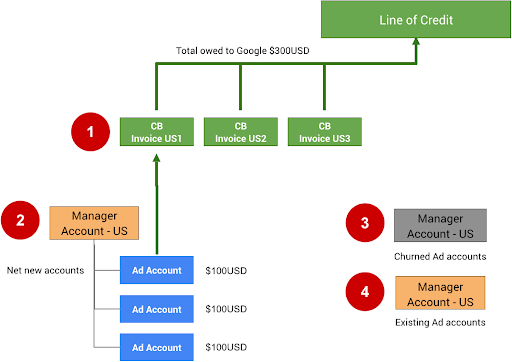
The following figure shows a recommended way to organize Google Ads manager accounts and advertiser accounts.

line_of_credit

The following notes refer to the numbers in the figure above:

  1. A consolidated bill (CB) has a 15K limit on the number of accounts or invoices that can be added. If the first consolidated bill (CB US1) reaches 15K invoices or accounts, all upcoming invoices or accounts should be added to CB US2.

  2. Consolidated billing can be set up for your manager account by applying through the Consolidated billing application form . You must first have an approved line of credit with Google; if you don't have one yet, you can apply for one through the Contact Google form .

  3. Inactive accounts (churned) can be moved into another manager account. Separating these accounts helps you stay within the 15K limit. As a precaution, we recommend that you remove the budget order for these accounts so that they can't continue to spend unless manually re-activated.

  4. If your integration allows users to use existing Ads accounts, create a separate manager account for these. Consolidated billing shouldn't be used for existing accounts, as they may already be spending on other campaign types and are likely to already have direct billing set up.

To set up consolidated billing directly in the Google Ads UI, follow the instructions in Set up consolidated billing .

Tech Guidance


To set up and manage billing for merchant Google Ads accounts using the API, use BillingSetup resources to get and manage account-wide billing configuration. A billing setup is an association between a Payments account and a specific Google Ads account. It effectively determines who pays for an advertiser's account. Follow the Billing Setup instructions .

An account budget defines account-level budget properties, such as start time, end time, and spending limit. All changes to account budgets are done by submitting separate account budget proposals, which, after being reviewed and approved, become account budgets. Use AccountBudgetProposal resources to create new AccountBudgets or update existing ones.

The following examples show how to create a new budget proposal:

Java

 private 
  
 void 
  
 runExample 
 ( 
 GoogleAdsClient 
  
 googleAdsClient 
 , 
  
 long 
  
 customerId 
 , 
  
 long 
  
 billingSetupId 
 ) 
  
 { 
  
 // Creates an AccountBudgetProposal. This will be reviewed offline by Google Ads, and if 
  
 // approved will become an AccountBudget. 
  
 AccountBudgetProposal 
  
 proposal 
  
 = 
  
 AccountBudgetProposal 
 . 
 newBuilder 
 () 
  
 . 
 setBillingSetup 
 ( 
 ResourceNames 
 . 
 billingSetup 
 ( 
 customerId 
 , 
  
 billingSetupId 
 )) 
  
 . 
 setProposalType 
 ( 
 AccountBudgetProposalType 
 . 
 CREATE 
 ) 
  
 . 
 setProposedName 
 ( 
 "Account Budget (example)" 
 ) 
  
 // Specifies the account budget starts immediately. 
  
 . 
 setProposedStartTimeType 
 ( 
 TimeType 
 . 
 NOW 
 ) 
  
 // Alternatively you can specify a specific start time. Refer to the 
  
 // AccountBudgetProposal 
  
 // resource documentation for allowed formats. 
  
 // 
  
 // .setProposedStartDateTime("2020-01-02 03:04:05") 
  
 // Specifies that the budget runs forever. 
  
 . 
 setProposedEndTimeType 
 ( 
 TimeType 
 . 
 FOREVER 
 ) 
  
 // Alternatively you can specify a specific end time. Allowed formats are as above. 
  
 // .setProposedEndDateTime("2021-02-03 04:05:06") 
  
 // Optional: sets notes for the budget. These are free text and do not effect budget 
  
 // delivery. 
  
 // .setProposedNotes("Received prepayment of $0.01") 
  
 // Sets the spending limit to 0.01, measured in the Google Ads account currency. 
  
 . 
 setProposedSpendingLimitMicros 
 ( 
 10_000 
 ) 
  
 // Optional: sets PO number for record keeping. This value is at the user's 
  
 // discretion, and has no effect on Google Billing & Payments. 
  
 // .setProposedPurchaseOrderNumber("PO number 12345") 
  
 . 
 build 
 (); 
  
 // Creates an operation which will add the new AccountBudgetProposal. 
  
 AccountBudgetProposalOperation 
  
 operation 
  
 = 
  
 AccountBudgetProposalOperation 
 . 
 newBuilder 
 (). 
 setCreate 
 ( 
 proposal 
 ). 
 build 
 (); 
  
 try 
  
 ( 
 AccountBudgetProposalServiceClient 
  
 accountBudgetProposalServiceClient 
  
 = 
  
 googleAdsClient 
 . 
 getLatestVersion 
 (). 
 createAccountBudgetProposalServiceClient 
 ()) 
  
 { 
  
 // Sends the request to the Account Budget Proposal Service. 
  
 MutateAccountBudgetProposalResponse 
  
 response 
  
 = 
  
 accountBudgetProposalServiceClient 
 . 
 mutateAccountBudgetProposal 
 ( 
  
 String 
 . 
 valueOf 
 ( 
 customerId 
 ), 
  
 operation 
 ); 
  
 System 
 . 
 out 
 . 
 printf 
 ( 
  
 "Account budget proposal created: %s.%n" 
 , 
  
 response 
 . 
 getResult 
 (). 
 getResourceName 
 ()); 
  
 } 
 } 


C#

 public 
  
 void 
  
 Run 
 ( 
 GoogleAdsClient 
  
 client 
 , 
  
 long 
  
 customerId 
 , 
  
 long 
  
 billingSetupId 
 ) 
 { 
  
 // Get the AccountBudgetProposalServiceClient. 
  
 AccountBudgetProposalServiceClient 
  
 proposalService 
  
 = 
  
 client 
 . 
 GetService 
 ( 
 Services 
 . 
 V24 
 . 
 AccountBudgetProposalService 
 ); 
  
 // Create an AccountBudgetProposal. The proposal will be reviewed offline by Google Ads, 
  
 // and if approved will become an AccountBudget. 
  
 AccountBudgetProposal 
  
 proposal 
  
 = 
  
 new 
  
 AccountBudgetProposal 
 () 
  
 { 
  
 BillingSetup 
  
 = 
  
 ResourceNames 
 . 
 BillingSetup 
 ( 
 customerId 
 , 
  
 billingSetupId 
 ), 
  
 ProposalType 
  
 = 
  
 AccountBudgetProposalType 
 . 
 Create 
 , 
  
 ProposedName 
  
 = 
  
 "Account Budget (example)" 
 , 
  
 // Specify the account budget starts immediately 
  
 ProposedStartTimeType 
  
 = 
  
 TimeType 
 . 
 Now 
 , 
  
 // Alternatively, you can specify a specific start time. Refer to the 
  
 // AccountBudgetProposal resource documentation for allowed formats. 
  
 // 
  
 //ProposedStartDateTime = "2020-01-02 03:04:05", 
  
 // Specify that the budget runs forever. 
  
 ProposedEndTimeType 
  
 = 
  
 TimeType 
 . 
 Forever 
 , 
  
 // Alternatively you can specify a specific end time. Allowed formats are as above. 
  
 //ProposedEndDateTime = "2021-02-03 04:05:06", 
  
 // Optional: set notes for the budget. These are free text and do not effect budget 
  
 // delivery. 
  
 //ProposedNotes = "Received prepayment of $0.01", 
  
 // Set the spending limit to 0.01, measured in the Google Ads account currency. 
  
 ProposedSpendingLimitMicros 
  
 = 
  
 10 
 _000 
  
 // Optional: set PO number for record keeping. This value is at the user's 
  
 // discretion, and has no effect on Google Billing & Payments. 
  
 //ProposedPurchaseOrderNumber = "PO number 12345" 
  
 }; 
  
 // Create an operation which will add the new AccountBudgetProposal 
  
 AccountBudgetProposalOperation 
  
 operation 
  
 = 
  
 new 
  
 AccountBudgetProposalOperation 
 () 
  
 { 
  
 Create 
  
 = 
  
 proposal 
  
 }; 
  
 try 
  
 { 
  
 // Send the request to the Account Budget Proposal Service. 
  
 MutateAccountBudgetProposalResponse 
  
 response 
  
 = 
  
 proposalService 
 . 
  
 MutateAccountBudgetProposal 
 ( 
 customerId 
 . 
 ToString 
 (), 
  
 operation 
 ); 
  
 // Display the results. 
  
 Console 
 . 
 WriteLine 
 ( 
 $"Account budget proposal '{response.Result.ResourceName}' " 
  
 + 
  
 "was created." 
 ); 
  
 } 
  
 catch 
  
 ( 
 GoogleAdsException 
  
 e 
 ) 
  
 { 
  
 Console 
 . 
 WriteLine 
 ( 
 "Failure:" 
 ); 
  
 Console 
 . 
 WriteLine 
 ( 
 $"Message: {e.Message}" 
 ); 
  
 Console 
 . 
 WriteLine 
 ( 
 $"Failure: {e.Failure}" 
 ); 
  
 Console 
 . 
 WriteLine 
 ( 
 $"Request ID: {e.RequestId}" 
 ); 
  
 throw 
 ; 
  
 } 
 } 


PHP

 public static function runExample( 
 GoogleAdsClient $googleAdsClient, 
 int $customerId, 
 int $billingSetupId 
 ) { 
 // Constructs an account budget proposal. 
 $accountBudgetProposal = new AccountBudgetProposal([ 
 'billing_setup' => ResourceNames::forBillingSetup($customerId, $billingSetupId), 
 'proposal_type' => AccountBudgetProposalType::CREATE, 
 'proposed_name' => 'Account Budget (example)', 
 // Specifies the account budget starts immediately. 
 'proposed_start_time_type' => TimeType::NOW, 
 // Alternatively you can specify a specific start time. Refer to the 
 // AccountBudgetProposal class for allowed formats. 
 // 
 // 'proposed_start_date_time' => '2020-01-02 03:04:05', 
 // Specify that the budget runs forever. 
 'proposed_end_time_type' => TimeType::FOREVER, 
 // Alternatively you can specify a specific end time. Allowed formats are as above. 
 // 'proposed_end_date_time' => '2021-02-03 04:05:06', 
 // Optional: set notes for the budget. These are free text and do not effect budget 
 // delivery. 
 // 'proposed_notes' => 'Received prepayment of $0.01', 
 // Optional: set PO number for record keeping. This value is at the user's 
 // discretion, and has no effect on Google Billing & Payments. 
 // 'proposed_purchase_order_number' => 'PO number 12345', 
 // Set the spending limit to 0.01, measured in the Google Ads account currency. 
 'proposed_spending_limit_micros' => 10000 
 ]); 
 $accountBudgetProposalOperation = new AccountBudgetProposalOperation(); 
 $accountBudgetProposalOperation->setCreate($accountBudgetProposal); 
 // Issues a mutate request to add the account budget proposal. 
 $accountBudgetProposalServiceClient = 
 $googleAdsClient->getAccountBudgetProposalServiceClient(); 
 $response = $accountBudgetProposalServiceClient->mutateAccountBudgetProposal( 
 MutateAccountBudgetProposalRequest::build($customerId, $accountBudgetProposalOperation) 
 ); 
 printf( 
 "Added an account budget proposal with resource name '%s'.%s", 
 $response->getResult()->getResourceName(), 
 PHP_EOL 
 ); 
 }  
 

Python

 def 
  
 main 
 ( 
 client 
 : 
 GoogleAdsClient 
 , 
 customer_id 
 : 
 str 
 , 
 billing_setup_id 
 : 
 str 
 ): 
 account_budget_proposal_service 
 = 
 client 
 . 
 get_service 
 ( 
 "AccountBudgetProposalService" 
 ) 
 billing_setup_service 
 = 
 client 
 . 
 get_service 
 ( 
 "BillingSetupService" 
 ) 
 account_budget_proposal_operation 
 = 
 client 
 . 
 get_type 
 ( 
 "AccountBudgetProposalOperation" 
 ) 
 proposal 
 = 
 account_budget_proposal_operation 
 . 
 create 
 proposal 
 . 
 proposal_type 
 = 
 client 
 . 
 enums 
 . 
 AccountBudgetProposalTypeEnum 
 . 
 CREATE 
 proposal 
 . 
 billing_setup 
 = 
 billing_setup_service 
 . 
 billing_setup_path 
 ( 
 customer_id 
 , 
 billing_setup_id 
 ) 
 proposal 
 . 
 proposed_name 
 = 
 "Account Budget Proposal (example)" 
 # Specify the account budget starts immediately 
 proposal 
 . 
 proposed_start_time_type 
 = 
 client 
 . 
 enums 
 . 
 TimeTypeEnum 
 . 
 NOW 
 # Alternatively you can specify a specific start time. Refer to the 
 # AccountBudgetProposal resource documentation for allowed formats. 
 # 
 # proposal.proposed_start_date_time = '2020-01-02 03:04:05' 
 # Specify that the budget runs forever 
 proposal 
 . 
 proposed_end_time_type 
 = 
 client 
 . 
 enums 
 . 
 TimeTypeEnum 
 . 
 FOREVER 
 # Alternatively you can specify a specific end time. Allowed formats are as 
 # above. 
 # 
 # proposal.proposed_end_date_time = '2021-01-02 03:04:05' 
 # Optional: set notes for the budget. These are free text and do not effect 
 # budget delivery. 
 # 
 # proposal.proposed_notes = 'Received prepayment of $0.01' 
 proposal 
 . 
 proposed_spending_limit_micros 
 = 
 10000 
 account_budget_proposal_response 
 = 
 ( 
 account_budget_proposal_service 
 . 
 mutate_account_budget_proposal 
 ( 
 customer_id 
 = 
 customer_id 
 , 
 operation 
 = 
 account_budget_proposal_operation 
 , 
 ) 
 ) 
 print 
 ( 
 "Created account budget proposal " 
 f 
 '" 
 { 
 account_budget_proposal_response 
 . 
 result 
 . 
 resource_name 
 } 
 ".' 
 ) 
  

Ruby

 def 
  
 add_account_budget_proposal 
 ( 
 customer_id 
 , 
  
 billing_setup_id 
 ) 
  
 # GoogleAdsClient will read a config file from 
  
 # ENV['HOME']/google_ads_config.rb when called without parameters 
  
 client 
  
 = 
  
 Google 
 :: 
 Ads 
 :: 
 GoogleAds 
 :: 
 GoogleAdsClient 
 . 
 new 
  
 operation 
  
 = 
  
 client 
 . 
 operation 
 . 
 create_resource 
 . 
 account_budget_proposal 
  
 do 
  
 | 
 proposal 
 | 
  
 proposal 
 . 
 billing_setup 
  
 = 
  
 client 
 . 
 path 
 . 
 billing_setup 
 ( 
 customer_id 
 , 
  
 billing_setup_id 
 ) 
  
 proposal 
 . 
 proposal_type 
  
 = 
  
 :CREATE 
  
 proposal 
 . 
 proposed_name 
  
 = 
  
 'Account Budget (example)' 
  
 # Specify the account budget starts immediately 
  
 proposal 
 . 
 proposed_start_time_type 
  
 = 
  
 :NOW 
  
 # Alternatively you can specify a specific start time. Refer to the 
  
 # AccountBudgetProposal resource documentation for allowed formats. 
  
 # 
  
 # proposal.proposed_start_date_time = '2020-01-02 03:04:05' 
  
 # Specify that the budget runs forever. 
  
 proposal 
 . 
 proposed_end_time_type 
  
 = 
  
 :FOREVER 
  
 # Alternatively you can specify a specific end time. Allowed formats are as 
  
 # above. 
  
 # 
  
 # proposal.proposed_end_date_time = '2021-01-02 03:04:05' 
  
 # Optional: set notes for the budget. These are free text and do not affect 
  
 # budget delivery. 
  
 # 
  
 # proposal.proposed_notes = 'Received prepayment of $0.01' 
  
 # Set the spending limit to 0.01, measured in the Google Ads account currency. 
  
 proposal 
 . 
 proposed_spending_limit_micros 
  
 = 
  
 10_000 
  
 end 
  
 account_budget_proposal_service 
  
 = 
  
 client 
 . 
 service 
 . 
 account_budget_proposal 
  
 # Add budget proposal. 
  
 response 
  
 = 
  
 account_budget_proposal_service 
 . 
 mutate_account_budget_proposal 
 ( 
  
 customer_id 
 : 
  
 customer_id 
 , 
  
 operation 
 : 
  
 operation 
 , 
  
 ) 
  
 puts 
  
 sprintf 
 ( 
 "Created budget proposal %s." 
 , 
  
 response 
 . 
 results 
 . 
 first 
 . 
 resource_name 
 ) 
 end  
 
 . 
 rb 
  

Perl

 sub 
  
 add_account_budget_proposal 
  
 { 
  
 my 
  
 ( 
 $api_client 
 , 
  
 $customer_id 
 , 
  
 $billing_setup_id 
 ) 
  
 = 
  
 @_ 
 ; 
  
 # Create an account budget proposal. 
  
 my 
  
 $account_budget_proposal 
  
 = 
  
 Google::Ads::GoogleAds::V24::Resources:: 
 AccountBudgetProposal 
 - 
> new 
 ({ 
  
 billingSetup 
  
 = 
>  
 Google::Ads::GoogleAds::V24::Utils::ResourceNames:: 
 billing_setup 
 ( 
  
 $customer_id 
 , 
  
 $billing_setup_id 
  
 ), 
  
 proposalType 
  
 = 
>  
 CREATE 
 , 
  
 proposedName 
  
 = 
>  
 "Account Budget (example)" 
 , 
  
 # Specify that the account budget starts immediately. 
  
 proposedStartTimeType 
  
 = 
>  
 NOW 
 , 
  
 # Alternatively you can specify a specific start time. Refer to the 
  
 # AccountBudgetProposal class for allowed formats. 
  
 # 
  
 # proposedStartDateTime => "2020-01-02 03:04:05", 
  
 # Specify that the account budget runs forever. 
  
 proposedEndDateTime 
  
 = 
>  
 FOREVER 
 , 
  
 # Alternatively you can specify a specific end time. Allowed formats are as below. 
  
 # proposedEndDateTime => "2021-02-03 04:05:06", 
  
 # Optional: set notes for the budget. These are free text and do not effect budget 
  
 # delivery. 
  
 # proposedNotes => "Received prepayment of $0.01", 
  
 # Optional: set PO number for record keeping. This value is at the user's 
  
 # discretion, and has no effect on Google Billing & Payments. 
  
 # proposedPurchaseOrderNumber => "PO number 12345", 
  
 # Set the spending limit to 0.01, measured in the Google Ads account currency. 
  
 proposedSpendingLimitMicros 
  
 = 
>  
 10000 
  
 }); 
  
 # Create an account budget proposal operation. 
  
 my 
  
 $account_budget_proposal_operation 
  
 = 
  
 Google::Ads::GoogleAds::V24::Services::AccountBudgetProposalService:: 
 AccountBudgetProposalOperation 
  
 - 
> new 
 ({ 
  
 create 
  
 = 
>  
 $account_budget_proposal 
  
 }); 
  
 # Add the account budget proposal. 
  
 my 
  
 $account_budget_proposal_response 
  
 = 
  
 $api_client 
 - 
> AccountBudgetProposalService 
 () 
 - 
> mutate 
 ({ 
  
 customerId 
  
 = 
>  
 $customer_id 
 , 
  
 operation 
  
 = 
>  
 $account_budget_proposal_operation 
  
 }); 
  
 printf 
  
 "Created account budget proposal '%s'.\n" 
 , 
  
 $account_budget_proposal_response 
 - 
> { 
 result 
 }{ 
 resourceName 
 }; 
  
 return 
  
 1 
 ; 
 } 


curl

To update account budgets, use the AccountBudgetProposalService to manage the budget parameters. The most common management operations are to update the spending limit and date-time fields. For a complete list of the mutable fields, see AccountBudgetProposal . The following example shows how to update the proposed spending limit for an existing account budget.

Java

 private 
  
 void 
  
 runExample 
 ( 
 GoogleAdsClient 
  
 googleAdsClient 
 , 
  
 long 
  
 customerId 
 , 
  
 long 
  
 billingSetupId 
 ) 
  
 { 
  
 // Creates an AccountBudgetProposal. This will be reviewed offline by Google Ads, and if 
  
 // approved will become an AccountBudget. 
  
 AccountBudgetProposal 
  
 proposal 
  
 = 
  
 AccountBudgetProposal 
 . 
 newBuilder 
 () 
  
 . 
 setBillingSetup 
 ( 
 ResourceNames 
 . 
 billingSetup 
 ( 
 customerId 
 , 
  
 billingSetupId 
 )) 
  
 . 
 setProposalType 
 ( 
 AccountBudgetProposalType 
 . 
 CREATE 
 ) 
  
 . 
 setProposedName 
 ( 
 "Account Budget (example)" 
 ) 
  
 // Specifies the account budget starts immediately. 
  
 . 
 setProposedStartTimeType 
 ( 
 TimeType 
 . 
 NOW 
 ) 
  
 // Alternatively you can specify a specific start time. Refer to the 
  
 // AccountBudgetProposal 
  
 // resource documentation for allowed formats. 
  
 // 
  
 // .setProposedStartDateTime("2020-01-02 03:04:05") 
  
 // Specifies that the budget runs forever. 
  
 . 
 setProposedEndTimeType 
 ( 
 TimeType 
 . 
 FOREVER 
 ) 
  
 // Alternatively you can specify a specific end time. Allowed formats are as above. 
  
 // .setProposedEndDateTime("2021-02-03 04:05:06") 
  
 // Optional: sets notes for the budget. These are free text and do not effect budget 
  
 // delivery. 
  
 // .setProposedNotes("Received prepayment of $0.01") 
  
 // Sets the spending limit to 0.01, measured in the Google Ads account currency. 
  
 . 
 setProposedSpendingLimitMicros 
 ( 
 10_000 
 ) 
  
 // Optional: sets PO number for record keeping. This value is at the user's 
  
 // discretion, and has no effect on Google Billing & Payments. 
  
 // .setProposedPurchaseOrderNumber("PO number 12345") 
  
 . 
 build 
 (); 
  
 // Creates an operation which will add the new AccountBudgetProposal. 
  
 AccountBudgetProposalOperation 
  
 operation 
  
 = 
  
 AccountBudgetProposalOperation 
 . 
 newBuilder 
 (). 
 setCreate 
 ( 
 proposal 
 ). 
 build 
 (); 
  
 try 
  
 ( 
 AccountBudgetProposalServiceClient 
  
 accountBudgetProposalServiceClient 
  
 = 
  
 googleAdsClient 
 . 
 getLatestVersion 
 (). 
 createAccountBudgetProposalServiceClient 
 ()) 
  
 { 
  
 // Sends the request to the Account Budget Proposal Service. 
  
 MutateAccountBudgetProposalResponse 
  
 response 
  
 = 
  
 accountBudgetProposalServiceClient 
 . 
 mutateAccountBudgetProposal 
 ( 
  
 String 
 . 
 valueOf 
 ( 
 customerId 
 ), 
  
 operation 
 ); 
  
 System 
 . 
 out 
 . 
 printf 
 ( 
  
 "Account budget proposal created: %s.%n" 
 , 
  
 response 
 . 
 getResult 
 (). 
 getResourceName 
 ()); 
  
 } 
 } 


C#

 public 
  
 void 
  
 Run 
 ( 
 GoogleAdsClient 
  
 client 
 , 
  
 long 
  
 customerId 
 , 
  
 long 
  
 billingSetupId 
 ) 
 { 
  
 // Get the AccountBudgetProposalServiceClient. 
  
 AccountBudgetProposalServiceClient 
  
 proposalService 
  
 = 
  
 client 
 . 
 GetService 
 ( 
 Services 
 . 
 V24 
 . 
 AccountBudgetProposalService 
 ); 
  
 // Create an AccountBudgetProposal. The proposal will be reviewed offline by Google Ads, 
  
 // and if approved will become an AccountBudget. 
  
 AccountBudgetProposal 
  
 proposal 
  
 = 
  
 new 
  
 AccountBudgetProposal 
 () 
  
 { 
  
 BillingSetup 
  
 = 
  
 ResourceNames 
 . 
 BillingSetup 
 ( 
 customerId 
 , 
  
 billingSetupId 
 ), 
  
 ProposalType 
  
 = 
  
 AccountBudgetProposalType 
 . 
 Create 
 , 
  
 ProposedName 
  
 = 
  
 "Account Budget (example)" 
 , 
  
 // Specify the account budget starts immediately 
  
 ProposedStartTimeType 
  
 = 
  
 TimeType 
 . 
 Now 
 , 
  
 // Alternatively, you can specify a specific start time. Refer to the 
  
 // AccountBudgetProposal resource documentation for allowed formats. 
  
 // 
  
 //ProposedStartDateTime = "2020-01-02 03:04:05", 
  
 // Specify that the budget runs forever. 
  
 ProposedEndTimeType 
  
 = 
  
 TimeType 
 . 
 Forever 
 , 
  
 // Alternatively you can specify a specific end time. Allowed formats are as above. 
  
 //ProposedEndDateTime = "2021-02-03 04:05:06", 
  
 // Optional: set notes for the budget. These are free text and do not effect budget 
  
 // delivery. 
  
 //ProposedNotes = "Received prepayment of $0.01", 
  
 // Set the spending limit to 0.01, measured in the Google Ads account currency. 
  
 ProposedSpendingLimitMicros 
  
 = 
  
 10 
 _000 
  
 // Optional: set PO number for record keeping. This value is at the user's 
  
 // discretion, and has no effect on Google Billing & Payments. 
  
 //ProposedPurchaseOrderNumber = "PO number 12345" 
  
 }; 
  
 // Create an operation which will add the new AccountBudgetProposal 
  
 AccountBudgetProposalOperation 
  
 operation 
  
 = 
  
 new 
  
 AccountBudgetProposalOperation 
 () 
  
 { 
  
 Create 
  
 = 
  
 proposal 
  
 }; 
  
 try 
  
 { 
  
 // Send the request to the Account Budget Proposal Service. 
  
 MutateAccountBudgetProposalResponse 
  
 response 
  
 = 
  
 proposalService 
 . 
  
 MutateAccountBudgetProposal 
 ( 
 customerId 
 . 
 ToString 
 (), 
  
 operation 
 ); 
  
 // Display the results. 
  
 Console 
 . 
 WriteLine 
 ( 
 $"Account budget proposal '{response.Result.ResourceName}' " 
  
 + 
  
 "was created." 
 ); 
  
 } 
  
 catch 
  
 ( 
 GoogleAdsException 
  
 e 
 ) 
  
 { 
  
 Console 
 . 
 WriteLine 
 ( 
 "Failure:" 
 ); 
  
 Console 
 . 
 WriteLine 
 ( 
 $"Message: {e.Message}" 
 ); 
  
 Console 
 . 
 WriteLine 
 ( 
 $"Failure: {e.Failure}" 
 ); 
  
 Console 
 . 
 WriteLine 
 ( 
 $"Request ID: {e.RequestId}" 
 ); 
  
 throw 
 ; 
  
 } 
 } 


PHP

 public static function runExample( 
 GoogleAdsClient $googleAdsClient, 
 int $customerId, 
 int $billingSetupId 
 ) { 
 // Constructs an account budget proposal. 
 $accountBudgetProposal = new AccountBudgetProposal([ 
 'billing_setup' => ResourceNames::forBillingSetup($customerId, $billingSetupId), 
 'proposal_type' => AccountBudgetProposalType::CREATE, 
 'proposed_name' => 'Account Budget (example)', 
 // Specifies the account budget starts immediately. 
 'proposed_start_time_type' => TimeType::NOW, 
 // Alternatively you can specify a specific start time. Refer to the 
 // AccountBudgetProposal class for allowed formats. 
 // 
 // 'proposed_start_date_time' => '2020-01-02 03:04:05', 
 // Specify that the budget runs forever. 
 'proposed_end_time_type' => TimeType::FOREVER, 
 // Alternatively you can specify a specific end time. Allowed formats are as above. 
 // 'proposed_end_date_time' => '2021-02-03 04:05:06', 
 // Optional: set notes for the budget. These are free text and do not effect budget 
 // delivery. 
 // 'proposed_notes' => 'Received prepayment of $0.01', 
 // Optional: set PO number for record keeping. This value is at the user's 
 // discretion, and has no effect on Google Billing & Payments. 
 // 'proposed_purchase_order_number' => 'PO number 12345', 
 // Set the spending limit to 0.01, measured in the Google Ads account currency. 
 'proposed_spending_limit_micros' => 10000 
 ]); 
 $accountBudgetProposalOperation = new AccountBudgetProposalOperation(); 
 $accountBudgetProposalOperation->setCreate($accountBudgetProposal); 
 // Issues a mutate request to add the account budget proposal. 
 $accountBudgetProposalServiceClient = 
 $googleAdsClient->getAccountBudgetProposalServiceClient(); 
 $response = $accountBudgetProposalServiceClient->mutateAccountBudgetProposal( 
 MutateAccountBudgetProposalRequest::build($customerId, $accountBudgetProposalOperation) 
 ); 
 printf( 
 "Added an account budget proposal with resource name '%s'.%s", 
 $response->getResult()->getResourceName(), 
 PHP_EOL 
 ); 
 }  
 

Python

 def 
  
 main 
 ( 
 client 
 : 
 GoogleAdsClient 
 , 
 customer_id 
 : 
 str 
 , 
 billing_setup_id 
 : 
 str 
 ): 
 account_budget_proposal_service 
 = 
 client 
 . 
 get_service 
 ( 
 "AccountBudgetProposalService" 
 ) 
 billing_setup_service 
 = 
 client 
 . 
 get_service 
 ( 
 "BillingSetupService" 
 ) 
 account_budget_proposal_operation 
 = 
 client 
 . 
 get_type 
 ( 
 "AccountBudgetProposalOperation" 
 ) 
 proposal 
 = 
 account_budget_proposal_operation 
 . 
 create 
 proposal 
 . 
 proposal_type 
 = 
 client 
 . 
 enums 
 . 
 AccountBudgetProposalTypeEnum 
 . 
 CREATE 
 proposal 
 . 
 billing_setup 
 = 
 billing_setup_service 
 . 
 billing_setup_path 
 ( 
 customer_id 
 , 
 billing_setup_id 
 ) 
 proposal 
 . 
 proposed_name 
 = 
 "Account Budget Proposal (example)" 
 # Specify the account budget starts immediately 
 proposal 
 . 
 proposed_start_time_type 
 = 
 client 
 . 
 enums 
 . 
 TimeTypeEnum 
 . 
 NOW 
 # Alternatively you can specify a specific start time. Refer to the 
 # AccountBudgetProposal resource documentation for allowed formats. 
 # 
 # proposal.proposed_start_date_time = '2020-01-02 03:04:05' 
 # Specify that the budget runs forever 
 proposal 
 . 
 proposed_end_time_type 
 = 
 client 
 . 
 enums 
 . 
 TimeTypeEnum 
 . 
 FOREVER 
 # Alternatively you can specify a specific end time. Allowed formats are as 
 # above. 
 # 
 # proposal.proposed_end_date_time = '2021-01-02 03:04:05' 
 # Optional: set notes for the budget. These are free text and do not effect 
 # budget delivery. 
 # 
 # proposal.proposed_notes = 'Received prepayment of $0.01' 
 proposal 
 . 
 proposed_spending_limit_micros 
 = 
 10000 
 account_budget_proposal_response 
 = 
 ( 
 account_budget_proposal_service 
 . 
 mutate_account_budget_proposal 
 ( 
 customer_id 
 = 
 customer_id 
 , 
 operation 
 = 
 account_budget_proposal_operation 
 , 
 ) 
 ) 
 print 
 ( 
 "Created account budget proposal " 
 f 
 '" 
 { 
 account_budget_proposal_response 
 . 
 result 
 . 
 resource_name 
 } 
 ".' 
 ) 
  

Ruby

 def 
  
 add_account_budget_proposal 
 ( 
 customer_id 
 , 
  
 billing_setup_id 
 ) 
  
 # GoogleAdsClient will read a config file from 
  
 # ENV['HOME']/google_ads_config.rb when called without parameters 
  
 client 
  
 = 
  
 Google 
 :: 
 Ads 
 :: 
 GoogleAds 
 :: 
 GoogleAdsClient 
 . 
 new 
  
 operation 
  
 = 
  
 client 
 . 
 operation 
 . 
 create_resource 
 . 
 account_budget_proposal 
  
 do 
  
 | 
 proposal 
 | 
  
 proposal 
 . 
 billing_setup 
  
 = 
  
 client 
 . 
 path 
 . 
 billing_setup 
 ( 
 customer_id 
 , 
  
 billing_setup_id 
 ) 
  
 proposal 
 . 
 proposal_type 
  
 = 
  
 :CREATE 
  
 proposal 
 . 
 proposed_name 
  
 = 
  
 'Account Budget (example)' 
  
 # Specify the account budget starts immediately 
  
 proposal 
 . 
 proposed_start_time_type 
  
 = 
  
 :NOW 
  
 # Alternatively you can specify a specific start time. Refer to the 
  
 # AccountBudgetProposal resource documentation for allowed formats. 
  
 # 
  
 # proposal.proposed_start_date_time = '2020-01-02 03:04:05' 
  
 # Specify that the budget runs forever. 
  
 proposal 
 . 
 proposed_end_time_type 
  
 = 
  
 :FOREVER 
  
 # Alternatively you can specify a specific end time. Allowed formats are as 
  
 # above. 
  
 # 
  
 # proposal.proposed_end_date_time = '2021-01-02 03:04:05' 
  
 # Optional: set notes for the budget. These are free text and do not affect 
  
 # budget delivery. 
  
 # 
  
 # proposal.proposed_notes = 'Received prepayment of $0.01' 
  
 # Set the spending limit to 0.01, measured in the Google Ads account currency. 
  
 proposal 
 . 
 proposed_spending_limit_micros 
  
 = 
  
 10_000 
  
 end 
  
 account_budget_proposal_service 
  
 = 
  
 client 
 . 
 service 
 . 
 account_budget_proposal 
  
 # Add budget proposal. 
  
 response 
  
 = 
  
 account_budget_proposal_service 
 . 
 mutate_account_budget_proposal 
 ( 
  
 customer_id 
 : 
  
 customer_id 
 , 
  
 operation 
 : 
  
 operation 
 , 
  
 ) 
  
 puts 
  
 sprintf 
 ( 
 "Created budget proposal %s." 
 , 
  
 response 
 . 
 results 
 . 
 first 
 . 
 resource_name 
 ) 
 end  
 
 . 
 rb 
  

Perl

 sub 
  
 add_account_budget_proposal 
  
 { 
  
 my 
  
 ( 
 $api_client 
 , 
  
 $customer_id 
 , 
  
 $billing_setup_id 
 ) 
  
 = 
  
 @_ 
 ; 
  
 # Create an account budget proposal. 
  
 my 
  
 $account_budget_proposal 
  
 = 
  
 Google::Ads::GoogleAds::V24::Resources:: 
 AccountBudgetProposal 
 - 
> new 
 ({ 
  
 billingSetup 
  
 = 
>  
 Google::Ads::GoogleAds::V24::Utils::ResourceNames:: 
 billing_setup 
 ( 
  
 $customer_id 
 , 
  
 $billing_setup_id 
  
 ), 
  
 proposalType 
  
 = 
>  
 CREATE 
 , 
  
 proposedName 
  
 = 
>  
 "Account Budget (example)" 
 , 
  
 # Specify that the account budget starts immediately. 
  
 proposedStartTimeType 
  
 = 
>  
 NOW 
 , 
  
 # Alternatively you can specify a specific start time. Refer to the 
  
 # AccountBudgetProposal class for allowed formats. 
  
 # 
  
 # proposedStartDateTime => "2020-01-02 03:04:05", 
  
 # Specify that the account budget runs forever. 
  
 proposedEndDateTime 
  
 = 
>  
 FOREVER 
 , 
  
 # Alternatively you can specify a specific end time. Allowed formats are as below. 
  
 # proposedEndDateTime => "2021-02-03 04:05:06", 
  
 # Optional: set notes for the budget. These are free text and do not effect budget 
  
 # delivery. 
  
 # proposedNotes => "Received prepayment of $0.01", 
  
 # Optional: set PO number for record keeping. This value is at the user's 
  
 # discretion, and has no effect on Google Billing & Payments. 
  
 # proposedPurchaseOrderNumber => "PO number 12345", 
  
 # Set the spending limit to 0.01, measured in the Google Ads account currency. 
  
 proposedSpendingLimitMicros 
  
 = 
>  
 10000 
  
 }); 
  
 # Create an account budget proposal operation. 
  
 my 
  
 $account_budget_proposal_operation 
  
 = 
  
 Google::Ads::GoogleAds::V24::Services::AccountBudgetProposalService:: 
 AccountBudgetProposalOperation 
  
 - 
> new 
 ({ 
  
 create 
  
 = 
>  
 $account_budget_proposal 
  
 }); 
  
 # Add the account budget proposal. 
  
 my 
  
 $account_budget_proposal_response 
  
 = 
  
 $api_client 
 - 
> AccountBudgetProposalService 
 () 
 - 
> mutate 
 ({ 
  
 customerId 
  
 = 
>  
 $customer_id 
 , 
  
 operation 
  
 = 
>  
 $account_budget_proposal_operation 
  
 }); 
  
 printf 
  
 "Created account budget proposal '%s'.\n" 
 , 
  
 $account_budget_proposal_response 
 - 
> { 
 result 
 }{ 
 resourceName 
 }; 
  
 return 
  
 1 
 ; 
 } 


curl

To terminate an active account budget, set the end time to the current time by sending a proposal with AccountBudgetProposalType.END .

Issue invoices

An invoice is issued monthly when enabled by the advertiser. Invoices contain details such as adjustments, regulatory costs, taxes and account budgets, and can be downloaded as PDF files. As a manager, you typically use them to automatically reconcile your own customer invoices. You need the following to enable invoicing:

  • Have monthly invoicing enabled for the Google Ads account. See the guides on account billing setups and budgets to learn how to manage billing using the Google Ads API.

  • If set, login-customer-id must specify the customer ID of a manager account that is managing the Google Ads account for which you're retrieving invoices. This is labeled as the paying manager in the Google Ads UI.

Retrieve Invoice resources for invoice data using the InvoiceService . Request the InvoiceService.ListInvoices method, setting all the required fields in the ListInvoicesRequest : customer_id , billing_setup , issue_year , and issue_month . The following examples show how to make this request:

Java

 // Issues the request. 
 ListInvoicesResponse 
  
 response 
  
 = 
  
 invoiceServiceClient 
 . 
 listInvoices 
 ( 
  
 String 
 . 
 valueOf 
 ( 
 customerId 
 ), 
  
 ResourceNames 
 . 
 billingSetup 
 ( 
 customerId 
 , 
  
 billingSetupId 
 ), 
  
 String 
 . 
 valueOf 
 ( 
 oneMonthAgo 
 . 
 getYear 
 ()), 
  
 MonthOfYear 
 . 
 valueOf 
 ( 
 oneMonthAgo 
 . 
 getMonth 
 (). 
 toString 
 ())); 


C#

 ListInvoicesResponse 
  
 response 
  
 = 
  
 invoiceServiceClient 
 . 
 ListInvoices 
 ( 
 customerId 
 . 
 ToString 
 (), 
  
 ResourceNames 
 . 
 BillingSetup 
 ( 
 customerId 
 , 
  
 billingSetupId 
 ), 
  
 // Year must be 2019 or later. 
  
 lastMonthDateTime 
 . 
 Year 
 . 
 ToString 
 ( 
 "yyyy" 
 ), 
  
 lastMonth 
 ); 


PHP

 // Issues the request. 
 $response = $googleAdsClient->getInvoiceServiceClient()->listInvoices( 
 ListInvoicesRequest::build( 
 $customerId, 
 ResourceNames::forBillingSetup($customerId, $billingSetupId), 
 // The year needs to be 2019 or later. 
 date('Y', $lastMonth), 
 MonthOfYear::value(strtoupper(date('F', $lastMonth))) 
 ) 
 );  
 

Python

 # Issues a request to list invoices. 
 response 
 = 
 client 
 . 
 get_service 
 ( 
 "InvoiceService" 
 ) 
 . 
 list_invoices 
 ( 
 customer_id 
 = 
 customer_id 
 , 
 billing_setup 
 = 
 client 
 . 
 get_service 
 ( 
 "GoogleAdsService" 
 ) 
 . 
 billing_setup_path 
 ( 
 customer_id 
 , 
 billing_setup_id 
 ), 
 # The year needs to be 2019 or later, per the docs: 
 # https://developers.google.com/google-ads/api/docs/billing/invoice?hl=en#retrieving_invoices 
 issue_year 
 = 
 str 
 ( 
 last_month 
 . 
 year 
 ), 
 issue_month 
 = 
 last_month 
 . 
 strftime 
 ( 
 "%B" 
 ) 
 . 
 upper 
 (), 
 ) 
  

Ruby

 # Issues a request to list invoices. 
 response 
  
 = 
  
 client 
 . 
 service 
 . 
 invoice 
 . 
 list_invoices 
 ( 
  
 customer_id 
 : 
  
 customer_id 
 , 
  
 billing_setup 
 : 
  
 client 
 . 
 path 
 . 
 billing_setup 
 ( 
 customer_id 
 , 
  
 billing_setup_id 
 ), 
  
 # The year needs to be 2019 or later. 
  
 issue_year 
 : 
  
 last_month 
 . 
 year 
 . 
 to_s 
 , 
  
 # '%^B' option returns the uppercased full month name (e.g. 'JANUARY'). 
  
 issue_month 
 : 
  
 last_month 
 . 
 strftime 
 ( 
 "%^B" 
 ) 
 . 
 to_sym 
 , 
 ) 


Perl

 # Issue the request. 
 my 
  
 $response 
  
 = 
  
 $api_client 
 - 
> InvoiceService 
 () 
 - 
> list 
 ({ 
  
 customerId 
  
 = 
>  
 $customer_id 
 , 
  
 billingSetup 
  
 = 
>  
 Google::Ads::GoogleAds::V24::Utils::ResourceNames:: 
 billing_setup 
 ( 
  
 ( 
 $customer_id 
 , 
  
 $billing_setup_id 
 ) 
  
 ), 
  
 # The year needs to be 2019 or later. 
  
 issueYear 
  
 = 
>  
 strftime 
 ( 
 "%Y" 
 , 
  
 @last_month 
 ), 
  
 issueMonth 
  
 = 
>  
 uc 
 ( 
 strftime 
 ( 
 "%B" 
 , 
  
 @last_month 
 ))}); 


curl

The response is a ListInvoicesResponse object that contains the list of matching Invoices . An invoice combines data of all the Google Ads accounts with billing setups that use the same underlying Payments account as the one used by the requested billing setup. This happens only when the underlying Payments account is eligible for consolidated billing .

Create a Mobile Website
View Site in Mobile | Classic
Share by: