

Page Summary
-
Publishers manage reader entitlements using server-side integration, primarily with the
UpdateReaderEntitlementsmethod for updating Product ID entitlements. -
Client-side integration is crucial for creating and managing linked subscriptions for readers.
-
Before using the Subscription Linking API, you must enable it in your Google Cloud project and create a service account with appropriate IAM roles.
-
Authenticate calls to the API using either the googleapis client library or by manually signing REST API requests with service account credentials.
-
Implement robust security measures, such as key rotation, to protect service account keys.
Publishers primarily use server-side integration for managing readers and their
entitlements. Publishers use UpdateReaderEntitlements
to update
Google's record of a Product ID entitlement for a PPID.
Google Cloud setup
Configuring Subscription Linking in Google Cloud includes two major components:
- Enabling the API for a given project
- Creating a service account for accessing the API
Enable the Subscription Linking API
To use a service account and manage a reader's entitlements, a Google Cloud
project requires the Subscription Linking API to be enabled and an OAuth
service account to be properly configured. To enable the Subscription
Linking API for a project, navigate from the menu -> APIs & Services ->
Library and search for Subscription Linking
, or visit the page directly:
https://console.cloud.google.com/apis/library?project= gcp_project_id
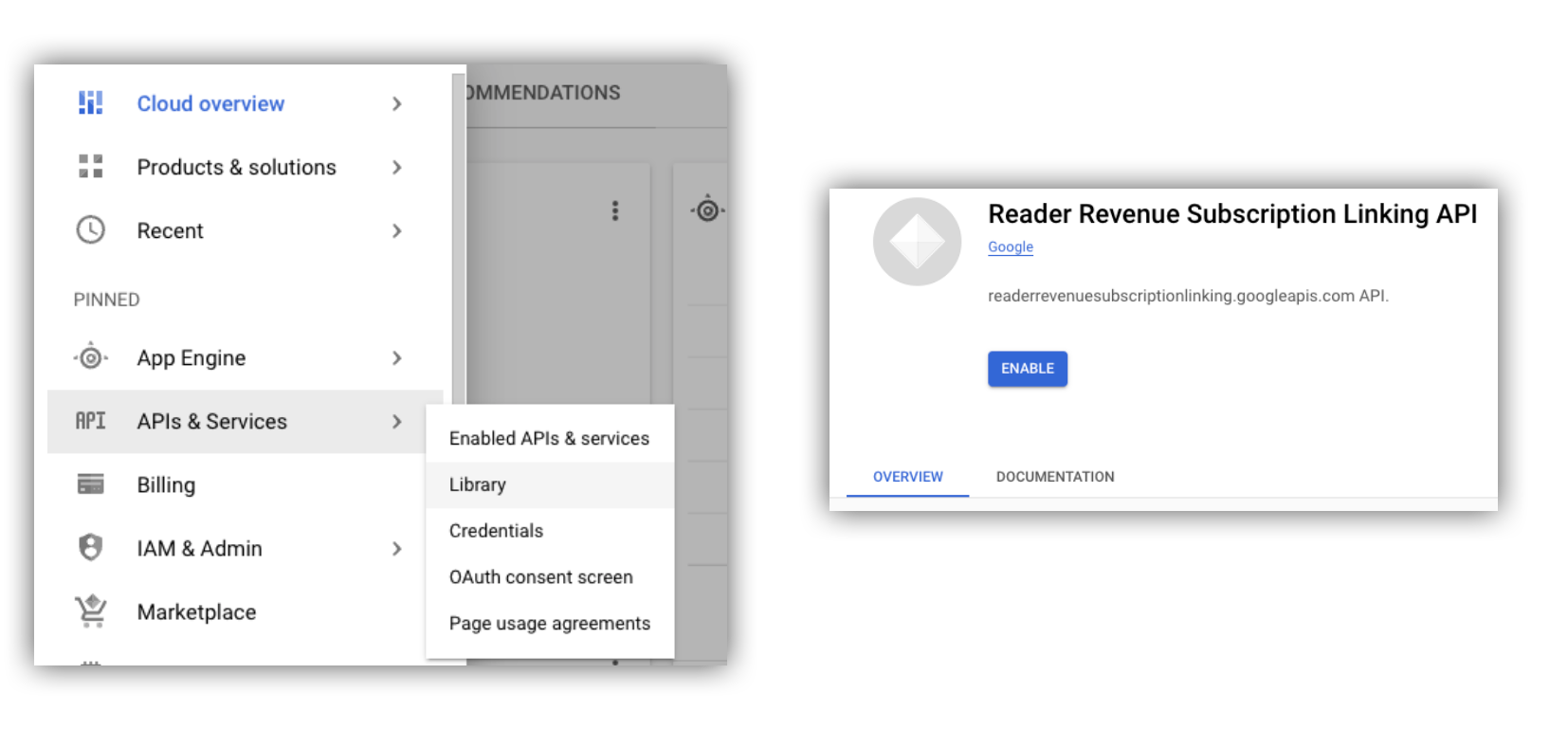
Figure 1.Navigating to the API Library, and enabling the API for a Google Cloud project.
Create a Service Account
Service accounts are used to allow access from your application to the Subscription Linking API.
- Create a service account within your project's console.
- Create credentials for the service account
, and store
the
credentials.jsonfile in a secure location accessible to your application. - Grant the IAM role "Subscription Linking Admin" to the service account you created. For granular control over the capabilities of the service account, you can assign the appropriate role from the following table.
| Capability / Role | Subscription Linking Admin | Subscription Linking Viewer | Subscription Linking Entitlements Viewer |
|---|---|---|---|
|
Get reader entitlements
|
|||
|
Get readers
|
|||
|
Update reader entitlements
|
|||
|
Delete readers
|
Use a Service Account with the Subscription Linking API
To authenticate calls to the Subscription Linking API with service accounts,
either use the googleapis client library
(which automatically handles access_token
requests)
or sign requests directly with the REST API. If using the REST API,
you must first obtain an access_token
(via the Google Auth library
or using a service account JWT
)
and then include it in the Authorization
header
Both the following client library
and REST API
examples have sample code for how to call getReader()
, getReaderEntitlements()
, updateReaderEntitlements()
and deleteReader()
.
Service Account Key and Application Default Credentials (ADC)
To call the Subscription Linking API, you must possess a service account key . If you cannot export a service account key due to your organization policy, you can use the Application Default Credentials (ADC) method.
Here is a sample command to set up an ADC using gcloud auth application-default login
command
:
 gcloud
config
 set

project
 [
YOUR_PROJECT_ID ]
 gcloud
auth
application-default
login
--impersonate-service-account
 [
YOUR_SERVICE_ACCOUNT_NAME@xxx.iam.gserviceaccount.com ]
This command creates a JSON file containing the service account credentials and places it in a well-known location on your file system. The location depends on your operating system:
- Linux, macOS:
$HOME/.config/gcloud/application_default_credentials.json - Windows:
%APPDATA%\gcloud\application_default_credentials.json
You don't need to provide the path to the key file in your code, as ADC automatically searches for credentials by itself.
  this
 .
 auth

 =

 new

 Auth
 .
 GoogleAuth
 ({

 // keyFile: process.env.KEY_FILE, - You don't need to provide this field

 'https://www.googleapis.com/auth/readerrevenue.subscriptionlinking.manage'

 ],

 ...
 });
Client library
This section explains how to use googleapis client library in Node.js.
Sample request
  import

 {
 readerrevenuesubscriptionlinking_v1
 ,

 Auth
 }

 from

 'googleapis'
 ;
 const

 subscriptionLinking

 =

 readerrevenuesubscriptionlinking_v1
 .
 Readerrevenuesubscriptionlinking
 ;
 class

 SubscriptionLinking

 {

 constructor
 ()

 {

 this
 .
 auth

 =

 new

 Auth
 .
 GoogleAuth
 ({

 keyFile
 :

 process
 .
 env
 .
 KEY_FILE
 ,

 scopes
 :

 [

 'https://www.googleapis.com/auth/readerrevenue.subscriptionlinking.manage'

 ],

 })

 }

 init
 ()

 {

 return

 new

 subscriptionLinking
 (

 {
 version
 :

 'v1'
 ,

 auth
 :

 this
 .
 auth
 })

 }
 }
 const

 subscriptionLinkingApi

 =

 new

 SubscriptionLinking
 ();
 const

 client

 =

 subscriptionLinkingApi
 .
 init
 ();
 /**
 * Retrieves details for a specific reader associated with the publication.
 * @async
 * @param {string} ppid - The Publisher Provided ID (ppid) for the reader.
 * @return {Promise<object>} A promise that resolves with the reader's details
 *  from the API.
 */
 async

 function

 getReader
 (
 ppid
 )

 {

 const

 publicationId

 =

 process
 .
 env
 .
 PUBLICATION_ID
 ;

 return

 await

 client
 .
 publications
 .
 readers
 .
 get
 ({

 name
 :

 `publications/
 ${
 publicationId
 }
 /readers/
 ${
 ppid
 }
 `
 ,

 });
 }
 /**
 * Updates the entitlements for a specific reader.
 * @async
 * @param {string} ppid - The Publisher Provided ID (ppid) for the reader whose
 *  entitlements are being updated.
 * @return {Promise<object>} A promise that resolves with the result of the
 *  updated entitlements object.
 */
 async

 function

 updateReaderEntitlements
 (
 ppid
 )

 {

 const

 publicationId

 =

 process
 .
 env
 .
 PUBLICATION_ID
 ;

 const

 requestBody

 =

 {

 /*
 Refer to
 https://developers.google.com/news/subscribe/subscription-linking/appendix/glossary#entitlements_object
 */

 entitlements

 :

 [{

 product_id
 :

 `
 ${
 publicationId
 }
 :basic`
 ,

 subscription_token
 :

 'abc1234'
 ,

 detail
 :

 'This is our basic plan'
 ,

 expire_time
 :

 '2025-10-21T03:05:08.200564Z'

 }]

 };

 return

 await

 client
 .
 publications
 .
 readers
 .
 updateEntitlements
 ({

 name
 :

 `publications/
 ${
 publicationId
 }
 /readers/
 ${
 ppid
 }
 /entitlements`
 ,

 requestBody

 });
 }
 /**
 * Retrieves the current entitlements for a specific reader.
 * @async
 * @param {string} ppid - The Publisher Provided ID (ppid) for the reader.
 * @return {Promise<object>} A promise that resolves with the reader's entitlements object.
 */
 async

 function

 getReaderEntitlements
 (
 ppid
 )

 {

 const

 publicationId

 =

 process
 .
 env
 .
 PUBLICATION_ID
 ;

 return

 await

 client
 .
 publications
 .
 readers
 .
 getEntitlements
 ({

 name
 :

 `publications/
 ${
 publicationId
 }
 /readers/
 ${
 ppid
 }
 /entitlements`

 });
 }
 /**
 * Deletes a specific Subscription Linking reader record associated with the publication.
 * @async
 * @param {string} ppid - The Publisher Provided ID (ppid) for the reader to be deleted.
 * @param {boolean=} forceDelete - If true, delete the user even if their
 *  entitlements are not empty
 * @return {Promise<object>} A promise that resolves upon successful deletion
 *  with an empty object ({})
 */
 async

 function

 deleteReader
 (
 ppid
 ,

 forceDelete

 =

 false
 )

 {

 const

 publicationId

 =

 process
 .
 env
 .
 PUBLICATION_ID
 ;

 return

 await

 client
 .
 publications
 .
 readers
 .
 delete
 ({

 name
 :

 `publications/
 ${
 publicationId
 }
 /readers/
 ${
 ppid
 }
 `

 force
 :

 forceDelete

 });
 }
REST API
If you want to call REST API endpoints, you can use either of the methods to
obtain accessToken
to set to the Authorization
header.
1. Use GoogleAuth
library
  import

 {

 GoogleAuth

 }

 from

 'google-auth-library'
 ;
 import

 credentialJson

 from

 'path_to_your_json_file'

 with

 {

 type
 :

 'json'

 };
 const

 auth

 =

 new

 GoogleAuth
 ({

 credentials
 :

 credential_json
 ,

 scopes
 :

 [

 'https://www.googleapis.com/auth/readerrevenue.subscriptionlinking.manage'

 ]
 });
 async

 function

 getAccessToken
 ()

 {

 const

 accessToken

 =

 await

 auth
 .
 getAccessToken
 ();

 return

 accessToken
 ;
 }
2. Generate an access_token
using a Service Account JWT
  import

 fetch

 from

 'node-fetch'
 ;
 import

 jwt

 from

 'jsonwebtoken'
 ;
 function

 getSignedJwt
 ()

 {

 /*
 Either store the service account credentials string in an environment variable
 Or implement logic to fetch it.
 */

 const

 key_file

 =

 process
 .
 env
 .
 CREDENTIALS_STRING

 const

 issueDate

 =

 new

 Date
 ();

 const

 expireMinutes

 =

 60
 ;

 const

 offsetInSeconds

 =

 issueDate
 .
 getTimezoneOffset
 ()

 *

 60000
 ;

 const

 expireDate

 =

 new

 Date
 (
 issueDate
 .
 getTime
 ()

 +

 (
 expireMinutes

 *

 60000
 ));

 const

 iat

 =

 Math
 .
 floor
 ((
 issueDate
 .
 getTime
 ()

 +

 offsetInSeconds
 )

 /

 1000
 );

 const

 exp

 =

 Math
 .
 floor
 ((
 expireDate
 .
 getTime
 ()

 +

 offsetInSeconds
 )

 /

 1000
 );

 const

 token

 =

 {

 iss
 :

 key_file
 .
 client_email
 ,

 iat
 ,

 exp
 ,

 aud
 :

 'https://oauth2.googleapis.com/token'
 ,

 scope
 :
 'https://www.googleapis.com/auth/readerrevenue.subscriptionlinking.manage'
 ,

 }

 return

 jwt
 .
 sign
 (
 token
 ,

 key_file
 .
 private_key
 ,

 {

 algorithm
 :

 'RS256'
 ,

 keyid
 :

 key_file
 .
 private_key_id
 ,

 })
 }
 async

 function

 getAccessToken
 (
 signedJwt
 )

 {

 let

 body

 =

 new

 URLSearchParams
 ();

 body
 .
 set
 (
 'grant_type'
 ,

 'urn:ietf:params:oauth:grant-type:jwt-bearer'
 );

 body
 .
 set
 (
 'assertion'
 ,

 signedJwt
 );

 const

 response

 =

 await

 fetch
 (
 'https://oauth2.googleapis.com/token'
 ,

 {

 method
 :

 'POST'
 ,

 headers
 :

 {
 'Content-Type'
 :

 'application/x-www-form-urlencoded'
 },

 body

 })

 const

 accessResponse

 =

 await

 response
 .
 json
 ();

 return

 accessResponse
 .
 access_token
 ;
 }
Sample code for REST API calls with the Google Auth library
  import

 {

 GoogleAuth

 }

 from

 'google-auth-library'
 ;
 import

 fetch

 from

 'node-fetch'
 import

 credentialJson

 from

 'path_to_your_json_file'

 with

 {

 type
 :

 'json'

 };
 const

 BASE_SUBSCRIPTION_LINKING_API_URL
 =
 'https://readerrevenuesubscriptionlinking.googleapis.com/v1'
 ;
 const

 publicationId

 =

 process
 .
 env
 .
 PUBLICATION_ID
 const

 auth

 =

 new

 GoogleAuth
 ({

 credentials
 :

 credentialJson
 ,

 scopes
 :

 [

 'https://www.googleapis.com/auth/readerrevenue.subscriptionlinking.manage'

 ]
 });
 async

 function

 getAccessToken
 ()

 {

 const

 accessToken

 =

 await

 auth
 .
 getAccessToken
 ();

 return

 accessToken
 ;
 }
 /**
 * Retrieves details for a specific reader associated with the publication.
 * @async
 * @param {string} ppid - The Publisher Provided ID (ppid) for the reader.
 * @return {object} reader json for the given ppid
 */
 async

 function

 getReader
 (
 ppid
 )

 {

 const

 endpoint

 =

 `
 ${
 BASE_SUBSCRIPTION_LINKING_API_URL
 }
 /publications/
 ${
 publicationId
 }
 /readers/
 ${
 ppid
 }
 `
 ;

 const

 accessToken

 =

 await

 getAccessToken
 ();

 const

 response

 =

 await

 fetch
 (
 endpoint
 ,

 {

 method
 :

 'GET'
 ,

 headers
 :

 {

 Authorization
 :

 `Bearer
 ${
 accessToken
 }
 `
 ,

 },

 });

 const

 reader

 =

 await

 response
 .
 json
 ();

 return

 reader
 ;
 }
 /**
 * Updates the entitlements for a specific reader.
 * @async
 * @param {string} ppid - The Publisher Provided ID (ppid) for the reader.
 * @return {object} the updated entitlements object in json.
 */
 async

 function

 updateReaderEntitlements
 (
 ppid
 )

 {

 const

 endpoint

 =

 `
 ${
 BASE_SUBSCRIPTION_LINKING_API_URL
 }
 /publications/
 ${
 publicationId
 }
 /readers/
 ${
 ppid
 }
 /entitlements`
 ;

 const

 requestBody

 =

 {

 /*
 Refer to
 https://developers.google.com/news/subscribe/subscription-linking/appendix/glossary#entitlements_object
 */

 entitlements

 :

 [{

 product_id
 :

 `
 ${
 publicationId
 }
 :basic`
 ,

 subscription_token
 :

 'abc1234'
 ,

 detail
 :

 'This is our basic plan'
 ,

 expire_time
 :

 '2025-10-21T03:05:08.200564Z'

 }]

 };

 const

 response

 =

 await

 fetch
 (
 endpoint
 ,

 {

 method
 :

 'PATCH'
 ,

 headers
 :

 {

 Authorization
 :

 `Bearer
 ${
 accessToken
 }
 `
 ,

 'Content-Type'
 :

 'application/json'
 ,

 },

 body
 :

 JSON
 .
 stringify
 (
 requestBody
 )

 })

 const

 updatedEntitlements

 =

 await

 response
 .
 json
 ();

 return

 updatedEntitlements
 ;
 }
 /**
 * Retrieves the current entitlements for a specific reader.
 * @async
 * @param {string} ppid - The Publisher Provided ID (ppid) for the reader.
 * @return {object} the reader's entitlements object in json.
 */
 async

 function

 getReaderEntitlements
 (
 ppid
 )

 {

 const

 endpoint

 =

 `
 ${
 BASE_SUBSCRIPTION_LINKING_API_URL
 }
 /publications/
 ${
 publicationId
 }
 /readers/
 ${
 ppid
 }
 /entitlements`
 ;

 const

 accessToken

 =

 await

 getAccessToken
 ();

 const

 response

 =

 await

 fetch
 (
 endpoint
 ,

 {

 method
 :

 'GET'
 ,

 headers
 :

 {

 Authorization
 :

 `Bearer
 ${
 accessToken
 }
 `
 ,

 },

 });

 const

 entitlements

 =

 await

 response
 .
 json
 ();

 return

 entitlements
 ;
 }
 /**
 * Deletes a specific Subscription Linkikng reader record associated with the publication.
 * @async
 * @param {string} ppid - The Publisher Provided ID (ppid) for the reader.
 * @param {boolean=} forceDelete - If true, delete the user even if their
 *  entitlements are not empty
 * @return {object} returns an empty object ({}) if the delete operation is successful
 */
 async

 function

 deleteReader
 (
 ppid
 ,

 forceDelete

 =

 false
 )

 {

 const

 endpoint

 =

 `
 ${
 BASE_SUBSCRIPTION_LINKING_API_URL
 }
 /publications/
 ${
 publicationId
 }
 /readers/
 ${
 ppid
 }
 ?force=
 ${
 forceDelete
 }
 `
 ;

 const

 response

 =

 await

 fetch
 (
 endpoint
 ,

 {

 method
 :

 'DELETE'
 ,

 headers
 :

 {

 Authorization
 :

 `Bearer
 ${
 accessToken
 }
 `
 ,

 }

 });

 const

 result

 =

 await

 response
 .
 json
 ();

 return

 result
 ;
 }
