Item logo image for Auto BCC for Gmail™ by cloudHQ

Auto BCC for Gmail™ by cloudHQ
cloudHQ LLC
Featured
4.2 (

122 ratings

)
Extension Communication 60,000 users
Item media 4 (screenshot) for Auto BCC for Gmail™ by cloudHQ
Item media 5 (screenshot) for Auto BCC for Gmail™ by cloudHQ
Item video thumbnail
Item media 2 (screenshot) for Auto BCC for Gmail™ by cloudHQ
Item media 3 (screenshot) for Auto BCC for Gmail™ by cloudHQ
Item media 4 (screenshot) for Auto BCC for Gmail™ by cloudHQ
Item media 5 (screenshot) for Auto BCC for Gmail™ by cloudHQ
Item video thumbnail
Item media 2 (screenshot) for Auto BCC for Gmail™ by cloudHQ
Item video thumbnail
Item media 2 (screenshot) for Auto BCC for Gmail™ by cloudHQ
Item media 3 (screenshot) for Auto BCC for Gmail™ by cloudHQ
Item media 4 (screenshot) for Auto BCC for Gmail™ by cloudHQ
Item media 5 (screenshot) for Auto BCC for Gmail™ by cloudHQ

Overview

Setup automatic blind copies to your CRM or any other email address

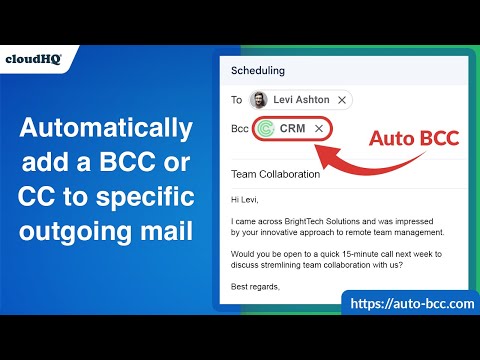
With the Auto BCC for Gmail by cloudHQ Chrome extension, you can automatically blind copy (or copy) specific people on specific emails so that you can rest assured that whoever should have a copy of your email, automatically does. Here's a list of features: ✅ Automatically CC or BCC another email address (like another one of your email addresses, your boss, your assistant, etc). ✅ Multiple rules based on your "from" email address: —Only email messages that you send from your professional email address will be CC or BCC'ed to an email address of your choice. ✅ Multiple rules based on your receiver's email address or domain: — Emails sent to certain contacts (for example, important clients) automatically have a CC or BCC included in your emails. ✅ Exclusion rules based on your receiver's email address or domain: — Emails that you send to your private contacts or internal company contacts do not get CC'ed or BCC'ed to anyone. ✅ Full support for Salesforce CRM, HubSpot CRM, and other major CRMs. cloudHQ. Helping professionals 1 click at a time. Website: https://www.auto-bcc.com/ Pricing: https://www.auto-bcc.com//pricing Support page: https://support.cloudhq.net/category/browser-extensions/auto-bcc-for-gmail/ Blog: https://blog.cloudhq.net X: https://x.com/cloudhq Facebook: https://www.facebook.com/cloudHQ cloudHQ is trademark of CloudHQ LLC. https://www.cloudhq.net/trademark

4.2 out of 5 122 ratings

Learn more about results and reviews.

Details

  • Version
    1.0.2.7
  • Updated
    November 29, 2025
  • Size
    578KiB
  • Languages
    11 languages
  • Developer
    cloudHQ LLC
    2247 29th Avenue San Francisco, CA 94116 US
    Website
    Email
    support@cloudhq.net
    Phone
    +1 415-509-6721
  • Trader
    This developer has identified itself as a trader per the definition from the European Union and committed to only offer products or services that comply with EU laws.
  • D-U-N-S
    064785518

Privacy

Manage extensions and learn how they're being used in your organization

Auto BCC for Gmail™ by cloudHQ has disclosed the following information regarding the collection and usage of your data. More detailed information can be found in the developer's privacy policy .

Auto BCC for Gmail™ by cloudHQ handles the following:

Personally identifiable information

This developer declares that your data is

  • Not being sold to third parties, outside of the approved use cases
  • Not being used or transferred for purposes that are unrelated to the item's core functionality
  • Not being used or transferred to determine creditworthiness or for lending purposes

Support

For help with questions, suggestions, or problems, visit the developer's support site

Related

Auto Follow Up for Gmail™ by cloudHQ

4.9

Automated follow up emails and mail merge

Salesforce

4.2

Work with Salesforce records directly in your browser.

Sort Gmail Inbox by cloudHQ

4.1

Find an email in seconds with free preset filters

Gmail Message Preview by cloudHQ

4.1

Preview emails in inbox.

Auto BCC for Gmail™

3.5

Automatically add BCC/CC fields when you send emails. Allow different BCC/CC addresses per each of your Gmail accounts.

Save Emails as PDF by cloudHQ

4.3

Export, convert and save Gmail™ emails as a PDF document

Meeting Scheduler for Gmail™ by cloudHQ

4.5

Easy meeting scheduling and meeting invitations directly from your mailbox

Gmail Auto BCC

3.7

Open source automatic cc/bcc for gmail.

Formatted Email Subject Lines by cloudHQ

4.5

Formatted email subject lines: underscore, bold, italics, strikethrough

ChatGPT for Gmail by cloudHQ

4.4

Automatically write emails using ChatGPT for Gmail

Gmail™ Email Templates by cloudHQ

4.2

Beautiful email templates for Gmail. Design your templates or import templates from Mailchimp. With team sharing!

Copilot for Gmail™ by cloudHQ

4.5

Mini CRM for your Gmail

Auto Follow Up for Gmail™ by cloudHQ

4.9

Automated follow up emails and mail merge

Salesforce

4.2

Work with Salesforce records directly in your browser.

Sort Gmail Inbox by cloudHQ

4.1

Find an email in seconds with free preset filters

Gmail Message Preview by cloudHQ

4.1

Preview emails in inbox.

Auto BCC for Gmail™

3.5

Automatically add BCC/CC fields when you send emails. Allow different BCC/CC addresses per each of your Gmail accounts.

Save Emails as PDF by cloudHQ

4.3

Export, convert and save Gmail™ emails as a PDF document

Meeting Scheduler for Gmail™ by cloudHQ

4.5

Easy meeting scheduling and meeting invitations directly from your mailbox

Gmail Auto BCC

3.7

Open source automatic cc/bcc for gmail.

Google apps
Create a Mobile Website
View Site in Mobile | Classic
Share by: