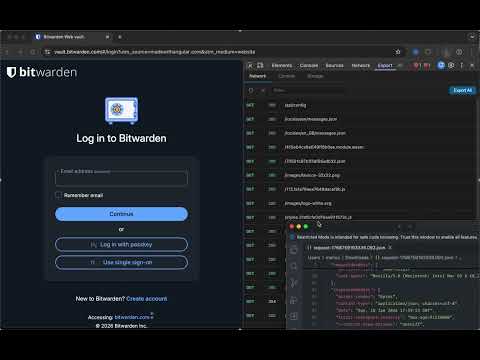
Item logo image for DevTools Export

DevTools Export

5.0 (

1 rating

)
Item video thumbnail
Item media 2 (screenshot) for DevTools Export

Overview

Export Console Logs, LocalStorage, HTTP requests from DevTools with headers, body, and response data for easy debugging and sharing.

Export DevTools data fast—network, console, and storage—with one‑click copy/download. Detailed description Turn DevTools into a shareable debugging powerhouse. DevTools Export adds a clean “Export” panel that captures the most important data you need to troubleshoot issues or hand off to teammates—without digging through raw DevTools tabs. Why you’ll love it • Export network requests with headers, bodies, and response data • Capture console logs and errors as structured JSON • Dump storage (localStorage, sessionStorage, cookies, IndexedDB) instantly • One‑click copy or download • Fast filtering to find exactly what you need • Optional iframe log capture for complex apps Perfect for • Bug reports • QA handoffs • Support tickets • Team collaboration Notes • Some pages may override console hooks; results can vary • Restricted URLs (chrome://, Chrome Web Store, etc.) are not capturable

Details

  • Version
    1.0.0
  • Updated
    January 21, 2026
  • Offered by
    CORSPROXY
  • Size
    314KiB
  • Languages
    English
  • Developer
    Email
    support@corsproxy.io
  • Non-trader
    This developer has not identified itself as a trader. For consumers in the European Union, please note that consumer rights do not apply to contracts between you and this developer.

Privacy

Manage extensions and learn how they're being used in your organization
The developer has disclosed that it will not collect or use your data. To learn more, see the developer’s privacy policy .

This developer declares that your data is

  • Not being sold to third parties, outside of the approved use cases
  • Not being used or transferred for purposes that are unrelated to the item's core functionality
  • Not being used or transferred to determine creditworthiness or for lending purposes

Support

Related

Console Copy Tool

5.0

Automatically captures and copies formatted console messages from Chrome DevTools

XHR Viewer

0.0

Real-time XHR/Fetch request viewer with prettified JSON responses

Download All Files

4.8

Find and download all files from a website

DevTraceShield - Always-On DevTools Recorder | Console & Network Logger

0.0

Never lose another bug! Auto-capture console logs & network. 2,000 free logs, 7-day retention. Upgrade to Pro for unlimited.

DevTools - Sources downloader

3.8

DevTools downloader

API Monitor

5.0

Monitor web API requests without opening DevTools.

Devtools - Download Resources

0.0

Uses the devtools API to add a panel with a download resources functionality.

Console Copy

5.0

Capture & analyze console logs with on-device AI Assistant (Gemini Nano) and Lighthouse-style Page Analysis. Filters, search, export

Browser History Export

5.0

Export your browser history in an encrypted format.

Network Logger

5.0

Capture and copy network requests with all details including URL, headers, payload, and response

Network & Console Logger

0.0

Records network requests and console logs from web pages.

Sharemaster: Copy Title & URL with Shortcut

4.8

Helps you copy the title and URL quickly with keyboard shortcuts

Console Copy Tool

5.0

Automatically captures and copies formatted console messages from Chrome DevTools

XHR Viewer

0.0

Real-time XHR/Fetch request viewer with prettified JSON responses

Download All Files

4.8

Find and download all files from a website

DevTraceShield - Always-On DevTools Recorder | Console & Network Logger

0.0

Never lose another bug! Auto-capture console logs & network. 2,000 free logs, 7-day retention. Upgrade to Pro for unlimited.

DevTools - Sources downloader

3.8

DevTools downloader

API Monitor

5.0

Monitor web API requests without opening DevTools.

Devtools - Download Resources

0.0

Uses the devtools API to add a panel with a download resources functionality.

Console Copy

5.0

Capture & analyze console logs with on-device AI Assistant (Gemini Nano) and Lighthouse-style Page Analysis. Filters, search, export

Google apps
Create a Mobile Website
View Site in Mobile | Classic
Share by:
