


Overview
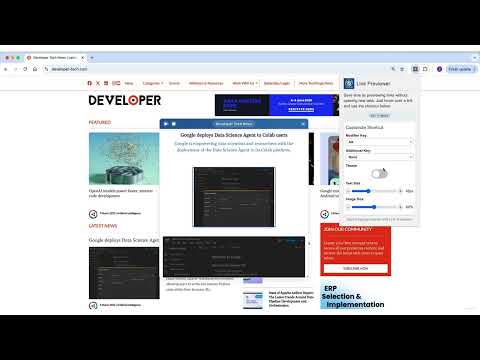
Hover & Alt for a sneak peek! Preview links without clicking.
🔍 Link Previewer: Instant Webpage Peek | Browse Smarter 🚀 Quick webpage preview tool for efficient browsing. See content before clicking - save time and boost productivity! Key Features: Instant Link Preview: Hover + Alt to peek at any webpage 🔍 Custom Shortcuts: Personalize your preview activation key 🔑 Universal: Preview links on news sites, blogs, online shops, and more 🌍 Flexible Viewing: Resize and reposition the preview window 🖥️ Fast & Responsive: Optimized for smooth browsing experience 🔥 Privacy-Centric: No data collection or tracking 🔒 Readout Functionality: Listen to the content of the previewed page 🔊 Customizable Content: Adjust text and main article image size 🎨 Dark Mode: Switch between light and dark themes 🌗 Perfect for: 🔬 Researchers, 🛒 Online Shoppers, 📰 News Readers, and 💼 Professionals How to Use: Hover over a link Press Alt (or your custom key) View webpage content instantly 🆕 Latest Update (v1.1.0): ✨ Fresh new blue UI with modern design ✨ Dark Mode Added ✨ Customizable shortcuts 🚀 Performance improvements 🔊 New Readout Feature 🎥 Customizable Content Display 🐛 Fixed issue with Google links Upgrade your Chrome browsing! Install Link Previewer and start smart-peeking today. 🚀
Details
- Version1.1.0
- UpdatedMarch 9, 2025
- Offered byomer.rah2
- Size861KiB
- LanguagesEnglish
- Developer
Email
omer.appsbw@gmail.com - Non-traderThis developer has not identified itself as a trader. For consumers in the European Union, please note that consumer rights do not apply to contracts between you and this developer.
Privacy

This developer declares that your data is
- Not being sold to third parties, outside of the approved use cases
- Not being used or transferred for purposes that are unrelated to the item's core functionality
- Not being used or transferred to determine creditworthiness or for lending purposes


