Native Speech: Pronunciation, Translation & Text to Speech

Overview
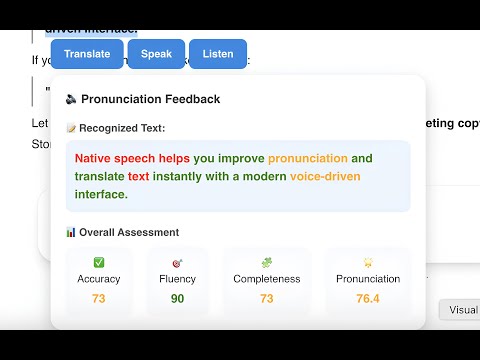
Translate any selected text for free. Practice pronunciation and listen to native speech with a NativeSpeech account.
Practice speaking, listening, and translation with AI-powered real-time speech assessment. Select text on any website and start learning instantly. Supports all English accents and other languages. Translate any selected text for free. Practice pronunciation and listen to native speech with a NativeSpeech account. Step-by-step Instructions: 1. Install the extension. 2. On any website, select any text — you should see a list of buttons: "Translate", "Listen", "Practice" and "Ask AI". Click any of them to get started. 3. Use the extension window to adjust the target language or select a preferred voice. You can also show or hide feature buttons. 4. Toggle Disable/Enable extension easily on right click. Enjoy! Privacy & Policy: https://nativespeech.app/privacy-policy
Details
- Version1.1.3
- UpdatedMay 11, 2026
- Size310KiB
- LanguagesEnglish
- DeveloperWebsite
Email
support@nativespeech.app - Non-traderThis developer has not identified itself as a trader. For consumers in the European Union, please note that consumer rights do not apply to contracts between you and this developer.
Privacy

Native Speech: Pronunciation, Translation & Text to Speech has disclosed the following information regarding the collection and usage of your data. More detailed information can be found in the developer's privacy policy .
Native Speech: Pronunciation, Translation & Text to Speech handles the following:
This developer declares that your data is
- Not being sold to third parties, outside of the approved use cases
- Not being used or transferred for purposes that are unrelated to the item's core functionality
- Not being used or transferred to determine creditworthiness or for lending purposes
Support
For help with questions, suggestions, or problems, visit the developer's support site