Item logo image for Pesticide - Advanced CSS Debugger

Pesticide - Advanced CSS Debugger
extension.rocks
4.9 (

84 ratings

)
Item media 4 (screenshot) for Pesticide - Advanced CSS Debugger
Item media 5 (screenshot) for Pesticide - Advanced CSS Debugger
Item video thumbnail
Item media 2 (screenshot) for Pesticide - Advanced CSS Debugger
Item media 3 (screenshot) for Pesticide - Advanced CSS Debugger
Item media 4 (screenshot) for Pesticide - Advanced CSS Debugger
Item media 5 (screenshot) for Pesticide - Advanced CSS Debugger
Item video thumbnail
Item media 2 (screenshot) for Pesticide - Advanced CSS Debugger
Item video thumbnail
Item media 2 (screenshot) for Pesticide - Advanced CSS Debugger
Item media 3 (screenshot) for Pesticide - Advanced CSS Debugger
Item media 4 (screenshot) for Pesticide - Advanced CSS Debugger
Item media 5 (screenshot) for Pesticide - Advanced CSS Debugger

Overview

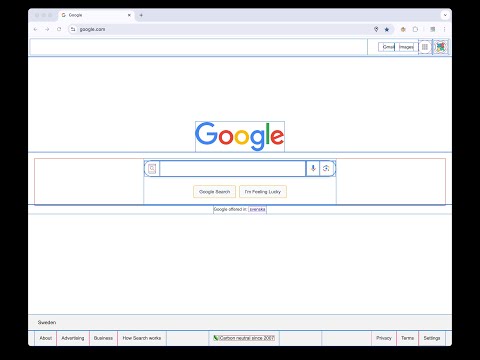
Not only inserts outlines (without background color) on all elements, but also inspects size and layout. CSS is awesome!

Pesticide 3.2 is an advanced CSS debugger for Chrome that helps you inspect layout, spacing, typography, and computed styles directly on the page. Turn it on and hover any element to open a floating inspector with the details you actually need: - Element tag, id, and classes - DOM path - Client / offset / scroll dimensions - Full box model: margin, border, padding, radius, and content size - Font inspection - Computed CSS properties - Copy CSS output in Tailwind, inline, or block format What makes Pesticide useful: - Outline-based debugging without shifting layout - Click to pin the current element while comparing spacing and styles - Resizable, draggable inspector overlay - Per-site saved panel position and size - Options page to show or hide inspector sections - Quick keyboard control with Ctrl + Shift + P Pesticide is built for front-end developers, designers, and anyone debugging tricky CSS. It gives you a fast visual way to understand how a page is built without opening heavyweight tools for every small layout check. Version 3.2 highlights: - Better floating inspector workflow - Copy CSS panel with Tailwind, inline, and block output - Font and computed-style inspection - Configurable inspector sections from the options page If you want a lightweight Chrome extension for faster CSS debugging, Pesticide is built for that job.

4.9 out of 5 84 ratings

Learn more about results and reviews.

Details

  • Version
    3.2.0
  • Updated
    March 26, 2026
  • Size
    169KiB
  • Languages
    51 languages
  • Developer
    Extension Rocks
    Västra Järnvägsgatan 15 Stockholm 111 64 SE
    Website
    Email
    contact@extension.rocks
  • Non-trader
    This developer has not identified itself as a trader. For consumers in the European Union, please note that consumer rights do not apply to contracts between you and this developer.

Privacy

Manage extensions and learn how they're being used in your organization

Pesticide - Advanced CSS Debugger has disclosed the following information regarding the collection and usage of your data. More detailed information can be found in the developer's privacy policy .

Pesticide - Advanced CSS Debugger handles the following:

User activity
Website content

This developer declares that your data is

  • Not being sold to third parties, outside of the approved use cases
  • Not being used or transferred for purposes that are unrelated to the item's core functionality
  • Not being used or transferred to determine creditworthiness or for lending purposes

Support

Related

Pesticide Layout Inspector

0.0

Pesticide Layout Inspector enhances web development by outlining page elements

Pesticide (without hover bar)

5.0

A CSS debugging tool that outlines all page elements to help identify and fix layout issues.

Outline HTML Elements

5.0

Outline HTML elements with a colorful border without affecting the layout to inspect website structure.

Pesticide for Chrome - Simple

5.0

Toggle CSS outlines to debug layouts easily.

Pesticide

4.0

A CSS debugging tool that inserts outlines onto all elements to help with debugging layout issues

CSS Peeper

4.2

Inspect website styles in seconds. Supercharge your workflow, and save hours of work.

CSS Debug with Pesticide

5.0

Toggle outlines on all elements to help debug CSS

VisBug

4.8

Open source browser design tools

Responsive Viewer

4.2

Show multiple screens once, Responsive design tester

DOM Tree Visualizer

5.0

HTML DOM Tree Visualizer is an educational Chrome extension that provides real-time visualization of how web browsers construct the…

Debug CSS

4.4

When enabled adds outline to all elements on the page, Hold Ctrl and hover to get more detail

JSON Viewer Pro

4.7

A completely free extension to visualise JSON response in awesome Tree and Chart view with great user experience and options. It…

Pesticide Layout Inspector

0.0

Pesticide Layout Inspector enhances web development by outlining page elements

Pesticide (without hover bar)

5.0

A CSS debugging tool that outlines all page elements to help identify and fix layout issues.

Outline HTML Elements

5.0

Outline HTML elements with a colorful border without affecting the layout to inspect website structure.

Pesticide for Chrome - Simple

5.0

Toggle CSS outlines to debug layouts easily.

Pesticide

4.0

A CSS debugging tool that inserts outlines onto all elements to help with debugging layout issues

CSS Peeper

4.2

Inspect website styles in seconds. Supercharge your workflow, and save hours of work.

CSS Debug with Pesticide

5.0

Toggle outlines on all elements to help debug CSS

VisBug

4.8

Open source browser design tools

Google apps
Create a Mobile Website
View Site in Mobile | Classic
Share by: