Item logo image for UI Enhancer for Gemini

UI Enhancer for Gemini

4.8 (

5 ratings

)
Item media 4 (screenshot) for UI Enhancer for Gemini
Item media 5 (screenshot) for UI Enhancer for Gemini
Item video thumbnail
Item media 2 (screenshot) for UI Enhancer for Gemini
Item media 3 (screenshot) for UI Enhancer for Gemini
Item media 4 (screenshot) for UI Enhancer for Gemini
Item media 5 (screenshot) for UI Enhancer for Gemini
Item video thumbnail
Item media 2 (screenshot) for UI Enhancer for Gemini
Item video thumbnail
Item media 2 (screenshot) for UI Enhancer for Gemini
Item media 3 (screenshot) for UI Enhancer for Gemini
Item media 4 (screenshot) for UI Enhancer for Gemini
Item media 5 (screenshot) for UI Enhancer for Gemini

Overview

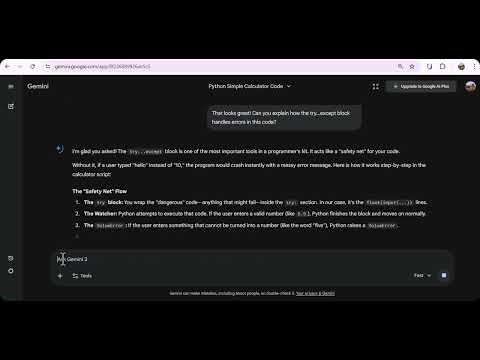
Enhances Gemini interface with useful tools: Wide Mode, Snippets, Multi-Quote & Message Sidebar.

Transform your Google Gemini™ experience into a professional productivity powerhouse. UI Enhancer for Gemini is a comprehensive toolkit designed for developers, writers, and power users who want more control over the Gemini interface. No more scrolling endlessly or struggling with narrow code blocks. 🚀 Key Features: ✅ Wide Mode (Full Width) Break free from the narrow central column. Utilize your entire screen width to view long lines of code, complex data tables, and detailed responses without awkward wrapping. ✅ Message Sidebar navigation Easily navigate through long conversations. A floating sidebar generates a clickable table of contents for your chat, allowing you to jump instantly to any previous prompt or response. ✅ Text Snippets Manager Save your frequently used prompts as templates. Insert complex instructions or repetitive text with a single click (or use the "Type first word + Arrow Right" shortcut) to speed up your workflow. ✅ Multi-Quote & Reply Select multiple parts of Gemini's response simultaneously. The extension collects your selections and attaches them to your input box, making it easy to ask specific questions about different parts of a long answer in one go. ✅ Code Expander Automatically collapses long code blocks to keep your chat interface clean. Use the "Show More" button to view the code only when you need it. 🔒 Privacy Focused This extension operates entirely locally on your browser. It does not collect, store, or transmit your chat data or personal information. Upgrade your AI workflow today with UI Enhancer for Gemini!

4.8 out of 5 5 ratings

Learn more about results and reviews.

Details

  • Version
    1.0.1
  • Updated
    December 23, 2025
  • Offered by
    core42x
  • Size
    38.7KiB
  • Languages
    English
  • Developer
    Email
    core42x@gmail.com
  • Non-trader
    This developer has not identified itself as a trader. For consumers in the European Union, please note that consumer rights do not apply to contracts between you and this developer.

Privacy

Manage extensions and learn how they're being used in your organization
The developer has disclosed that it will not collect or use your data. To learn more, see the developer’s privacy policy .

This developer declares that your data is

  • Not being sold to third parties, outside of the approved use cases
  • Not being used or transferred for purposes that are unrelated to the item's core functionality
  • Not being used or transferred to determine creditworthiness or for lending purposes

Support

For help with questions, suggestions, or problems, visit the developer's support site

Related

Wider Gemini

4.9

让 Google Gemini 的对话界面更宽,支持自定义宽度和代码自动换行

Gemini Enhancer

4.8

Supercharge Gemini AI: custom slash commands, auto-tab renaming, chat folding, and message navigation. Boost your AI productivity.

Refined for Gemini - Custom Themes & PDF Export

4.6

The best Gemini Dark Theme & PDF Exporter. Customize Gemini with 20+ themes like Dracula, Matrix & Nord. Clean, Fast & Private

Better Gemini

5.0

Personalize your Gemini: Adjust width, font, colors and more!

Gemini & ChatGPT Wide View

4.7

Ensacha la vista de Gemini y ChatGPT para aprovechar mejor la pantalla.

Quote & Reply for Gemini

5.0

Select any text in Gemini's responses and reply with automatic context. Makes follow-up questions clearer and more specific.

Wide Mode for Gemini™

5.0

Wide-screen mode for the Gemini chat to improve readability

Anwingels: Premium Themes, Live Editor & Export Gemini 3 Chat to PDF

5.0

Customize Google Gemini with animated themes, dark mode, live UI style editor, and seamless tools to export Gemini chat to PDF fast.

Better Gemini: Wide UI, Quick Launch, Export

5.0

Wide 98% chat layout, quick launch (type 'gem'), export to Markdown, 40+ keyboard shortcuts, default model picker. More coming!

Gemini Font

5.0

Customize fonts, sizes, colors & line spacing for Gemini AI chat. Full RTL Arabic support included.

Gemini Chat Navigator

5.0

Adds a navigation sidebar to Gemini chats based on user prompts for easier navigation.

Gemini Enhancer

5.0

Enhance your Gemini experience with conversation folders and productivity features

Wider Gemini

4.9

让 Google Gemini 的对话界面更宽,支持自定义宽度和代码自动换行

Gemini Enhancer

4.8

Supercharge Gemini AI: custom slash commands, auto-tab renaming, chat folding, and message navigation. Boost your AI productivity.

Refined for Gemini - Custom Themes & PDF Export

4.6

The best Gemini Dark Theme & PDF Exporter. Customize Gemini with 20+ themes like Dracula, Matrix & Nord. Clean, Fast & Private

Better Gemini

5.0

Personalize your Gemini: Adjust width, font, colors and more!

Gemini & ChatGPT Wide View

4.7

Ensacha la vista de Gemini y ChatGPT para aprovechar mejor la pantalla.

Quote & Reply for Gemini

5.0

Select any text in Gemini's responses and reply with automatic context. Makes follow-up questions clearer and more specific.

Wide Mode for Gemini™

5.0

Wide-screen mode for the Gemini chat to improve readability

Anwingels: Premium Themes, Live Editor & Export Gemini 3 Chat to PDF

5.0

Customize Google Gemini with animated themes, dark mode, live UI style editor, and seamless tools to export Gemini chat to PDF fast.

Google apps
Create a Mobile Website
View Site in Mobile | Classic
Share by:
