

This document is part of a series that provides key information and guidance related to planning and performing Oracle® 11g/12c database migrations to Cloud SQL for MySQL version 5.7, second-generation instances. The series includes the following parts:
- Migrating Oracle users to Cloud SQL for MySQL: Terminology and functionality
- Migrating Oracle users to Cloud SQL for MySQL: Data types, users, and tables
- Migrating Oracle users to Cloud SQL for MySQL: Queries, stored procedures, functions, and triggers
- Migrating Oracle users to Cloud SQL for MySQL: Security, operations, monitoring, and logging (this document)
Security
This section explains the differences in data encryption between Oracle Cloud SQL for MySQL and discusses auditing Cloud SQL for MySQL access control.
Oracle data encryption
Beyond basic user authentication and user privileges management, Oracle offers the TDE (Transparent Data Encryption) mechanism to add an additional encryption layer for data-at-rest security at the operating system level. Once configured, Oracle TDE is implemented by the system automatically and does not require any manual interaction from users. In order to implement Oracle TDE, we recommend configuring it explicitly (by command) on the required and supported database objects, which can accept this kind of encryption—for example, tablespace, table, or column. For handling security for data in transit, we recommend that you implement a network security solution.
Cloud SQL for MySQL data encryption
Google Cloud provides several layers of encryption to protect customer data at rest in Google Cloud products, including Cloud SQL. Cloud SQL is encrypted using AES-128 or AES-256 encryption. For additional information, see the following topic on encryption at rest . Unlike Oracle encryption (which must be implemented through configuration actions), Google Cloud encrypts customer data at rest, without any required action. From a schema conversion perspective, no actions are required, and encryption remains transparent to the user.
To better understand how Google Cloud handles data-in-transit encryption, see How encryption is managed for data in transit .
Auditing
Oracle provides several methods for auditing, such as standard and fine-grained auditing. In contrast, MySQL by default does not provide equivalent audit solutions. To overcome this limitation, you can use Google Cloud dashboards and monitoring, but in order to capture database DML/DDL operations, you can use the slow-query, general, and error logs as a more robust auditing solution.
In order to implement this solution, we recommend that you use the instance FLAGS
to enable the slow-query log and the general log. In addition, you
should manage retention for these logs according to your business needs.
You can use Google Cloud audit logs to collect audit information. These logs cover three main levels:
- Admin activity audit logs(enabled by default)
- Data access audit logs(disabled by default)
- Read about how to configure data access logs .
- Note that data access audit logs don't record data access operations on resources that can be accessed without logging into Google Cloud.
- System event audit logs(enabled by default)
Viewing Google Cloud audit logs
Here's the access path for viewing audit logs: Google Cloud console > Home > Activity
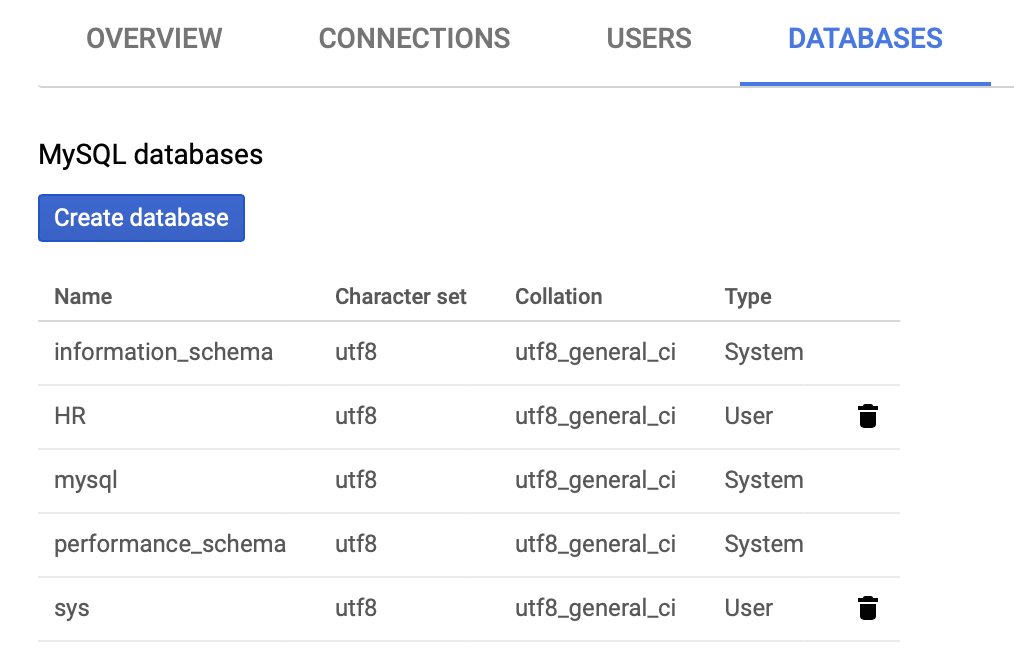
You can filter information granularity between the audit levels. The following screenshot shows an admin activity audit.
Cloud Logging page
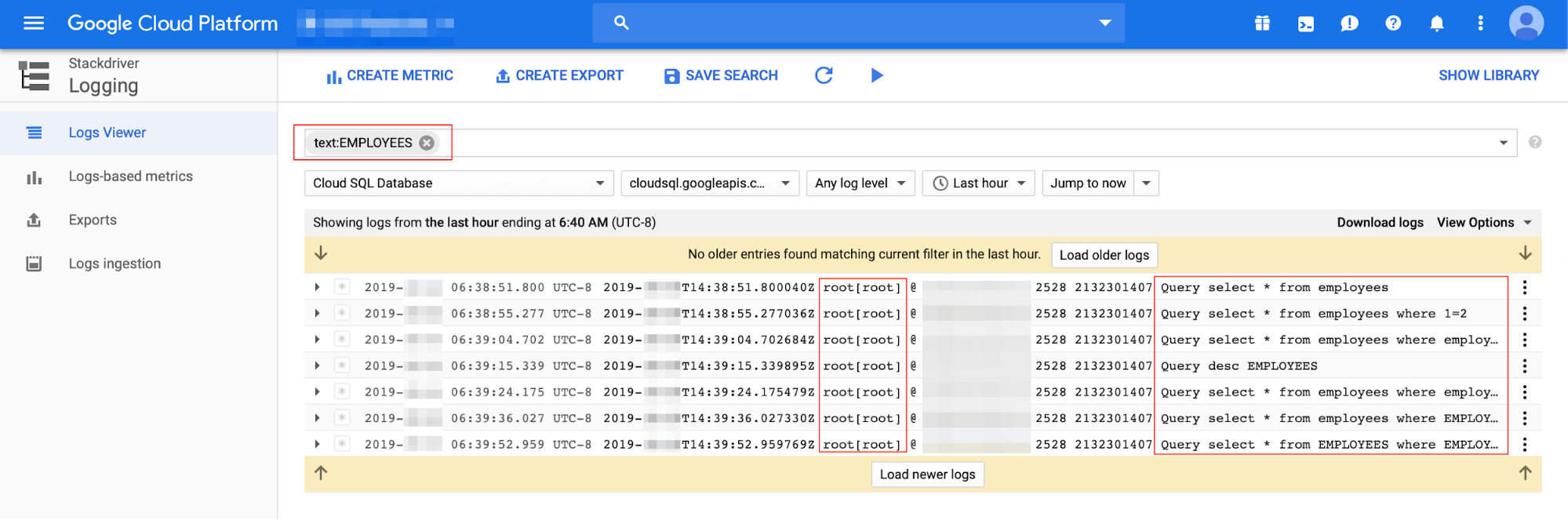
Here's the access path for the logging page: Google Cloud console > Cloud Logging
You can filter information granularity between the log types. The following screenshot shows a general-log audit (audit data for user, host, and SQL statement).
Cloud SQL for MySQL access control
Users can connect to the Cloud SQL for MySQL instance by using a MySQL client with an authorized static IP address or by using Cloud SQL Proxy , in a manner similar to any other database connection. For other connection sources such as App Engine or Compute Engine, users have several options such as using Cloud SQL Proxy. These options are described in more detail in Instance access control .
Operations
This section discusses export and import, instance-level backup and restore, the MySQL event scheduler (for database jobs), and standby instances for read-only operations and disaster recovery.
Export and import
Oracle's main method for performing logical export and import operations is the Data Pump
utility, using the EXPDP
/ IMPDP
commands (an older version of
Oracle export/import functionality included the exp
and imp
commands). The
MySQL equivalent commands are the mysqldump
and the mysqlimport
utilities,
which generate dump files and then perform the import at a database or object
level (including exporting and importing metadata only).
There is no direct MySQL equivalent solution for the Oracle DBMS_DATAPUMP
utility (the Oracle method to apply the EXPDP
/ IMPDP
functionality
interacting directly with the DBMS_DATAPUMP
package). To convert
from Oracle DBMS_DATAPUMP
PL/SQL code, use
alternative code (for example, Bash or Python) to implement logical
elements, and use MySQL mysqldump
and mysqlimport
to run export/import
operations.
The MySQL mysqldump
and mysqlimport
utilities run at the client level (as
part of MySQL client programs
),
connecting remotely to the Cloud SQL for MySQL instance. Dump files are
created at the client side.
mysqldump
:
A client utility performs logical backups and data imports (as sql
). This
produces a set of SQL statements that can be executed to reproduce the original
database object definitions and table data. The mysqldump
utility can also
generate output in CSV format, in other delimited text, or in XML format. The
main advantage of this output format is that it lets you view or edit the export
output before restoring, because it's a text file. The main disadvantage is that
it is not intended as a fast or scalable solution for backing up substantial
amounts of data.
mysqldump
usage:
-- Single database backup & specific tables backup
# mysqldump database_name > outpitfile.sql
# mysqldump database_name tbl1 tbl2 > outpitfile.sql

-- Back up all databases
# mysqldump --all-databases > all_databases.sql

-- Ignore a given table
# mysqldump --databases db1 --ignore-table db1.tbl > outpitfile.sql

-- Back up metadata only - Schema only
# mysqldump --no-data db1 > bck.sql

-- Include stored procedures and functions (routines)
# mysqldump db1 --routines > db1.sql

-- Back up only rows by a given WHERE condition
# mysqldump db1 tbl1 --where="col1=1" > bck.sql

-- Include triggers for each dumped table (default)
# mysqldump db1 tbl1 —triggers > bck.sql
mysqlimport
:
This is a client program that provides a command-line interface to the LOAD
DATA INFILE
SQL statement. mysqlimport
is frequently used for importing
data from a text or CSV files into a MySQL table with a corresponding structure.
Oracle SQL*Loader can be converted into mysqlimport
as both share the same
functionality of loading data from an external file.
mysqlimport
usage:
-- Example of loading data from a CSV file into a table:
-- Create a table named csv_file
mysql> create table file(col1 int, col2 varchar(10));

-- Create a CSV file (delimited by tab)
# echo 1    A > file.csv
# echo 2    B >> file.csv
# echo 3    C >> file.csv

-- Import the CSV file into the csv_file table
-- Note that the file and table name must be named identically
# mysqlimport -u USER -p -h HOSTNAME/IP DB_NAME --local file.csv
csv_file: Records: 3  Deleted: 0  Skipped: 0  Warnings: 0

-- Verify
# mysql -u USER -p -h HOSTNAME/IP DB_NAME -e "SELECT * FROM file"
+------+------+
| col1 | col2 |
+------+------+
|    1 | A    |
|    2 | B    |
|    3 | C    |
+------+------+

-- Example of using LOAD DATA INFILE to load a CSV file (using the same
   table from the previous example, with the CSV delimiter defined by
   comma)
mysql> LOAD DATA LOCAL INFILE 'file.csv' INTO TABLE file
       FIELDS TERMINATED BY ','
       LINES TERMINATED BY '\n' (col1, col2);

mysql> SELECT * FROM file;
+------+------+
| col1 | col2 |
+------+------+
|    1 | A    |
|    2 | B    |
|    3 | C    |
+------+------+
Cloud SQL for MySQL export/import:
The following documentation links illustrate how to use the gcloud CLI to interact with the Cloud SQL instance and with Cloud Storage in order to apply Export and Import operations.
Instance-level backup and restore
It's a simple operation to migrate from Oracle RMAN or Data Pump and include additional backup and restore options (for example, VM snapshots, cold backup, or third-party tools) to Cloud SQL for MySQL. No code or additional knowledge is required. You can manage this process by using the Google Cloud console or the Google Cloud CLI. (The preceding examples were compiled with second-generation Cloud SQL instances.)
MySQL database backups methods types are on-demand backups and automated backups .
You can use Cloud SQL for MySQL database instance restoration to restore to the same instance, overwriting the existing data, or, restoring to a different instance. Cloud SQL for MySQL also lets you restore a MySQL database to a specific point-in-time using binary logging with the automated backup option enabled.
Cloud SQL for MySQL provides the ability to clone an independent version of the source database. This feature applies only to the primary (master) database or another clone and cannot be taken from a read-replica instance. You can also use this feature to restore a MySQL instance from a point in time, allowing data recovery if needed. You can apply Cloud SQL for MySQL database restoration by using the Google Cloud console or the gcloud CLI.
MySQL event scheduler (database jobs)
To initiate predefined database procedures, the functionality of MySQL event scheduler
is equivalent to Oracle DBMS_JOBS
or Oracle DBMS_SCHEDULER
. By default, the event_scheduler
database parameter is set to OFF
. If required, it should be
switched to ON
using Cloud SQL flags
.
You can use MySQL event scheduler to run an explicit DML/DDL command or to schedule a stored procedure or function at a specific time and with a certain logic.
Conversion consideration for Oracle DBMS_JOBS
or DBMS_SCHEDULER
:
All Oracle jobs must be converted into MySQL syntax and functionality manually or by using commercially available PL/SQL conversion tools.
Use the following statement to verify the current event_scheduler
parameter
value from a client run:
  mysql
>
 SHOW

 VARIABLES

 LIKE

 '%event_s%'
 ;
 +-----------------+-------+
 |

 Variable_name

 |

 Value

 |
 +-----------------+-------+
 |

 event_scheduler

 |

 ON

 |
 +-----------------+-------+
Event scheduler examples:
-
Oracle DBMS_SCHEDULER
SQL > BEGIN DBMS_SCHEDULER . CREATE_JOB ( job_name = > 'job_sessions_1d_del' , job_type = > 'PLSQL_BLOCK' , job_action = > 'BEGIN DELETE FROM sessions WHERE session_date < SYSDATE - 1; END;' , start_date = > SYSTIMESTAMP , repeat_interval = > 'FREQ=DAILY' , end_date = > NULL , enabled = > TRUE , comments = > 'Deletes last day data from the sessions table' ); END ; / -
MySQL EVENT conversion:
mysql > CREATE EVENT job_sessions_1d_del ON SCHEDULE EVERY 1 DAY COMMENT 'Deletes last day data from the sessions table' DO DELETE FROM sessions WHERE session_date < DATE_SUB ( SYSDATE (), INTERVAL 1 DAY ); -
MySQL event scheduler metadata:
  mysql
>
 SELECT

 *

 FROM

 INFORMATION_SCHEMA
 .
 EVENTS

 \
 G
 ;
 -- OR
 mysql
>
 SHOW

 EVENTS

 FROM

 HR
 ;
Standby instances for read-only operations and disaster recovery implementation
Oracle Active Data Guard allows a standby instance to serve as a read-only endpoint while new data is still being applied through the redo and archive logs. You can also use Oracle GoldenGate to enable an additional instance for read purposes while data modifications are applied in real-time, serving as a Change Data Capture (CDC) solution.
Cloud SQL for MySQL supports read/write separation by using read-replicas to direct any reads or analytical workloads from the primary to an alternative replicated source in near real time. You can apply settings for Cloud SQL for MySQL read-replicas by using the Google Cloud console or the gcloud CLI.
Cloud SQL for MySQL supports additional replication options: replicating to an external MySQL instance and replicating from an external MySQL instance .
You can implement Oracle Active Data Guard and Oracle GoldenGate as a disaster recovery (DR) solution, adding a standby instance already in sync with the primary instance.
Cloud SQL for MySQL read-replicas are not intended to serve as a standby instances for DR scenarios, for that purpose, Cloud SQL provides the ability to configure a MySQL instance for high-availability (using the Google Cloud console or the gcloud CLI).
Some operations might require an instance reboot (for example, adding HA to an existing primary instance). From a high availability (HA) SLA perspective, if the primary is unresponsive for approximately 60 seconds, then the HA standby instance will be available upon reconnection. To enable HA for Cloud SQL for MySQL, see the following instructions .
Logging and monitoring
Oracle's alert log file is the main source for identifying general system events and error events in order to understand any Oracle database instance lifecycle (mainly troubleshooting failure events and error events).
The Oracle alert log displays information about the following:
- Oracle database instance errors and warnings (
ORA-+ error number). - Oracle database instance startup and shutdown events.
- Network and connection related issues.
- Database redo logs switching events.
- Oracle trace files might be mentioned with a link for additional details regarding a specific database event.
In addition, Oracle provides dedicated log files for different services such as LISTENER, ASM, and Enterprise Manager (OEM), which do not have equivalent components in Cloud SQL for MySQL.
Cloud SQL for MySQL log types:
mysql.err
mysql-slow.log
-
slow_query_log -
long_query_time
mysql-general.log
OFF
when the operation
is done.general_log
variables
should be set to ON
.log_bin
config parameter to ON
.Viewing Cloud SQL for MySQL operation logs
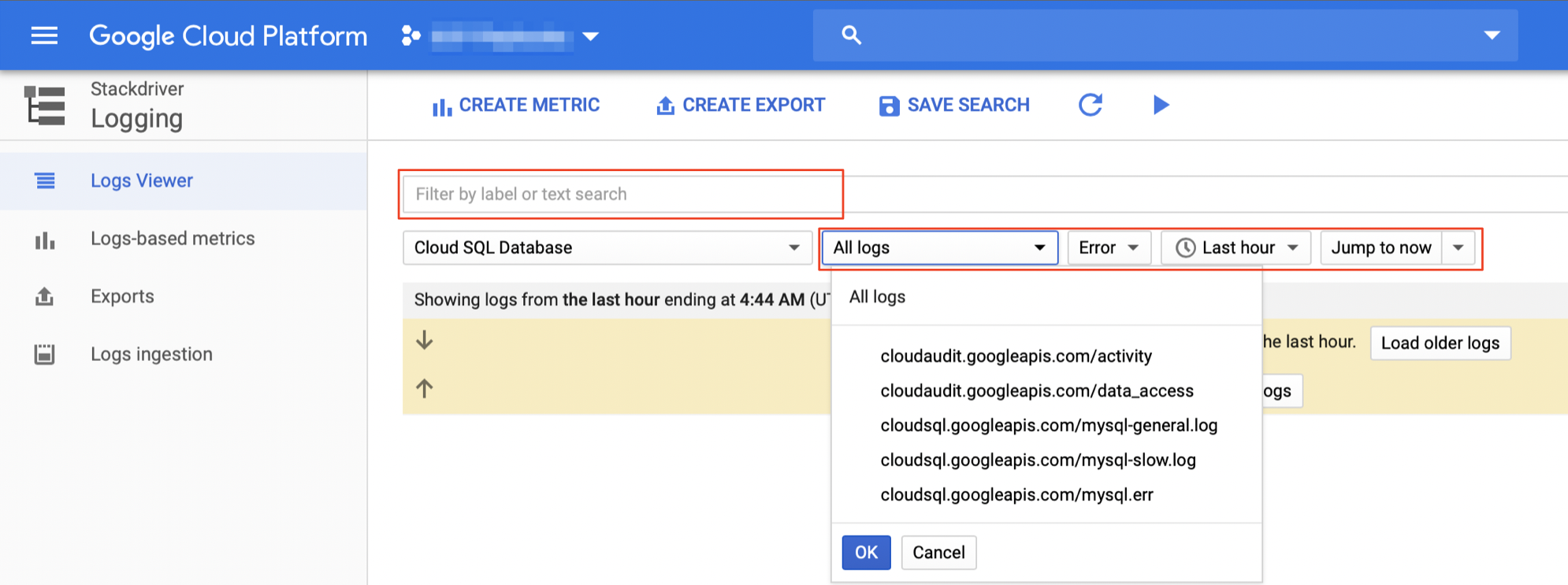
Cloud Logging is the main platform to view all log details. You can select different logs and filter by the log event level (for example, Critical, Error, or Warning). Event timeframe and free text filtering are also available.
Example
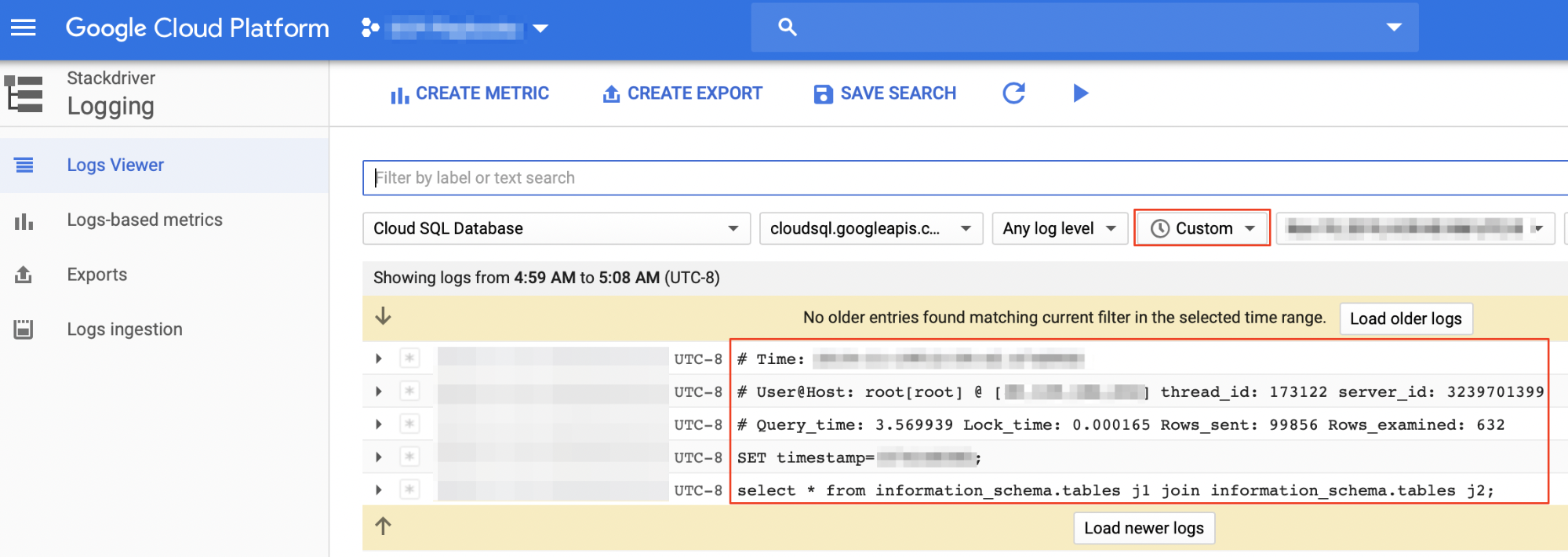
The following screenshot shows finding a specific query in the mysql-slow.log
file using a custom time frame as a filter criteria.
MySQL database instance monitoring
Oracle's main UI monitoring dashboards are part of the OEM and Grid/Cloud Control products (for example, Top Activity Graphs) and are useful for real-time database instance monitoring at the session or SQL statement level. Cloud SQL for MySQL provides similar monitoring capabilities using the Google Cloud console. You can view summarized information about the Cloud SQL for MySQL database instances with multiple monitoring metrics such as CPU utilization, storage usage, memory usage, read/write operations, ingress/egress bytes, active connections, and more.
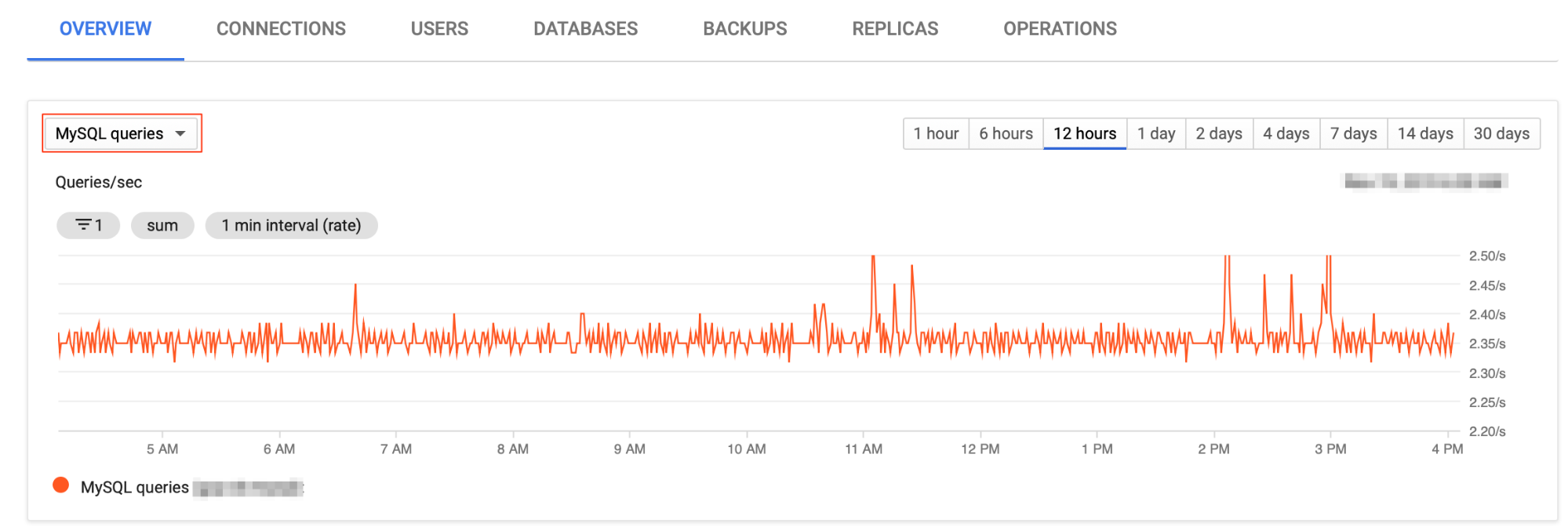
Cloud Logging supports additional monitoring metrics for Cloud SQL for MySQL. The following screenshot shows MySQL queries graph for the last 12 hours.
MySQL read-replica monitoring
You can monitor read-replicas in a similar manner to a primary instance, using the Google Cloud console monitoring metrics (as described earlier). In addition, there is a dedicated monitoring metric for monitoring the replication delay—determining the lag between the primary instance to the read-replica instance in seconds (can be monitored from the read-replica instance overview tab in the Google Cloud console).
You can use the gcloud CLI to retrieve the replication status :
 gcloud
sql
instances
describe
REPLICA_NAME
You can also do replication monitoring by using commands from a MySQL client, which provides a status for the primary and subordinate databases and for the binary log and relay log.
You can use the following SQL statement to verify the read-replica status:
  mysql
>
 SHOW

 SLAVE

 STATUS
 ;
MySQL monitoring
This section describes basic MySQL monitoring methods that are considered routine tasks performed by a DBA (Oracle or MySQL).
Session monitoring
Oracle session monitoring is done by querying the dynamic performance views
known as the "V$" views. The V$SESSION
and V$PROCESS
views are commonly
used to gain real-time insights about current database activity, using SQL
statements. You can monitor session activity in MySQL by using commands and
SQL statements. For example, the MySQL SHOW PROCESSLIST
command provides the following details about session activity:
  mysql
>
 SHOW

 PROCESSLIST
 ;
You can also query and filter the SHOW PROCESSLIST
results using a SELECT
statement:
  mysql
>
 SELECT

 *

 FROM

 information_schema
 .
 processlist
 ;
Long transaction monitoring
In order to identify long running transactions in real-time that might lead
to performance issues, you can query the information_schema.innodb_trx
dynamic view. This view shows records only for open transactions running in
the MySQL database instance.
Lock monitoring
You can monitor database locks using the information_schema.innodb_locks
dynamic view, which provides real-time information about lock occurrences
that might lead to performance issues.
