Item logo image for Cursorfly - Open Source Screen Recorder with Auto Zoom

Cursorfly - Open Source Screen Recorder with Auto Zoom
codefright.com
4.6 (

9 ratings

)
Extension Tools 502 users
Item media 5 (screenshot) for Cursorfly - Open Source Screen Recorder with Auto Zoom
Item media 6 (screenshot) for Cursorfly - Open Source Screen Recorder with Auto Zoom
Item video thumbnail
Item media 2 (screenshot) for Cursorfly - Open Source Screen Recorder with Auto Zoom
Item media 3 (screenshot) for Cursorfly - Open Source Screen Recorder with Auto Zoom
Item media 4 (screenshot) for Cursorfly - Open Source Screen Recorder with Auto Zoom
Item media 5 (screenshot) for Cursorfly - Open Source Screen Recorder with Auto Zoom
Item media 6 (screenshot) for Cursorfly - Open Source Screen Recorder with Auto Zoom
Item video thumbnail
Item media 2 (screenshot) for Cursorfly - Open Source Screen Recorder with Auto Zoom
Item video thumbnail
Item media 2 (screenshot) for Cursorfly - Open Source Screen Recorder with Auto Zoom
Item media 3 (screenshot) for Cursorfly - Open Source Screen Recorder with Auto Zoom
Item media 4 (screenshot) for Cursorfly - Open Source Screen Recorder with Auto Zoom
Item media 5 (screenshot) for Cursorfly - Open Source Screen Recorder with Auto Zoom
Item media 6 (screenshot) for Cursorfly - Open Source Screen Recorder with Auto Zoom

Overview

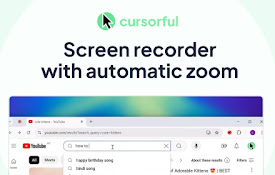
Free & open-source screen recorder. Create beautiful recordings with automatic cinematic zoom & pan — 100% offline, no sign-up.

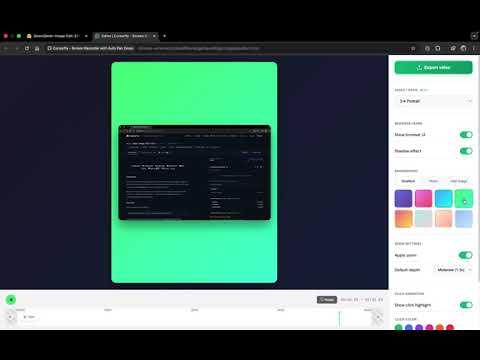
FEATURES: - Automatic zooms and pans based on clicks - OpenSource. Completely free - 100% local processing - Record camera and microphone feeds along - Trim video segments - Choose a background or upload your own - Hide browser toolbars - Export in multiple aspect ratios - High-quality recording up to 4K - Optionally record system audio - Cross-platform support PRIVACY FIRST: ✅ No data collection - We don't collect any user data ✅ No external servers - Everything processed locally ✅ No internet required - Works completely offline ✅ You control everything - Videos saved directly to your device Feel free to extend and contribute on Github: https://github.com/anugotta/cursorfly-screen-recorder

4.6 out of 5 9 ratings

Learn more about results and reviews.

Details

  • Version
    1.4.0
  • Updated
    March 21, 2026
  • Size
    114KiB
  • Languages
    English
  • Developer
    Website
    Email
    codefright@gmail.com
  • Non-trader
    This developer has not identified itself as a trader. For consumers in the European Union, please note that consumer rights do not apply to contracts between you and this developer.

Privacy

Manage extensions and learn how they're being used in your organization
The developer has disclosed that it will not collect or use your data. To learn more, see the developer’s privacy policy .

This developer declares that your data is

  • Not being sold to third parties, outside of the approved use cases
  • Not being used or transferred for purposes that are unrelated to the item's core functionality
  • Not being used or transferred to determine creditworthiness or for lending purposes

Support

Related

ClickZoom Editor – Screen Recorder

0.0

Record your screen with auto click-zoom effects, built-in editing, and 4K exports. Perfect for tutorials, demos, and creators.

Zoomflow – Auto Zoom Screen Recorder & Editor

5.0

Record professional screen videos with auto zoom, cursor focus, webcam, and smooth animations. Perfect for demos & tutorials.

Visura - Screen Recorder & Editor

0.0

Professional screen recorder with zoom animations, HD quality, and built-in video editing.

ScreenSmooth - Screen Recorder with AI Auto Zoom

5.0

ScreenSmooth creates beautiful screen recordings with automatic zooms, pans, and smooth cursor by AI that keep the viewer engaged.

SnapZoom — Screen Recorder with Auto-Zoom on Click

5.0

Screen recorder for Chrome with auto-zoom on every click. Create tutorials and demos instantly — no editing needed.

Cursorful - Screen Recorder with Auto Zoom

4.9

Cursorful creates beautiful screen recordings with automatic zooms and pans that keep the viewer engaged.

Videoyards - Screen Recorder with Custom Cursor & Auto Zoom

4.5

Create stunning, professional-quality screen recordings effortlessly. Perfect for tutorials, product demos, and more.

Poindeo - Record Screen with Auto Zoom

5.0

Record your screen with auto-zoom, making polished, highlighted shots that capture your audience's attention.

Open Cursorful

5.0

Local screen recorder with auto-zoom cursor tracking.

Rendune - Professional Marketing Demo Videos In Minutes

5.0

Create amazing 3D demo videos that convert viewers into clients

MakeDemoFast - Screen Recorder & Demo Video Editor

5.0

Screen recorder with auto-zoom, custom cursors, and a built-in video editor. Turn screen recordings into polished demo videos.

Cursora - Screen Recorder with Auto Zoom

3.0

Cursora creates polished screen recordings with automatic zoom and smooth camera follow, without any editing.

ClickZoom Editor – Screen Recorder

0.0

Record your screen with auto click-zoom effects, built-in editing, and 4K exports. Perfect for tutorials, demos, and creators.

Zoomflow – Auto Zoom Screen Recorder & Editor

5.0

Record professional screen videos with auto zoom, cursor focus, webcam, and smooth animations. Perfect for demos & tutorials.

Visura - Screen Recorder & Editor

0.0

Professional screen recorder with zoom animations, HD quality, and built-in video editing.

ScreenSmooth - Screen Recorder with AI Auto Zoom

5.0

ScreenSmooth creates beautiful screen recordings with automatic zooms, pans, and smooth cursor by AI that keep the viewer engaged.

SnapZoom — Screen Recorder with Auto-Zoom on Click

5.0

Screen recorder for Chrome with auto-zoom on every click. Create tutorials and demos instantly — no editing needed.

Cursorful - Screen Recorder with Auto Zoom

4.9

Cursorful creates beautiful screen recordings with automatic zooms and pans that keep the viewer engaged.

Videoyards - Screen Recorder with Custom Cursor & Auto Zoom

4.5

Create stunning, professional-quality screen recordings effortlessly. Perfect for tutorials, product demos, and more.

Poindeo - Record Screen with Auto Zoom

5.0

Record your screen with auto-zoom, making polished, highlighted shots that capture your audience's attention.

Google apps
Design a Mobile Site
View Site in Mobile | Classic
Share by: