


Parametric EQ - Tab Equalizer with Volume Control

Overview
Parametric EQ for Chrome - Control Tab Sound Like an Audio Engineer
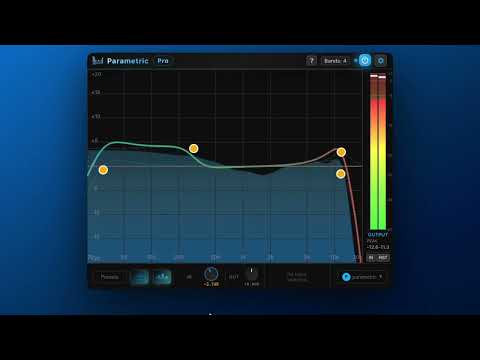
🎵 Transform Any Web Audio Into Perfect Shape For Your Ears! This professional parametric equalizer brings DAW-level audio processing to Chrome, letting you enhance music, podcasts, videos, and streaming audio with precision EQ, real-time spectrum analysis, and customizable presets 🎛️ Professional Parametric EQ - Add unlimited EQ bands to any Chrome tab 📊 Real-Time Spectrum Analyzer - See your audio frequencies in action 🎯 Click & Drag Interface - Intuitive EQ curve editing 💾 Smart Presets - Save your settings or use built-in profiles 🎧 Solo & Bypass - Audition bands and A/B compare instantly ⚡ Zero Latency - Real-time processing with no audio delay Perfect for music enthusiasts. CHANGELOG: Version 1.1 — May 4, 2026 We overly engineered it, here's the new 1.1 version's update notes: [ AUTH ] Added Google sign-in option on the login page. [ MULTI-TAB ] Each tab now runs its own independent EQ session — enabling EQ on one tab no longer disables it on another. Spectrum analyzer and dB meter now only show data for the tab the popup controls. [ SPECTRUM ANALYZER ] - Rebuilt from the ground up. Runs at up to 240 fps with a true stereo pre/post-EQ tap and rendering. - A new feature for the spectrum. Hover mouse for half a second to focus on spectrum. - Optional translucent pre-EQ ghost layer underneath the post-EQ trace. - Replaced the single "Speed" setting with separate Attack (5–500 ms) and Release (20–3000 ms) sliders. - Fixed ghost spectrum on silent tabs. Spectrum now follows solo: only the soloed band's shaping is reflected during a solo hold. [ EQ CURVE & RENDERING ] - Spectrum analyzer and EQ curve now smoothed and snappy on high-refresh displays. - Bypassed bands stay visible in off state. - Selected band indicators improved. [ BANDS ] -Clicking a band selects it and shows an inline frequency / gain / Q readout. - Band gain range widened to ±30 dB; the footer GAIN knob now triggers the same axis upgrade as canvas drag. - Range auto-upgrade now triggers from the band's actual position, not the cursor's, preventing double-upgrades. - Multi-band drag — shift-click or marquee-select bands and drag any one to move the group in lock-step on the log frequency axis. - Selection now persists through dragging a band that is already part of a multi-selection. - Multi-band bypass — the Turn On / Turn Off button applies to every selected band. - Fixed multi-band audio sync: every band in a group drag is flushed to the audio engine on the same tick. - Fixed click-then-drag deleting a band (the second click was being counted as a double-click). - Fixed band vanishing when EQ was enabled immediately after creation. - Fixed hover-create hold-drag freeze-then-snap — new bands now follow the pointer immediately on click-and-drag. [ FILTERS ] - HP/LP tooltip rows now read frequency → dB/oct slope → filter type, matching every other filter type. - HP/LP slope changes now immediately re-derive Q from the band's vertical position. - Fixed HP/LP creation Q — bands created near the canvas edges now seed Q from the click position instead of always defaulting to Q = 1 - HP/LP resonance at 0 dB is now calibrated per slope for better user experience. - High/low shelf Q is now capped at 10; bell bands above Q = 10 snap down when switched to a shelf. - Fixed audible click on every shelf frequency/gain/Q mouse-move — shelves now crossfade coefficients over ~12 ms. [ SOLO ] - Bell solo now uses a 6-stage bandpass cascade (~36 dB/oct skirts) for tighter focus. - Bell solo now reflects the band's stored gain - Dragging horizontally during a solo hold now keeps the new frequency on release. - Fixed Q drift on Macs from trackpad inertia during solo - Fixed tooltip flickering to the audition Q during the solo fade-out. - Hover tooltips on muted bands are suppressed for the duration of a solo hold. [ DB METER ] - Fixed level bars and peak-hold markers tracking apart — over-smoothing on the bar has been corrected. - Numeric peak readout now uses a peak follower (instant attack, ~12 dB/s release) and updates at 10 Hz instead of 60 Hz. - L/R values use fixed-width tabular numerals so columns no longer shift as digits change. - PH (Peak hold) and RST (Reset) buttons are now working (sorry about prior inconvenience) [ UI ] - UI is now little smaller to have you more space (EQ area size didn't change.) - Footer band editor now updates in place when switching bands (no crossfade on knob colors, divider, or filter-type buttons). - Account profile button with name changed to be only small icon button.
Details
- Version1.1.1
- UpdatedMay 4, 2026
- FeaturesOffers in-app purchases
- Size239KiB
- LanguagesEnglish
- DeveloperWebsite
Email
support@parametric.pro - Non-traderThis developer has not identified itself as a trader. For consumers in the European Union, please note that consumer rights do not apply to contracts between you and this developer.
Privacy

Parametric EQ - Tab Equalizer with Volume Control has disclosed the following information regarding the collection and usage of your data. More detailed information can be found in the developer's privacy policy .
Parametric EQ - Tab Equalizer with Volume Control handles the following:
This developer declares that your data is
- Not being sold to third parties, outside of the approved use cases
- Not being used or transferred for purposes that are unrelated to the item's core functionality
- Not being used or transferred to determine creditworthiness or for lending purposes


