Item logo image for Rename Tabs with F2

Rename Tabs with F2

3.8 (

5 ratings

)
Extension Tools 444 users
Item media 4 (screenshot) for Rename Tabs with F2
Item media 5 (screenshot) for Rename Tabs with F2
Item video thumbnail
Item media 2 (screenshot) for Rename Tabs with F2
Item media 3 (screenshot) for Rename Tabs with F2
Item media 4 (screenshot) for Rename Tabs with F2
Item media 5 (screenshot) for Rename Tabs with F2
Item video thumbnail
Item media 2 (screenshot) for Rename Tabs with F2
Item video thumbnail
Item media 2 (screenshot) for Rename Tabs with F2
Item media 3 (screenshot) for Rename Tabs with F2
Item media 4 (screenshot) for Rename Tabs with F2
Item media 5 (screenshot) for Rename Tabs with F2

Overview

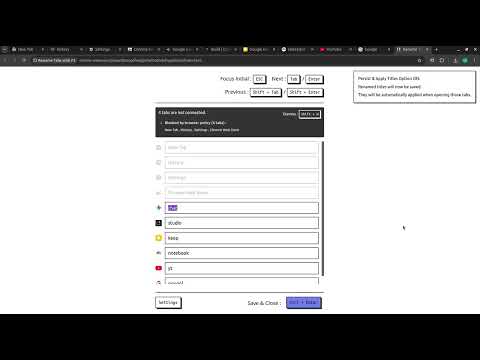
Rename tab titles at extension page that can be opened with F2 keyboard shortcut.

⌨️ Rename tabs without using a mouse! - Press 'F2' to Open Rename Page at any tab - 'Tab' or 'Enter' / 'Shift+Tab' or 'Shift+Enter' to Move around tab titles - 'Ctrl+Enter' to Apply changes and Close - Titles are automatically applied with 'Persist & Apply Titles' option - 'Shift+R' to reload connectable tabs - 'F5' or 'Ctrl+R' to Reset changes (browser original) - 'Ctrl+W' or 'Ctrl+F4' to Close without applying (browser original) 📌 'F2' shortcut and Renaming is ⚠️not available⚠️ at some pages (e.g. ⚠️ chrome web store page ⚠️, chrome:// pages, new tab page, etc) due to security reasons of the browser. 📌 When extension is 'first installed ⬇️', you need to 'refresh 🔄' tab to use 'F2' shortcut because extension cannot connect to tabs that are created before its installed. v1.3 - Added option to toggle persist & apply titles - Titles are automatically applied when tab is created or title has changed (when 'Persist & Apply Titles' option is on) - Save, upload titles data as file & clear titles data - Resolve upload title conflictions by selecting - Added option to change point colors v1.2 - Added descriptions about unavailable tabs - Reload all reconnectable tabs with 'Shift+R' shortcut - All buttons are now clickable v1.1 - Added settings - Change shortcut - Darkmode - Adjust list width Source code of this extension is opened : https://github.com/vhv3y8/rename-tabs-with-f2 Feature Request, Language Support, Bug Report : Github Issue or vhv3y8@gmail.com

3.8 out of 5 5 ratings

Learn more about results and reviews.

Details

  • Version
    1.3.0
  • Updated
    April 29, 2026
  • Offered by
    vhv3y8
  • Size
    408KiB
  • Languages
    2 languages
  • Developer
    Email
    vhv3y8@gmail.com
  • Non-trader
    This developer has not identified itself as a trader. For consumers in the European Union, please note that consumer rights do not apply to contracts between you and this developer.

Privacy

Manage extensions and learn how they're being used in your organization
The developer has disclosed that it will not collect or use your data.

This developer declares that your data is

  • Not being sold to third parties, outside of the approved use cases
  • Not being used or transferred for purposes that are unrelated to the item's core functionality
  • Not being used or transferred to determine creditworthiness or for lending purposes

Related

Simple Tab Renamer

3.4

Quickly rename your Chrome tabs with a click

Simple Tab Renamer

3.5

A simple chrome tab renamer extension

Tab Rename

5.0

Quickly rename the current tab title.

Tab Renamer

5.0

Rename your Chrome tabs for better multitasking.

Tab Renamer

5.0

Rename your browser tabs easily

Easy Tab Renamer

3.0

Extension that enables renaming of browser tabs

Tab Renamer

5.0

Rename your browser tabs easily

Retabtile

5.0

Retabtile - set the title of your browser tabs.

simple-tab-rename

5.0

This is a Simple Tab Rename.

Rename Tab

0.0

Extension to rename website title temporarily.

Auto Tab Renamer

5.0

Renames tabs that contain specific URL matches.

Rename Tab Title

4.1

Renames the Tab Title

Simple Tab Renamer

3.4

Quickly rename your Chrome tabs with a click

Simple Tab Renamer

3.5

A simple chrome tab renamer extension

Tab Rename

5.0

Quickly rename the current tab title.

Tab Renamer

5.0

Rename your Chrome tabs for better multitasking.

Tab Renamer

5.0

Rename your browser tabs easily

Easy Tab Renamer

3.0

Extension that enables renaming of browser tabs

Tab Renamer

5.0

Rename your browser tabs easily

Retabtile

5.0

Retabtile - set the title of your browser tabs.

Google apps
Design a Mobile Site
View Site in Mobile | Classic
Share by:
