Item logo image for Save to ClickUp

Save to ClickUp

upsys-consulting.com
4.1 (

9 ratings

)
Extension Tools 628 users
Item media 5 (screenshot) for Save to ClickUp
Item media 6 (screenshot) for Save to ClickUp
Item video thumbnail
Item media 2 (screenshot) for Save to ClickUp
Item media 3 (screenshot) for Save to ClickUp
Item media 4 (screenshot) for Save to ClickUp
Item media 5 (screenshot) for Save to ClickUp
Item media 6 (screenshot) for Save to ClickUp
Item video thumbnail
Item media 2 (screenshot) for Save to ClickUp
Item video thumbnail
Item media 2 (screenshot) for Save to ClickUp
Item media 3 (screenshot) for Save to ClickUp
Item media 4 (screenshot) for Save to ClickUp
Item media 5 (screenshot) for Save to ClickUp
Item media 6 (screenshot) for Save to ClickUp

Overview

Save content directly to ClickUp tasks

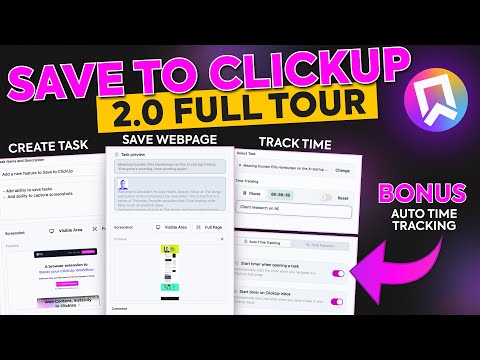
Save any webpage to ClickUp in two clicks. Auto-tracks time the moment you open a task. Cleans up the ClickUp interface. --- An ultra fast alternative to the official ClickUp extension, now with AI ✨: → Reads the task you are on: Open any task, list, or doc. Type a prompt or speak one. AI reads the page and proposes the action. You approve before anything changes. → Bulk edit with AI Filter a list, multi-select rows, describe the change. Brain proposes the exact field updates, status, assignee, due date, custom fields, across every selected row. ON ANY TAB OUTSIDE CLICKUP → Save a webpage: Captures the full article body, not just the URL. Capture the visible area or scroll the entire page. Attached directly to the task. Read it later on your phone or tablet straight from ClickUp, even after the source goes behind a paywall. → Create a task in two clicks Name, description, comment, and screenshot. Pick the workspace and list. Submit. Five clicks with the official extension becomes two. → Track time from any tab Stopwatch with a billable toggle. The timer keeps running if you close the popup. INSIDE CLICKUP → Auto time tracking Open a ClickUp task. Timer starts. Leave the task. Timer stops. You do not have to remember to click play. → ClickUp Boosters: Toggles that run inside ClickUp across every workspace and list to declutter your UI. WHO BUILT IT UpSys is a ClickUp Verified Consulting Partner. Save to ClickUp started as our internal toolkit. Every feature in it solves a friction we hit on real client projects. We use it before anything ships to you. PRICING The extension is free, except for AI - Task AI ($9/seat/month): Perform any AI action on tasks - Workspace AI ($19/seat/month): Perform any AI action on ClickUp lists and docs. A 20-person team pays $180/month for ClickUp Brain. Two power users on our plan pay $18. Works on Chrome, Firefox, and Edge. Install in two clicks. Free.

4.1 out of 5 9 ratings

Learn more about results and reviews.

Details

  • Version
    3.3.0
  • Updated
    May 16, 2026
  • Size
    693KiB
  • Languages
    English
  • Developer
    Website
    Email
    ramzi@upsys-consulting.com
  • Non-trader
    This developer has not identified itself as a trader. For consumers in the European Union, please note that consumer rights do not apply to contracts between you and this developer.

Privacy

Manage extensions and learn how they're being used in your organization

Save to ClickUp has disclosed the following information regarding the collection and usage of your data. More detailed information can be found in the developer's privacy policy .

Save to ClickUp handles the following:

Personally identifiable information

This developer declares that your data is

  • Not being sold to third parties, outside of the approved use cases
  • Not being used or transferred for purposes that are unrelated to the item's core functionality
  • Not being used or transferred to determine creditworthiness or for lending purposes

Support

For help with questions, suggestions, or problems, visit the developer's support site

Related

ClickUp copy link

4.5

Copy ClickUp tasks as hyperlinks in a human readable format!

Clickup Automatic Time Tracking

5.0

This extension automatically starts the time tracking notifications and tasks and provides some additional shortcuts for clickup.

To-Doist for ClickUp

3.0

Building an extension

Task Manager for ClickUp

5.0

Task Manager for ClickUp

Unread for ClickUp

3.7

A simple Extension that allows you to access your clickup WorkSpaces and Tasks!

TaskUp for ClickUp

3.0

View from and add tasks to all of your ClickUp workspaces in just one place in one click.

ClickUp: Tasks, Screenshots, Email, Time

2.6

ClickUp is a productivity platform that makes your personal and work lives more productive, saving you time.

Clickup File Manager

3.0

A simple Extension that allows you to manage files on ClickUp

ClickUp: Talk to AI in Any Tab: ChatGPT, Gemini & Claude + Voice Dictation

4.1

One AI-powered extension to rule them all. Research, write, and get work done 4× faster with ClickUp BrainGPT in every tab.

Clickup Custom Shortcuts

3.7

Add ability to set keyboard hotkeys for task actions

ClickUp Champ

4.0

A browser extension for ClickUp

Save Links to ClickUp

5.0

Save Links to ClickUp helps to manage all your hyperlinks in ClickUp document easily.

ClickUp copy link

4.5

Copy ClickUp tasks as hyperlinks in a human readable format!

Clickup Automatic Time Tracking

5.0

This extension automatically starts the time tracking notifications and tasks and provides some additional shortcuts for clickup.

To-Doist for ClickUp

3.0

Building an extension

Task Manager for ClickUp

5.0

Task Manager for ClickUp

Unread for ClickUp

3.7

A simple Extension that allows you to access your clickup WorkSpaces and Tasks!

TaskUp for ClickUp

3.0

View from and add tasks to all of your ClickUp workspaces in just one place in one click.

ClickUp: Tasks, Screenshots, Email, Time

2.6

ClickUp is a productivity platform that makes your personal and work lives more productive, saving you time.

Clickup File Manager

3.0

A simple Extension that allows you to manage files on ClickUp

Google apps
Design a Mobile Site
View Site in Mobile | Classic
Share by: