


Overview
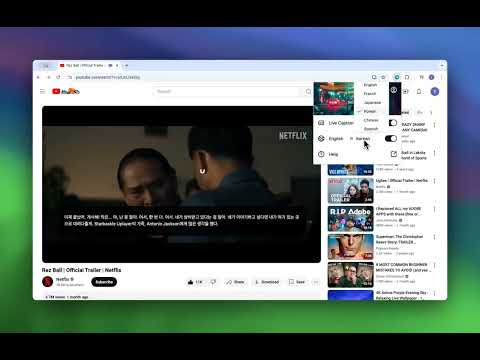
Vi Subtitle - Add Live Captions for your watching video or speech with AI
AI-powered Live Captions & Subtitle Generator — SRT/VTT Export, Bilingual Subtitles (Chrome 138+) Generate real-time subtitles with on-device AI. No cloud, no privacy risk. Works on any video, meeting, or live stream in your browser. ━━━━━━━━━━━━━━━━━━━━━━ FREE FEATURES ━━━━━━━━━━━━━━━━━━━━━━ ✓ Live captions powered by on-device Whisper AI (no internet required) ✓ Transcribe 17+ languages: English, Chinese, Japanese, Spanish, French, German, Korean, and more ✓ Overlay subtitles on any webpage — YouTube, Netflix, Zoom, Google Meet, Twitch, and more ✓ Customizable font size, color, and position ━━━━━━━━━━━━━━━━━━━━━━ PREMIUM FEATURES ━━━━━━━━━━━━━━━━━━━━━━ ★ Translate subtitles into 10+ languages in real time ★ Bilingual subtitles — show original and translation simultaneously (perfect for language learners) ★ Export subtitles as .TXT, .SRT, or .VTT — ready for video editing (Premiere, DaVinci, CapCut, etc.) ★ 7-day free trial ━━━━━━━━━━━━━━━━━━━━━━ PERFECT FOR ━━━━━━━━━━━━━━━━━━━━━━ • Language learners who want to read both original and translated text at once • Content creators and video editors who need SRT/VTT subtitle files • Professionals attending multilingual meetings or webinars • Deaf and hard-of-hearing users who need live captions • Students watching foreign-language lectures or online courses ━━━━━━━━━━━━━━━━━━━━━━ HOW TO USE ━━━━━━━━━━━━━━━━━━━━━━ 1. Install the extension (model downloads automatically on first launch) 2. Visit any video page or start a meeting 3. Click the extension icon and turn on Live Caption 4. Select your source language (and target language for translation) 5. Subtitles appear instantly as an overlay ━━━━━━━━━━━━━━━━━━━━━━ SUPPORTED LANGUAGES ━━━━━━━━━━━━━━━━━━━━━━ English, Chinese (Simplified & Traditional), Hindi, Spanish, French, Arabic, Bengali, Russian, Portuguese, Indonesian, Italian, German, Greek, Japanese, Korean, Thai, Vietnamese ━━━━━━━━━━━━━━━━━━━━━━ NOTES ━━━━━━━━━━━━━━━━━━━━━━ • Requires Chrome 138 or above • Recommended: Windows 16GB RAM + NVIDIA GPU, or Mac with Apple Silicon Questions or feature requests? Contact us via the support link.
Details
- Version1.1.0
- UpdatedApril 22, 2026
- FeaturesOffers in-app purchases
- Offered byNatlan LLC
- Size6.36MiB
- Languages14 languages
- DeveloperNatlan LLC
30 N Gould St ste r Sheridan, WY 82801-6317 USEmail
natlan.tech@gmail.com - Non-traderThis developer has not identified itself as a trader. For consumers in the European Union, please note that consumer rights do not apply to contracts between you and this developer.
Privacy

Vi Subtitle: Add Live Captions to Any Webpage has disclosed the following information regarding the collection and usage of your data. More detailed information can be found in the developer's privacy policy .
Vi Subtitle: Add Live Captions to Any Webpage handles the following:
This developer declares that your data is
- Not being sold to third parties, outside of the approved use cases
- Not being used or transferred for purposes that are unrelated to the item's core functionality
- Not being used or transferred to determine creditworthiness or for lending purposes
Support
For help with questions, suggestions, or problems, visit the developer's support site


