Item logo image for Zero Bookmark Manager

Zero Bookmark Manager

Featured
3.7 (

3 ratings

)
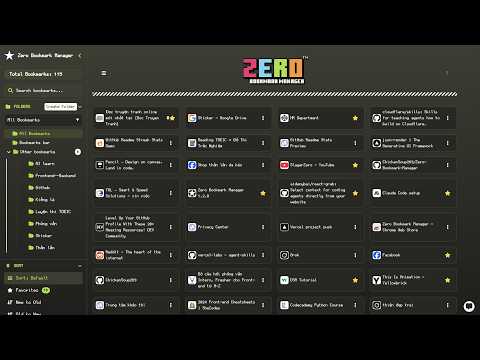
Item media 4 (screenshot) for Zero Bookmark Manager
Item media 5 (screenshot) for Zero Bookmark Manager
Item video thumbnail
Item media 2 (screenshot) for Zero Bookmark Manager
Item media 3 (screenshot) for Zero Bookmark Manager
Item media 4 (screenshot) for Zero Bookmark Manager
Item media 5 (screenshot) for Zero Bookmark Manager
Item video thumbnail
Item media 2 (screenshot) for Zero Bookmark Manager
Item video thumbnail
Item media 2 (screenshot) for Zero Bookmark Manager
Item media 3 (screenshot) for Zero Bookmark Manager
Item media 4 (screenshot) for Zero Bookmark Manager
Item media 5 (screenshot) for Zero Bookmark Manager

Overview

A sleek and intuitive Chrome extension to manage bookmarks.

# Bookmark Manager - Chrome Web Store Description ---- Bookmark Manager is a powerful and intuitive Chrome extension designed to help you organize and manage your bookmarks effortlessly. With a modern interface, it allows you to view, search, sort, and customize bookmarks efficiently. ---- You can bookmark the current page using the universal browser shortcut: - Windows / Linux: Ctrl + D - Mac: Command (⌘) + D - Pro Tip: + Bookmark all open tabs into a single folder: + Windows / Linux: Ctrl + Shift + D + Mac: ⌘ + Shift + D ---- Key Features: Versatile Display Modes Tailor your view to your workflow. Choose from 5 different layouts: - Nested Tree: Classic folder structure. - Grid Card: Visual preview of your bookmarks. - Detailed View: Comprehensive info with web previews. - Flat and Compact Lists: For maximum efficiency. AI-Powered Productivity - Smart Chatbot: Manage bookmarks using natural language commands. - AI Integration: Supports Google Gemini and Chrome's built-in AI. Intelligent Organization - Raindrop-style Sidebar: Smooth navigation with nested folders. - Drag and Drop: Effortlessly rearrange bookmarks and folders. - Smart Cleanup: Automatically detect and remove duplicate links. Advanced Tools - Link Health Check: Identify dead links or suspicious URLs instantly. - Web Preview: Preview websites in a modal without leaving the extension. - QR Code Generator: Share any bookmark to your phone in a second. - Visit Tracking: See which links you use the most. - Tagging System: Organize with custom color-coded tags. Customization and Security - 10+ Professional Themes: Tokyo Night, Dracula, Monokai, GitHub, and more. - Custom Fonts: Support for Nerd Fonts and system styles. - Side Panel Support: Keep your bookmarks always accessible. - Safe Data: Import/Export via JSON, HTML, or CSV. ---- Privacy & Security: - No personal data is collected or transmitted. - All data is processed locally within your browser. - No remote code, analytics, or third-party services. ---- Source Code: https://github.com/ChickenSoup269/Zero-Bookmark-Manager ---- View All Releases version here: https://extension-changelogs.vercel.app/changelog?ext=Zero+Bookmark+Manager

3.7 out of 5 3 ratings

Learn more about results and reviews.

Details

  • Version
    1.3.0
  • Updated
    May 11, 2026
  • Offered by
    ChickenSoup269
  • Size
    274KiB
  • Languages
    2 languages
  • Developer
    Email
    thientran01345@icloud.com
  • Non-trader
    This developer has not identified itself as a trader. For consumers in the European Union, please note that consumer rights do not apply to contracts between you and this developer.

Privacy

Manage extensions and learn how they're being used in your organization
The developer has disclosed that it will not collect or use your data. To learn more, see the developer’s privacy policy .

This developer declares that your data is

  • Not being sold to third parties, outside of the approved use cases
  • Not being used or transferred for purposes that are unrelated to the item's core functionality
  • Not being used or transferred to determine creditworthiness or for lending purposes

Related

Bookmark Manager + Quick Search

3.7

Search, organize, and manage your bookmarks the smart way. Instant results every time.

Zero Startpage - Newtab Replacement

5.0

A beautiful and simple startpage replacement.

Bookmark Maestro

5.0

Bookmark Manager

Manage Tabs with AI & Auto Close - TabsPrompt

4.6

TabsPrompt helps you organize tabs with prompts, automatically close inactive tabs and save tabs to cloud archives

Tabs History

4.8

Organize your browsing history by tabs, not time, for a clearer, smarter way to retrace your steps.

PageTrail

0.0

This Extension tracks your daily surfing activity

Markleaf: Bookmark Manager

5.0

Bookmark manager.

Smart Bookmarker (Save bookmark to folder)

4.8

Save bookmarks smartly to folders, with smart bookmarker and see your bookmark's folder structure.

Bookmark Manager Zero

4.3

A modern interface for the native Chrome bookmark manager.

Bookmark Navigator

5.0

Fast and simple bookmark navigation

Power Bookmarks

5.0

Power Bookmarks allows you to search your bookmarks easily. Its tree view and sunburst view allow you to analyze the complexity of…

News Storyline

5.0

News Storyline

Bookmark Manager + Quick Search

3.7

Search, organize, and manage your bookmarks the smart way. Instant results every time.

Zero Startpage - Newtab Replacement

5.0

A beautiful and simple startpage replacement.

Bookmark Maestro

5.0

Bookmark Manager

Manage Tabs with AI & Auto Close - TabsPrompt

4.6

TabsPrompt helps you organize tabs with prompts, automatically close inactive tabs and save tabs to cloud archives

Tabs History

4.8

Organize your browsing history by tabs, not time, for a clearer, smarter way to retrace your steps.

PageTrail

0.0

This Extension tracks your daily surfing activity

Markleaf: Bookmark Manager

5.0

Bookmark manager.

Smart Bookmarker (Save bookmark to folder)

4.8

Save bookmarks smartly to folders, with smart bookmarker and see your bookmark's folder structure.

Google apps
Design a Mobile Site
View Site in Mobile | Classic
Share by:
