


This page describes service accounts and VM access scopes and how they are used with Dataproc.
Security requirement beginning August 3, 2020:Dataproc users are required to have service account ActAs
permission
to deploy Dataproc resources, such as creating clusters and submitting jobs. The Service Account User
role contains this permission. See Roles for service account authentication
for information about required Dataproc roles.
Opt-in for existing Dataproc users:Existing Dataproc users as of August 3, 2020 can opt in to this security requirement (see Securing Dataproc, Dataflow, and Cloud Data Fusion ).
What are service accounts?
A service account is a special account that can be used by services and applications running on a Compute Engine virtual machine (VM) instance to interact with other Google Cloud APIs. Applications can use service account credentials to authorize themselves to a set of APIs and perform actions on the VM within the permissions granted to the service account.
Dataproc cluster service accounts
The following service accounts must have the permissions necessary to perform Dataproc actions in the project where your cluster is located.
Dataproc VM service account
The VMs in a Dataproc cluster use a service account for
Dataproc data plane operations
.
The Compute Engine default service account
, project_number
-compute@developer.gserviceaccount.com
, is used as the VM service account unless you specify a
custom service account
when you create a cluster. The VM service account must have the Dataproc Worker
role, which includes the permissions required for Dataproc data
plane operations. For more information, see Dataproc roles
.
View VM service account roles
To view the roles granted to the Dataproc VM service account, do the following:
-
In the Google Cloud console, go to the IAMpage.
-
Click Include Google-provided role grants.
-
View the roles listed for the VM service account. The following image shows the required Dataproc Workerrole listed for the Compute Engine default service account (
project_number -compute@developer.gserviceaccount.com) that Dataproc uses by default as the VM service account.
-
You can click the pencil icon displayed on the service account row to grant or remove service account roles .
Dataproc Service Agent service account
Dataproc creates the Service Agent service account
, service- project_number
@dataproc-accounts.iam.gserviceaccount.com
, and grants the service account
the Dataproc Service Agent
role in a Google Cloud project. This service
account performs Dataproc control plane
operations, such as the creation, update, and deletion of
cluster VMs. You can't replace this service account with a custom VM service
account when you create a cluster.
Role grant to Service Agent service account in a Shared VPC network
If a Dataproc cluster uses a Shared VPC network, a Shared VPC Admin must grant the Dataproc Service Agent service account the role of Network User for the Shared VPC host project. For more information, see the following:
- Create a cluster that uses a VPC network in another project
- Shared VPC documentation: configuring service accounts as Service Project Admins
Create a cluster with a custom VM service account
When you create a cluster, you can specify a custom VM service account that your cluster will use for Dataproc data plane operations instead of the default VM service account (you can't change the VM service account after the cluster is created). Using a VM service account with assigned IAM roles lets you provide your cluster with fine-grained access to project resources.
Preliminary steps
-
Create the custom VM service account within the project where the cluster will be created.
-
Grant the custom VM service account the Dataproc Worker role on the project and any additional roles needed by your jobs, such as the BigQuery Reader and Writer roles (see Dataproc roles ).
gcloud CLI example:
- The following sample command grants the custom VM service account in the cluster project the Dataproc Worker role at the project level:
gcloud projects add-iam-policy-binding CLUSTER_PROJECT_ID
\
    --member=serviceAccount: SERVICE_ACCOUNT_NAME
@ PROJECT_ID
.iam.gserviceaccount.com \
    --role="roles/dataproc.worker"
- Consider a custom role:Instead of granting service
account the predefined Dataproc Worker role (
roles/dataproc.worker), you can grant the service account a custom role that contains Worker role permissions but limits thestorage.objects.*permissions.- The custom role must at least grant the VM service account
storage.objects.create,storage.objects.get, andstorage.objects.updatepermissions on the objects in the Dataproc staging and temp buckets and on any additional buckets needed by jobs that will run on the cluster.
- The custom role must at least grant the VM service account
Create the cluster
- Create the cluster in your project.
gcloud Command
Use the gcloud dataproc clusters create command to create a cluster with the custom VM service account.
gcloud dataproc clusters create CLUSTER_NAME
\
    --region= REGION
\
    --service-account= SERVICE_ACCOUNT_NAME
@ PROJECT_ID
.iam.gserviceaccount.com \
    --scopes= SCOPE
Replace the following:
- CLUSTER_NAME : The cluster name, which must be unique within a project. The name must start with a lowercase letter, and can contain up to 51 lowercase letters, numbers, and hyphens. It cannot end with a hyphen. The name of a deleted cluster can be reused.
- REGION : The region where the cluster will be located.
- SERVICE_ACCOUNT_NAME : The service account name.
- PROJECT_ID : The Google Cloud project ID of the project containing your VM service account . This will be the ID of the project where your cluster will be created or the ID of another project if you are creating a cluster with a custom VM service account in another project .
- SCOPE
: Access scope(s)
for cluster VM instances (for example,
https://www.googleapis.com/auth/cloud-platform).
REST API
When completing the GceClusterConfig
as part of the clusters.create
API request, set the following fields:
-
serviceAccount: The service account will be located in the project where your cluster will be created unless you are using a VM service account from a different project . -
serviceAccountScopes: Specify the access scope(s) for cluster VM instances (for example,https://www.googleapis.com/auth/cloud-platform).
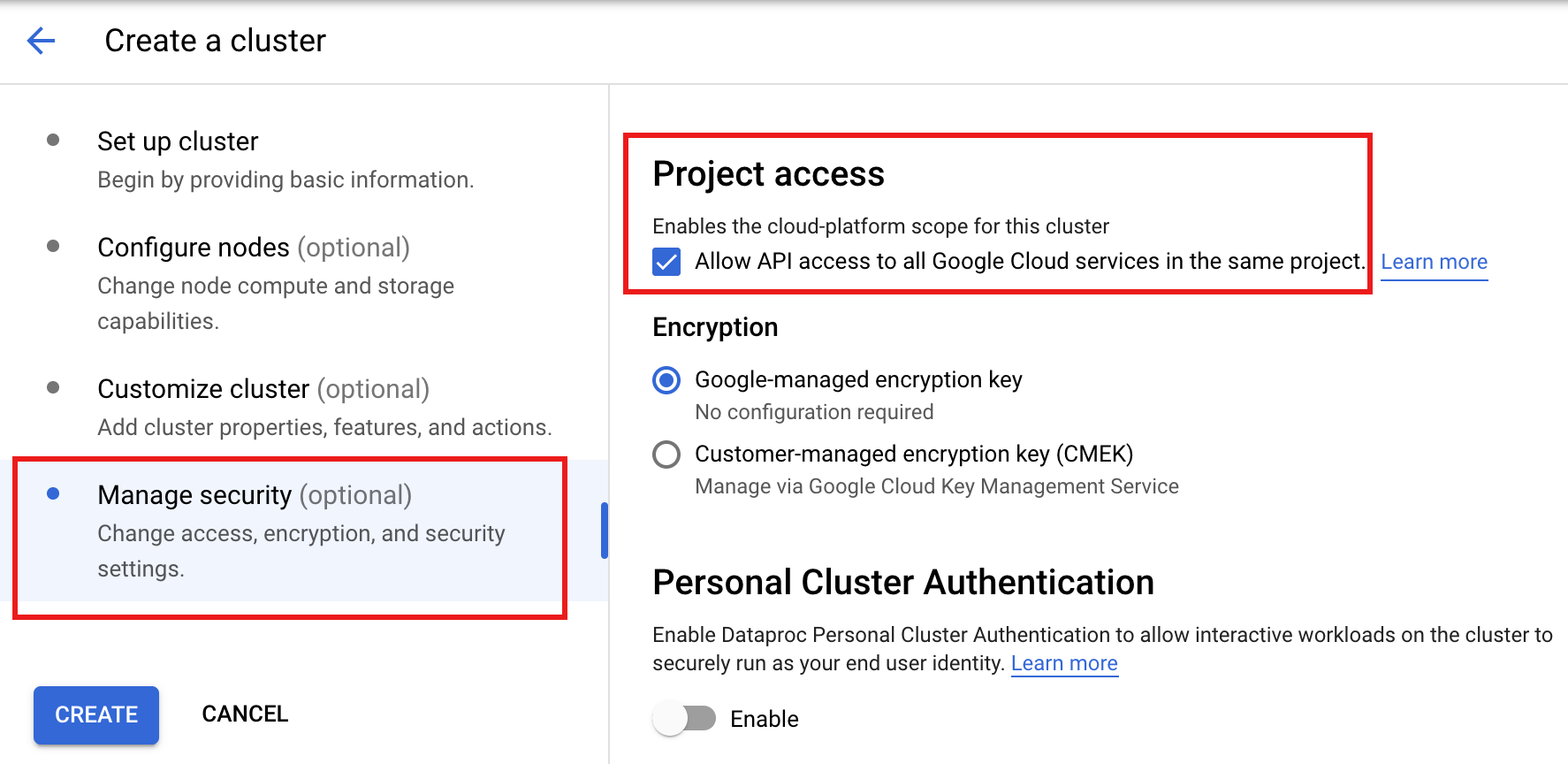
Console
Setting a Dataproc VM service account
in the Google Cloud console is not supported. You can set the cloud-platform
access scope
on cluster
VMs when you create the cluster by clicking
"Enables the cloud-platform scope for this cluster"
in the Project accesssection of the Manage securitypanel on the Dataproc Create a cluster
page in the Google Cloud console.
Create a cluster with a custom VM service account from another project
When you create a cluster, you can specify a custom VM service account that your cluster will use for Dataproc data plane operations instead of using the default VM service account (you can't specify a custom VM service account after the cluster is created). Using a custom VM service account with assigned IAM roles allows you to provide your cluster with fine-grained access to project resources.
Preliminary steps
-
In the service account project (the project where the custom VM service account is located):
-
Enable the Dataproc API.
Roles required to enable APIs
To enable APIs, you need the Service Usage Admin IAM role (
roles/serviceusage.serviceUsageAdmin), which contains theserviceusage.services.enablepermission. Learn how to grant roles .
-
Grant to your email account (the user who is creating the cluster) the Service Account User role on either the service account project or, for more granular control, the custom VM service account in the service account project.
For more information:See Manage access to projects, folders, and organizations to grant roles at the project level and Manage access to service accounts grant roles at the service account level.
gcloud CLI examples:
- The following sample command grants to the user the Service Account User role at the project level:
gcloud projects add-iam-policy-binding SERVICE_ACCOUNT_PROJECT_ID
\
    --member= USER_EMAIL
\
    --role="roles/iam.serviceAccountUser"
Notes:
USER_EMAIL: Provide your user account email address, in the format:user:user-name@example.com.- The following sample command grants to the user the Service Account User role at the service account level:
gcloud iam service-accounts add-iam-policy-binding VM_SERVICE_ACCOUNT_EMAIL
\
    --member= USER_EMAIL
\
    --role="roles/iam.serviceAccountUser"
Notes:
USER_EMAIL: Provide your user account email address, in the format:user:user-name@example.com. -
Grant the custom VM service account the Dataproc Worker role on the cluster project.
gcloud CLI example:
gcloud projects add-iam-policy-binding CLUSTER_PROJECT_ID
\
    --member=serviceAccount: SERVICE_ACCOUNT_NAME
@ SERVICE_ACCOUNT_PROJECT_ID
.iam.gserviceaccount.com \
    --role="roles/dataproc.worker"
-
Grant the Dataproc Service Agent service account in the cluster project the Service Account User and the Service Account Token Creator roles on either the service account project or, for more granular control, the custom VM service account in the service account project. By doing this, you allow the Dataproc service agent service account in the cluster project to create tokens for the custom Dataproc VM service account in the service account project.
For more information:See Manage access to projects, folders, and organizations to grant roles at the project level and Manage access to service accounts grant roles at the service account level.
gcloud CLI examples:
- The following sample commands grant the Dataproc Service Agent service account in the cluster project the Service Account User and Service Account Token Creator roles at the project level:
gcloud projects add-iam-policy-binding SERVICE_ACCOUNT_PROJECT_ID
\
    --member=serviceAccount:service- CLUSTER_PROJECT_NUMBER
@dataproc-accounts.iam.gserviceaccount.com \
    --role="roles/iam.serviceAccountUser"
gcloud projects add-iam-policy-binding SERVICE_ACCOUNT_PROJECT_ID
\
    --member=serviceAccount:service- CLUSTER_PROJECT_NUMBER
@dataproc-accounts.iam.gserviceaccount.com \
    --role="roles/iam.serviceAccountTokenCreator"
- The following sample commands grant the Dataproc Service Agent service account in the cluster project the Service Account User and Service Account Token Creator roles at the VM service account level:
gcloud iam service-accounts add-iam-policy-binding VM_SERVICE_ACCOUNT_EMAIL
\
    --member=serviceAccount:service- CLUSTER_PROJECT_NUMBER
@dataproc-accounts.iam.gserviceaccount.com \
    --role="roles/iam.serviceAccountUser"
gcloud iam service-accounts add-iam-policy-binding VM_SERVICE_ACCOUNT_EMAIL
\
    --member=serviceAccount:service- CLUSTER_PROJECT_NUMBER
@dataproc-accounts.iam.gserviceaccount.com \
    --role="roles/iam.serviceAccountTokenCreator"
-
Grant the Compute Engine Service Agent service account in the cluster project the Service Account Token Creator role on either the service account project or, for more granular control, the custom VM service account in the service account project. By doing this, you grant the Compute Agent Service Agent service account in the cluster project the ability to create tokens for the custom Dataproc VM service account in the service account project.
For more information:See Manage access to projects, folders, and organizations to grant roles at the project level and Manage access to service accounts grant roles at the service account level.
gcloud CLI examples:
- The following sample command grants the Compute Engine Service Agent service account in the cluster project the Service Account Token Creator role at the project level:
gcloud projects add-iam-policy-binding SERVICE_ACCOUNT_PROJECT_ID
\
    --member=serviceAccount:service- CLUSTER_PROJECT_NUMBER
@compute-system.iam.gserviceaccount.com \
    --role="roles/iam.serviceAccountTokenCreator"
- The following sample command grants the Compute Engine Service Agent service account in the cluster project the Service Account Token Creator role at the VM service account level:
gcloud iam service-accounts add-iam-policy-binding VM_SERVICE_ACCOUNT_EMAIL
\
    --member=serviceAccount:service- CLUSTER_PROJECT_NUMBER
@compute-system.iam.gserviceaccount.com \
    --role="roles/iam.serviceAccountTokenCreator"
