

Page Summary
-
Google Sign-In for Android is outdated and users should migrate to Credential Manager for better security and user experience, except for some Wear OS developers.
-
Developers should migrate from using access tokens obtained with
GoogleAuthUtil.getTokenas identity assertions to the ID token flow or the server auth code flow. -
If you used
GoogleAuthUtilfor ID tokens or server auth codes, you should migrate to the new Sign-In API's respective flows. -
The new Sign-In API provides benefits like a streamlined one-tap sign-in experience and the ability for your server to get user profile information more efficiently.
If you integrated with Google Sign-In in the past using GoogleAuthUtil.getToken
or Plus.API
, you should migrate to the newest
Sign-In API for greater security and a better user experience.
Migrate from access token anti-pattern
You should not send access tokens obtained with GoogleAuthUtil.getToken
to
your backend server as an identity assertion, since you cannot easily verify
that the token was issued to your backend, leaving you vulnerable to insertion
of an access token from an attacker.
For example, if your Android code looks like the example below, you should migrate your app to the current best practices.
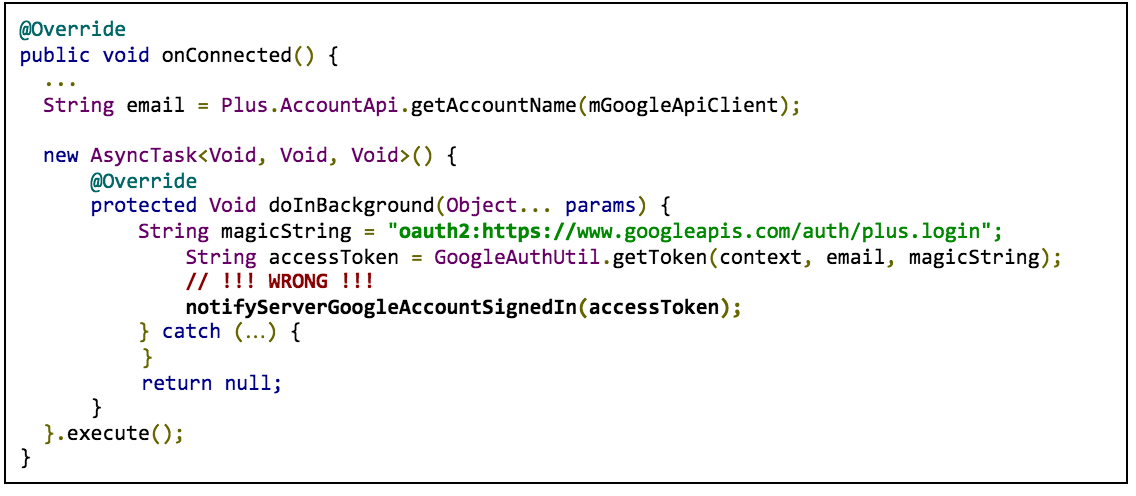
In the example, access token requests use oauth2:
plus a scope string as the scope
parameter for the GoogleAuthUtil.getToken
call
( oauth2:https://www.googleapis.com/auth/plus.login
).
Instead of authenticating with an access token acquired with GoogleAuthUtil.getToken
, use either the ID token flow or the auth code flow.
Migrate to the ID token flow
If all you need is the user's ID, email address, name, or profile picture URL, use the ID token flow .
To migrate to the ID token flow, make the following changes:
Android client side
- Remove the
GET_ACCOUNTS(Contacts) permission if you request it - Switch any code using
GoogleAuthUtil,Plus.API,AccountPicker.newChooseAccountIntent(), orAccountManager.newChooseAccountIntent()toAuth.GOOGLE_SIGN_IN_APIwithGoogleSignInOptions.Builder.requestIdToken(...)configuration.
Server side
- Create a new endpoint for ID token auth
- Turn off the old endpoint after your client apps are migrated
Migrate to the server auth code flow
If your server needs to access other Google APIs, such as Google Drive, Youtube, or Contacts, use the server auth code flow .
To migrate to the server auth code flow, make the following changes:
Android client side
- Remove the
GET_ACCOUNTS(Contacts) permission if you request it - Switch any code using
GoogleAuthUtil,Plus.API,AccountPicker.newChooseAccountIntent(), orAccountManager.newChooseAccountIntent()toAuth.GOOGLE_SIGN_IN_APIwithGoogleSignInOptions.Builder.requestServerAuthCode(...)configuration.
Server side
- Create a new endpoint for the server auth code flow
- Turn off the old endpoint after your client apps are migrated
You can still share API access logic between your old and new endpoints. For example:
 GoogleTokenResponse

 tokenResponse

 =

 new

 GoogleAuthorizationCodeTokenRequest
 (
 ...
 );
 String

 accessToken

 =

 tokenResponse
 .
 getAccessToken
 ();
 String

 refreshToken

 =

 tokenResponse
 .
 getRefreshToken
 ();
 Long

 expiresInSeconds

 =

 tokenResponse
 .
 getExpiresInSeconds
 ();
 // Shared by your old and new implementation, old endpoint can pass null for refreshToken
 private

 void

 driveAccess
 (
 String

 refreshToken
 ,

 String

 accessToken
 ,

 Long

 expiresInSeconds
 )

 {

 GoogleCredential

 credential

 =

 new

 GoogleCredential
 .
 Builder
 ()

 .
 setTransPort
 (
 ...
 )

 ...

 .
 build
 ();

 credential
 .
 setAccessToken
 (
 accessToken
 );

 credential
 .
 setExpiresInSeconds
 (
 expiresInSeconds
 );

 credential
 .
 setRefreshToken
 (
 refreshToken
 );
 }
Migrate from the GoogleAuthUtil ID token flow
If you use GoogleAuthUtil
to get ID tokens, you should migrate to the new
Sign-In API ID token flow
.
For example, if your Android code looks like the following example, you should migrate:

In the example, ID token requests use audience:server:client_id
plus the
client ID for your web server as the ‘scope’ parameter for the GoogleAuthUtil.getToken
call
( audience:server:client_id:9414861317621.apps.googleusercontent.com
).
The new Sign-In API ID token flow has the following benefits:
- Streamlined one-tap sign-in experience
- Your server can get user profile information without an extra network call
To migrate to the ID token flow, make the following changes:
Android client side
- Remove the
GET_ACCOUNTS(Contacts) permission if you request it - Switch any code using
GoogleAuthUtil,Plus.API,AccountPicker.newChooseAccountIntent(), orAccountManager.newChooseAccountIntent()toAuth.GOOGLE_SIGN_IN_APIwithGoogleSignInOptions.Builder.requestIdToken(...)configuration.
Server side
The new Sign-In API issues ID tokens that comply with the OpenID Connect
specification, unlike GoogleAuthUtil.getToken
, which uses a deprecated format.
In particular, the issuer is now https://accounts.google.com
, with a https
schema.
During your migration process, your server needs to verify ID token from both your old and new Android clients. To verify both formats of the token, make the change that corresponds to the client library you use (if you use one):
- Java (Google APIs Client Libraries): upgrade to 1.21.0 or newer
- PHP (Google APIs Client Libraries): if you use v1, upgrade to 1.1.6 or newer; if you use v2, upgrade to 2.0.0-RC1 or newer
- Node.js: upgrade to 0.9.7 or newer
- Python or your own implementations: accept both of these issuers:
https://accounts.google.comandaccounts.google.com
Migrate from the GoogleAuthUtil server auth code flow
If you use GoogleAuthUtil
to get a server auth code, you should migrate to the
new Sign-In API auth code flow
.
For example, if your Android code looks like the following example, you should migrate:

In the example, server auth code requests use oauth2:server:client_id
+ the
client ID for your web server as the scope
parameter for the GoogleAuthUtil.getToken
call ( oauth2:server:client_id:9414861317621.apps.googleusercontent.com
).
The new Sign-In API auth code flow has the following benefits:
- Streamlined one-tap sign-in experience
- If you follow the migration guide below, your server can get an ID token containing the user's profile information when you do the auth code exchange
To migrate to the new auth code flow, make the following changes:
Android client side
- Remove the
GET_ACCOUNTS(Contacts) permission if you request it - Switch any code using
GoogleAuthUtil,Plus.API,AccountPicker.newChooseAccountIntent(), orAccountManager.newChooseAccountIntent()toAuth.GOOGLE_SIGN_IN_APIwithGoogleSignInOptions.Builder.requestServerAuthCode(...)configuration.
Server side
Keep your current code, but specify https://oauth2.googleapis.com/token
as the token server endpoint when constructing the GoogleAuthorizationCodeTokenRequest
object, so that you can get an ID token
with the user’s email, user ID, and profile info without the need for another
network call. This endpoint is fully backward compatible, and the below code
will work for server auth codes retrieved from both your old and new Android
client implementations.
 GoogleTokenResponse

 tokenResponse

 =

 new

 GoogleAuthorizationCodeTokenRequest
 (

 transport
 ,

 jsonFactory
 ,

 //

 Use

 below

 for

 tokenServerEncodedUrl

 parameter

 "https://oauth2.googleapis.com/token"
 ,

 clientSecrets
 .
 getDetails
 ()
 .
 getClientId
 (),

 clientSecrets
 .
 getDetails
 ()
 .
 getClientSecret
 (),

 authCode
 ,

 REDIRECT_URI
 )

 .
 execute
 ();
 ...
 //

 You

 can

 also

 get

 an

 ID

 token

 from

 auth

 code

 exchange
 .
 GoogleIdToken

 googleIdToken

 =

 tokenResponse
 .
 parseIdToken
 ();
 GoogleIdTokenVerifier

 verifier

 =

 new

 GoogleIdTokenVerifier
 .
 Builder
 (
 transport
 ,

 jsonFactory
 )

 .
 setAudience
 (
 Arrays
 .
 asList
 (
 SERVER_CLIENT_ID
 ))

 .
 setIssuer
 (
 "https://accounts.google.com"
 )

 .
 build
 ();
 //

 Refer

 to

 ID

 token

 documentation

 to

 see

 how

 to

 get

 data

 from

 idToken

 object
 .
 GoogleIdToken

 idToken

 =

 verifier
 .
 verify
 (
 idTokenString
 );
 ...
