
Skip to content
new ogbongeblog logo
  • Advertise
  • Blog
  • Contact

How To Add Facebook Mobile Comment Form To Blogger / Blogspot Mobile View

January 17, 2015

·

Uncategorized
jidetheblogger Avatar
jidetheblogger

If you’ve enabled custom Blogger mobile template, you can customize the mobile view of your blog as you desire. You can add and remove whatever you like in as much as you know how to go about it. Today, I have decided to share with you, how to add Facebook mobile comment form to Blogger or Blogspot mobile view.
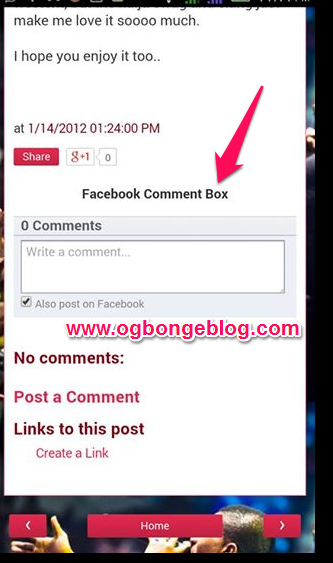
facebook mobile comment box

To get started, I recommend you enable Custom Blogger mobile template. If you don’t know how to do that, sign in to your blog, go to “Template”. Click the icon under “Mobile”. Select “ Yes. Show mobile template on mobile devices “. Select “Custom” from the drop down box and SAVE .

Next is to get your blog’s Facebook APP ID handy. If you know the ID, copy it somewhere and if you’ve forgotten it, you can check the Facebook apps page . If you can’t find it on the apps page, then you need to read how to get Facebook application ID for your blog here .

Next is to log in to your Blogger dashboard, back up your template and go to “Template” > “Edit HTML”

==> Click inside the HTML and use CTRL F to find : <body
==> Directly below it, paste <div id=’fb-root’/>

==> Open a new tab on your browser and go to www.freehtmlparser.blogspot.com
==> Copy and paste the code below inside the box on the page

<script>(function(d, s, id) {
  var js, fjs = d.getElementsByTagName(s)[0];
  if (d.getElementById(id)) return;
  js = d.createElement(s); js.id = id;
  js.src = “//connect.facebook.net/en_US/sdk.js#xfbml=1&appId= 1569785879914041 &version=v2.0″;
  fjs.parentNode.insertBefore(js, fjs);
}(document, ‘script’, ‘facebook-jssdk’));</script>

==> Carefully replace the highlighted appID with the Facebook app ID of your blog==> Click “Encode”

==> Go back to the browser tab where you have your blog HTML

==> Copy and Paste the encoded script directly below the  <div id=’fb-root’/>

==> Now, your HTML should look similar to the screenshot below:

fb jdk

==> Click “Save Template”

==> Click inside the HTML and use CTRL F to find :


<b:if cond=’data:top.showMobileShare’>

==> Carefully find the ending </div> as seen in the screenshot below:

blogger html comment form fb

==> Directly below it, copy and paste the code below:

<p align=’center’>
<span style=’font-size: 15px;font-weight:bold;’>Facebook Comment Box </span>
</p>
<div style=’text-align: center;’>
<fb:comments expr:href=’data:post.url’ expr:title=’data:post.title’ expr:xid=’data:post.id’ mobile=’yes’ numposts=’10’/>
</div>

–> Click SAVE Template .

View one of your blog posts and the comment box should appear on the mobile view,  above the Blogger comment form.

Try this and let me know if it works for you. Also leave your comments if you’ve questions to ask.

Note : You might not find in your template if you are using a third-party template.

Please Share :
blogger mobile template tips blogger tips facebook social plugins

Like What You Read?

Sign Up to get similar articles delivered to your email inbox.

Leave a Reply Cancel reply

Your email address will not be published. Required fields are marked *

37 responses to “How To Add Facebook Mobile Comment Form To Blogger / Blogspot Mobile View”

  1. Anonymous Avatar
    Anonymous
    January 17, 2015

    Ogbonge you Rock… Despite the fact that I'm an experience blogger, I find this tutorial so helpful. Thanks bro. Let me just maintain my anonymous status.

    Loading…
    Reply
    1. Jide Oguns Avatar
      Jide Oguns
      January 17, 2015

      Lol..maintaining anonymous status is allowed 🙂 Glad you find it helpful. Have fun!

      Loading…
      Reply
  2. Ryo Lucazzy Avatar
    Ryo Lucazzy
    January 17, 2015

    Thumbs up Oga Jide. You are the best.

    So happy I finally found this tutorial after an endless search online.

    Pls, what message were you passing in the note you dropped below the post? What might one not be able to find if he/she is using a third party template?

    Loading…
    Reply
    1. Jide Oguns Avatar
      Jide Oguns
      January 17, 2015

      You might not find the code in some templates that are not blogger default templates.

      Loading…
      Reply
  3. omotoso oluwatimilehin Avatar
    omotoso oluwatimilehin
    January 17, 2015

    nice

    Loading…
    Reply
    1. Jide Oguns Avatar
      Jide Oguns
      January 19, 2015

      Thanks Timi

      Loading…
      Reply
  4. oworock Avatar
    oworock
    January 18, 2015

    Nice write up, will implement it soon.

    Loading…
    Reply
    1. Jide Oguns Avatar
      Jide Oguns
      January 19, 2015

      Implement it and let me know what's up

      Loading…
      Reply
  5. www.adkscrapbook.com Avatar
    www.adkscrapbook.com
    January 18, 2015

    The blog name is OGBONGE and for once, it has never failed to live up to expectations. Continue the good work, Jide.

    Loading…
    Reply
    1. Jide Oguns Avatar
      Jide Oguns
      January 19, 2015

      I will by God's grace. Thanks

      Loading…
      Reply
  6. OLUFERRY Avatar
    OLUFERRY
    January 18, 2015

    hi thanks for the tutorial, but mine is nit showing at all, instead its showing " FACEBOOK COMMENT BOX" in words without a place or box to comment.. please help review this http://speak4us.blogsot.com

    Loading…
    Reply
    1. Jide Oguns Avatar
      Jide Oguns
      January 19, 2015

      Ensure you parse the facebook sdk at freehtmlparser.blogspot.com before pasting it. In your blog html and also ensure you didn't delete anything else while replacing the app id in the sample above.

      Loading…
      Reply
  7. Frabidel Abiodun Avatar
    Frabidel Abiodun
    January 18, 2015

    same problem wif oluferry…..www.frabidel.com

    Loading…
    Reply
  8. Don Martins Avatar
    Don Martins
    January 19, 2015

    Wonderful tutorial oga Jide. But I didn't use it on my blog. I even removed that of the PC version. Because I didn't see any blog using it. Those who did initially including ogbongeblog removed them afterwards. Any reason why? Plus I seem to be mobile restricted so can't generate the app ID.

    http://www.nairawriter.com .

    Loading…
    Reply
  9. Akpene Jacob Avatar
    Akpene Jacob
    January 20, 2015

    Waooo thanks bro, it worked bro so how can i do it to work on web version?

    Loading…
    Reply
  10. naija rebrander Avatar
    naija rebrander
    January 26, 2015

    My oga i still find it difficult to add facebook mobile comments on my blog. Please what else can i do cos it seems Facebook made adjustment on their web. naijarebrander@gmail.com

    http://www.naijarebrander.blogspot.com

    Loading…
    Reply
  11. De Champions Avatar
    De Champions
    April 7, 2015

    it is not working on my mobile site http://www.dechampions.net/?m=1 wat can i do

    Loading…
    Reply
  12. creebhills Avatar
    creebhills
    April 17, 2015

    bro its not working for my page at all.what can i do. am using a 3rd party template

    Loading…
    Reply
  13. Michael Honrada Avatar
    Michael Honrada
    June 8, 2015

    Thank you very much!

    Loading…
    Reply
  14. davidtaiwo Avatar
    davidtaiwo
    June 18, 2015

    didnt show on mah blog @tycoach.blogspot.com

    Loading…
    Reply
  15. Tycoach Avatar
    Tycoach
    June 22, 2015

    am also using a third party templates..please what should i do?

    Loading…
    Reply
    1. Jide Oguns Avatar
      Jide Oguns
      August 12, 2015

      You have to do alot of try n error in finding the right place to place the code. Easier when using default blogger template.

      Loading…
      Reply
  16. Mayedul Avatar
    Mayedul
    June 25, 2015

    Your article is so much effective for me. i was searching it. now my problem is solved. thanks for sharing your valuable experience.

    Loading…
    Reply
  17. Rihan Avatar
    Rihan
    July 3, 2015

    Wonderful article. Thanks for sharing. Waiting for another one.

    Loading…
    Reply
  18. itotohafrique.com Avatar
    itotohafrique.com
    July 26, 2015

    9ce one bosss!

    Loading…
    Reply
  19. Mion Avatar
    Mion
    August 2, 2015

    fantastic post. thanks for sharing it.

    Loading…
    Reply
    1. Jide Oguns Avatar
      Jide Oguns
      August 12, 2015

      You're welcome

      Loading…
      Reply
  20. Mashhur Rihan Avatar
    Mashhur Rihan
    October 28, 2015

    Very important article specially for me and should be followed practically…..

    Loading…
    Reply
  21. Lakhaipur Dotcom Avatar
    Lakhaipur Dotcom
    January 19, 2016

    Dude, I tried this but no showing on mobile device. Please suggest me what to do now- http://www.lakhaipur.com

    Loading…
    Reply
  22. Alternative News Avatar
    Alternative News
    March 6, 2016

    thank you. can you help me how to put comments under other widgets?

    Loading…
    Reply
  23. Pethony Uche Avatar
    Pethony Uche
    May 7, 2016

    Will this facebook comment show below the related post gadget and will it also allow the normal comment box for blogger?

    Loading…
    Reply
  24. Dickson Egwu Avatar
    Dickson Egwu
    May 14, 2016

    thanks bro working fi

    Loading…
    Reply
  25. Bruno Bezerra Avatar
    Bruno Bezerra
    June 17, 2016

    If I install this system, the comments will appear on either the desktop version, the mobile?

    Loading…
    Reply
  26. Komolafe Daniel Avatar
    Komolafe Daniel
    August 30, 2016

    "Note: You might not find in your template if you are using a third-party template." so how are we to over come this because i am using a third party template

    Loading…
    Reply
  27. Nicholas Ndubuka Avatar
    Nicholas Ndubuka
    September 28, 2016

    This post is interesting.I tried this tutorial in my blog and it worked for me.Thanks

    Loading…
    Reply
  28. Gabe Damage Avatar
    Gabe Damage
    October 23, 2016

    Thank you very much!!! Thank you!!!

    Loading…
    Reply
  29. Ashutosh Srivastwa Avatar
    Ashutosh Srivastwa
    June 17, 2017

    i have done everything perfectly but i still can't see comment box in mobile view.

    Loading…
    Reply

WANT TO ADVERTISE?

Chat on WhatsApp

RELATED POSTS

  • How To Display Adsense On Mobile Templates of Blogger/Blogspot blogs
  • How To Change Blogger’s Mobile Template
  • How To Remove Mobstac Code from Blogger/Blogspot Blogs

FEATURED


  • CREDICORP launches C.L.I.C.K.D. Scheme with FG’s 3MTT Programme, expanding affordable consumer credit for locally-assembled laptops and devices for digital workers

    CREDICORP launches C.L.I.C.K.D. Scheme with FG’s 3MTT Programme, expanding affordable consumer credit for locally-assembled laptops and devices for digital workers

  • What Happens to Your Online Accounts When You Die?

    What Happens to Your Online Accounts When You Die?

JOIN AI WEB DESIGN GROUP


  • AI Website Design Training Whatsapp Group by Jidetheblogger

    AI Website Design Training Whatsapp Group by Jidetheblogger

← Finally Receives Konga Nigeria Affiliate Commissions In My Bank Account
You Can Now Purchase Domain Name Right From Blogger Settings →

Join 25,000+ subscribers

Receive our latest blog posts in your inbox.

Search

Social

Facebook

Instagram

Twitter

new ogbongeblog logo

Copyright © 2026 | About | Advertise | Featured | Sitemap | Privacy Policy | Powered by WordPress

Your cart (items: 0)

Products in cart

Product
Details
Total
Subtotal ₦0.00
Shipping and discounts calculated at checkout.
View my cart
Go to checkout

Your cart is currently empty!

Start shopping

Notifications

%d

    LIKE My Fan Page

    Privacy Policy | Copyright © 2012,OgbongeBlog.All Rights Reserved. Powered by Blogger .
    Create a Mobile Site
    View Site in Mobile | Classic
    Share by:


